What Does a Radio Code Do?
A radio unlock code, sometimes also known as an anti-theft code is a numeric security code that unlocks your factory radio after it has been disabled.
This security code is triggered when the radio loses power.
Automakers include this feature to protect factory stereos from theft.
If power is cut, the radio locks automatically and requires the unlock CODE before it can function normally.
Once the right combination is entered, the stereo is unlocked.
When the Hyundai Stereo May Lock
Dealing with a locked Hyundai Genesis radio? In most cases, it was caused by one of these common events.
After a Battery Change
After a battery change, your radio may stop working.
This happens because the radio recognizes a voltage interruption, which triggers the security lock.
More Situations That Can Lock Your Genesis's Radio
- Software updates may reset the radio memory on some Hyundai Genesis units.
- A power surge can reset the radio and prompt for a code.
- Replacing the head unit with a used one requires the code for that particular radio.
- Even a quick battery boost can activate the anti-theft lock.
What You Might Try First
Before you pay for it, you should check a few places where the code is often already written down.
Some drivers find their Hyundai Genesis radio code without needing any tools or paperwork.
Here are the most common things to check first.
Look Through the Car Papers
- On a sticker in the center console.
- In the owner's handbook, often on a separate code card.
- Near the trunk lining, where some manufacturers place radio labels.
- In the maintenance records provided with the car.
- On the radio chassis if the unit was previously removed.
Can You Get a Hyundai Genesis Radio Code from the Dealer?
Dealerships can retrieve your radio code by checking the VIN in their system.
They typically ask for registration and ID before sharing the unlock code.
This is the official way to restore access to the factory radio.
Downsides:
- The lookup is often slower and may require waiting.
- Some imported or older radios may need extra verification.
- Dealers frequently bill for the code (sometimes more than 100$).
- You may need to visit the dealer during business hours.
How to Find the S/N on a Genesis's Radio
To get the correct unlock code, you first need the radio's serial.
Depending on your model, you can find it shown on the display or locate it on the unit.
It's often written as: Serial Num. / S/N / Serial Number etc.
These are the most common ways to get it:
1. Finding Genesis's S/N on the Infotainment
Unfortunately, on Hyundai Genesis radios the serial number cannot be viewed on the screen.
In that case, you'll need to take out the head unit and check the label on the back of the radio.
2. Locating your Serial Number on the Radio Body
The serial number is usually printed on a label attached to the head unit.
Step 1: Turn off the the ignition.
Step 2: After that, remove the dashboard.
Step 3: Then release the mounting clips.
Step 4: Carefully pull the radio forward partially (Be careful not to damage the cables).
Step 5: Look for the serial on the side of the unit.
Step 6: Write down the full S/N carefully and come back here so that we can generate the code.
Important: Differentiate the Serial Number for the Part Number!
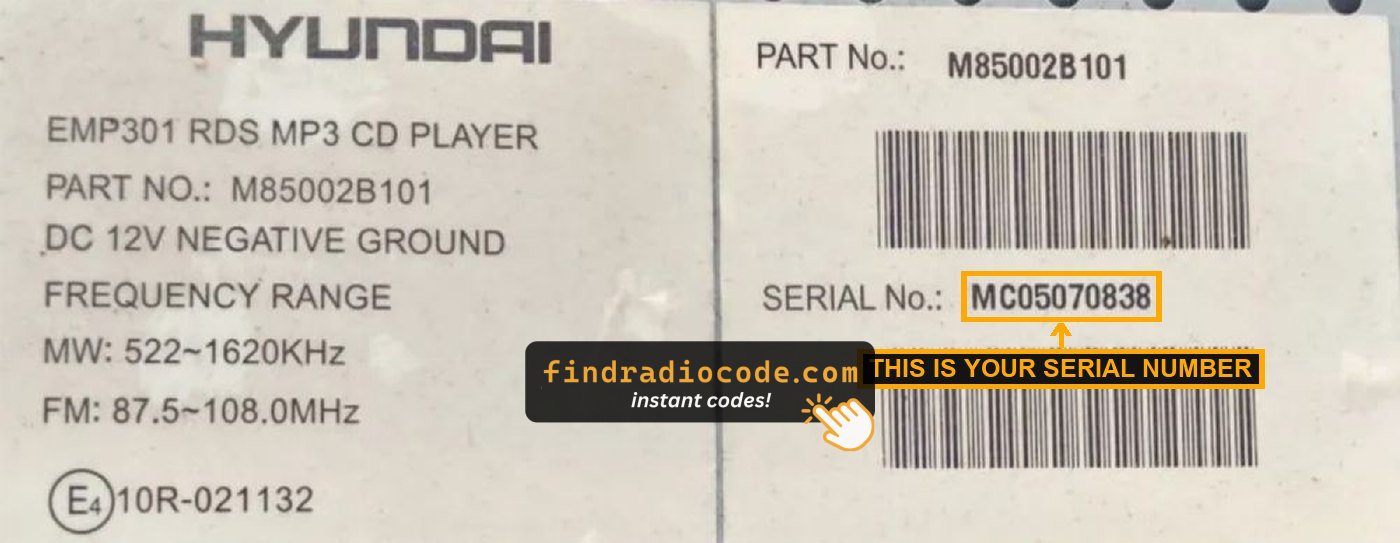
Example: Hyundai Genesis serial number label location
Serial Number Prefixes You'll See on Hyundai Genesis
Your Hyundai Genesis radio serial number may start with:
M0MP0
Entering the Radio Code on Hyundai Genesis
With your code ready, it's time to enter it into the Hyundai Genesis's radio.
The locked radio will usually show a "CODE" prompt.
Use the radio presets or a rotary dial to select each number, then confirm to activate the stereo.
If you make a mistake multiple times, you may cause the Genesis's head unit to enter lockout mode.
When this happens, the screen can display messages like "CODE ERR", "ERROR", or a blank screen.
To unlock the unit, you usually need to keep the ignition on for a waiting period that is shown or up to an hour before trying again.
Hyundai Genesis Radio Code - FAQ
Many original head units use a security code, but some versions require one.
Whether a code is needed is determined by the installed head unit and the vehicle generation.
Free are not easy to find.
Some service documents may help, but most codes require a serial number lookup.
The only free way would be to search your vehicle and its manual to see if you already have the code.
Yes. Each car stereo has its own unique code.
If you install a used radio, you'll need the code for that individual radio.