Common Situations Requiring a Code
Dealing with a locked Hyundai i20 radio? In most cases, it was caused by one of these well-known events.
Problems After a Battery Replacement
When the battery is disconnected, the Hyundai i20 radio locks automatically.
This factory protection system is designed to protect the original head unit by disabling the radio after electrical reset.
Other Situations
- A fuse removal can cause the Hyundai i20 radio to request a security code.
- Installing a used head unit will trigger the original radio code.
- Jump-starting the vehicle can reset the radio, requiring the unlock code.
- After an ECU or software reset, the radio may enter security mode.
Places to Check Before Buying a Radio Code
Before you pay for it, it's worth checking a few places where the code is often already written down.
Some drivers find their Hyundai i20 radio code without needing any tools or paperwork.
Here are the most common things to check first.
Check the Owner's Documents
- Near the boot panel, where some manufacturers place radio labels.
- In the owner's handbook, often on a separate code card.
- On the head unit casing if the unit was previously removed.
- In the vehicle documentation provided with the car.
- On a sticker in the door pillar.
Can You Get a Hyundai i20 Radio Code from the Dealer?
Dealerships can retrieve your radio code by checking the vehicle records in their system.
They typically require proof of ownership before sharing the unlock code.
This is the official way to restore access to the factory radio.
Downsides:
- The lookup is often slower and may require waiting.
- You may need to contact service support during business hours.
- Dealers frequently bill for the code (It may cost more than 100$).
- Some imported or older radios may need extra verification.
Finding the S/N on a i20
The only thing you'll need to retrieve the unlock code is your radio's radio serial. No extra vehicle data is required.
On many Hyundai models, you can find it in one of the following locations:
- Displayed on the radio screen (in some cases by using specific button presses)
- On the radio unit itself - you'll need to extract it and write down your serial (which is fairly easy)
Search for a label such as: Serial Num. or SN.
1. Get the S/N from Hyundai i20's Screen
Hyundai i20 radio does not display the serial number on the screen.
Unfortunately, the unit must then be extracted from the dashboard to find the serial on a factory sticker on the radio casing.
2. The Serial Number on the Radio Sticker
The serial number is usually printed on a sticker attached to the radio casing.
Step 1: Turn off the car.
Step 2: After that, remove the dashboard trim.
Step 3: Then release the mounting clips.
Step 4: Carefully slide the unit out partially (Be careful not to damage the connections).
Step 5: Search for the serial number on the rear of the unit.
Step 6: Write down the full number carefully and come back to our website so that we can generate your code.
Important: Be careful not to mix the Serial Number for the Part Number!
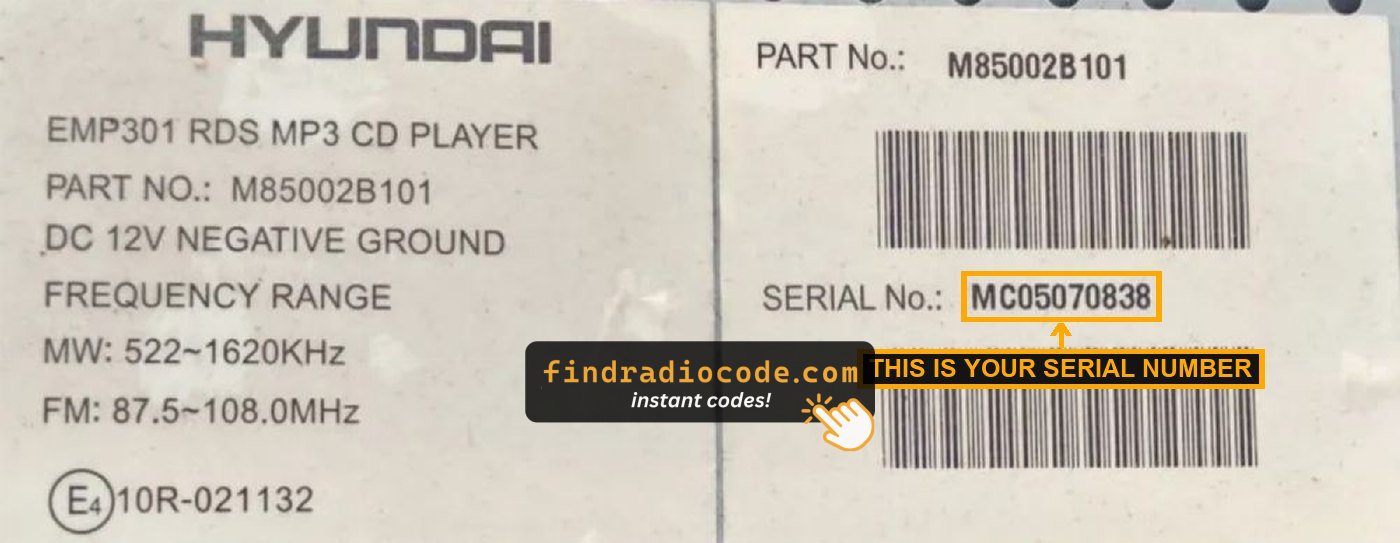
Example: Hyundai i20 serial number label location
Serial Number Prefixes You'll See on Hyundai i20
Your Hyundai i20 radio serial number may start with:
MP0FD-01
How to Enter the Anti-Theft Code on Your Vehicle
You need to type in the code into the system to unlock your Hyundai's radio.
When the unit is locked, the screen usually displays a security message.
Based on the radio, use radio presets, control knob, or touchscreen to set each digit, then confirm the code to restore radio functionality.
If you fail multiple times, you may cause the i20's head unit to block further attempts.
When this happens, your screen usually displays messages like "CODE ERR", "ERROR", or a blank screen.
To unlock the system, you usually need to keep the ignition on for a waiting period that is shown or up to a full hour before trying again.