Hyundai Radio Code: How to Read Your Serial and Unlock the Radio
What the code prompt means, where the serial hides on each Hyundai unit, and how to enter the code without triggering the lockout.
Published 19 September 2026 Updated: 5 October 2026
Short answer A Hyundai radio code is calculated from the serial number printed on the radio itself, never from the VIN. Read the serial off the unit label, type it with the HYUNDAI: prefix, and the code arrives instantly.
Why Your Hyundai Is Asking for a Code
Hyundai factory radios lock themselves the moment they lose power. Disconnect or replace the battery, jump start the car, blow the radio fuse or move the unit to another vehicle and the display comes back asking for a code instead of playing. This is the anti-theft feature working as designed: the radio is useless in another car until the right code is entered. The code is tied to that one radio, so a replacement or second-hand unit needs its own code rather than the one from the radio it replaced.
Where Is the Hyundai Radio Code Sticker?
There is no sticker with the code on the radio itself: the label on the unit carries the serial number, never the code. When the car was sold new, Hyundai supplied the code on a small plastic card, about the size of a credit card, handed over with the owner's manual. Hyundai's own radio manuals tell owners not to keep that card in the car, so it is usually with the paperwork rather than in the glovebox.
- The owner's manual wallet and the service book.
- The documents from when the car was bought, including any folder the first owner kept.
- A Hyundai dealer may be able to retrieve the code if you can prove you own the car.
The card only matches the radio the car left the factory with. If the unit has ever been replaced, the card code will not work and the code has to come from that radio's own serial.
The Three Hyundai Radio Families We Decode
Almost every factory Hyundai head unit falls into one of three families. Which one you have decides which number you read off the label, so it is worth identifying before you start.
- Hyundai EMP3 covers the EMP300 through EMP350 range and is the most common family. The serial is printed on the top label next to "SERIAL No.", under the second barcode, and usually starts MP, MC, MT, MD, HM, BQ, TQ, BTJ or BTC. A typical one reads MP01060807.
- Hyundai Autonet units carry an M0 number along the bottom edge of the label, such as M0674077020. The same family also appears as a model number like HN445JMEUABCA, or a serial beginning UAU, G7U, UBTE, FSV or CXNB. All of those are accepted.
- Hyundai MP3 covers the FD-01 and the MP3-03A, MP3-03G, MP3-05G, MP3-05TU and MP3-36TU units. These carry a GS1 barcode and you need only the last four digits of it.
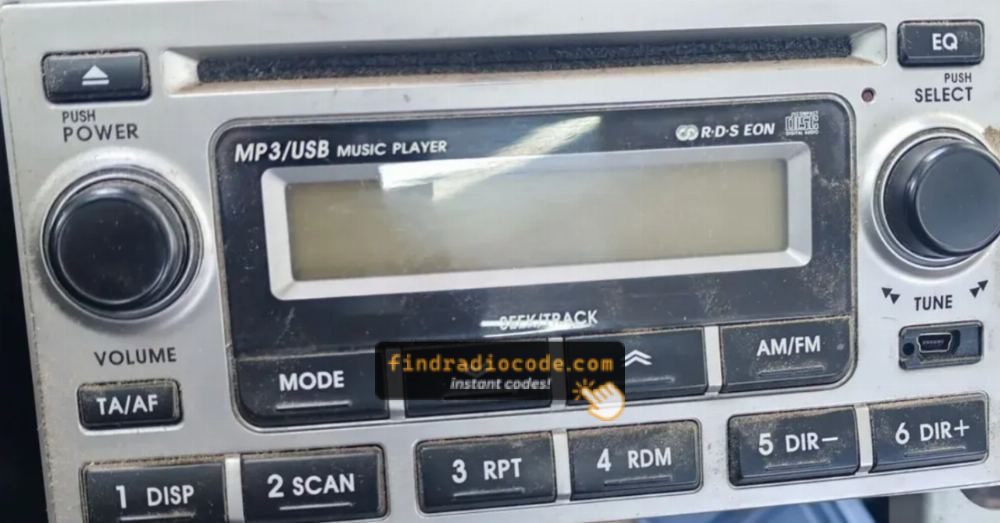
Hyundai EMP3 - the most common family
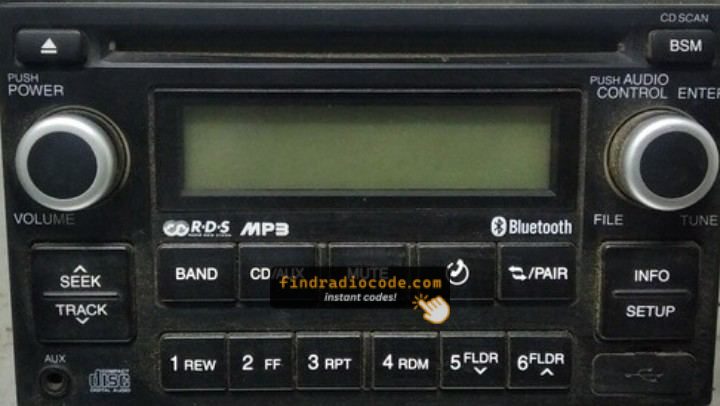
Hyundai Autonet HN445
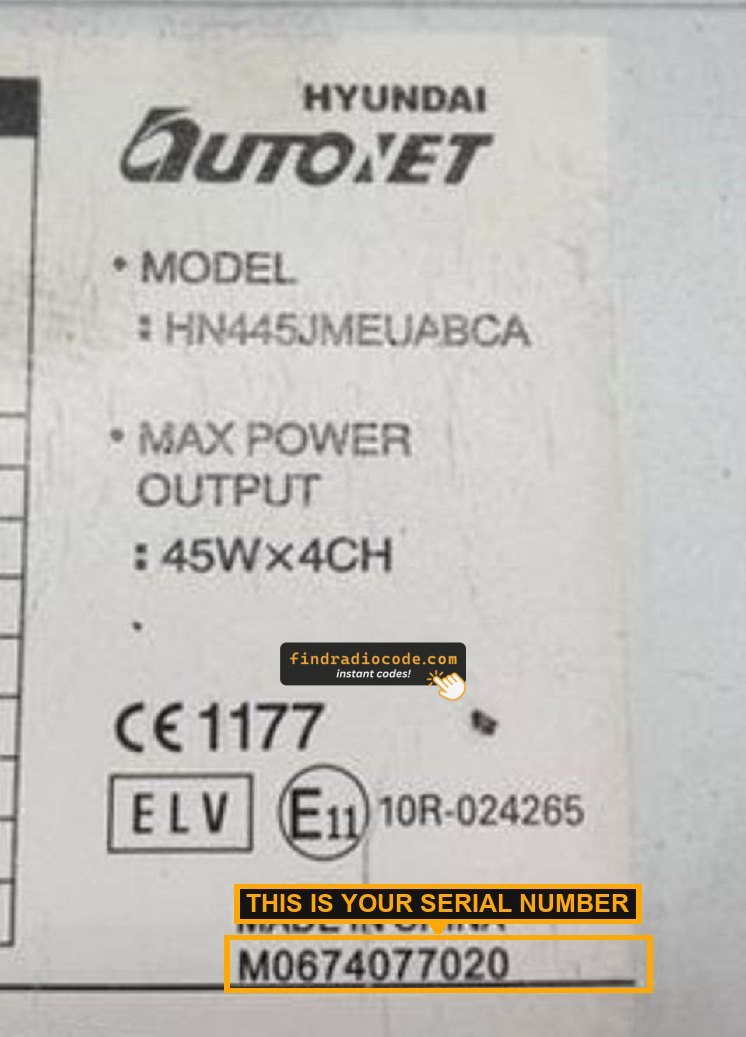
Autonet HN445 - the M0 number at the bottom
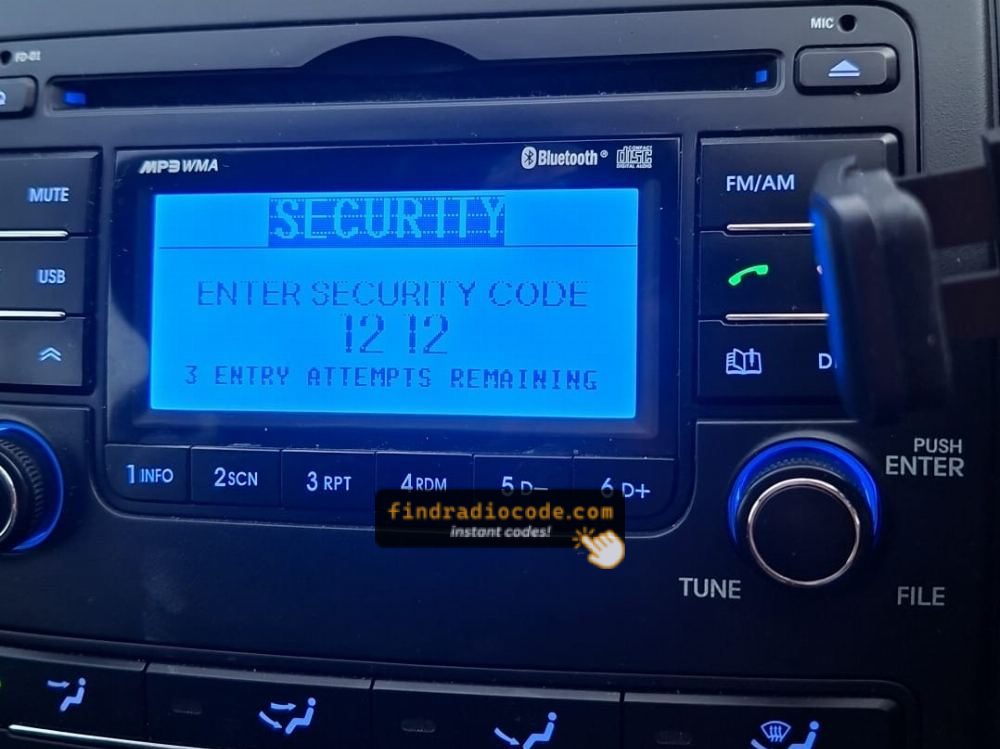
Some MP3 units show the serial on screen
Finding the Serial Number on Your Hyundai Radio
EMP3 and Autonet units do not show the serial on screen, so the radio has to come out of the dash far enough to read the label on top of the case. The trim in front of the unit usually lifts off without disconnecting anything.
- Ease the plastic trim around the radio away with a flat plastic tool, working around the edge rather than pulling from one corner.
- Undo the screws or release clips holding the unit in the dash. Most Hyundai units use four screws.
- Slide the radio forward far enough to see the top of the case. You do not need to unplug the loom to read the label.
- Find the white or silver sticker on the top or side. The serial is the number next to "SERIAL No." or along the bottom edge, not the part number.
Some MP3 units do show the serial on screen. Hold the preset buttons as your manual describes and the number appears in the display, in which case the radio can stay where it is.
Hyundai Radio Serial Number Location by Model
On every model below the serial sits on a white or silver label on the top or side of the radio case, so the job is getting the unit far enough forward to read it. Only rows we could confirm are listed, and trim details change between years, so check a walkthrough for your exact car.
| Model | Radio and label | Getting to the label |
|---|---|---|
| Getz (2002-2011) | MP3-03 / MP3-03G CD unit. Use the last four digits of the (21) barcode section. | Push radio release keys into the slots on each side of the unit, then pull it forward. |
| i20 (2008-2014) | PB-01 unit, label on the top of the case. | Pry off the trim around the radio and air vents with a plastic tool, then undo the screws on each side of the radio. |
| i30 (2012-2014) | Label on the top or side of the case. | Release keys and trim, as in the i30 walkthrough below. |
| ix35 (2012-2014) | Label on the top or side of the case. | Trim off, then slide the radio forward, as in the ix35 walkthrough below. |
| Tucson (2004-2009) | Label on the top or side of the case. | Remove the trim frame around the radio and heater controls, then the screws holding the radio at its sides. |
| Accent (2012-2017) | Label on the top or side of the case. | Pry off the bezel around the radio and climate controls, then undo the four screws, two on each side. |
Removal walkthroughs

i30 (2012-2014) - release keys and trim

Tucson - trim panel and unit removal

ix35 (2012-2014) - radio out of the dash
The same pattern covers the whole range: trim off, four screws or clips, then slide the unit forward far enough to read the label on top. Nothing needs unplugging.
Reading the GS1 Barcode on FD-01 and MP3 Units
This is where most people go wrong. The barcode label on FD-01 and MP3 units prints two bracketed sections and only the second one matters. A typical label reads: (01) 1 880 912179 001 7 (21) 11 07 0795.
The (01) section is the part number. It is identical on every FD-01 and MP3 unit ever built, so it can never identify your radio. Ignore it completely.
The (21) section is the serial. Take only the last four digits from it. In the example above that is 0795, so you would enter HYUNDAI:0795.
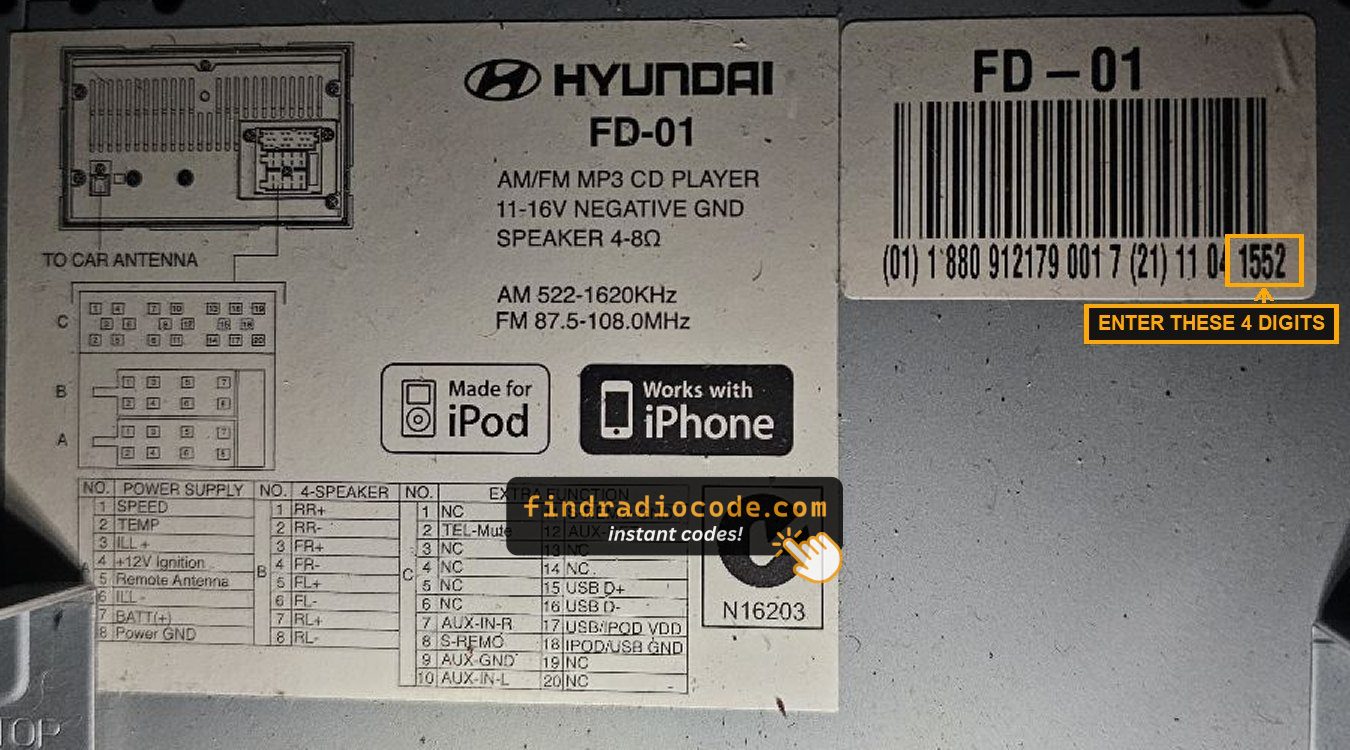
An FD-01 label with the four digits you need marked
The HYUNDAI: Prefix
Whatever your label shows, put HYUNDAI: in front of it. That one prefix is accepted for every supported Hyundai unit, so you do not have to work out which family you have before typing. For example: HYUNDAI:MP01060807 for an EMP3, HYUNDAI:M0674077020 for an Autonet, HYUNDAI:UAU9404233S for an Autonet label serial, or HYUNDAI:0795 for an MP3.
Have your serial already? Get the code now
Not sure which radio you have? Browse Hyundai radio codes by model
Entering the Code on a Hyundai
Hyundai radios take the code on the preset buttons rather than a keypad. Each press steps that digit up by one.
- Switch the radio on so the code prompt appears in the display.
- Press preset button 1 until the first digit is right, then preset 2 for the second digit, and so on through preset 4.
- Check all four digits against the code we sent before confirming. A mistyped digit uses up one of your attempts.
- Confirm the entry. On the FD-01 and MP3 units Hyundai's manuals say to press preset 5 once; other units may ask you to hold a preset button or press menu or enter.

Entering the code with presets 1 to 4
Hyundai Radio Code Not Working?
When a Hyundai radio rejects a code, the cause is almost always one of the five below. Work through them before the next try, because the radio only allows a few attempts before it shuts you out.
- The code was never confirmed. On the FD-01, MP3-03 and MP3-05 units, Hyundai's manuals say the code is stored only when you press preset 5 once after the fourth digit. Setting the digits and waiting does nothing.
- A digit was miscounted. Each press steps that digit up by one, so a 3 means three presses of preset 1. Read all four digits on the display before you confirm.
- The card belongs to a different radio. The code card matches the factory-fitted unit only. A replacement or second-hand radio needs the code for its own serial.
- The wrong number was read. The part number (for example M85002B100) and the (01) section of the barcode identify the model, not your radio, so a code worked out from them will fail.
- The code was a guess. Shortcuts such as 1212 work on some units and fail on many others, and every miss uses up an attempt. See the FAQ below.
- 1 CDE - the radio is waiting for the code.
- 2 CDE - one wrong attempt. The FD-01 spells it out as 2 ENTRY ATTEMPTS REMAINING.
- 3 CDE - two wrong attempts and one try left (1 ENTRY ATTEMPT REMAINING on the FD-01).
- The radio switches off - the third code was wrong. Hyundai's manuals say to wait at least one hour before entering the correct code.
Hyundai's manuals describe no way to skip that wait. "Resetting" a locked Hyundai radio simply means letting the hour pass, then entering the right code once and confirming it.
WAIT, Code Error and the Lockout Timer
Enter the wrong code and the radio locks for a period, showing WAIT or a similar message. Leave the unit powered with the ignition on and let the timer run down, which normally takes about an hour, then try again. Do not keep guessing: every wrong attempt restarts the timer, and on some units repeated failures lengthen the wait considerably.
If the code we supplied is rejected on a correctly read serial, contact us rather than retrying. We refund in full if our code does not work.
Can I Get a Hyundai Radio Code From the VIN?
No. A Hyundai radio code comes from the radio serial number, not the VIN. Renault and Dacia are the rare makes where a VIN lookup works; Hyundai is not one of them. Any service claiming to produce a Hyundai code from your registration or VIN alone cannot deliver a working code, because the number that generates it is printed on the radio.
Is There a Free Hyundai Radio Code?
No free tool produces a working Hyundai code. The code is calculated from the individual radio serial, so it cannot be looked up in a published list. Sites offering free Hyundai codes either fail outright or return a code belonging to a different unit, which then burns an attempt and starts the lockout timer. Our Hyundai codes are $19.99 with a full refund if the code does not work.
Hyundai Radio Code FAQ
Related guides
- Hyundai radio code by serial number - enter your serial and get the code instantly.
- How to find your car radio serial number - the general guide across all makes.
- Radio code from VIN explained - why only Renault and Dacia work that way.
- Radio says WAIT 30 minutes - what the lockout timer means and how to clear it.
- How car radio anti-theft codes work - the background on why the code exists.