How to Find Your Car Radio Serial Number
Almost every radio code starts with the serial number, not the VIN. Here is where to find it on your car, in the order that takes the least work.
September 13, 2026 Updated: October 14, 2026
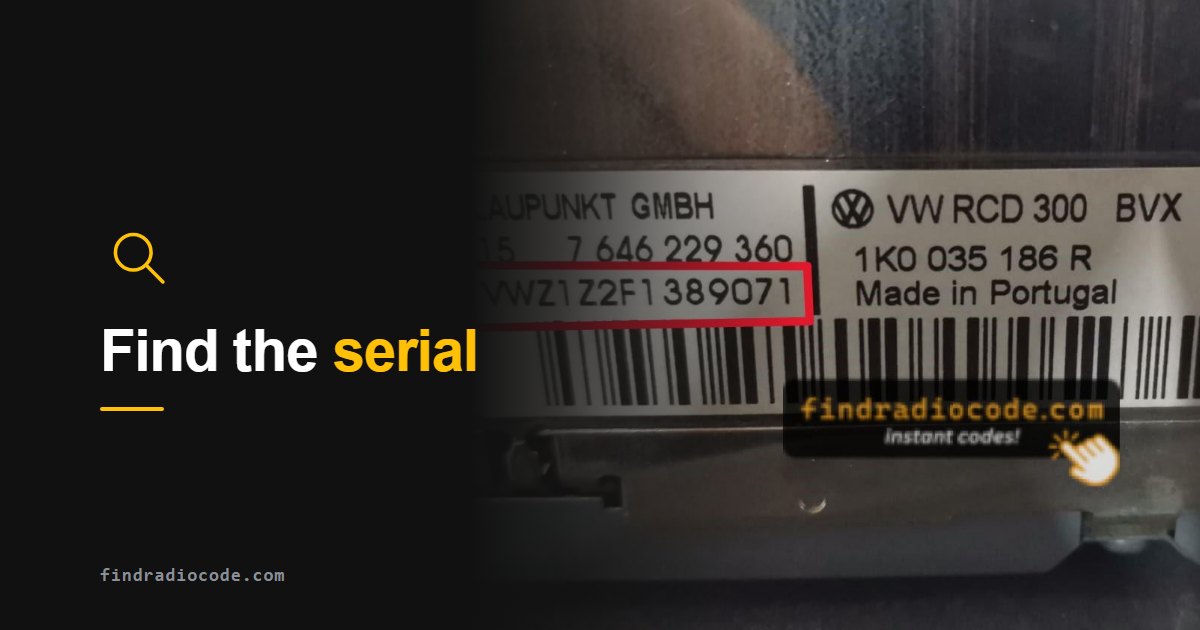
The short answer
The radio serial number is a unit identifier printed on the radio label and, on some systems, available on screen. Its length and format vary by radio manufacturer and model. Most are about 6 to 14 characters long; some Continental, Ford and Volvo serials run to 16-20. Try the on-screen method first. If your radio has no screen or will not show it, the label on the side or top of the unit is the fallback, and that means pulling the radio out. The VIN only produces a radio code on Renault and Dacia.
The four places a radio serial can be
In rough order of effort, from no tools to removing the head unit:
1. On the screen, via a service or dealer menu
Common on Chrysler, Dodge, Jeep, Ram and Fiat units with a touchscreen (Uconnect and Mopar systems), and on several Honda, Acura, Ford and Porsche units. No tools needed when your unit supports it. This is the method worth trying first because it costs you nothing if it fails.
2. A sticker in the glovebox, owner's manual or service book
Some manufacturers shipped a card or sticker with the radio code or serial already printed on it. Worth thirty seconds of looking before you reach for tools, especially on older cars with the original paperwork.
3. The label on the radio chassis
The universal fallback and the only option on most VW, Audi, Skoda, Seat, Mercedes, BMW and older units. The label sits on the top, side or back of the radio housing and is only readable once the unit is out of the dashboard. You will usually need a pair of extraction keys, which are inexpensive and make-specific.
4. A diagnostic tool
A workshop-grade diagnostic interface can read the head unit's identity on some platforms. This is a mechanic or specialist route rather than a driveway one, and for most owners the label is faster.
Finding a Uconnect Radio Serial Number
The retrieval method depends on the radio installed in your vehicle. Some Uconnect units show the serial in a radio-information or diagnostic screen; others require access to the label on the unit. Check our Uconnect on-screen serial guide for the procedure that matches your system. If the serial cannot be displayed, use the radio removal guide and the instructions for your vehicle.
If the radio has been replaced, record the serial of the unit currently installed. Read the field marked Serial Number, Serial No. or S/N, and keep the full identifier. Do not substitute the vehicle VIN or a nearby part number. If the label is difficult to read, try our radio label scanner.
What your serial looks like, and what it means
The first few characters usually identify the radio family. If what you are holding matches one of these shapes, you are looking at the right number:
| Starts with | Example | Typically found on |
|---|---|---|
| TM9 | TM9123456789 |
Chrysler, Dodge, Jeep, Ram and Fiat units - often readable on screen |
| T00AM | T00AM1234T5678 |
Uconnect touchscreen systems - readable on screen via dealer mode |
| T0071 | T00711234A5678 |
Mopar screen units - readable on screen |
| T0MYD | T0MYD123456789 |
Chrysler, Dodge, Jeep and RAM Uconnect units built by Aptiv or Delphi |
| VWZ / SKZ / AUZ / SEZ | VWZ1Z2A0123456 |
VW, Skoda, Audi and Seat - label only, the radio has to come out |
| V or M | V123456 |
Ford units - the short V or M serial is the one the code is built from |
| TF | TF039155100177 |
Continental and Fiat units - a long numeric serial on the label |
Two characters cause most of the failed submissions we see: the letter O against the digit 0, and the letter I against the digit 1. If a serial is rejected, re-read those first before assuming the number is wrong.
The surest way to avoid both is not to copy the serial by eye at all. Most labels carry the same number as a barcode or Data Matrix: photograph the label and our free barcode scanner for radio serial numbers reads it for you, in your browser, and tells you which of the codes on the label is the serial.
What about the VIN?
This is the single most common wrong turn, and it is worth being blunt about it: a VIN produces a working radio code on Renault and Dacia only. On every other make the VIN identifies the car, not the radio, and the two are not linked in any database a third party can use. A dealer can sometimes look a code up from the VIN using manufacturer systems, but that is a dealer service, not something a VIN alone can do. If a site promises you an Audi, VW, Ford or Dodge radio code from a VIN, it cannot deliver it. On a Renault or Dacia, our Renault and Dacia pre-code guide covers the VIN route and the quicker on-screen pre-code.
Once you have the serial
Enter it exactly as printed, including any letters, with no spaces. Codes are delivered by email within minutes and are generated per radio, so pricing depends on the unit - it starts at $9.99 and the exact figure is shown before you pay.
Before you start typing the code in
Many head units lock out after repeated wrong attempts, and the number of attempts allowed and the waiting time vary by unit. Get the code first, then enter it once, carefully.
Have your serial number?
Enter it and we will tell you straight away whether a code is available for your radio.