Renault and Dacia Radio Code: How the Pre-Code System Actually Works
Renault built its anti-theft system differently to everyone else, and that difference works in your favour. Two buttons usually get you the identifier without touching a screwdriver - and this is the one family where the VIN genuinely helps.
September 13, 2026 Updated: October 5, 2026
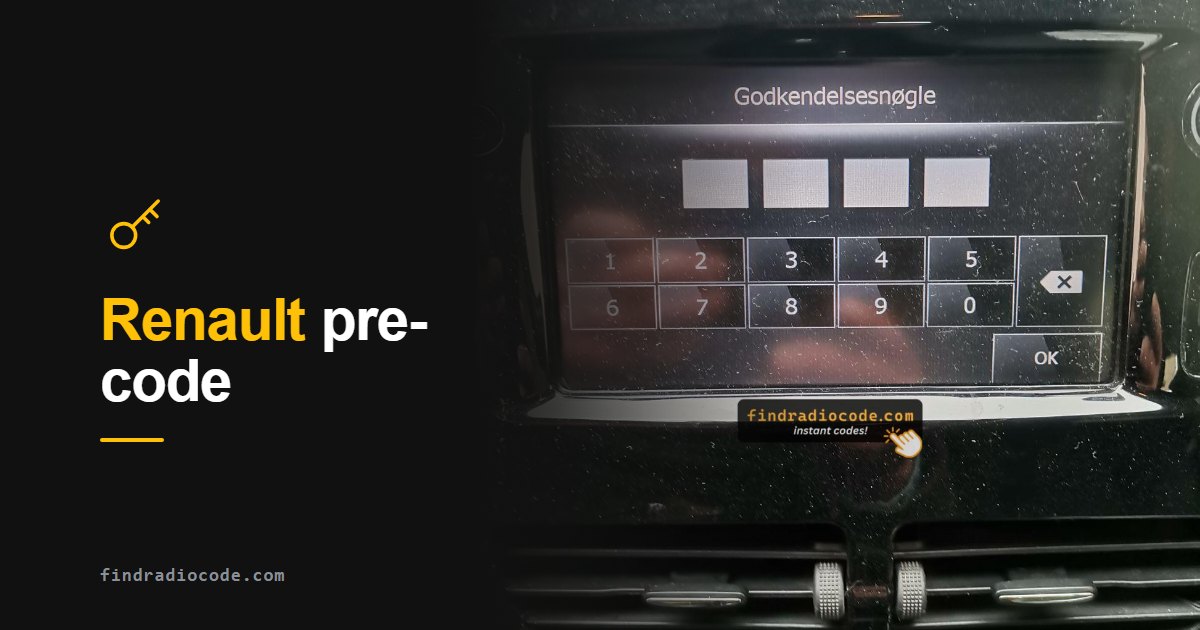
Quick answer: Hold preset buttons 1 and 6 for about five seconds and the radio displays its pre-code - one letter plus three digits, like A123. That pre-code, the serial on the unit label (8200, 2811 or 7700), or the VIN generates your 4-digit unlock code. Renault and Dacia are the only makes where the VIN genuinely works.
Three Ways In, Where Most Makes Give You One
Almost every car maker ties the radio code to a single identifier printed on a label inside the head unit, which is why unlocking a VW or a Mercedes usually starts with pulling the radio out of the dashboard. Renault and Dacia do not work that way. They give you three separate routes to the same four-digit code, and two of them never require the radio to leave the dash.
The three identifiers are the pre-code (a short letter-plus-three-digits string the radio will display on request), the serial number on the unit label, and the VIN. That last one matters more than it sounds: Renault and Dacia are effectively the only makes on the road where a radio code can genuinely be derived from the vehicle identification number. Every other brand needs the radio serial, no exceptions.
Where Is the Renault Radio Code Card?
If the car still has the radio it was built with, the code may already be in your paperwork. It is never printed on the radio itself: the unit label carries the serial, and the display only shows the pre-code. Renault UK points owners to these places first:
- Inside the front or rear cover of the vehicle handbook.
- The My Renault app, under Vehicle Details, where the app is available in your country.
A code written in the handbook belongs to the factory-fitted radio. If the unit has been changed, or the handbook is gone, use the pre-code method below instead. If your radio shows a pre-code, our free Renault radio code tool turns it into the four-digit code at no cost.
Method 1 - Display the Pre-Code (No Removal, 30 Seconds)
Start here. On most Renault List, Tuner, Update List and Dacia units the pre-code can be summoned straight onto the display.
- Turn the ignition on and switch the radio on.
- Press and hold preset buttons 1 and 6 together for about 5 seconds.
- The pre-code appears on the display in the format one letter followed by three digits, for example
A123,B456orC789. - Write it down exactly. That string is what generates your unlock code.
What is a pre-code? It is a short public identifier the radio is happy to show anyone, deliberately separate from the secret four-digit code that actually unlocks it. Think of it as the radio saying "this is who I am" - useful for looking up the code, useless for playing music. Because it is only four characters, it is far easier to read and transcribe accurately than a 14-character serial, which is why it is worth trying first.
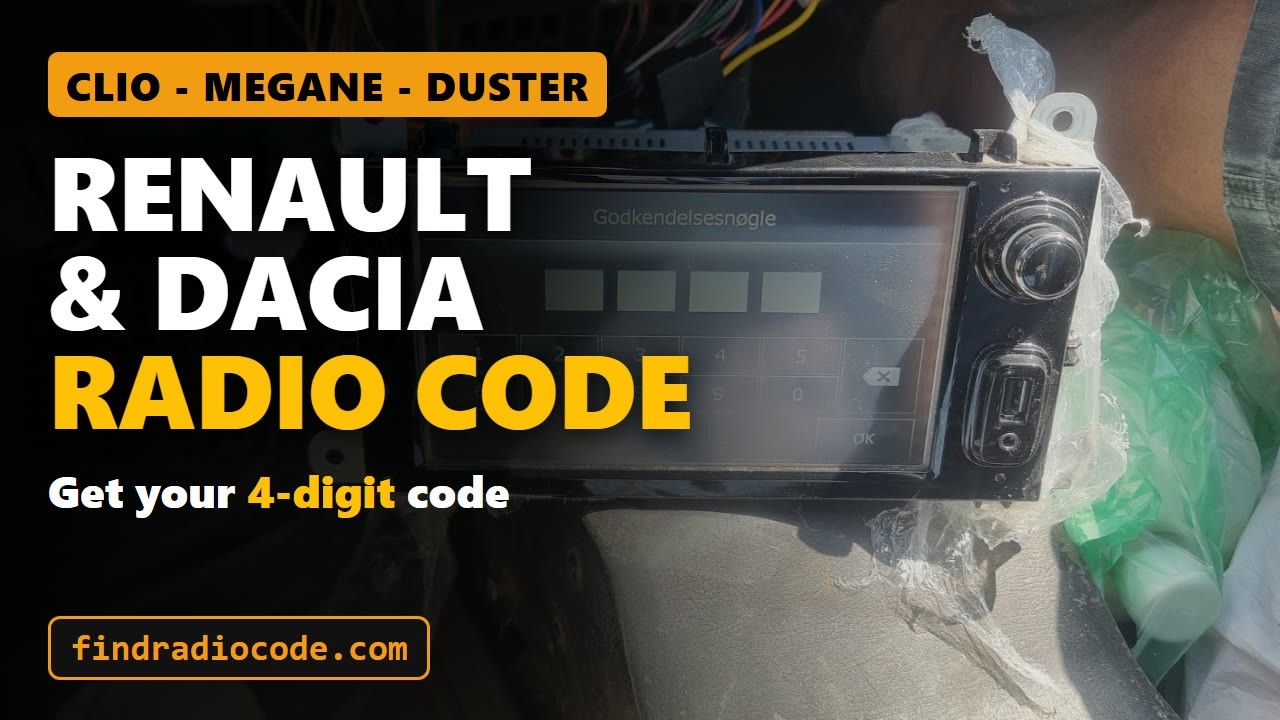
Renault and Dacia radio code with instant unlock service
Method 2 - The Serial Number on the Unit Label
If the pre-code will not display - a dead screen, a unit that ignores the button combination, a radio bought loose on eBay - fall back to the label. This one does mean pulling the radio out with DIN or Renault release keys.
- 8200 followed by more characters - Philips-built units, the most common by far
- 2811 followed by more characters - Continental and VDO units
- 7700 followed by more characters - older Renault units
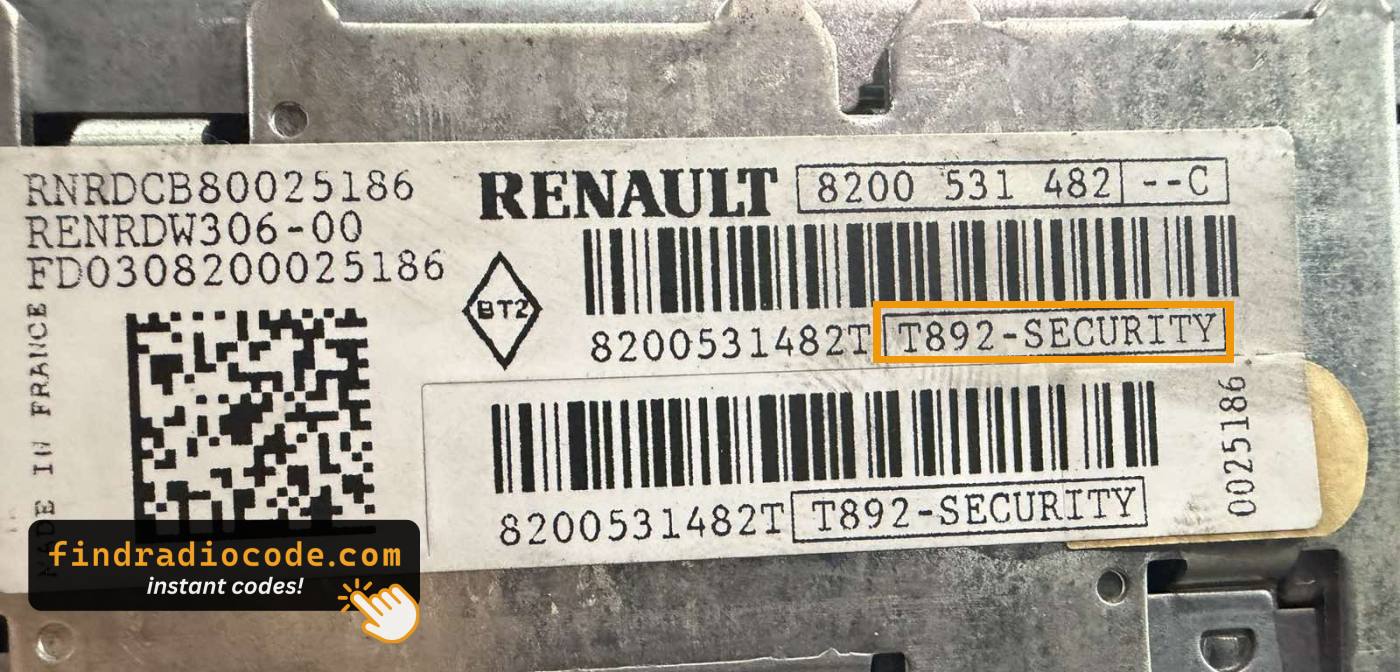
7648024391, Continental ones like 281150047R with a trailing R, Philips ones like 8200403537. The part number tells you which radio you have; only the field marked S/N or Serial generates the code.
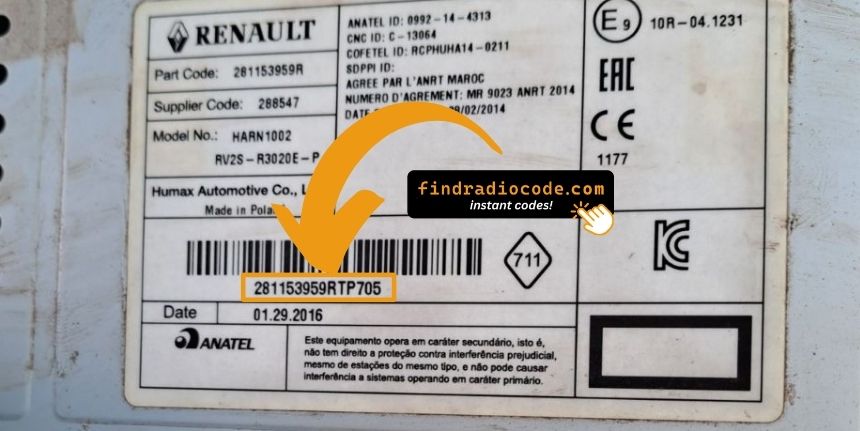
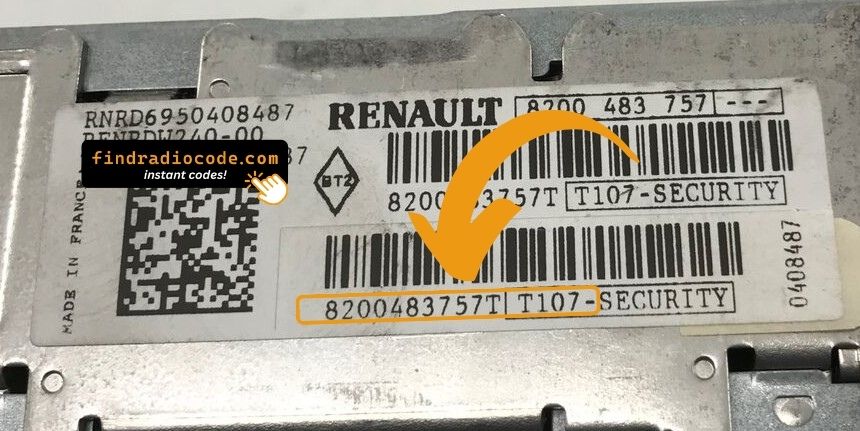
On Update List radios the pre-code is also printed on the label, in the box that ends in -SECURITY. On the label below it is T892, next to the 8200 part number.
Method 3 - The VIN (Yes, Really, and Only Here)
Search the web for "radio code from VIN" and you will find dozens of sites promising it for any make. For almost all of them it is nonsense - a Ford, Honda, VW or Uconnect code cannot be derived from a VIN, because the manufacturer never built that link. Renault and Dacia are the exception that created the myth.
- Find the VIN on the windscreen base, the driver door pillar, or the vehicle registration document.
- Renault and Dacia VINs commonly start VF, X7, 93, ME, UU or 9F and run to 17 characters.
- Check the characters carefully. A VIN never contains the letters I, O or Q, so anything that looks like one of those is a 1 or a 0. You can confirm your VIN decodes correctly with the official NHTSA vPIC decoder.
Use the VIN route when the radio is fitted from the factory and has never been swapped. If the head unit came from another car - a breaker, a replacement after a fault, a second-hand upgrade - the VIN belongs to the vehicle but the code belongs to the radio, so the pre-code or serial is the reliable answer. Our full explanation of VIN versus serial covers where the line falls.
Got your pre-code or serial? Check it now and get your Renault or Dacia code - from $9.99, delivered instantly.
How to Enter the Code
Renault code entry follows the same counting logic as VW and Mercedes: each preset button drives one digit position, and one button submits the lot.
- Switch the radio on. The display shows
0000with the first zero flashing. - Press preset button 1 repeatedly until the first digit of your code appears.
- Press 2 for the second digit, 3 for the third and 4 for the fourth.
- Press and hold button 6 until the radio beeps to confirm. This can take several seconds, so do not let go early. On some models it is button 5.
- The radio unlocks and plays. Your presets and settings come back untouched.
Code entry on a Renault Update List radio, from 0000 to a playing radio
Media Nav and R-Link units built by LG replace all of this with an on-screen keypad - type the four digits and press OK. The identifier is still read the same way.
Some units take the code through the steering column remote instead of the preset buttons: press the button, turn the thumbwheel until the right digit shows, repeat for all four digits, then hold the button until the code is stored.
Renault Radio Code Not Working?
If the radio refuses a code you are sure of, one of these is usually behind it. Check them before you try again, because every wrong entry makes the next wait longer.
- You typed the pre-code. The letter-plus-three-digits string the radio shows on buttons 1 and 6 is its identifier, not the unlock code. The radio wants the four-digit number generated from it, and it only accepts digits.
- The code was not stored. Hold button 6 (5 on some models) until the radio beeps. Owners report this can take up to about ten seconds, so letting go after a second does nothing.
- The radio is not the one the car was built with. A code from the handbook, or one traced from the VIN, belongs to the factory-fitted unit. A replacement or second-hand radio needs the code for its own pre-code or serial.
- The pre-code was misread. Some displays alternate the pre-code with the software version. Watch for a couple of seconds and copy the letter-plus-three-digits string exactly.
- The display shows ERROR or WAIT. That is the timer after a wrong code, not a fault. Leave the ignition and the radio switched on and do not press anything until
0000comes back. Owners report that switching off or pressing buttons starts the countdown again, and that each further wrong code makes the wait longer.
The Lockout, and Why It Is Worth Avoiding
After a wrong code, Renault and Dacia radios make you wait before the next attempt, and the wait grows with each further mistake. The display shows ERROR, WAIT or LOCKED, and no input is accepted until the timer runs out.
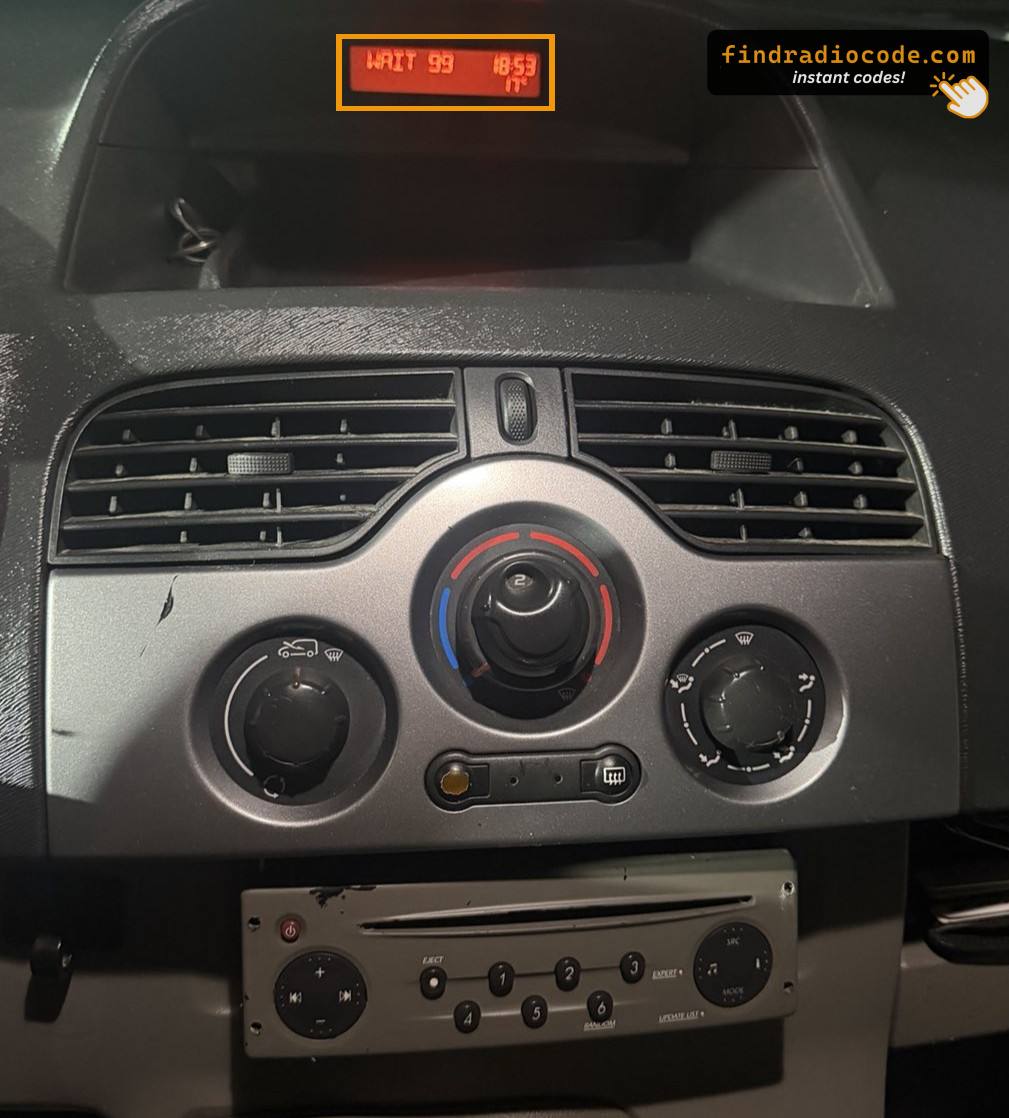
WAIT 99 on the display is this same timer. The 99 is not part of your code, and while WAIT 99 is showing you cannot enter the code yet. Leave the ignition and the radio on until 0000 comes back.
- Leave the ignition and the radio switched on, and do not press any buttons.
- Wait for the
0000prompt to return, then enter the code once, carefully. - Switching off or pressing buttons while the timer runs can start it again, and owners report that after several wrong codes the wait can run to hours on some units, so be patient.
Which Renault and Dacia Models This Covers
The pre-code method spans the whole range, from small hatchbacks to the truck side of the business. Model-specific detail, including which radio was fitted in which years, lives on the Renault radio code page for Clio, Megane, Scenic, Laguna, Kangoo, Master and Trafic - on older Clio and Megane units the lock often shows up as the CD player asking for a code, and the pre-code method above is exactly how that CD player code is recovered, and on the Dacia radio code page for Sandero, Logan, Duster, Dokker and Lodgy.
Renault trucks - Magnum, Premium, Midlum, Kerax - use a different family of Bosch and Delphi units where the serial label is the route in rather than the pre-code, since those radios do not carry the same display function.
Turn Your Pre-Code Into the Real Code
Whether you are holding a pre-code, a serial number or the VIN, the four-digit unlock code is generated the moment you submit it - on screen and by email. From $9.99, with a refund if it does not work.
Not sure which radio you have? Browse Renault radio codes by model
Radio code pages for these models
Frequently Asked Questions
Related Articles
Radio Code From the VIN?
Why Renault and Dacia are the exception, and what every other make needs instead.
Read GuideHow Anti-Theft Codes Work
What the lock is protecting, and why a battery change triggers it in the first place.
Read GuideIs Buying a Code Online Safe?
How to check a code retrieval service before you hand over any money.
Read Guide