
Why Did the Radio Lock and Ask for a Code?
The single most common cause for a locked radio on Renault vehicles, but there are a few others to be aware of:
- Battery replacement: Battery replacement is the top reason across all Renault models. The lock activates any time 12V power is interrupted. It catches many owners off-guard, even when the battery is only disconnected briefly.
- Second-hand purchase: The radio code is seldom included when a car changes hands. Private sellers and dealers often do not have it.
- Flat battery from sitting: A battery drained from sitting unused triggers the code request when power is restored.
- Workshop or service work: Any work involving the battery — including an MOT, tyre change, or oil change — can trigger the lock.
How to Get Your 2005 Renault Laguna Radio Code
Car radios use anti-theft codes dependent on the radio unit itself rather than the model or production year.
- The generator identifies your Renault radio via serial-based verification.
- After entering the serial into the form above, the system identifies the radio family and generates the code that you need.
- Use the code to unlock the radio immediately.
- The online process is quicker and more accessible than visiting the Renault dealer.
Entering the Radio Security Code
Once the system gives you 2005 Renault Laguna radio code from the S/N, you're ready to reactivate the radio.
Some drivers hesitate at this stage because input process can look different across radio versions, but it's usually quick.
When the radio shows ENTER CODE, it means the unit is waiting for the correct numbers.
Entering Process Explained
To enter the code on the 2005 Renault Laguna:
- Ignition ON. Radio displays "CODE" or four dashes (----).
- Press preset buttons 1-4 to enter each digit of the 4-digit code. Each press advances the digit (0-9).
- Press and hold button 5 or button 6 to submit.
Lockout: Multiple incorrect entries will trigger a lockout. Leave the radio for approximately half an hour, then retry.
The Correct Way to Enter It
Limited Attempt Warning. The Renault factory radios fitted to the 2005 Laguna tolerate only a small number of wrong entries before locking and forcing a wait between further attempts. Confirm the unlock code is correct before any input.
Turn the ignition to accessory and power the radio on. After a few seconds the display shows four flashing zeros (0000), indicating that the radio is ready for code entry. Press preset 1 repeatedly to set the first digit; use preset 2 for the second digit, preset 3 for the third and preset 4 for the fourth. When the displayed value equals the unlock code, press and hold preset 6 until the radio confirms and resumes playback.
If the vehicle has the satellite control on the steering column, an alternative is to rotate the thumbwheel to set each digit, press the bottom button to advance and press and hold the bottom button on the final digit to confirm. If the entry is wrong, the display returns to 0000; stop and verify the code rather than continuing to guess.
Radio Serial Number Explained - Finding It on Your Renault
The initial step is to find and write down the radio's serial number.
Based on the head unit type fitted in your 2005 Laguna, the serial can usually be found either through the display menu or by checking the label on the radio itself.
Follow the steps below to identify your serial the right way.
Which Head Unit Is in Your 2005 Laguna?
The 2005 model year corresponds to the Mk2 Phase 2 mid-cycle refresh. Standard fitment remained the Tuner Cassette on the entry trim and Tuner CD on mid-trims, but the Tuner List with CD became the dominant factory unit on volume trims. Top trims continued to offer Carminat navigation as a separate centre-stack display paired with the head unit.
The Tuner List is identified by the LIST button next to the tuning knob and the wider information display showing station and track list lines. All factory units share the standard Renault DIN cage and the row of 1 to 6 preset buttons used for the pre-code procedure and code entry.
View Your Serial via the Radio Screen
These are the steps you need to follow for 2005 Renault Laguna:
The 2005 Renault Laguna comes with a Renault OEM radio or MediaNav system. Many Renault radios do not have an on-screen serial display method.
The serial number is located on a label on the radio chassis. The radio must be extracted to access it. Certain newer Laguna with MediaNav may show the serial in Settings → System.
Display-Based Serial Number Retrieval
Switch the ignition to accessory and turn the radio on. Once the normal source display appears, press and hold preset 1 and preset 6 together for around five seconds.
The display switches to PRE-CODE followed by a string in the form letter + three digits (for example V873). Release the buttons and note the value exactly. On Carminat-equipped vehicles, the pre-code appears on the head unit's own LCD rather than on the Carminat navigation panel.
If the screen does not change after the hold, the pre-code is only available from the sticker on the chassis of the head unit.
Find the Serial by Pulling Out the Radio
If the serial number cannot be accessed through menu, use the removal method.
Most Renault Laguna original radios include a sticker with the serial number printed on the housing.
Step-by-Step Approach:
- Turn off the vehicle.
- Remove the trim surrounding the radio.
- Release the clips.
- Pull the unit slightly out to access the label.
The serial number is usually located near the printed code.
To access the serial on the 2005 Renault Laguna:
- Power down the vehicle.
- Find the extraction holes on each side of the radio. Renault radios commonly use pin-release extraction slots.
- Insert extraction tools and pull the radio out.
- Locate the serial on the manufacturer label on the housing. It begins with PH.
Note: Renault extraction tools are the same European-style tools used for many European vehicles.
Find the S/N by Pulling Out the Radio Unit
If the pre-code is not visible on the display, the same identifier is printed on a sticker on the metal casing of the head unit.
Safety first. Switch the ignition off, remove the key and disconnect the negative battery terminal. Wait several minutes before reaching into the dashboard so the SRS system can discharge. Do not pull on the yellow airbag connectors or other SRS wiring.
Tools: four Renault DIN release keys (CT22UV01-type), plastic trim removal tools, a flashlight and a phone for the photograph.
Insert the release keys fully into the four corner slots until the cage clips release. Pull the unit straight out using the keys as handles. Disconnect the ISO power, speaker, antenna and Carminat data leads at the rear. Do not power the radio while it is partially disconnected.
The pre-code sticker is on the top or side of the metal casing and is labelled PRE-CODE or SERIAL. The pre-code is a letter and three digits. The longer supplier internal serial printed nearby is not the unlock identifier. Photograph the sticker and verify the characters before re-fitting the unit.
On vehicles with deeply integrated Carminat hardware the assembly can be unusually involved; if the unit does not release with firm even pressure on the keys, stop and consult a professional.
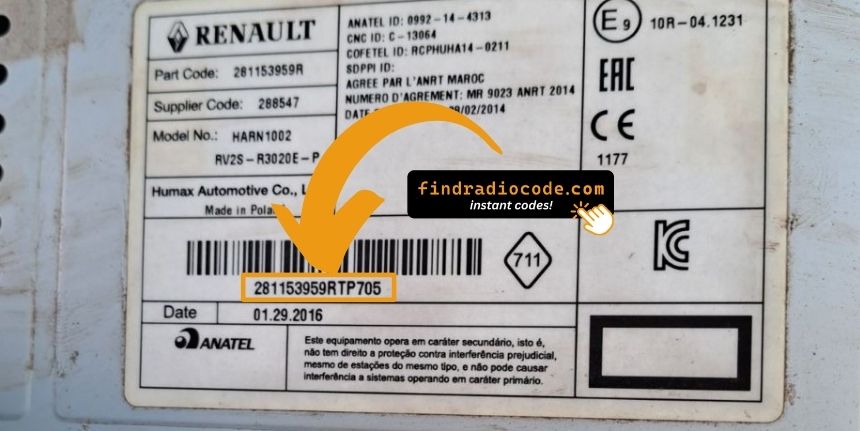
Example: Renault Laguna serial number label location
Typical Serial Number Examples for 2005 Laguna
The 2005 Renault Laguna radio serial prefixes:
BP####– Blaupunkt radio serial (standard)CC####– Continental radio serialPH####– Philips radio serialPR####– Alternate Renault OEM prefix
The serial is printed on the radio unit. Don't confuse it with the vehicle part number.
Common S/N Formats Used on 2005 Laguna Units
The Tuner Cassette, Tuner CD and Tuner List units fitted to the 2005 Laguna expose a short pre-code rather than a long supplier serial. Typical format: one letter followed by three digits, for example N420.
The chassis sticker may also display a longer supplier internal serial and a Renault part number beginning 8200. Those identify the supplier and the Renault fitment, but they are not the strings used for unlocking. Submit the four-character pre-code only and double-check 0 versus O and 1 versus I.
Fixing Common Code Entry Problems for 2005 Laguna
Code entry on Renault Laguna radios uses the preset station buttons to dial in the code digit by digit.
- Button 1 sets the first digit — pressing it cycles from 0 to 9.
- Button 2 sets digit 2, button 3 digit 3, button 4 digit 4.
- After setting all digits, press and hold button 5, button 6, or the Enter / AM-FM button to submit the entry.
Important: Newer Renault models with a MediaNav touchscreen use a touchscreen code entry pad. Tap the digits on the on-screen number pad. No hold-to-confirm is needed.
The screen reads "WAIT" / "SAFE" after 3 wrong code attempts, locking out further input until the timer resets.
To clear the lockout: Turn the ignition to ON and leave it there for a full 60 minutes. Any power interruption starts the wait again from the beginning. The timer resets every time power is cut.
On Renault models, battery drain during a long wait is possible. Run the engine or connect a charger where practical to prevent the timer restarting.
Should "CODE" or the four dashes not appear, try the following:
- Force the code prompt: Disconnect the battery for 30 seconds, refit, and turn the ignition on. The CODE prompt should appear.
- It may already be working: If the radio plays stations and responds to all controls, it is not locked. You do not need to do anything.
- On MediaNav touchscreen versions: Renault MediaNav does not show a code prompt the same way. Check Settings → System for unlock or serial options.
- Ignition position: Older Renault radios may only show the code prompt when the ignition is in ACC or ON. Try both.
If the radio rejects your code, check the following before entering it again.
- Check the serial format: Renault radios take serials starting with BP, CC, PH, or PR. Make sure you entered the full serial from the radio label — not the vehicle part number or chassis number.
- Look for digit confusion: With older Blaupunkt/Philips stickers, 0 and O, 1 and I, and 8 and B look similar. Take a clear photo and examine it carefully.
- Entry method: Pressing button 1 cycles digit 1 from 0 to 9. Rapid pressing may go past the right number. Press deliberately and count. Only confirm once all four digits are correct.
Still getting the wrong code? Contact us with your serial number and we'll check and reissue if needed.
The serial number on Renault radios can be found on a sticker on the rear or side of the radio unit, only visible after removing the unit.
- Expected format: The serial starts with BP, CC, PH, or PR then numbers and letters.
- If the label is hard to read: Older Renault labels can be faded. Photograph under good light and zoom in — detail is easier to read in a zoomed image.
- Removal tools: Pin-release extraction tools fit all Renault models. Insert them into the holes on both sides of the radio and pull forward.
Do not use the vehicle VIN or dashboard label number — they are not the radio serial and will generate the wrong result.