
What Caused the Radio to Lock?
The single most common cause for a locked radio on Renault vehicles, but there are a few others worth knowing:
- Battery replacement: The most frequent cause by far on Renaults. The lock activates any time 12V power is interrupted. It catches many owners off-guard, even during a very short disconnect.
- Second-hand purchase: The original code is seldom included when a car changes hands. Private sellers and dealers often do not have it.
- Flat battery from sitting: A completely flat battery triggers the code request when power is restored.
- Service disconnect: Any work involving the battery — including an MOT, tyre change, or oil change — can trigger the lock.
From Serial Number to Unlock Code for your Renault Laguna - Explained
- Skip long troubleshooting discussions or service visits - you can generate the code online with the radio serial number.
- Start by finding your radio's serial. The best place to search is on the unit itself, and sometimes it can be visible on the Laguna's radio screen.
- Type it into the generator above, and our system will generate the correct 2008 Laguna unlock code.
- When you receive the code, input it using Laguna's radio buttons to release the blockade fully.
- The entire process takes just a short moment and requires zero paperwork and no dealer visit.
Final Step - Enter the Radio Code
Once the system gives you 2008 Renault Laguna radio code from the serial, you're ready to reactivate the radio.
Many drivers get stuck at this stage because input methods can look different across radio versions, but it's usually simple.
When the radio shows dashed lines, it means the unit is waiting for the correct numbers.
Step-by-Step Code Input Guide
To input the code on the 2008 Renault Laguna:
- Ignition ON. Radio displays "CODE" or four dashes (----).
- Press preset buttons 1-4 to enter each digit of the 4-digit code. Each press advances the digit (0-9).
- Hold button 5 or button 6 to confirm.
Lockout: Several incorrect entries will trigger a lockout. Turn off the radio for approximately 30 minutes, then try again.
Entering Process Explained
Once the correct four-digit unlock code is in hand, it must be entered carefully. Renault factory radios of this era allow only a limited number of attempts.
Limited Attempt Warning: after three incorrect entries the unit typically enters an extended wait/lock state, and further mistakes can lock it out entirely until a new attempt window is reached. Verify each digit before confirming.
Tuner List CD
- Switch the ignition to accessory and wait for
CODEto appear on the display. - Without steering wheel controls: use preset buttons 1 to 4 - each press of preset 1 increments the first digit, preset 2 the second, and so on.
- With the steering wheel satellite control: rotate the thumbwheel to dial each digit, press the wheel button to register, and repeat for all four digits.
- Confirm by holding the underneath button (or preset 6 on some units) until a beep is heard.
- On success the radio resumes normal operation. On failure the display shows the wait state.
Can't Find Your Radio S/N? Follow The Steps Below for Renault Laguna 2008
The initial step is writing down the radio S/N.
Most people assume the code depends on the Renault model or year, but actually, the whole process depends on the unique radio unit's serial number.
The serial is the key used to calculate the correct unlock code.
This is actually better, because if you have bought a used radio, the VIN or other vehicle-specific data wouldn't help.
Based on the radio used, you can retrieve the serial directly from the screen or by checking the label on the radio chassis.
Factory Radios on the 2008 Renault Laguna
The 2008 Laguna Mk3 (X91) launched with two main head unit options, mapped to trim level.
- Tuner List CD - standard on Expression and Dynamique trims. Single-DIN unit with a small monochrome dot-matrix display showing radio station lists. No screen for video or navigation. Identified by the LIST button on the fascia and the absence of a colour screen in the centre console.
- Carminat TomTom - optional on Dynamique, standard on Initiale. Built-in colour navigation screen mounted high in the centre stack with a separate audio control panel below. Identified by the TomTom branding on the boot menu and the dedicated NAV hard key.
Quick field test: if the head unit shows a station list with no map, it is a Tuner List. A built-in navigation map confirms Carminat TomTom.
Access Your S/N via the Radio Display
These are the steps you should follow for 2008 Renault Laguna:
The 2008 Renault Laguna is equipped with a Philips OEM radio or MediaNav system. Most Renault radios do not support an on-screen serial number retrieval method.
The serial number can be found on a label on the radio unit. The radio must be extracted to access it. Some more recent Laguna with MediaNav may show the serial in Settings → System.
Display-Based Serial Number Retrieval
The Tuner List head unit in the 2008 Laguna can show the pre-code on screen using a button combination. Carminat TomTom on the Mk3 typically requires diagnostic readout, so it is not covered here.
Tuner List CD
- Turn the ignition to accessory so the radio powers up.
- Press and hold preset buttons 1 and 6 together for approximately five seconds.
- The display shows
PRE xxxxwhere the four characters are one letter followed by three digits. - Write down the pre-code exactly as shown.
This pre-code is what findradiocode.com uses to derive the four-digit unlock code.
Pulling Out the Unit to View the S/N on the Tag
If the serial does not appear on display, the next step is checking the radio itself.
Many Renault radios require physical access to the ID label attached to the unit.
Typical approach:
- Start by completely shutting off the engine - pull the key out.
- Then detach the radio surround.
- Next, loosen the mounting points and slide the radio forward.
- Look for a factory sticker showing the serial number.
To access the serial on the 2008 Renault Laguna:
- Turn off the vehicle.
- Locate the release slots on each side of the radio. Renault radios typically use pin-release removal holes.
- Insert radio release keys and slide the radio forward.
- Find the serial on the manufacturer label on the casing. It starts with PH.
Tip: Renault radio release keys are the standard European-style tools used for Fiat vehicles.
Pulling Out the Radio to See the S/N on the Tag
If the screen method is unavailable or the radio refuses to power on, the serial number can be read from a label on the radio chassis after removing the unit.
Safety first:
- Turn the ignition off and remove the key from the barrel.
- Disconnect the negative battery terminal and wait several minutes for residual power to dissipate.
- Avoid touching any yellow connectors - these are airbag/SRS circuits.
- Use plastic trim removal tools only; metal screwdrivers will damage the fascia.
- Do not force panels. If resistance is high, stop and reassess.
Tools typically needed:
- Set of four Renault DIN radio release keys (U-shaped pins).
- Plastic trim wedges.
- Small Phillips/Torx driver set.
- Flashlight and phone camera to photograph the label.
Removal overview for the Tuner List unit:
- Insert the four release keys into the four small holes on the fascia (two each side of the radio) until they click.
- Apply gentle outward pressure on the keys and pull the unit forward.
- Disconnect the ISO power/speaker block and the antenna lead at the rear.
- Do not power the radio while partly disconnected.
Where to find the serial number: a printed label on the top or side of the radio case. Look for S/N, Serial, or a barcode line. The serial typically starts with T. Photograph the label and double-check 0 against O and 1 against I.
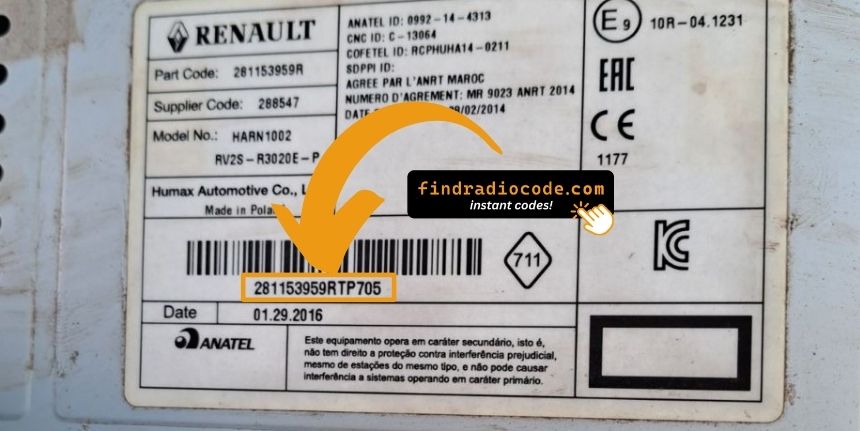
Example: Renault Laguna serial number label location
What a Valid Serial Number Looks Like
The 2008 Renault Laguna radio serial formats:
BP####– Blaupunkt radio serial (most common)CC####– Continental radio serialPH####– Philips radio serialPR####– Alternate Renault OEM format
The serial is found on the radio casing. Don't confuse it with the vehicle part number.
Typical Serial Number Formats for 2008 Laguna Radios
Serial format is dictated by the radio manufacturer, not by Renault, so the two head units use slightly different conventions.
- Tuner List CD - the chassis label commonly carries a serial beginning with
Tfollowed by a letter and three digits, mirroring the pre-code shown on the display. Total length is typically around 8 to 14 characters when the supplier batch prefix is included. - Carminat TomTom - the unit carries a longer alphanumeric serial on the rear label; format varies by hardware revision. Use the full string printed after S/N on the label.
Practical validation tips:
- Do not confuse the part number (often preceded by
P/N) with the serial number. - Re-check ambiguous characters: 0 vs O, 1 vs I, 8 vs B.
- Submit the serial exactly as printed, without spaces.
Fixing Common Code Entry Problems for 2008 Laguna
When the radio starts but does not ask for a code, work through these steps:
- Force the code prompt: Pull the radio fuse briefly, refit, and turn the ignition on. The CODE prompt should appear.
- Check if already unlocked: When all functions work normally without restriction, it is already unlocked. No code entry is needed.
- On MediaNav touchscreen versions: Renault MediaNav uses a different interface. Check Settings → System for unlock or serial options.
- Ignition position: Older Renault radios sometimes only display the CODE screen when the ignition is in ACC or ON. Check both positions.
The display shows "WAIT" / "SAFE" after 3 wrong code attempts, blocking further input until the timer resets.
To clear the lockout: Turn the ignition to ON and keep it in that position for a full 60 minutes. Any power interruption restarts the 60-minute timer. This is particularly important — the timer does not pause, it restarts.
On Renault models, voltage can drop if the ignition is on for an extended period without the engine running. Keep the engine idling or connect a charger where practical to prevent the timer restarting.
Code entry on Renault passenger car radios uses the preset station buttons to build the code digit by digit.
- Button 1 sets the first digit — pressing it cycles from 0 to 9.
- Button 2 sets digit 2, button 3 digit 3, button 4 digit 4.
- After setting all digits, hold down button 5, button 6, or the Enter / AM-FM button to confirm.
Important: Newer Renault models with a MediaNav touchscreen use an on-screen keypad instead of preset buttons. If a number pad appears on screen, tap it directly. No hold-to-confirm is needed.
If the radio rejects your code, check the following before entering it again.
- Check the serial format: Renault radios use serials starting with BP, CC, PH, or PR. Make sure you entered the correct serial from the radio label — not any other sticker inside the car.
- Look for digit confusion: On worn or faded labels, characters are easily confused. Take a clear photo and examine it carefully.
- Button sequence: Pressing button 1 cycles digit 1 from 0 to 9. Rapid pressing may go past the right number. Press deliberately and count. Only confirm once all four digits are correct.
Still getting the wrong code? Contact us with your serial number and we'll check and reissue if needed.
Finding the serial on Renault radios can be found on a sticker on the rear or side of the radio unit, only visible once the radio is pulled forward.
- What to look for: The serial starts with BP, CC, PH, or PR then 8–10 alphanumeric characters.
- Label condition: Older Renault labels can be faded. Photograph under good light and zoom in — a camera often reveals characters the eye misses.
- Removal tools: Standard DIN release keys work on all Renault models. Insert them into the holes on both sides of the radio and draw the unit out far enough to read the rear label.
Do not use the vehicle VIN or dashboard label number — these produce an incorrect code.