
Radio Serial Number Explained - Finding It on Your Honda
The initial step is to find the radio's serial number.
Based on the head unit type fitted in your 2024 Passport, the serial can usually be accessed either through the display menu or by checking the label on the radio itself.
Follow the steps below to identify your serial the right way.
2024 Passport - Which Factory Radio Did You Get?
- 8-inch Color Touch-Screen Display Audio (Sport, EX-L, TrailSport) - the 8-inch landscape colour touchscreen carried forward from the 2022 refresh, with Apple CarPlay and Android Auto standard (wired), Bluetooth HandsFreeLink, SiriusXM, HD Radio and HondaLink. Capacitive Home, Back and Brightness touch controls run down the left edge with a volume/power knob beside them. Sport, EX-L and TrailSport trims pair this head unit with a 215-watt, 7-speaker audio system that includes a subwoofer.
- 8-inch Color Touch-Screen Display Audio with Honda Satellite-Linked Navigation (Touring, Elite, Black Edition) - the same 8-inch hardware as the standard unit but with factory navigation built in and turn-by-turn directions on the central screen. Touring, Elite and the new-for-2024 Black Edition pair this unit with a 10-speaker, 590-watt premium audio system. The Elite and Black Edition also add wireless phone charging in the centre console.
- Standard across the line-up - every 2024 Passport, regardless of trim, comes with the 8-inch Display Audio head unit, Apple CarPlay and Android Auto, Bluetooth HandsFreeLink, SiriusXM-ready hardware (subscription required after the trial), HD Radio and steering-wheel audio controls. The differences between trims are speaker count, amplifier output, whether built-in navigation is present and whether wireless charging is included.
- For code retrieval purposes - the 2024 Passport uses a single head-unit family across the line-up: the 8-inch Display Audio module (with or without the navigation option). Audio package and trim level change the speakers and amplifier, not the physical head-unit module that holds the anti-theft code.
- 2024 vs 2023 reminder - if you are cross-referencing parts or service info, the 2024 Passport keeps the 2022 refresh dashboard and infotainment hardware unchanged; the only line-up addition for 2024 is the Black Edition trim, which uses the same Display Audio with navigation as Touring and Elite.
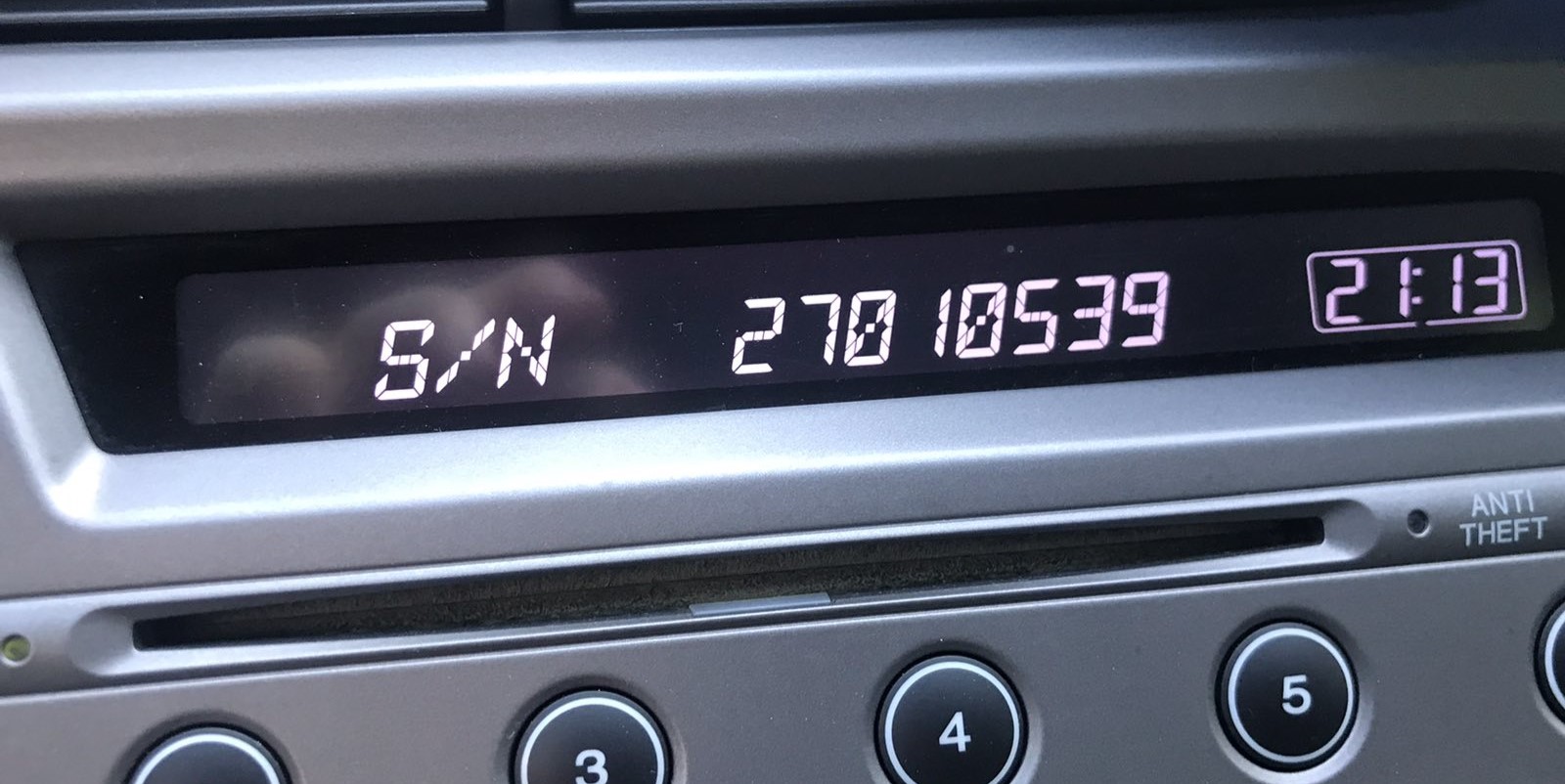
View the S/N on the Radio Screen
The method for 2024 Honda Passport is this:
The 2024 Honda Passport may be equipped with Honda's Display Audio system (7" depending on trim) or a standard non-touchscreen radio. All versions support serial number retrieval via the 1+6 button method:
- Turn ignition to ON. Let the radio to turn on. The screen shows "CODE" if locked.
- Simultaneously press preset buttons 1 and 6 for about 5 seconds.
- The serial number shows in two halves (e.g.,
U3210+L0482).
Alternative: On 2024 Passport with the Display Audio touchscreen, navigate to Settings → System → Device Information – the serial may be shown there instead of the button combination.
Releasing the Unit to Access the S/N on the Tag
If the serial does not appear on display, the next step is checking the radio itself.
Many Honda radios require physical access to the serial sticker attached to the unit.
Common approach:
- Start by completely powering down the engine - pull the key out.
- Then detach the trim panel.
- Next, loosen the mounting points and slide the radio forward.
- Look for a printed tag showing the serial number.
If none of these methods succeed on the 2024 Honda Passport:
- Power down the vehicle.
- Detach the center stack trim panel. The 2024 Passport's integrated dashboard uses friction clips.
- On touchscreen trims: Unscrew the fasteners (Phillips-head) securing the display module.
- For standard radios: Unscrew the 4 Phillips screws holding the head unit.
- Slide the unit out and read the serial on the sticker on the unit casing.
Tip: The touchscreen unit is larger and more tightly fitted than the standard radio. Be careful when extracting it.
Pulling the Head Unit on a 2024 Passport
- Safety first. Park on a flat surface, set the parking brake, switch the ignition off and remove the key/fob from the cabin. Disconnect the negative (-) terminal of the 12V battery and wait at least three minutes for the SRS (airbag) capacitor to discharge before touching anything in the centre stack - the passenger airbag harness runs close to the head-unit bezel on the refreshed dashboard.
- Tools you will want. A set of plastic trim removal tools, a 10mm socket on a short extension, and a small Phillips screwdriver. Masking tape around the bezel protects the soft-touch dashboard from scuffs while prying.
- Release the centre bezel. The 2024 Passport keeps the same gloss-black centre-stack panel as the 2022 refresh, surrounding the head unit and the climate controls. Insert a plastic trim tool at the lower edge and work the spring clips loose along the bottom first, then up each side. The whole panel comes forward as one piece. Tilt it toward you and disconnect the climate-control and accessory connectors at the back so the panel can be set aside.
- Unbolt the head unit. Four 10mm bolts hold the radio chassis into the dashboard cradle - two at the top corners and two at the bottom corners. Remove all four, slide the unit straight out a few centimetres, then disconnect the wiring harness, antenna lead, USB ribbon and HDMI ribbon connectors at the back. The head unit is now free.
- Read the serial. The serial number sticker is on the top or side of the metal radio chassis - a small white label with a barcode and an 8-character alphanumeric serial. Photograph it with your phone before reinstalling so you have a clean record for the code request.
- Reassembly. Reverse the sequence: rear connectors first, four 10mm bolts back in, climate panel connectors reattached, trim bezel pressed into its spring clips, battery negative terminal reconnected last. The radio will request its anti-theft code on first power-up.
- Dealer alternative. Any Honda dealer can read the radio serial through their HDS (Honda Diagnostic System) tool plugged into the OBD-II port without removing the unit at all. On a near-new 2024 Passport this is normally the fastest and lowest-risk path, especially with the car still under warranty.
- Check the obvious places first. Before pulling the dashboard or booking a service appointment, check the owner's manual pouch, the glovebox, the original window sticker and any paperwork delivered with the car at purchase - Honda dealers often place a small white label with the radio anti-theft code in the glovebox or owner's manual wallet at delivery, which avoids the whole removal job.
Example: Honda Passport serial number label location
S/N Patterns and Prefixes
Based on which radio fitted to the 2024 Honda Passport:
U1234L5678– Standard Honda OEM formatHBM####– Used in Display Audio and nav-equipped units913A####– Some Alpine-manufactured radios
The 2024 Passport may have: base CD radio (U/L format), Display Audio 5"/7" (HBM format), or navigation unit (HBM format). All require a 5-digit unlock code.
Important Verify you record the serial number, not the part number (which starts with 39100, 39101, or similar Honda part coding).
2024 Passport Radio Serial Format
The 2024 Passport's 8-inch Display Audio head unit (with or without navigation) uses the standard Honda 8-character alphanumeric serial. The string contains only digits 0-9 and uppercase letters A-Z, with no spaces, dashes or special characters, and is laser-printed or sticker-printed on the metal chassis of the unit. Older Honda single-DIN radios display this same serial in a split 'U' (upper) and 'L' (lower) format on a dealer-mode display that you concatenate into the 8-character string, but whether the 2024 Passport Display Audio still supports that split-display dealer-mode is not publicly confirmed for this model year. The most reliable reference for the serial is always the chassis sticker or an HDS read at a Honda dealer.
How Code Entry Works on Your Honda Radio
Once you have the serial number and retrieved the unlock code, the last part is entering it into your radio.
Honda OEM units display a CODE prompt when ready for input.
The process is usually straightforward, but button layouts and confirmation methods may vary depending on the radio version installed in your Passport.
Correct Entering Process
To enter the code on the 2024 Honda Passport:
- Ignition ON. Radio displays "CODE" or "ENTER CODE".
- Non-touchscreen models: Use preset buttons 1-5 to select each digit, then press and hold button 6 to confirm.
- Display Audio touchscreen: An on-screen keypad may appear. Tap each digit and press "Enter" or "OK".
Lockout: Three wrong attempts activate a 60-minute lockout. Keep ignition ON. Do not cycle the key or the timer starts over.
Entering the Code on the 2024 Passport
- Touchscreen entry on the 8-inch Display Audio. Every 2024 Passport uses the 8-inch touchscreen unit, so the entry workflow is identical across Sport, EX-L, TrailSport, Touring, Elite and Black Edition trims. When the unit prompts 'Enter Code', a numeric keypad appears on the touchscreen. Tap the five digits of your code in order, then tap Enter (or Done) on the touchscreen. The radio resumes normal operation if the code is accepted, or shows the number of remaining attempts if it is rejected.
- Lockout protection. Honda head units typically lock out after about ten failed attempts and require a one-hour cooldown with the radio powered on before further attempts are accepted. Leave the ignition in accessory and the radio on, then retry once the lockout has cleared.
- VIN-pairing. Some 2024 Display Audio units may revalidate against the VIN through HDS after a 12V battery disconnect. If the correct code is rejected and the unit refuses to unlock, a Honda dealer can re-pair the head unit through their diagnostic tool, normally as a quick service-bay job.
- Quick check before you start. Before requesting a code, check the owner's manual pouch, the glovebox and any paperwork delivered with the car at purchase - Honda dealers often place a small white label with the radio anti-theft code in the glovebox or owner's manual wallet at delivery, which avoids the portal request entirely.
How the Code Retrieval Process Works for Honda Passport 2024
To get the code, you'll take only a few easy steps.
- Locate your radio's serial - this is the only info required to generate the correct unlock code.
The difference with the dealership lookup is that no VIN is needed. - When you've found the S/N, type it into the form above.
The system checks it against a database of supported units and automatically retrieves the matching anti-theft code. - In most cases, the code appears instantly on the screen after you pay and is also sent to your email , just in case.
If we need to check it manually, you'll be informed before checkout. - When you receive the code, just enter it into the radio to restore full functionality.
Why Did the Radio Lock and Ask for a Code?
Honda's Display Audio system carries the same anti-theft design as earlier radios: losing battery power triggers a code request at next startup. Applies to both the base radio and the Display Audio touchscreen.
- Battery replacement — by far the most frequent cause.
- Battery disconnect during repairs — any work that cuts battery power will activate the lock.
- Completely dead battery — a fully discharged battery has the same result.
Worth knowing: many higher-trim Display Audio models from this era do not use a traditional code-based lock — if the radio never showed "CODE" after a battery change, it could have a different anti-theft method linked to the vehicle VIN.
Understanding Unlock Issues with Your Passport
Code entry depends on the specific radio in the Display Audio-era Passport:
- Non-touchscreen base radio: Press preset buttons 1–5 to scroll to each digit, then hold button 6 to confirm — same as older Honda platforms.
- Display Audio 5" or 7" touchscreen: An on-screen numeric keypad appears when the code prompt is active. Enter the digits and press OK or Enter on screen.
If the touchscreen is unresponsive, try the physical preset buttons — certain units accept both input method. Ensure the screen is fully booted before attempting entry.
The Display Audio platform uses the same 3-attempt lockout as older Honda radios. To recover:
- Keep the ignition in ON or ACC — do not switch off.
- Allow the full 60-minute period. The touchscreen might dim during this time — this is expected.
- After 60 minutes, the radio re-displays "CODE" and you can.
On Display Audio touchscreen models, the lockout countdown runs in the background. Simply leave the vehicle running or the ignition on ACC for the full hour.
The Display Audio era covers radios using multiple serial prefixes depending on which unit was fitted:
U####L####— base CD radio serial (10 characters, two halves).HBM####— Display Audio 5"/7" and navigation units.913A####— certain Alpine OEM units.
Part numbers printed nearby begin with 39100 or 39101 — these are not serials. If uncertain, use the Settings → Device Information menu or the 1+6 button method to display the serial directly from the unit.
If the Display Audio screen comes on but shows the home screen without a "CODE" prompt, check the following:
- The radio may not be locked — some battery changes skip the lock if done quickly enough.
- On some Display Audio units, the code prompt shows only on the audio portion of the screen, not the navigation display — give it a moment after startup.
- Try the Settings → System → Device Information route; if the serial is visible there, the unit could still be functional without a code.
If none of these apply, checking the radio fuse is the next step — a blown fuse will stop the radio from powering on at all.
On the Display Audio, a rejected code usually points to the serial was incorrectly noted. Both the button method and the settings menu can produce the correct serial — double-check that the serial you submitted was read off the radio unit and not from a sticker elsewhere in the car.
After one failed entry, pause and contact support before trying again — a second wrong attempt brings you closer to the 60-minute lockout. A no-charge serial reverification is available on request.