Step-by-Step Honda Passport 2019 Radio Code Retrieval Guide
- Rather than relying on Honda dealership lookup or online threads you can generate the code online with the radio S/N.
- Identify the serial number. It is always present on the unit itself, and in some cases you can see it on the Passport's display.
- Enter it into the form above, and our system will calculate the correct 2019 Passport unlock code.
- After receiving your code, type it in using Passport's radio controls to unlock the system successfully.
- The entire process takes just a short moment and requires zero paperwork and no dealer visit.
Locate the Serial Number Needed to Generate Honda Passport 2019 Radio Code
The initial step is to locate the radio's serial num.
Based on the head unit type fitted in your 2019 Passport, the S/N can usually be accessed either through the display menu or by checking the label on the radio itself.
Below are the most common methods to identify your serial quickly.
2019 Honda Passport - Identifying Your Factory Head Unit
The Passport returned for 2019 as a five-seat sibling to the Pilot, sharing the same YF-platform centre stack and the same Display Audio family used on the third-generation Pilot. Identifying which one you have is the first step before any radio code retrieval.
5-inch Color LCD Audio (Sport). Visual ID: a smaller non-touch 5-inch colour LCD set into the upper centre dash with a row of physical buttons and a rotary knob beneath it. Standard with AM/FM, Bluetooth HandsFreeLink and a 7-speaker, 215-watt audio system. The Sport trim does not get Apple CarPlay or Android Auto on its 5-inch unit and is the only 2019 Passport trim with this head-unit family.
8-inch Display Audio with High-Resolution Electrostatic Touch-Screen (EX-L, Touring, Elite). Visual ID: a larger 8-inch landscape touchscreen with capacitive touch controls down the left edge (Home, Back, Brightness) and a volume/power knob. Three customisable shortcut icons run along the top, with a digital clock and audio-source indicator. Standard with Apple CarPlay and Android Auto (wired), Bluetooth, SiriusXM, HD Radio and HondaLink. Software is updatable over Wi-Fi.
8-inch Display Audio with Honda Satellite-Linked Navigation (Touring, Elite). Same 8-inch hardware as above, but with factory navigation baked into the head unit and turn-by-turn directions on the central display. Touring and Elite trims pair this unit with a 10-speaker, 590-watt premium audio system; the EX-L keeps the 7-speaker, 215-watt setup. The Elite adds wireless phone charging in the centre console.
For radio code retrieval, the head unit you need to identify is either the 5-inch Audio module (Sport) or the 8-inch Display Audio module (EX-L and above, with or without navigation). Audio package and trim level change the speakers and amplifier, not the head unit itself.
Using Hidden Radio Menus to Find the Serial
These are the steps you should follow for 2019 Honda Passport:
The 2019 Honda Passport may feature Honda's Display Audio touchscreen (7" depending on trim) or a standard non-touchscreen radio. All versions support serial number display via the 1+6 button method:
- Turn ignition to ON. Wait for the radio to turn on. The screen shows "CODE" if locked.
- Simultaneously press preset buttons 1 and 6 for approximately 3-5 seconds.
- The serial number shows in two halves (e.g.,
U3210+L0482).
Alternative: On 2019 Passport with the Display Audio touchscreen, check Settings → System → Device Information – the serial may be shown there without needing the button combination.
Manufacturer Label Inspection
If the serial number cannot be accessed through menu, use the pull-out method.
Most Honda Passport factory radios include a label with the serial number printed on the casing.
Steps:
- Power down the vehicle.
- Remove the bezel surrounding the radio.
- Loosen the fasteners.
- Move the unit slightly out to access the label.
The serial number is usually located near the manufacturer sticker.
If neither methods work on the 2019 Honda Passport:
- Power down the vehicle.
- Detach the radio surround. The 2019 Passport's modern dashboard uses snap-fit clips.
- On touchscreen trims: Unscrew the mounting screws (Phillips) securing the display module.
- On base trims: Unscrew the 4 Phillips screws holding the radio unit.
- Ease the unit forward and read the serial on the sticker on the unit casing.
Tip: The Display Audio unit is wider and more tightly fitted than the standard radio. Take care when extracting it.
Pulling the Head Unit to Read the S/N Off the Sticker
Safety first. Before you start, switch the ignition off, take the key (or fob) out of reach, and disconnect the negative terminal of the 12V battery. Wait at least three minutes for the SRS (airbag) capacitor to discharge before touching anything in the centre stack - the passenger airbag harness runs close to the radio bezel. Park on a flat surface with the parking brake on.
Tools you will want. A set of plastic trim removal tools, a 10mm socket and a short extension, and a small Phillips screwdriver. Masking tape on the dashboard around the bezel will protect the soft-touch trim from scuffs.
Removal sequence. The 2019 Passport shares its centre dash with the third-generation Pilot, so the same approach applies. Start at the lower edge of the centre stack panel that surrounds the head unit and the climate controls, and work plastic trim tools gently behind it to release the spring clips - work along the bottom first, then up the sides. The whole gloss-black panel comes forward as one piece on the 8-inch units; on the Sport 5-inch unit the panel is a similar shape but with the smaller display aperture. Once the panel is loose, tilt it forward and disconnect the climate control and accessory connectors at the back so the panel can be set aside.
Behind the trim panel are four 10mm bolts holding the head unit chassis into the dashboard cradle - two at the top, two at the bottom. Remove all four, slide the unit straight out toward you a few centimetres, then disconnect the wiring harness, antenna lead and (on Display Audio units) the USB and HDMI ribbon connectors at the back. The head unit is now free.
Reading the serial. The serial number sticker is on the top or side of the metal radio chassis. On Honda Display Audio units it is usually a small white label with a barcode and an alphanumeric serial. Photograph it with your phone before reinstalling the unit.
Reassembly. Reverse the sequence: connect the harness/antenna/ribbon connectors, slide the unit back in, refit the four 10mm bolts, reconnect the climate panel connectors, and press the trim panel back into place along the spring clips. Reconnect the battery last. After power-up the radio will ask for its anti-theft code on first use.
If you would rather not pull the unit yourself, a Honda dealer can read the serial through their HDS (Honda Diagnostic System) tool plugged into the OBD-II port - no physical removal required. This is normally the fastest path if your Passport is still under warranty.
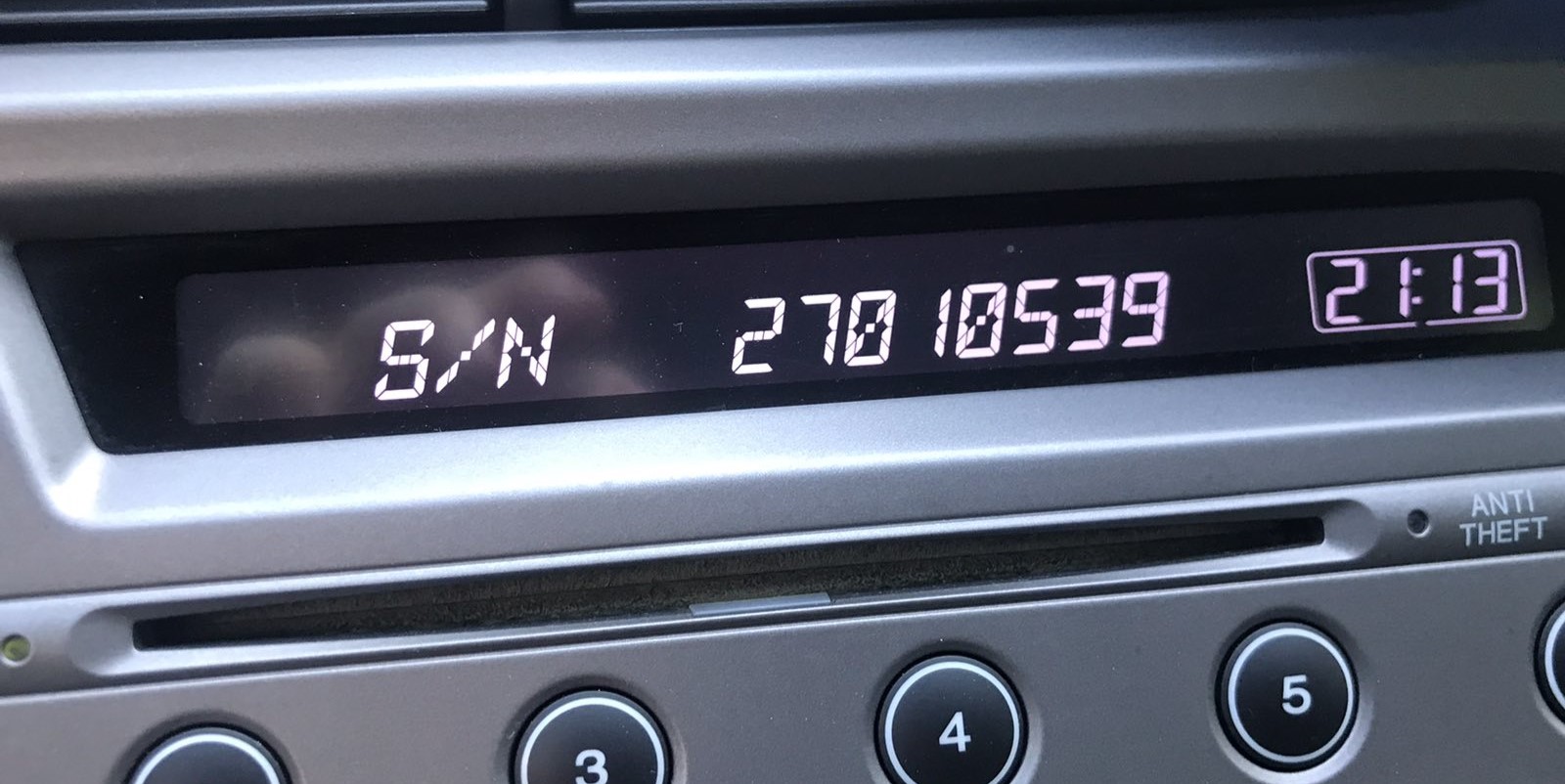
Example: Honda Passport serial number label location
Common Serial Number Structures
Based on the radio installed in the 2019 Honda Passport:
U1234L5678– Most common Honda OEM formatHBM####– Found on Display Audio and navigation units913A####– Certain Alpine-manufactured units
The 2019 Passport may have: base CD radio (U/L format), Display Audio 5"/7" (HBM format), or navigation unit (HBM format). All require a 5-digit unlock code.
Important Make sure you copy the serial number, not the part number (which starts with 39100, 39101, or similar Honda part coding).
Honda Passport Radio Serial Format
Honda Display Audio and 5-inch Audio head units used on the 2019 Passport follow the long-standing Honda 8-character alphanumeric serial convention - typically four digits or letters, then four more, with no spaces, dashes or special characters. The serial is laser-printed or sticker-printed on the metal chassis of the unit and is sometimes split visually on the dealer-mode display into a 'U' line and an 'L' line that you concatenate to form the full 8-character string. The exact prefix can vary by supplier and head-unit family (5-inch Audio vs 8-inch Display Audio), so always read the serial directly off the unit or through HDS rather than guessing from another vehicle.
Code Entry Process for 2019 Passport
Now that you've found the serial number and received the unlock code, the next part is entering it into your radio.
Honda OEM units display a ENTER CODE message when ready for input.
The process is simple, but button layouts and confirmation methods may change depending on the radio version installed in your Passport.
The Correct Way to Enter It
To enter the code on the 2019 Honda Passport:
- Ignition ON. Radio shows "CODE" or "ENTER CODE".
- Non-touchscreen models: Use preset buttons 1-5 to select each digit, then hold button 6 to confirm.
- Display Audio touchscreen: An on-screen keypad appears. Enter each digit and press "Enter" or "OK".
Lockout: 3 wrong codes activate a 60-minute lockout. Leave ignition ON. Do not cycle the key or the timer resets.
To request the code from the official Honda radio and navigation code portal, you will need the Vehicle Identification Number (VIN), the registered phone number and ZIP code that match Honda's records, and the 8-character radio serial number. The portal is normally available Sunday-Friday 4:00am-9:00pm Pacific and Saturday 4:00am-6:30pm Pacific.
Entering the code on the 8-inch Display Audio (EX-L / Touring / Elite). When the radio is in 'Enter Code' mode the touchscreen will display a numeric keypad. Tap the five digits of your code in order, then tap the Enter or Done key on the touchscreen. The radio will resume normal operation if the code is accepted. If the code is rejected, the screen will show the number of remaining attempts before the unit locks out.
Entering the code on the 5-inch Audio (Sport). Use the preset buttons on the front of the head unit to enter each digit. Each preset stands for its own number, so every digit of the code is one press of the matching preset, in order (for example, a code of 31524 is preset 3, preset 1, preset 5, preset 2, preset 4). On some firmware versions the tuning knob and a confirmation button are used instead - the on-screen prompt will tell you which.
If you run out of attempts. Most Honda head units lock out after about ten failed attempts and need to wait one hour with the radio powered on before they will accept further codes - leave the ignition in accessory and the radio on, and try again after the cooldown.
Passport 2019 Common Radio Problems
Code entry depends on the specific radio in the Display Audio-era Passport:
- Non-touchscreen base radio: Use preset buttons 1–5 to scroll to each digit, then hold button 6 to confirm — same as older Honda platforms.
- Display Audio 5" or 7" touchscreen: An on-screen numeric keypad is shown when the code prompt is active. Enter the digits and press OK or Enter on screen.
If the touchscreen is unresponsive, try the physical preset buttons — some units support either input method. Ensure the screen is fully powered on before starting entry.
The Display Audio era covers radios using multiple serial prefixes depending on the trim level:
U####L####— base CD radio serial (10 characters, two halves).HBM####— Display Audio 5"/7" and navigation modules.913A####— some Alpine OEM units.
Part numbers on the same label begin with 39100 or 39101 — these are not serials. If uncertain, use the Settings → Device Information menu or the 1+6 button method to display the serial directly from the radio.
For Display Audio-era Honda radios, a rejected code most often means the serial was incorrectly noted. Either retrieval method can produce the correct serial — double-check that the serial you submitted was read off the radio unit and not from the owner's card.
After one failed entry, pause and reach out before trying again — another incorrect entry brings you closer to the 60-minute lockout. A no-charge serial reverification can be done on request.
If the Display Audio screen comes on but shows the home screen without any "CODE" display, check the following:
- The radio may not be locked — some battery changes don't trigger the lock if power was restored fast.
- On some Display Audio units, the code prompt shows only on the audio portion of the screen, not the navigation display — give it a moment after startup.
- Try the Settings → System → Device Information route; should the serial appear, the unit could still be functional without a code.
Should none of the above match, checking the radio fuse is the next step — a blown fuse prevents the radio from showing any display at all.
The Display Audio platform enforces the same 3-attempt lockout as older Honda radios. To recover:
- Maintain the ignition in ON or ACC — do not switch off.
- Wait out the full 60-minute period. The touchscreen may go to sleep during this time — that's normal.
- After 60 minutes, the code prompt returns and another attempt is possible.
For touchscreen units, the lockout countdown runs in the background. Just leave the vehicle running or the ignition on ACC for the full hour.
What Caused the Radio to Lock?
Honda's Display Audio system carries the same anti-theft design as earlier radios: losing battery power causes a code request at next startup. This affects both the base radio and the Display Audio unit.
- Battery replacement — the most common trigger.
- Battery disconnect during repairs — service that interrupts battery power will re-engage the lock.
- Completely dead battery — a drained battery also triggers the request.
Worth knowing: many higher-end Display Audio models from the 2014–2021 period do not use a traditional code-based lock — if the radio never prompted for a code after losing power, it may use a different anti-theft method tied to the vehicle VIN.