
2015 Dodge Journey Stereos and Suppliers
The following head units were fitted to the 2015 Dodge Journey. Pick the one that matches your dash to check how to identify it and how to get the code.
| Years | Factory radio | Serial starts with |
|---|---|---|
| 2013-2018 | Chrysler Uconnect 8.4 Panasonic |
TM9
|
| 2013-2018 | Uconnect 3.0 RA1 VP1 Continental |
TQN, TVPQN, A2C, A3C
|
| 2013-2017 | Uconnect 4.3 REB Continental |
TQN, TVPQN, A2C, A3C
|
| 2013-2018 | Uconnect 8.4 RA3 VP3 CA Harman |
T00AM, T00BE, T0012
|
| 2013-2018 | Uconnect 8.4 RA3 VP3 MX Harman |
T00AM, T00BE, T0012
|
| 2013-2018 | Uconnect 8.4 RA3 VP3 NA Harman |
T00AM, T00BE, T0012
|
| 2014-2017 | Uconnect 5.0 RA2 VP2H NA Harman |
T00AM, T00BE, T0012
|
| 2014-2018 | Uconnect 8.4 RA4 VP4 NA Harman |
T00AM, T00BE, T0012
|
Understanding the Radio Serial Number and How to Locate It on 2015 Journey
The first part is to locate the radio's serial num.
Depending on the radio unit fitted in your 2015 Journey, the serial can be found either through the display menu or by checking the label on the radio itself.
Follow the steps below to identify your S/N the right way.
2015 Journey - Which Radio Did You Get?
The 2015 Journey continued with the same three Uconnect 3 (3C) head units as 2014; no platform change for this model year.
- Radio 4.3 (Uconnect 4.3) - the standard head unit on SE and the volume fit overall. 4.3-inch colour display, AM/FM/CD, hard preset buttons. The upgraded Uconnect Touch 4.3S adds touchscreen response and SiriusXM and was offered on SXT.
- Uconnect 8.4 (sales code RE2) - 8.4-inch colour touchscreen, no navigation. Continental-built unit with a glossy bezel and on-screen home menu (no NAV soft key). Optional on SXT/Crossroad/Limited.
- Uconnect 8.4N with Garmin navigation (sales code RB5) - the same 8.4-inch hardware as the RE2 but with Garmin-based navigation, HD Radio and SiriusXM Travel Link enabled. Tell it apart by the NAV soft key on the home menu and the Garmin boot logo. The rarer of the two 8.4 units.
View Your Serial Number on the Radio Display
Try the following for your 2015 Dodge Journey:
The 2015 Dodge Journey serves as a practical family vehicle and comes with the Uconnect 8.4" (RA3) infotainment system. Retrieving the serial number is done via Dealer Mode.
Climate Button Method:
- Turn the ignition to ACC or ON.
- On the Journey's center stack, find the Climate Up, Climate Down, and Front Defrost buttons below the 8.4" screen. Hold all three at the same time for 5 seconds.
- Dealer Mode loads on the screen.
- Select: System Info → Radio Part Info → Serial Number.
Backup Method: Hold Temperature Up (red) and Temperature Down (blue) for 5 seconds to enter Engineering Mode, then navigate to the same menu.
Display-Based Serial Number Retrieval
If your 2015 Journey has the Uconnect 8.4 (RE2) or 8.4N (RB5), the radio's serial number can usually be read from the screen using FCA's factory dealer/diagnostic mode without taking anything apart. The base Radio 4.3 / Uconnect 4.3 does not expose this on screen, so on that head unit you have to read the chassis label after removal.
- Turn the ignition to RUN/ACC so the radio powers up but the engine stays off.
- Wait for the Uconnect home screen to finish loading.
- On the climate panel below the screen, press and hold the driver-side temperature UP, the driver-side temperature DOWN, and the front DEFROST button together for about 7 seconds.
- The screen switches to the dealer/diagnostic menu listing radio information, software revisions and serial numbers.
- Read the radio serial number off that screen exactly as printed and double-check ambiguous characters such as 0/O and 1/I.
- Switch the ignition off to exit; the head unit returns to normal on the next start.
If the three-button combination does not bring up the dealer menu the radio is most likely the base 4.3, and the serial will need to be read from the chassis sticker.
Locate Serial on Journey's Radio Chassis
If the serial does not appear on screen, the next step is checking the radio itself.
Many Dodge radios require physical access to the ID label attached to the unit.
Typical approach:
- Start by completely shutting off the engine - pull the key out.
- Then lift the dashboard bezel.
- Next, unscrew the mounting points and slide the radio forward.
- Look for a printed tag showing the serial number.
If Dealer Mode is not accessible on your 2015 Journey, the radio must be physically removed to see the serial label. The Journey's compact center stack is straightforward to work on:
- Remove the center trim bezel – The Journey's trim panel surrounds the radio and climate section. Use a trim tool at the bottom corners and gently pry along the perimeter to release the snap-in clips.
- Remove the 4 mounting screws – Phillips or Torx T20 screws at the radio frame corners.
- Pull the radio forward – Slide the unit out far enough to view the serial label on the top or side.
The serial is a 14-character barcode label. Wiring can stay plugged in.
Locate Serial on Journey's Radio Chassis
For 2015 Journeys with the base Radio 4.3 / Uconnect 4.3, or if the dealer-mode shortcut does not work on the 8.4 unit, the head unit has to come out so the printed serial label on the chassis can be read.
- Safety first: turn the ignition off, remove the key, disconnect the negative battery terminal, and wait several minutes; never disturb the yellow airbag/SRS connectors and use plastic trim tools to keep clips and metal contacts intact.
- Tools you will need: plastic trim removal kit, Phillips screwdriver, small Torx bit set, flashlight, and a 7 mm socket on hand for any deeper retaining bolts.
- Start at the lower edge of the centre dash bezel and ease it forward with a plastic pry tool, working up the sides; the bezel is held in by spring/friction clips with no visible screws on its face.
- Once the clips release, tilt the bezel out and unplug the connector for the hazard switch and any HVAC/auxiliary plugs on the back of the panel before lifting it clear.
- Set the bezel aside on a soft cloth to protect the gloss finish.
- Remove the screws (typically four) securing the radio chassis to the dash bracket.
- Slide the radio forward and disconnect the antenna lead and the multi-pin power/data harnesses on the rear of the unit.
- The serial number is printed on a barcode/sticker label on the top or side of the radio chassis, alongside the part number and Mopar/supplier markings.
- Photograph the label and double-check ambiguous characters such as 0/O and 1/I before submitting the serial.
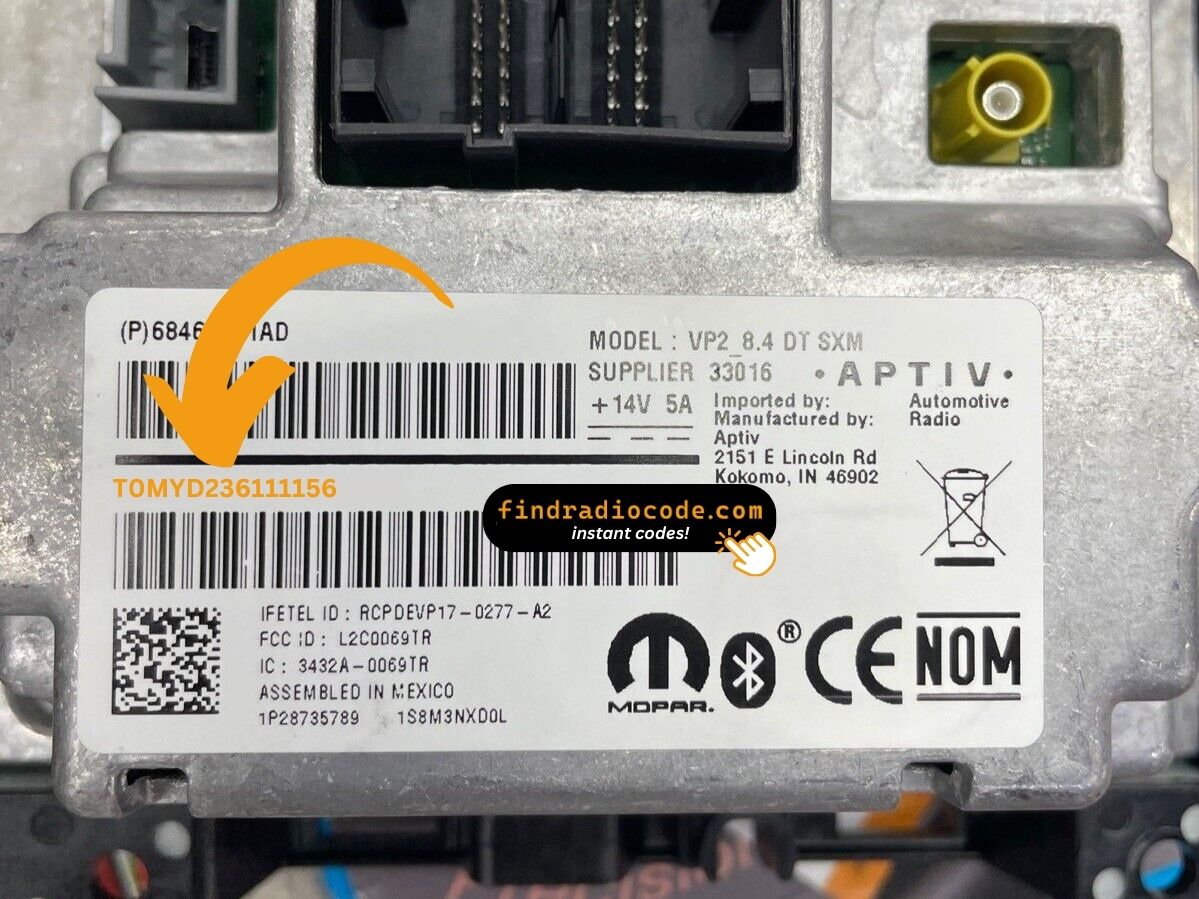
Example: Dodge Journey serial number label location
Common Serial Number Structures
The 2015 Dodge Journey with the 8.4" Uconnect (RA3) uses these serial formats:
T00AM– Harman VP2 Uconnect (standard format)T00BE– Continental buildTM9– Older Harman production
Radio designation: RA3. Serial length: 14 characters. Note: The Journey ran the older RA3 platform through 2020 — even the final production years.
Reminder The Journey's label also shows a part number (P05064... or 68...) — only the serial is used for code generation.
Common S/N Formats Used on 2015 Journey Units
The prefix printed on the chassis label depends on which head unit was specified and which supplier built it.
Uconnect 8.4 (RE2) and 8.4N (RB5)
- These Continental-built 8.4-inch units typically print an alphanumeric serial on the case sticker.
- Common Mopar Uconnect 8.4 prefixes from this generation begin with the letter
Tfollowed by additional letters and digits. - The serial usually runs as a continuous block of characters with no dashes or spaces.
Radio 4.3 / Uconnect 4.3 (Touch 4.3S)
- The base 4.3 head unit usually carries a Mopar-style serial on a chassis sticker.
- Treat the printed label on the unit itself as the authoritative reference and copy each character exactly.
How 2015 Dodge Journey Radio Code Lookup Works
Vehicle radios use security codes dependent on the radio unit itself rather than the vehicle model or production year.
- Our lookup service works by matching your Dodge Journey radio's serial number.
- Once the serial number is submitted, the system identifies the radio family and retrieves the corresponding code.
- Simply input the digits into the Journey stereo.
- The online process is quicker and more accessible than visiting the Dodge dealer.
Code Entry Process for 2015 Journey
After receiving 2015 Dodge Journey unlock code from the serial number, you're ready to reactivate the radio.
Some drivers get stuck at this stage because input process can look different across radio versions, but it's usually quick.
When the radio shows CODE, it means the unit is waiting for the correct numbers.
Detailed Input Instructions for Journey 2015
Entering the code on the 2015 Journey's Uconnect 8.4":
- Ignition ON. Screen displays "ENTER CODE" or ----.
- Use the touchscreen on the Journey's 8.4" screen to enter your 4-digit code.
- The radio auto-unlocks after the 4th digit — nothing else needed.
Lockout: 3 wrong attempts = 60-minute lockout. Keep ignition ON throughout. Cycling the ignition restarts the wait.
The Correct Entering Process
Once the unlock code has been retrieved for a 2015 Journey radio, it can be keyed in directly at the head unit - no scan tool or dealer visit is required.
- Limited attempts: after three successive incorrect codes the radio drops into a
WAITlockout state, so confirm each digit before pressing it. - Place the ignition in RUN/ACC so the radio powers up while the engine stays off.
- Wait for the display to show
CODE,Please Enter Anti-Theft Code, or a similar prompt. - On the Uconnect 8.4 (RE2) and 8.4N (RB5) units, key the four digits using the on-screen number pad and confirm with the on-screen OK/Enter button.
- On the base Radio 4.3 / Uconnect 4.3 unit, press the numbered preset buttons (1-6) in sequence and confirm with the tune/menu knob or labelled enter button as prompted on the display.
- If
WAITappears after three failed attempts, leave the radio powered with the ignition in RUN for a continuous 30 minutes (the vehicle may be driven during this time) before trying the correct code again.
Journey 2015 Common Radio Problems
After 3 wrong entries on the Journey's Uconnect, a 60-minute lockout kicks in. The screen shows "WAIT":
- Leave the Journey's ignition ON — engine off is fine but key stays in ON.
- Wait the full 60 minutes to pass.
- Turning the ignition off resets the wait.
Once clear, try again with the verified code.
The Journey's Uconnect 8.4" uses touchscreen-only input for code entry — no hardware keys are involved. Once "ENTER CODE" shows:
- Tap each digit directly on the on-screen pad.
- The radio auto-unlocks after the 4th digit — no "OK" button is required.
If the touchscreen doesn't respond, restart by turning the ignition off and on.
A rejected code on the Journey's Uconnect 8.4" nearly always means a serial mismatch. The RA3 label has a serial number (14-char code, starts with T00AM, T00BE, or TM9) and a part number (P... or 68...) on the same sticker.
Re-read the serial via Dealer Mode or the physical label and reach out for a free re-check if needed.
On the 2015 Journey, the RA3 radio label has both the serial and the part number:
- Serial number — 14 characters, beginning with
T00AM,T00BE, orTM9. This is what you need. - Part number — prefixed by
P05064or68. Not used.
For this model, Dealer Mode is the quickest way: System Info → Radio Part Info → Serial Number. No removal needed.
If the Journey's radio doesn't ask for a code after a battery event:
- Ensure ignition is in ON (not ACC) and give it a moment for the system to fully start.
- Inspect the radio fuse — fuse failure will stop the display from activating.
- Certain models may require a brief button press to trigger the code prompt.
Should nothing appear, a blown fuse is likely the problem.
Why Is the Radio Asking for a Code?
Owners of this family crossover face radio lockouts most commonly because of:
- Battery replacement — the Journey's use as a daily driver means batteries get replaced regularly, and every disconnect activates the code screen.
- Dead battery from short trips — vehicles driven on frequent short trips can develop weak batteries, eventually causing a dead battery and locking the radio.
- Blown fuse — a fuse failure counts as a power cut and locks the radio.
- Used purchase — the Journey was a popular family used buy without the prior code means the radio is locked from the start.
The unlock code is permanently tied to the serial number and never changes.