Harman Uconnect 8.4 RA4 VP4 NA Locked? Get It Back Today
Harman | Chrysler | Instant Retrieval
Our refund policy in full.
Supported Radio Serial Prefixes
| Serial Prefix | Status |
|---|---|
T00AM |
Supported |
T00BE |
Supported |
T0012 |
Supported |
If your serial starts with one of these, we can retrieve your code.
Your code in three steps
Everything runs from the serial number on the radio's own label.
- 1 Check the unit's sticker Look for it on the chassis label. The radio normally has to come forward a little - the wiring can stay plugged in.
- 2 Paste it into the box Letters and digits as they appear on the label - the form validates them before payment.
- 3 Unlock the radio You get the digits at once, with an email copy to keep. Type them into the radio and it plays again.
If it does not work, you are refunded in full.

Your radio carries a label like this one. The serial is the code printed on it.
What a valid serial looks like
Examples of serial numbers taken from Chrysler vehicles:
T00AM1801T0282
(prefix: T00AM)
T00BE351823197
(prefix: T00BE)
T0012566327123
(prefix: T0012)
T00AM2244H1937
(prefix: T00AM)
T00BE104477269
(prefix: T00BE)
Prefixes we see most: T00AM, T00BE, T0012
Check If This Is Your Radio
Compare the design, controls, display and features listed below with your factory-installed radio - the Uconnect 8.4 RA4 VP4 NA is easy to tell apart once you know what to look for.
What the Uconnect 8.4 RA4 VP4 NA looks like:
- 8.4" touchscreen in the centre of the dash
- Built-in navigation with factory map data
- Built for the North America market
- RA4 VP4 NA printed on the factory label
- Serial number starting with T00AM, T00BE, T0012
This is probably your radio if:
- RA4 VP4 NA appears as the sales code on the label
- the printed serial opens with T00AM, T00BE, T0012
- the model year sits within 2014-2018
- the display matches the Uconnect 8.4 8.4" touchscreen
RA4 has the NAV tile. If tapping NAV returns "Feature not available" you have RA3, not RA4. VP4 is the second-generation Uconnect 8.4 platform - it boots faster than the VP3 RA4 and has Apple CarPlay/Android Auto support in later model years.
Uconnect 8.4 RA4 VP4 NA Overview
Fitted as factory equipment in selected Chrysler models, the Uconnect 8.4 RA4 VP4 NA handles audio playback and vehicle integration from the factory. Depending on the version, it can also add Bluetooth, touchscreen operation, CD/DVD playback, navigation or wider multimedia support.
Uconnect 8.4 RA4 (VP4 North America) is the most common 8.4-inch navigation Uconnect in US-market FCA vehicles - 8.4-inch touchscreen with built-in maps, SiriusXM Travel Link, climate controls integrated into the screen on most vehicles. The home screen shows a NAV tile alongside Radio, Media, Phone.
Between 2014-2018 the Uconnect 8.4 RA4 VP4 NA appeared across a number of Chrysler models, usually on vehicles using the Harman multimedia platform. It stayed in production long enough to become a common sight in that generation of cars.
Typical features include:
8.4" touchscreen
AM/FM radio
Navigation built in, with factory map data
SiriusXM satellite radio*
Bluetooth for hands-free calls and music streaming
USB media playback
Steering wheel control support
Anti-theft security code
*Availability varies with the vehicle specification.
As with other Harman factory units, the Uconnect 8.4 RA4 VP4 NA locks itself when power is lost. After a battery disconnect or a workshop visit the screen will ask for the original security code before any audio returns.
Platform details and official documentation are available from the official Uconnect site.
What Usually Triggers the Code Screen
Nearly all of the Uconnect 8.4 RA4 VP4 NA codes we generate follow one of these four events.
The seller had no code
Used cars routinely arrive with a locked radio and no code card in the glovebox. The serial number on the unit is all that is needed to recover it.
A different unit is in the dash now
The code does not transfer from one unit to another: the swapped-in unit has a different serial, and that serial is what the code is calculated from.
The battery was replaced
Whether the battery was changed or just ran flat, the radio sees a power loss and asks for the code the next time it starts.
After electrical work
The repair worked - the locked radio is just the side effect of the battery being off the car for a while.
All four roads lead to the same solution - read the serial off the unit, enter it above, and the original code comes back instantly.
How to Read the Serial Number Off Your Uconnect 8.4 RA4 VP4 NA
The code is calculated from the radio's own serial number, so that number is the only thing you need before ordering. It is printed on the factory sticker of the unit itself, not in the vehicle documents.
On this unit: White printed label on the top of the chassis, near the rear edge. Three 7mm bolts and two trim clips release the dash bezel; pull the radio forward enough to read the label from above. No on-screen serial menu is available while the unit is locked.
How to reach the number:
- Slide the radio out of the dash - most units need a pair of release keys, which cost very little online.
- Read the serial from the printed label on the housing, next to or under the barcode.
- Copy it into the form precisely as printed; the checker catches any typo before payment.
The sticker that carries the serial
See it done on video

From our YouTube channel - the same steps apply to this unit.
Technical Overview
| Specification | Value |
|---|---|
| Manufacturer | Harman |
| Radio Family | Uconnect 8.4 |
| Variant | RA4 VP4 NA |
| Market | North America |
| Vehicle Brand | Chrysler / Dodge / Jeep / Ram |
| Production Years | 2014-2018 |
| Display | 8.4" touchscreen |
| Navigation | Yes |
| Serial Prefixes | T00AM, T00BE, T0012 |
The exact functionality of the Uconnect 8.4 RA4 VP4 NA depends on the vehicle it was installed in. Some versions include advanced multimedia features like navigation and Bluetooth, others ship in a simpler configuration. Features vary by production year, trim and regional specification.
Supported Vehicle Models
| Vehicle Model | Typical Production Years | Notes |
|---|---|---|
| Chrysler 200, 300 (navigation trims) | 2014-2018 | |
| Dodge Charger, Challenger, Durango, Grand Caravan, Journey (nav trims) | 2014-2018 | |
| Jeep Cherokee KL, Compass, Grand Cherokee WK2, Renegade, Wrangler JK (nav trims) | 2014-2018 | |
| Ram 1500/2500/3500/4500/5500 (Laramie/Longhorn/Limited) | 2014-2018 |
Some vehicle models were available with several different factory radio depending on trim level, production year or regional market. Always confirm your radio model before ordering a code.
Find Your Part Number 174
All of the part numbers listed here are supported. Match the one printed on your unit's label and you are in the right place.
Behind the 174 references sit 16 base part numbers; suffix letters like AA or ZD distinguish factory revisions of the same hardware, all of them covered here.
05091051AC 05091051AD 05091051AE 05091051AF 05091051AG 05091051AH 05091051AI 05091051AJ 05091051AK 68164641AC 68164641AD 68164641AE 68164641AF 68164641AG 68164641AH 68190240AA 68190240AB 68190240AC 68190240AD 68190240AE 68190240AF 68190240AG 68190240ZA 68190240ZB 68190240ZC 68190240ZD 68190240ZE 68190240ZF 68190240ZG 68190260AA All 174 supported references
68190260AB 68190260AC 68190260AD 68190260AE 68190260AF 68190260AG 68190260AH 68190260AI 68190260AL 68190260AM 68190260ZE 68190260ZF 68190260ZG 68190260ZH 68190260ZI 68190260ZJ 68190260ZK 68190260ZL 68190260ZM 68206388AB 68206388AC 68206388AD 68206388AE 68206388AF 68206388AG 68206388AH 68206388AI 68206388AJ 68206388AK 68206388AL 68206388AM 68211955AA 68211955AB 68211955AC 68211955AD 68211955AE 68211955AF 68211955AG 68211955AH 68211955AI 68211955ZI 68211955ZJ 68224525AA 68224525AB 68224525AC 68224525AD 68224525AE 68224525AF 68224525AG 68224525AH 68224525AI 68224525AJ 68224525ZA 68224525ZB 68224525ZC 68224525ZD 68224525ZE 68224525ZF 68224525ZG 68224525ZH 68224525ZI 68224525ZJ 68224525ZK 68232026AB 68232026AH 68232026AI 68232026AJ 68232026AK 68232026AM 68232026AN 68238619AA 68238619AB 68238619AC 68238619AD 68238619AE 68238619AF 68238619AG 68238619AH 68239117AE 68239117AF 68239117AG 68239117AH 68239117AI 68239117AJ 68257281AA 68257281AB 68257281AC 68258382AA 68258382AB 68258382AC 68258382AD 68258382AE 68258382AF 68258382AG 68258382AH 68258382AI 68258382ZD 68258382ZE 68258382ZF 68258382ZG 68258382ZH 68258382ZI 68258397AD 68258397AF 68258397AG 68258397AH 68258397ZA 68258397ZB 68258397ZC 68258397ZD 68258397ZE 68258397ZF 68258397ZG 68258397ZH 68258671AA 68258671AC 68258671AD 68258671AE 68258671AF 68258671AG 68258671AH 68258671AJ 68258671ZB 68258671ZC 68258671ZD 68258671ZE 68258671ZF 68258671ZG 68258671ZH 68261196AB 68261196AD 68261196AE 68261196AF 68261196AG 68261196AH 68261196AI 68270661AB 68270661AC 68270661AD 68270661AE 68270661AF 68270661AG 68270661AH 68270661ZB Look for the part number on the radio's identification sticker, typically beside the serial number. Any reference listed here is supported by this service.
How to enter your Uconnect 8.4 RA4 VP4 NA code
Nothing to install and no tools needed - only the code itself.
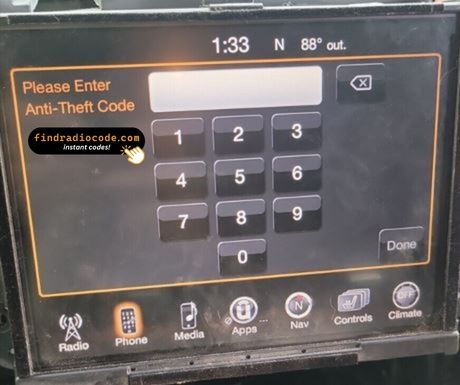
- Switch the ignition on and let the radio boot to its security screen.
- The code prompt comes up with its own keypad.
- Enter the four digits in the order you received them.
- As soon as the last digit lands, the radio runs the check on its own.
- On a correct code the radio leaves security mode and plays again.
Troubleshooting the Uconnect 8.4 RA4 VP4 NA
The radio is counting down
A countdown means the anti-theft system is holding the unit. Leave the ignition on until it clears. After three wrong codes the screen shows "INCORRECT CODE - WAIT" with a 30-minute countdown. The timer counts down only while the radio has 12V applied (ignition in RUN or ACC) - cutting power restarts the 30 minutes. The radio cannot be permanently locked; the correct code always works once the timer expires.
I cannot find the serial number
It is printed on the housing, so the unit normally has to come forward to read it. White printed label on the top of the chassis, near the rear edge. Three 7mm bolts and two trim clips release the dash bezel; pull the radio forward enough to read the label from above. No on-screen serial menu is available while the unit is locked.
Why it happened again
That is normal - the anti-theft system re-arms every time the unit loses power. Any interruption of 12V power for more than about a minute. Common causes: dead battery, battery replacement, jump-start failure, alternator service, dash repair that disconnected the battery, or pulling the radio out of the dash.
Same face, different radio
One glance at the label settles it - worth doing before the order. RA4 has the NAV tile. If tapping NAV returns "Feature not available" you have RA3, not RA4. VP4 is the second-generation Uconnect 8.4 platform - it boots faster than the VP3 RA4 and has Apple CarPlay/Android Auto support in later model years.
The code belongs to the radio and never changes, so keep it somewhere safe once you have it.
Common Questions About the Uconnect 8.4 RA4 VP4 NA
After the Code Arrived
Left by customers after entering their code. See the reviews page for all of them.
"Paid the money I got the code before I could make it out the house thank you so much 👋🏾"
Thank you for the code, you saved me a 140.00 and a trip to the dealer.
Matt Diekmann - Chrysler
Great job
Alvaro Ordonez - Chrysler
What Is Included
Code delivered automatically once payment clears - on screen and in your inbox.
Full money-back guarantee if the code does not unlock your radio.
Available 24/7 - no appointment, no dealer visit, no towing.
The code never expires - keep it and future battery changes cost nothing.
Related Radio Models
These units are easily confused with the Uconnect 8.4 RA4 VP4 NA. If the details above do not match your radio, check one of these instead.
The Uconnect 8.4 RA4 VP4 NA is only one of the Harman radios we support - the Harman radio code overview shows all of them.