Get Your Harman Uconnect 8.4 RA3 VP3 NA Radio Code in 3 Simple Steps
Harman | Chrysler | Instant Retrieval
Our refund policy in full.
Accepted Serial Number Formats
| Serial Prefix | Status |
|---|---|
T00AM |
Supported |
T00BE |
Supported |
T0012 |
Supported |
If your serial starts with one of these, we can retrieve your code.
From serial number to code
No VIN, no paperwork, no appointment - the serial number off the radio is all we need.
- 1 Locate the serial number Pull the radio a few centimetres forward and read the number off its label - nothing has to be unplugged.
- 2 Put it in the form on the left Just the serial and your email. The format check runs before the payment step.
- 3 Receive the radio code The code appears the moment the payment clears, and a copy goes to your email. Save it - the same four digits work for the life of the radio.
Covered by a full refund if the code does not work on your unit.

An example from the same family - find the matching sticker on your unit.
What a valid serial looks like
Real Chrysler serials, so you know what to look for:
T00AM1801T0282
(prefix: T00AM)
T00BE351823197
(prefix: T00BE)
T0012566327123
(prefix: T0012)
T00AM2244H1937
(prefix: T00AM)
T00BE104477269
(prefix: T00BE)
Prefixes we see most: T00AM, T00BE, T0012
Is This Your Uconnect 8.4 RA3 VP3 NA?
Before ordering a radio code it is important to confirm the exact model. Compare the design, controls, display and features below with the unit in your dashboard.
Typical identification features:
- 8.4" touchscreen set into the middle of the dash
- No navigation tile on the home screen - no maps installed
- Shipped for the North America market
- Sales code RA3 VP3 NA on the chassis label
- A serial that begins with T00AM, T00BE, T0012
Your radio is the Uconnect 8.4 RA3 VP3 NA if:
- the factory label reads RA3 VP3 NA
- the printed serial opens with T00AM, T00BE, T0012
- the build year falls inside 2013-2018
- the display matches the Uconnect 8.4 8.4" touchscreen
RA3 has no built-in navigation - the home screen will not show a NAV tile. Tapping "Nav" or "Maps" returns "Feature not available." If maps draw, you have RA4. The lockout keypad is identical on both, but the supported part-numbers differ.
What Is the Uconnect 8.4 RA3 VP3 NA Radio?
The Uconnect 8.4 RA3 VP3 NA is a dealer-installed Chrysler audio and multimedia unit. Alongside standard radio and audio playback it may include touchscreen controls, Bluetooth, CD/DVD playback or factory navigation, depending on how the vehicle left the factory.
Uconnect 8.4 RA3 (North America) is the 8.4-inch non-navigation Uconnect for US-market vehicles. Large central touchscreen, AM/FM, SiriusXM, Bluetooth, USB, climate controls integrated into the screen on most vehicles. No built-in maps.
Between 2013-2018 the Uconnect 8.4 RA3 VP3 NA appeared across a number of Chrysler models, usually on vehicles using the Harman multimedia platform. It stayed in production long enough to become a familiar sight in that generation of cars.
Common features on this unit:
8.4" touchscreen
AM/FM radio
Hands-free Bluetooth with audio streaming
USB input for music playback
SiriusXM satellite radio*
Steering wheel control support
Anti-theft security code
*Availability varies with the vehicle configuration.
The Uconnect 8.4 RA3 VP3 NA carries the same anti-theft protection as most factory units. Once power is cut - a flat battery, a battery swap, or the radio being removed - it will ask for the original code before it plays again.
Platform details and official documentation are available from the official Uconnect site.
How to Get the Serial Number From Your Radio
The code is calculated from the radio's own serial number, so that number is the only thing you need before ordering. It is printed on the chassis label of the unit itself, not in the vehicle documents.
On the Uconnect 8.4 RA3 VP3 NA: Top of the chassis on a white printed label. Three 7mm bolts and two clips release the bezel; the radio slides forward and the label is on the upper surface near the back. There is no menu shortcut while the radio is locked.
Getting to the label:
- Pull the unit forward with release keys (cheap online) - the wiring can stay connected.
- The serial is on the chassis sticker, usually right by the barcode - copy it down.
- Copy it into the form letter for letter; the checker catches any typo before payment.
Serial number location on this unit
See it done on camera

Our own clip of the unlock - more videos are on the channel.
Technical Specifications
| Specification | Value |
|---|---|
| Manufacturer | Harman |
| Radio Family | Uconnect 8.4 |
| Variant | RA3 VP3 NA |
| Market | North America |
| Vehicle Brand | Chrysler / Dodge / Jeep / Ram |
| Production Years | 2013-2018 |
| Display | 8.4" touchscreen |
| Navigation | No |
| Serial Prefixes | T00AM, T00BE, T0012 |
The exact functionality of the Uconnect 8.4 RA3 VP3 NA depends on the vehicle it was installed in. Some versions include advanced multimedia features like navigation and Bluetooth, others ship in a simpler configuration. Features vary by production year, trim and regional specification.
How Owners End Up on This Page
The lock screen rarely appears out of nowhere - one of these four situations is behind nearly every locked Uconnect 8.4 RA3 VP3 NA we see.
New battery, locked radio
The most common trigger by far: the moment the battery is disconnected, the radio forgets it was ever unlocked and asks for its code on the next start.
Back from the mechanic, radio locked
Mechanics routinely disconnect the battery before electrical work. The car comes back fixed and the radio comes back locked - expected, not a fault.
A used car with a locked radio
Second and third owners rarely get the code card. The radio itself still carries everything needed - its serial number.
A unit from a donor car
A used unit from a donor car arrives locked, and the code from your old radio will not fit - the code follows each radio's own serial number, so order it for the serial on the REPLACEMENT unit.
The route back to a working radio is the same in every case: serial number in, original code out, within seconds.
Compatible OEM Part Numbers 158
Check your radio's label against this list - any match means the code for your unit can be retrieved here.
The 158 references boil down to 22 base numbers - the trailing letters (AA, AB, ZC and so on) are factory revisions of the same unit, and every revision is covered.
05091054AA 05091054AB 05091054AC 05091054AD 05091054AE 05091054AF 05091054AG 05091054AH 05091054AI 05091054AJ 05091054AK 68164637AD 68164637AF 68164637AG 68164637AH 68164637AI 68190242AA 68190242AB 68190242AC 68190242AD 68190242AE 68190256AA 68190256AB 68190256AC 68190256AD 68190256AE 68206389AB 68206389AD 68206389AF 68206389AG Show all 158 part numbers
68206389AH 68206389AI 68211959AA 68211959AB 68211959AC 68211959AD 68211959AE 68211959AF 68211959AG 68211959AH 68211959AI 68224531AA 68224531AC 68224531AD 68224531AE 68224531AF 68224531AG 68224531AH 68224531ZJ 68232028AA 68232028AB 68232028AH 68232028AI 68232028AJ 68232028AK 68232028AM 68232028AN 68238621AA 68238621AB 68238621AC 68238621AD 68238621AE 68238621AF 68238621AG 68238621AH 68238621AI 68238621AJ 68238621AK 68238621AL 68238621ZA 68238621ZB 68238621ZC 68238621ZD 68238621ZE 68238621ZF 68238621ZG 68238621ZH 68238621ZI 68238621ZJ 68238621ZK 68239115AE 68239115AF 68239115AG 68239115AH 68249986AA 68249986AB 68249986AC 68249986AD 68249986AE 68249986AF 68249986AG 68249986AH 68249986AI 68249986AJ 68257282AA 68257282AB 68257282AC 68258380AE 68258380AF 68258380AG 68258380AH 68258380AI 68258398AD 68258398AF 68258398AG 68258398AH 68261015AA 68261015AC 68261015AD 68261015AE 68261015AF 68261015AG 68261015AH 68261015AI 68261015ZB 68261015ZC 68261015ZD 68261015ZE 68261015ZF 68261015ZG 68270657AA 68270657AB 68270657AC 68270657AD 68270657AE 68270657AF 68270657AG 68270657AH 68270657ZC 68270670AC 68270670AD 68270670AE 68270670AF 68270670AH 68270680AE 68270680AF 68301353AA 68301353AB 68301353AC 68312540AA 68312540AB 68312540AC 68312540AD 68312540AE 68323694AH 68323694AI 68323694ZA 68323694ZB 68323694ZC 68323694ZD 68323694ZE 68323694ZF 68323694ZG 68323694ZH 68323694ZI Z8270657AC Z8270657AD Z8270657AE The part number is printed on the label on top of or on the side of the radio chassis, usually next to the serial number. If yours appears above, the Uconnect 8.4 RA3 VP3 NA is the right page.
Uconnect 8.4 RA3 VP3 NA Vehicle Compatibility
| Vehicle Model | Typical Production Years | Notes |
|---|---|---|
| Chrysler 200, 300 (USA) | 2013-2018 | |
| Dodge Charger, Challenger, Dart, Durango, Grand Caravan, Journey (USA) | 2013-2018 | |
| Jeep Cherokee KL, Compass, Grand Cherokee WK2, Patriot, Renegade, Wrangler JK (USA) | 2013-2018 | |
| Ram 1500/2500/3500/4500/5500, ProMaster (USA) | 2013-2018 |
The vehicles listed above are the most common factory applications for the Uconnect 8.4 RA3 VP3 NA. Equipment packages and regional specifications vary, so verify the radio using its design, serial number or part number before ordering a code.
Putting the code into the radio
It takes less than a minute once you have the four digits.
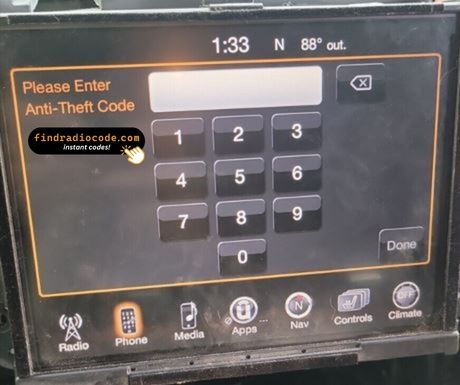
- Give the radio power - key to accessory is enough - and wait for the code prompt.
- The screen shows a numeric keypad for the four digits.
- Punch in all four digits, first to last.
- Verification happens by itself once the fourth digit is in.
- The security screen disappears and the unit returns to normal operation.
Troubleshooting the Uconnect 8.4 RA3 VP3 NA
The unit will not take more codes
Wrong codes put the unit into a lockout, and the only fix is to leave it powered and wait. Three wrong entries show "INCORRECT CODE - WAIT" with a 30-minute countdown. Keep the ignition switch in RUN or ACC for the timer to count down - cutting power resets it to 30 minutes. The radio never bricks; the correct code always works once the timer expires.
I cannot find the serial number
It is printed on the housing, so the unit normally has to come forward to read it. Top of the chassis on a white printed label. Three 7mm bolts and two clips release the bezel; the radio slides forward and the label is on the upper surface near the back. There is no menu shortcut while the radio is locked.
Why it happened again
That is normal - the anti-theft system re-arms every time the unit loses power. Loss of 12V power for more than about a minute - dead battery, battery replacement, alternator work, body-shop repairs that disconnect the battery, or removal of the radio from the dash.
This radio looks like several others
A few models in this family share the same face, so the label is what settles it. RA3 has no built-in navigation - the home screen will not show a NAV tile. Tapping "Nav" or "Maps" returns "Feature not available." If maps draw, you have RA4. The lockout keypad is identical on both, but the supported part-numbers differ.
Save the code: it stays valid, so the next battery change costs you nothing.
Questions About Your Uconnect 8.4 RA3 VP3 NA Code
What Customers Say
Left by customers after their radio came back to life. See the reviews page for all of them.
"Worked great! I ordered the code at 8pm est and received the code at 2am est put the code it this morning and radio is working great!"
Dang I thought it was a scam but it’s not it’s true I paid for it the code came through and I put it in and it works thank you
Vandale - Chrysler
This actually works it is worth it to buy
Emily - Chrysler
What Happens After You Order
The original code on screen seconds after you pay, emailed to you as well.
A complete refund any time the code fails to open your unit.
Available 24/7 - no appointment, no dealer visit, no towing.
One code, forever: the same digits unlock the unit after every power cut.
Looking for a Different Radio Model?
These units are easily confused with the Uconnect 8.4 RA3 VP3 NA. If the details above do not match your radio, check one of these instead.
Looking for another Harman radios? Go to the Harman radio codes page.