Identify your 2020 Dodge Durango Head Unit
These radio models were installed in the 2020 Dodge Durango. Pick the one that matches your dash to check where its serial number is and how to get the code.
| Years | Factory radio | Serial starts with |
|---|---|---|
| 2017-2020 | Chrysler Uconnect 8.4 UAV Panasonic |
TM9
|
| 2017-2020 | Chrysler Uconnect 8.4 UCQ Panasonic |
TM9
|
| 2017-2020 | Chrysler Uconnect 8.4 UCV Panasonic |
TM9
|
| 2017-2020 | Chrysler Uconnect 8.4 UDV Panasonic |
TM9
|
| 2017-2020 | Uconnect 5.0 UCA UDA VP2RFP Continental |
TQN, TVPQN, A2C, A3C
|
| 2017-2021 | Uconnect 8.4 VP2RFP UAM UCM Continental |
TQN, TVPQN, A2C, A3C
|
| 2019-2023 | Aptiv Uconnect 7.0 UAG VP2_7 WD NA Aptiv |
T0MYD
|
| 2019-2023 | Aptiv Uconnect 8.4 UJM VP2_8.4 HDCC SXM WD Aptiv |
T0MYD
|
Understanding the 2020 Dodge Durango Radio Code Retrieval Process
To get the code, you'll take only 4 simple steps.
- Locate the radio's serial number - this is the only information required to generate the correct unlock code.
Unlike dealership lookup, no VIN or paperwork is needed. - When you've found the S/N, type it into the form above.
The system checks it against a database of supported radios and automatically finds the matching security code. - In most cases, the code appears instantly on the screen after you pay and is also sent to your email , just in case.
If manual verification is required (rare situations), you'll be informed before checkout. - Once you get it, just enter it into the radio to restore the functionality.
Final Step - Enter the Radio Code
After generating the correct unlock code based on the serial number, you can restore normal functionality by entering it into the unit.
The code entry process depends on the head unit design, but most 2020 Durango systems follow a similar structure using preset buttons, touch controls, or rotary knobs - depending on if it's a factory or an aftermarket unit.
You will typically see SAFE displayed on screen.
Step-by-Step Code Input Guide
Code entry on the 2020 Durango's Uconnect 4C:
- Ignition ON. The Durango's 8.4" display presents "ENTER CODE".
- Tap the on-screen number pad to enter each digit of your 4-digit code.
- The radio confirms automatically after the 4th digit — no extra step needed.
Lockout: 3 wrong attempts = 60-minute lockout. Leave the Durango's ignition ON. Turning it off resets the timer.
Can't Find Your Radio S/N? Follow The Steps Below for Dodge Durango 2020
The first part is to find and write down the radio's S/N.
Based on the head unit type fitted in your 2020 Durango, the S/N can usually be accessed either through the display menu or by checking the label on the radio itself.
Follow the steps below to identify your serial quickly.
Screen-Based Serial Lookup Method
The method for 2020 Dodge Durango is this:
The 2020 Dodge Durango seats up to 7 passengers updated with the Uconnect 4C (RA4) 8.4" touchscreen prominently positioned in the console. Accessing the serial number on screen uses Dealer Mode:
- Turn ignition to ACC or ON.
- Press the bottom-left and bottom-right corners of the physical screen bezel (plastic frame, not the glass) simultaneously for 5 seconds.
- Dealer Mode opens on screen.
- Go to: System Info → Radio Part Info → Serial Number.
Note On some 2020 Durango units, Dealer Mode may be restricted after a software update. If the bezel press fails, physical radio removal is required.
Pulling Out the Unit to Access the S/N on the Tag
If the serial number cannot be accessed on-screen, use the removal method.
Most Dodge Durango original radios include a tag with the serial number printed on the casing.
Step-by-Step Approach:
- Turn off the vehicle.
- Detach the dashboard frame surrounding the radio.
- Loosen the clips.
- Pull the unit forward to access the label.
The serial number is usually located near the barcode.
If Dealer Mode is inaccessible on your 2020 Durango, the RA4 radio needs to be removed to access the serial label. The Durango's elevated console provides straightforward access:
- Remove the center stack trim – The Durango's center bezel covers the 8.4" screen and climate controls. Start at the bottom with a plastic pry tool to release the friction-clipped panel.
- Remove the 4 Torx T20 screws – Securing the radio mounting frame.
- Ease the unit out – Slide the radio forward just enough to see the serial label on the top or side.
The 14-character serial is on a barcode sticker. Wiring can stay plugged in while you record it.
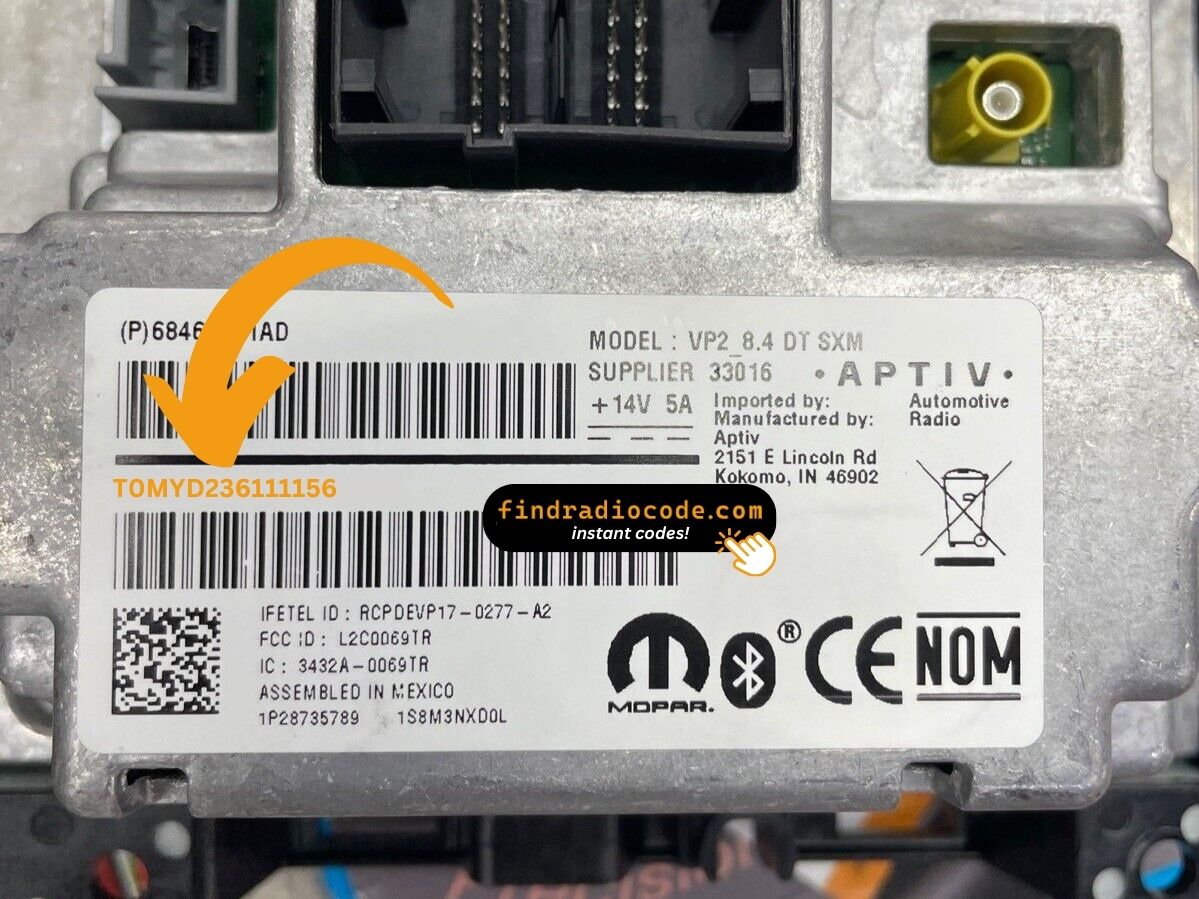
Example: Dodge Durango serial number label location
These are the Common Serial Formats
The 2020 Dodge Durango Uconnect 4C (RA4) uses these serial number formats:
T00AM– Standard Harman prefix for Uconnect 4CT00BE– Continental-sourced version
Radio designation: RA4 (Uconnect 4C, 8.4"). Serial: 14 characters. The Durango received the RA4 update in 2019 and continued this platform through 2025.
Note: The serial number is not the same as the part number (P... or 68...) on the same label. Only the serial generates the unlock code.
What Caused the Radio to Lock?
Durango owners encounter radio lockouts most commonly due to:
- Towing-related electrical work — Durango owners who add trailer wiring or disconnect the battery for towing accessories trigger the lock.
- Battery replacement — the Durango's higher electrical demand can wear batteries faster, making replacements more frequent, and every replacement triggers the code screen.
- Long periods unused — Durangos left parked for weeks can drain enough to lock the radio.
- Used purchase — second-hand purchase without the original unlock code leaves the radio locked.
The unlock code is permanently tied to the RA4 serial number and always remains valid.
Understanding Unlock Issues with Your Durango
A rejected code on the Durango's RA4 usually indicates a serial number error. The RA4 label has the serial (14 characters, starts with T00AM or T00BE) and the part number (P... or 68...) — submit only the serial.
Double-check the serial via Dealer Mode or the physical label and reach out for a free re-check if needed.
The RA4 label in the Durango shows more than one number:
- Serial number — 14 alphanumeric characters, prefixed by
T00AMorT00BE. Use this. - Part number — begins with
P05or68. Do not use this.
For this SUV, Dealer Mode is most reliable way: System Info → Radio Part Info → Serial Number. No removal required.
Three wrong code entries on the Durango's Uconnect 4C activate a 60-minute lockout, displaying "WAIT":
- Leave the ignition ON in the Durango — engine off is fine but ignition must stay ON.
- Wait the full 60 minutes.
- Turning the Durango off restarts the lockout.
Once 60 minutes are up, re-enter the correct code.
In the 2020 Durango, all code entry is via the 8.4" touchscreen — no physical buttons are used. When the locked screen appears:
- Press each number on the on-screen keypad.
- The radio auto-confirms after the 4th digit — no confirm button needed.
If the Durango's touchscreen is unresponsive, cycle the ignition and wait 30 seconds.
If the Durango's radio doesn't show a code prompt after a battery event:
- Ensure the ignition is fully in ON (not ACC) and give the system 15–20 seconds to boot.
- Check the radio fuse in the Durango. Fuse failure prevents any radio power.
- On some 2020 Durango units, a OTA update may suppress the code prompt — try a screen touch to activate the prompt.
Should nothing appear, a blown fuse is the first thing to check.