Open Up Your Panasonic Chrysler Uconnect 8.4 UCV Radio
Panasonic | Chrysler | Instant Retrieval
Read the full refund policy.
Serial Number Prefixes for the Chrysler Uconnect 8.4 UCV
| Serial Prefix | Status |
|---|---|
TM9 |
Supported |
If your serial starts with any prefix above, we can recover your code.
How it goes
No VIN, no paperwork, no appointment - the serial number off the radio is all we need.
- 1 Get the serial off the radio On the factory sticker on the radio housing, next to the barcode. Most units have to come out of the dash - release keys cost a few dollars.
- 2 Paste it into the box Type the full serial with your email address. A format check catches mistakes before checkout.
- 3 Your code lands in seconds The code appears the moment the payment clears, and a copy goes to your email. Save it - the same four digits work for the life of the radio.
Covered by a full refund if the code turns out not to fit your unit.
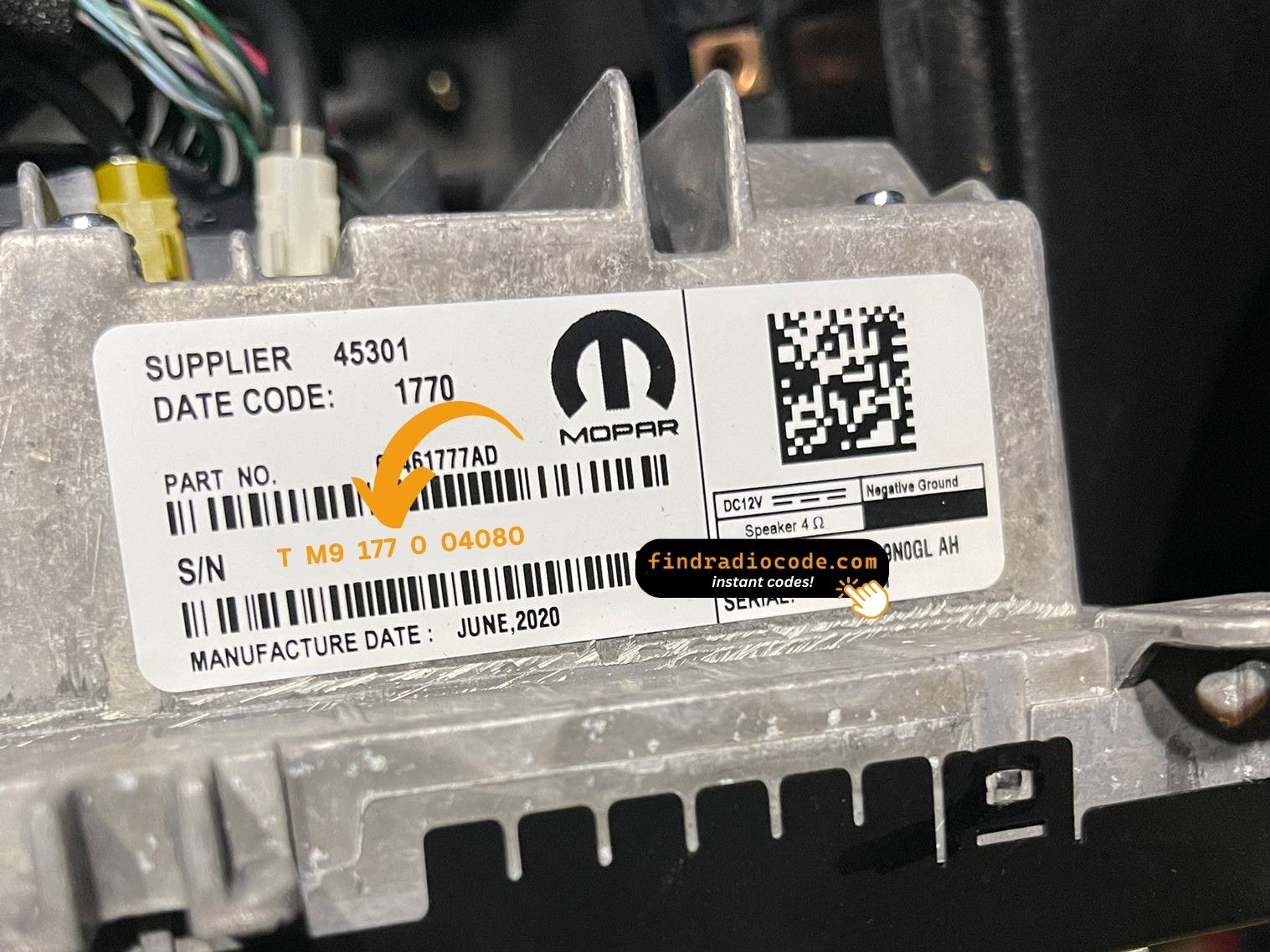
The sticker on your unit will look similar. Read the serial straight off it.
Example serial numbers
Common Chrysler serial numbers look like this:
TM9341100221
(prefix: TM9)
TM9128455907
(prefix: TM9)
TM9067230144
(prefix: TM9)
Prefixes we see most: TM9
How to Identify the Chrysler Uconnect 8.4 UCV
Before ordering a radio code it is important to confirm the exact model. Match the design, controls, display and features below with the unit in your dashboard.
Typical identification features:
- 8.4" touchscreen in the centre of the dash
- A navigation unit - maps installed from the factory
- A Canada-market build
- The chassis label carries the UCV sales code
- A serial that begins with TM9
You most likely have the Chrysler Uconnect 8.4 UCV if:
- the chassis label carries the UCV sales code
- the label serial begins with TM9
- it came in a car from the 2017-2020 range
- the screen is the 8.4" touchscreen fitted to the Uconnect 8.4
UCV is the Canadian nav variant. UCQ is the non-nav Canadian sibling. The presence of the NAV tile is the cleanest tell.
Chrysler Uconnect 8.4 UCV Overview
The Chrysler Uconnect 8.4 UCV is a factory-fitted Chrysler audio and multimedia unit. Alongside standard radio and audio playback it may include touchscreen controls, Bluetooth, CD/DVD playback or factory navigation, depending on how the vehicle left the factory.
Uconnect 8.4 UCV is the Canadian-market Panasonic 8.4-inch navigation head unit - bilingual EN/FR menus, built-in Canadian map data, NAV tile on the home screen, SiriusXM Travel Link.
The Chrysler Uconnect 8.4 UCV was installed in various Chrysler models between 2017-2020. It was commonly fitted to vehicles built on the Panasonic multimedia platform and remains one of the more recognisable factory radios of that period.
Common features on this unit:
8.4" touchscreen
AM/FM radio
Factory navigation with on-board maps
SiriusXM satellite radio*
Bluetooth for hands-free calls and music streaming
USB media playback
Steering wheel control support
Anti-theft security code
*Availability depends on the vehicle configuration.
The Chrysler Uconnect 8.4 UCV carries the same anti-theft protection as most factory units. Once power is cut - a flat battery, a battery swap, or the radio being removed - it will ask for the original code before it plays again.
For the manufacturer's own documentation of this platform, see the official Uconnect site.
How to Get the Serial Number From Your Radio
Your unlock code is tied to the radio's serial number, so it is the one detail the form asks for. The number lives on the label printed on the housing of the radio itself.
Where exactly: Top of the chassis on a printed white sticker. Removal required.
Getting to the label:
- Pull the unit forward with release keys (a few dollars online) - the wiring can stay connected.
- Read the serial from the printed label on the housing, next to or under the barcode.
- Type it into the form exactly as printed, with no spaces or dashes.
The sticker that carries the serial
See it done on video

From our YouTube channel - the same steps apply to this unit.
Four Ways a Chrysler Uconnect 8.4 UCV Ends Up Locked
Nearly all of the Chrysler Uconnect 8.4 UCV codes we generate follow one of these four events.
After mechanical work
The repair worked - the locked radio is just the side effect of the battery being off the car for a while.
A different unit is in the dash now
The code does not transfer from one unit to another: the swapped-in unit has a different serial, and that serial is what the code is calculated from.
The seller had no code
Used cars routinely arrive with a locked radio and no code card in the glovebox. The serial number on the unit is all that is needed to recover it.
A battery change
Whether the battery was changed or just ran flat, the radio sees a power loss and asks for the code the next time it starts.
Whichever of these applies, the fix is identical: the serial number off the radio, the form at the top of this page, and the code arrives in seconds.
Technical Overview
| Specification | Value |
|---|---|
| Manufacturer | Panasonic |
| Radio Family | Uconnect 8.4 |
| Variant | UCV |
| Market | Canada |
| Vehicle Brand | Chrysler / Dodge / Jeep / Ram |
| Production Years | 2017-2020 |
| Display | 8.4" touchscreen |
| Navigation | Yes |
| Serial Prefixes | TM9 |
The exact functionality of the Chrysler Uconnect 8.4 UCV depends on the vehicle it was installed in. Some versions include advanced multimedia features like navigation and Bluetooth, others ship in a simpler configuration. Features vary by production year, trim and regional specification.
Which Vehicles Use the Chrysler Uconnect 8.4 UCV?
| Vehicle Model | Typical Production Years | Notes |
|---|---|---|
| Chrysler 300 (Canadian Limited/S/C with nav) | 2017-2020 | |
| Dodge Charger, Challenger, Durango (Canadian nav trims) | 2017-2020 | |
| Jeep Grand Cherokee WK2 (Canadian Limited/Overland with nav) | 2017-2020 | |
| Ram 1500/2500/3500 (Canadian Laramie/Limited with nav) | 2017-2020 |
Vehicle compatibility can vary between trims, model years and regional versions. Because the same car could leave the factory with different radios, identify your unit before placing an order.
Supported OEM References 52
These are the OEM references this page covers. If the number on your radio's label appears below, we can retrieve your code.
Behind the 52 references sit 8 base part numbers; suffix letters like AA or ZD separate factory revisions of the same hardware, all of them supported here.
68307656AA 68307656AC 68307656AD 68307656AE 68307656AF 68307656AG 68307656AH 68307656AI 68307656AJ 68307656AL 68307656AM 68307656ZC 68307656ZD 68307656ZE 68307656ZF 68351932AA 68351932AB 68351932AC 68351932AD 68351932AE 68351932AF 68351932AG 68351932AH 68351932AI 68351932ZA 68351932ZB 68351932ZC 68351932ZD 68351932ZE 68351932ZF Show all 52 part numbers
68351932ZG 68381425AA 68381425AC 68381425AD 68381425AE 68381425AF 68422052AA 68422052AC 68422052AD 68422052AE 68429205AB 68429205AC 68429215AA 68429215AB 68461751AA 68461751AD 68461751AF 68520193AA 68520193AB 68520193AC 68520193AE 68520193AF The part number is printed on the sticker on top of or on the side of the radio chassis, usually next to the serial number. If yours appears above, the Chrysler Uconnect 8.4 UCV is the right page.
Putting the code into the radio
It takes less than a minute once you have the four digits.
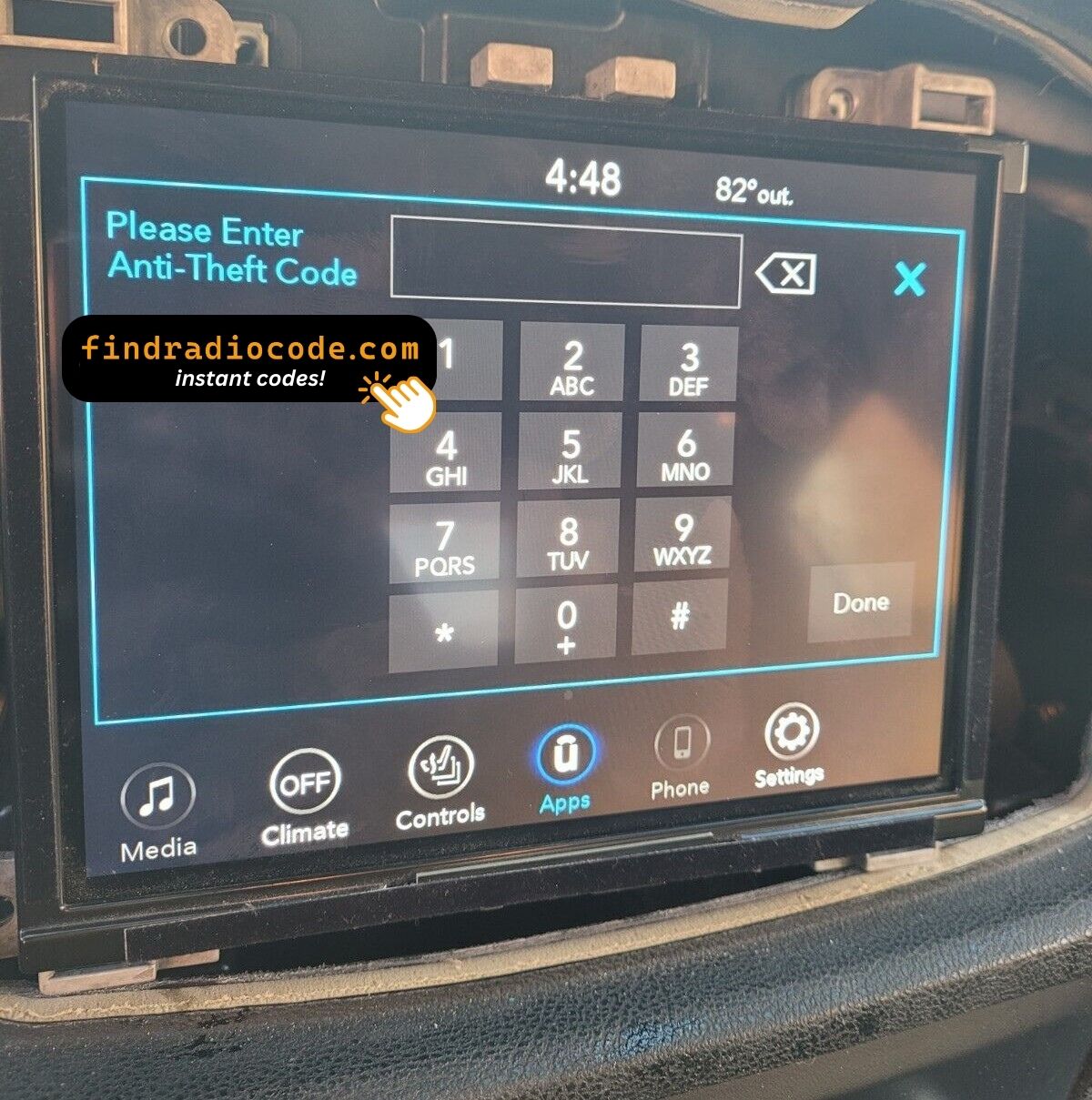
- Give the radio power - key to accessory is enough - and wait for the code prompt.
- The screen shows a numeric keypad for the four digits.
- Punch in all four digits, first to last.
- Verification happens by itself once the fourth digit is in.
- The security screen disappears and the unit returns to normal operation.
If something goes wrong
The screen shows a wait timer
The timer is the radio guarding itself after failed entries - power on, patience, then try again. 30-minute "INCORRECT CODE - WAIT" countdown after three wrong codes.
The label is not where I expected
Only the radio itself carries it - bring the unit out and the label is right there. Top of the chassis on a printed white sticker. Removal required.
Locked again after it was fine
Nothing is broken. Any interruption to the 12V supply brings the lock screen back. Loss of 12V power.
This radio looks like several others
A few models in this family share the same face, so the label is what settles it. UCV is the Canadian nav variant. UCQ is the non-nav Canadian sibling. The presence of the NAV tile is the cleanest tell.
Save the code: it stays valid, so the next battery change costs you nothing.
Chrysler Uconnect 8.4 UCV FAQ
After the Code Arrived
These are real orders and real radios. Hundreds more are on the reviews page.
"Amazing people amazing service everything amazing I got my code immediately thank God for these people"
Code worked perfectly, ty!!!
Lisa Witherspoon - Chrysler
Thank you!!!!
Darius - Chrysler
What Happens After You Order
The original code on screen within seconds of payment, emailed to you as well.
A complete refund any time the code fails to open your unit.
Order at 3 a.m. or 3 p.m. - no dealership, no appointment, no towing.
The code never expires - keep it and future battery changes cost nothing.
Looking for a Different Radio Model?
The models below look similar and are frequently mistaken for the Chrysler Uconnect 8.4 UCV. Not your radio? Open one of these.
Check the Chrysler Uconnect 8.4 UCV with the rest of the Panasonic head units on the Panasonic radio code page.