Unlock Your Panasonic Chrysler Uconnect 8.4 UDV Radio
Panasonic | Chrysler | Instant Retrieval
Refund terms explained.
Serial Number Prefixes for the Chrysler Uconnect 8.4 UDV
| Serial Prefix | Status |
|---|---|
TM9 |
Supported |
If your serial starts with one of these, we can recover your code.
Getting your Chrysler Uconnect 8.4 UDV code
Everything runs from the serial number printed on the radio itself.
- 1 Check the unit's sticker Pull the radio a few centimetres forward and read the number off its sticker - nothing has to be unplugged.
- 2 Enter the serial Exactly as printed, no spaces. The format is checked before you pay.
- 3 Your code arrives in seconds The code appears the moment the payment clears, and a copy goes to your email. Keep it - the same four digits work for the life of the radio.
If it does not work, you get your money back.
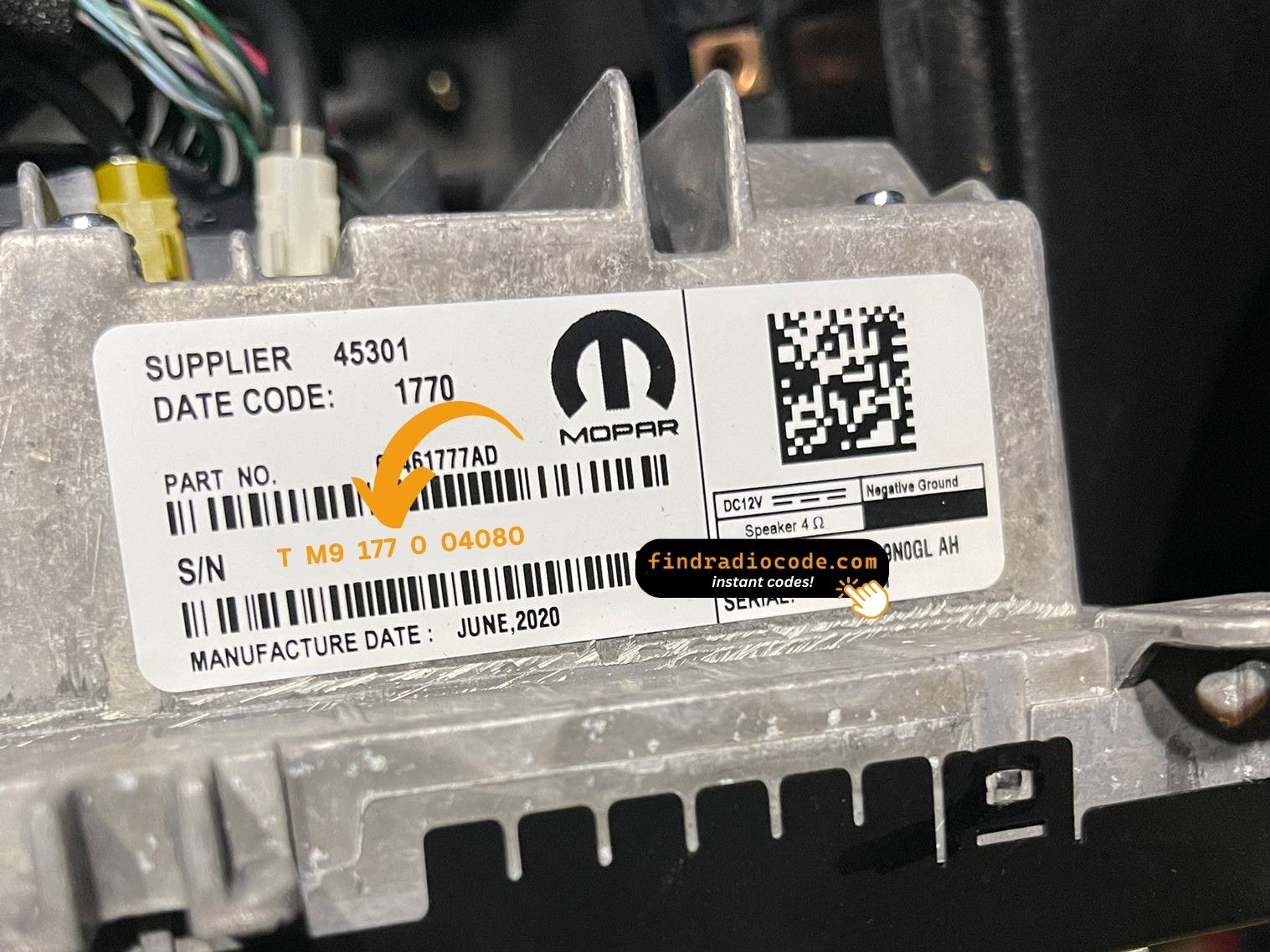
An example from the same family - find the matching sticker on your unit.
Sample serials we handle
Examples of serial numbers taken from Chrysler vehicles:
TM9341100221
(prefix: TM9)
TM9128455907
(prefix: TM9)
TM9067230144
(prefix: TM9)
Prefixes we see most: TM9
Confirm Your Radio Model
Compare the design, controls, display and features listed below with your factory-installed radio - the Chrysler Uconnect 8.4 UDV is easy to identify once you know what to look for.
Typical identification features:
- Centre-stack 8.4" touchscreen
- Built-in navigation with factory map data
- A Mexico-market build
- Sales code UDV on the chassis label
- A serial that begins with TM9
Tick these off to be sure:
- the factory label reads UDV
- the label serial begins with TM9
- the vehicle was built between 2017-2020
- the display matches the Uconnect 8.4 8.4" touchscreen
UDV has the NAV tile and Mexican-region map data. If your maps cover only US/Canada, you have UAV/UCV rather than UDV.
How to Get the Serial Number From Your Radio
Your unlock code is bound to the radio's serial number, so it is the one detail the form asks for. The number lives on the label stuck to the chassis of the radio itself.
On the Chrysler Uconnect 8.4 UDV: White label on the top of the chassis, near the back. Removal required.
Three steps to the serial number:
- Bring the radio out of its slot; release keys do it in a minute and nothing needs disconnecting.
- Read the serial from the factory sticker on the housing, beside the barcode.
- Copy it into the form precisely as printed; the checker catches any typo before payment.
Serial number location on this unit
See it done on video

Recorded on a radio from this family; your unit behaves the same.
About the Chrysler Uconnect 8.4 UDV
Fitted as original equipment in selected Chrysler models, the Chrysler Uconnect 8.4 UDV handles audio playback and vehicle integration from the factory. Depending on the version, it can also add Bluetooth, touchscreen operation, CD/DVD playback, navigation or wider multimedia support.
Uconnect 8.4 UDV is the Mexican-market Panasonic 8.4-inch navigation head unit - Spanish UI by default, built-in Mexican map data, SiriusXM, NAV tile visible on the home screen.
Production of the Chrysler Uconnect 8.4 UDV ran across 2017-2020, mainly in Chrysler models built around the Panasonic multimedia platform, so plenty of these units are still on the road.
Common features on this unit:
8.4" touchscreen
AM/FM radio
Built-in navigation with factory maps
SiriusXM satellite radio*
Hands-free Bluetooth with audio streaming
Media playback over USB
Steering wheel control support
Anti-theft security code
*Availability depends on the vehicle configuration.
As with other Panasonic factory units, the Chrysler Uconnect 8.4 UDV locks itself when power is lost. After a battery disconnect or a workshop visit the screen will ask for the original security code before any audio returns.
Background on the platform itself is published by the official Uconnect site.
What Usually Triggers the Code Screen
A locked Chrysler Uconnect 8.4 UDV is almost always the result of one of four everyday situations, none of which mean anything is broken.
A repair cut the power
Alternator, starter or fuse-box work usually means disconnecting the battery - and the radio arms its anti-theft as a side effect of the repair.
A replacement radio
Swapping in a second-hand radio means a new serial and therefore a new code - the one from the old unit will never work.
You bought the car used
No handbook, no code card, seller unreachable - none of it matters. The radio's own serial number carries everything needed to calculate the code.
The battery was replaced
A replacement battery - or a flat one after the car stood over winter - cuts power to the radio, and the anti-theft system arms itself the moment power returns.
Whichever of these applies, the fix is identical: the serial number off the radio, the form at the top of this page, and the code arrives in seconds.
Chrysler Uconnect 8.4 UDV Specifications
| Specification | Value |
|---|---|
| Manufacturer | Panasonic |
| Radio Family | Uconnect 8.4 |
| Variant | UDV |
| Market | Mexico |
| Vehicle Brand | Chrysler / Dodge / Jeep / Ram |
| Production Years | 2017-2020 |
| Display | 8.4" touchscreen |
| Navigation | Yes |
| Serial Prefixes | TM9 |
Not every Chrysler Uconnect 8.4 UDV offers the same set of features. Bluetooth connectivity, navigation, USB support or multimedia playback may vary depending on the vehicle specification, production year and factory equipment package.
Cars Equipped with the Chrysler Uconnect 8.4 UDV
| Vehicle Model | Typical Production Years | Notes |
|---|---|---|
| Chrysler 300 (Mexican navigation trims) | 2017-2020 | |
| Dodge Charger, Challenger, Durango (Mexican nav trims) | 2017-2020 | |
| Jeep Grand Cherokee WK2 (Mexican Limited/Overland nav) | 2017-2020 | |
| Ram 1500/2500 (Mexican Laramie/Limited nav) | 2017-2020 |
Vehicle compatibility can differ between trims, model years and regional versions. Because the same car could leave the factory with different radios, identify your unit before placing an order.
OEM Radio References 33
The Chrysler Uconnect 8.4 UDV was supplied under the part numbers below. Spot the one on your unit's label and you know this is the right page.
The 33 references boil down to 8 base numbers - the trailing letters (AA, AB, ZC and so on) are factory revisions of the same unit, and every revision is covered.
68351933AA 68351933AB 68351933AC 68351933AD 68351933AE 68351933AF 68351933AG 68351933AH 68351933AI 68381421AA 68381421AC 68381421AD 68381421AE 68381421AF 68403071AA 68403071AB 68403071AD 68403071AE 68422050AA 68422050AC 68422050AD 68429206AB 68429206AC 68429216AA 68429216AB 68461752AA 68461752AD 68461752AF 68520194AA 68520194AB All 33 supported references
68520194AC 68520194AE 68520194AF You will find the part number on the chassis label of the unit, normally alongside the serial. A match in this list confirms you are on the right page for the Chrysler Uconnect 8.4 UDV.
Once the code arrives
The code goes straight into the radio, not into the car's menus.
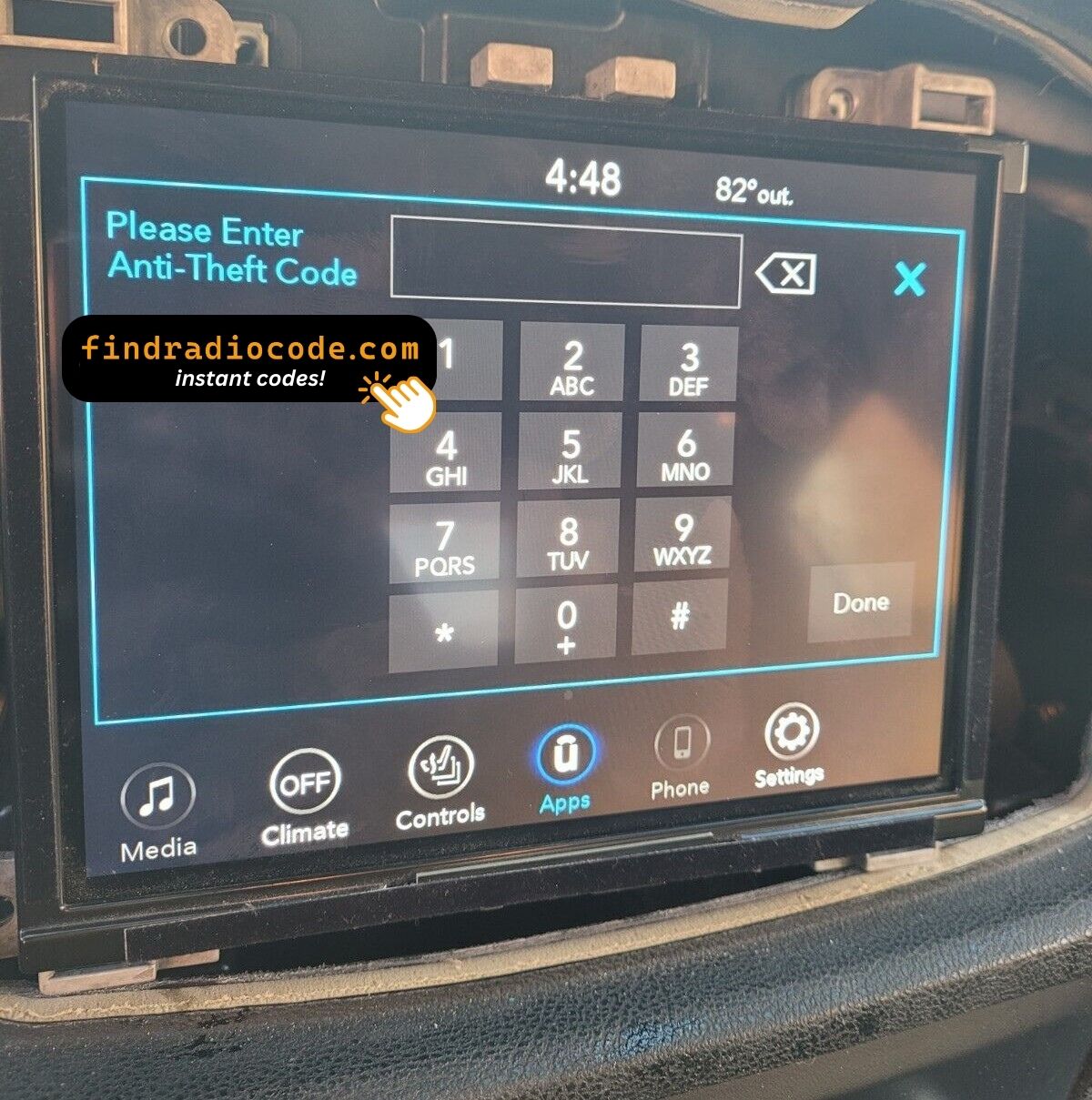
- Turn the ignition on so the radio powers up and shows the locked screen.
- A keypad for the code fills the middle of the screen.
- Tap the four digits of your code in order.
- There is no separate OK button - the radio checks the code on the last tap.
- A correct code clears the lock screen and the audio comes straight back.
Common problems
The unit will not take more codes
Wrong codes put the unit into a lockout, and the only fix is to leave it powered and wait. 30-minute WAIT countdown after three wrong codes.
The serial is hiding from you
Nothing on the car's menus shows it - the number lives on the radio's own label. White label on the top of the chassis, near the back. Removal required.
It is asking for the code a second time
By design, every loss of power resets the anti-theft lock. Loss of 12V supply.
Making sure it is the right unit
The differences are easy to miss, so check this before ordering. UDV has the NAV tile and Mexican-region map data. If your maps cover only US/Canada, you have UAV/UCV rather than UDV.
Write the code down - the same four digits work for the life of the unit.
What Owners Usually Ask
After the Code Arrived
Short notes from real orders; the reviews page has the rest.
"I would give it a 10 all day didn't know if I was going to get took for my money but soon as I sent the money the code I need for my wife chrysler 200 came back an work"
Had to replace the head unit and bought one on eBay but the anti theft code wasn’t provided. This option to get it worked out well
Bill wagner - Chrysler
Great job
Alvaro Ordonez - Chrysler
What You Get
Code delivered automatically once payment clears - on screen and by email.
Full money-back guarantee if the code does not open your radio.
Order at 3 a.m. or 3 p.m. - no dealership, no appointment, no towing.
Works again and again - the code stays valid for the life of the radio.
Related Radio Models
The models below look similar and are frequently mistaken for the Chrysler Uconnect 8.4 UDV. Not your radio? Open one of these.
The Chrysler Uconnect 8.4 UDV is only one of the Panasonic head units we cover - the Panasonic radio code page lists all of them.