
Situations When your Fusion Requests a Code
Facing a locked Ford Fusion radio? Usually, it was caused by one of these well-known situations.
Radio Lock After Battery Replacement
After a battery change, your radio may stop working.
This happens because the radio loses power, which activates the security lock.
Other Possible Triggers
- After an ECU or software reset, the radio may lock.
- Jump-starting the vehicle can trigger anti-theft mode, requiring the unlock code.
- Installing a used head unit will require the original radio code.
- A blown fuse can cause the Ford Fusion radio to lock.
Radio Code Explained
A radio code, sometimes also known as an anti-theft code is a unique numeric unlock key that reactivates your car audio system after it has been locked.
This security code is triggered when the radio detects a power interruption.
Automakers include this feature to protect factory stereos from theft.
If power is lost, the radio locks automatically and asks for the CODE before it can work again.
Once the right combination is entered, the stereo is fully reactivated.
Places to Check Before Buying a Radio Code
There is a chance your Ford Fusion radio code is already somewhere in your car.
Before spending money, take a few minutes check the places below - it costs nothing to look.
Look for it in the Vehicle Itself
- In the service booklet provided with the car.
- On a sticker in the glove compartment.
- On the head unit casing if the unit was previously removed.
- Near the trunk lining, where some manufacturers place radio labels.
- In the radio manual, often on a separate page.
Dealer Retrieval Process
A Ford dealer can usually retrieve the radio code using your Fusion's VIN.
In most cases, you need to visit or contact them and show vehicle documents.
Once verified, they can request the original unlock code for your radio.
Not Always Ideal:
- You usually need to book an appointment and bring vehicle paperwork.
- Some older Ford Fusion radios may not be supported.
- The process can take hours depending on the model and database.
- Dealers often charge a fee for the lookup service and it can cost more than 100$.
Finding the S/N on a Fusion's Radio
The only thing you'll need to get the code is your radio's serial number. VIN or other details are not required.
On most Ford vehicles, you can find it in one of these places:
- Displayed on the radio screen (sometimes by using specific button presses)
- On the radio housing itself - you'll need to pull it out and write down serial (which is fairly easy)
Search for something like: Serial Num. or SN.
1. Get the S/N from Ford Fusion's Display
Some Ford radio models are able to show the serial number on the display using button combinations. The method varies by your specific radio model.
Ford 6000CD
- Turn the ignition to ON and power on the radio.
- Press and hold preset buttons 1 and 6 simultaneously.
- The display will cycle through several codes – write down the serial number that appears.
- Confirm with button 5 or ENTER if required.
Note: On the 6000CD MK2 variant, use the # button or preset 5 for confirmation.
Ford 4500 RDS E-O-N
- Press and hold preset buttons 2 and 6 simultaneously.
- The serial number will be displayed (format:
M123123). - If button 5 does not confirm, try the TA button instead.
Ford Sony MP3
- Press and hold preset buttons 1 and 6 simultaneously.
- The serial number appears on screen (e.g.
SOCD6X8V404077). - Hold the center button for 3 seconds to confirm.
Ford Travelpilot EX / NX / FX
For Ford navigation units:
- Check for a pull-out label on the right side of the radio unit.
- Alternatively, press and hold the SELECT button on the right turn-wheel.
2. The Serial Number on the Radio Label
To find the serial number, you'll need to pull out the radio unit out.
- Start by turning off the vehicle and removing the trim panel.
- Next, unscrew the mounting bolts and pull the unit forward to check the label on the side of the radio. Be careful not to damage the cables that the unit is connected to.
- Write down full serial number precisely and come back to our website.
- Know that serial number and part number are not equal. You can find both on the unit, but you only need for the serial.
Removing the Ford Fusion Radio
If on-screen display fails, the radio must be removed using Ford radio release keys — thin tools that slide into the rectangular slots on each side of the unit. Once inserted, the clips release and the radio slides forward. The serial label is on the top or side of the housing.
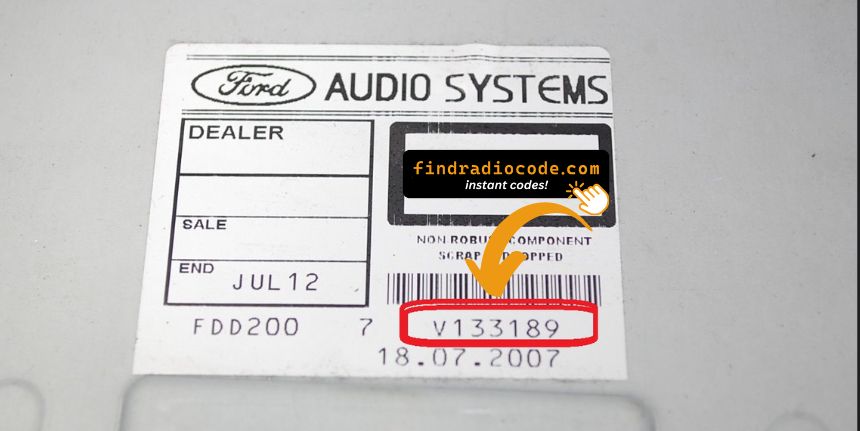
Example: Ford Fusion serial number label location
Serial Number Prefixes You'll See on Ford Fusion
To unlock your radio, locate the serial number starting with M or V (e.g. V654321). TravelPilot EX/NX units have a pull-out label on the right side with a BP prefix.
Why Should You Our Ford Fusion Radio Code Generator Service?
Our Ford Fusion radio code lookup is designed to avoid dealer visits.
Unlike traditional dealer lookup, this method requires no paperwork and can be done online in minutes.
It's a faster and cheaper alternative for drivers who need their radio unlocked quickly.
Side-by-Side Comparison
- Dealer services often charge high fees, while FindRadioCode offers codes from 9.99 USD.
- Dealerships operate during weekdays, while FindRadioCode is available anytime.
- Some dealers require a visit to the service center, while FindRadioCode is fully online.
- Dealer lookups often come with limited refunds, while FindRadioCode offers a 100% refund.
- Dealer lookup can take time, while our system delivers codes right away 95% of times.
You Found the Code. How Entering Works?
Once you have the Ford's radio code, you can enter it using the radio buttons.
Most radios display "ENTER CODE", "----" or "XXXX" message when they are locked.
You typically use the preset buttons to input the code.
After entering the full code, the radio will unlock automatically.
To input the unlock code on your Ford radio:
- Turn the ignition to ON and power on the radio.
- The display will show "CODE" or "ENTER KEY CODE".
- Use the preset buttons (1–4) to enter each digit of your 4-digit code. Press each button the number of times corresponding to the digit (e.g. press button 1 three times for digit 3).
- After entering all 4 digits, press button 5 or ENTER to confirm.
Tip: On some Ford models (e.g. Sony MP3), you enter the code directly using the numbered buttons instead of cycling preset buttons.