Ford Ranger's Most Common Radio Code Causes
Many owners encounter radio lock problems on their Ranger after battery-related issues.
Below are the most common situations when this can happen.
Radio Asking for Code After Battery Change
A dead battery is the most common reason a Ford Ranger radio asks for a code.
Even a brief voltage drop is enough to activate the built-in anti-theft lock.
Additional Scenarios
- If a power circuit is interrupted, the radio can lock itself.
- After a software update, electrical repair, or an ECU reset, some Ford Ranger radios display a CODE message.
- When the head unit is removed, it usually requires the original code.
- After a boost start, the radio may reset and request a security code.
Places to Check Before Paying for a Radio Code
Before you pay for it, you should check a few places where the code is often stored.
Some drivers find their Ford Ranger radio code without needing any tools or paperwork.
Here are the most common things to check first.
Look for it in the Car Itself
- In the user guide, often on a separate code card.
- On the head unit casing if the unit was previously removed.
- In the vehicle documentation provided with the car.
- On a sticker in the center console.
- Near the boot panel, where some manufacturers place radio labels.
Through the Dealer
A Ford dealer can usually look up the radio code using your Ranger's VIN.
In most cases, you need to visit or contact them and prove ownership.
When it is verified, they can generate the original unlock code for your radio.
Downsides:
- The process can take hours depending on the model and database.
- Dealers often ask for payment for the lookup service and it can cost more than 100$.
- You usually need to book an appointment and bring vehicle paperwork.
- Some older Ford Ranger radios may not be supported.
Finding the Serial Number on a Ranger's Radio
To generate the right radio code, you first need the radio's serial.
Depending on your model, you can find it shown on the display or check the radio hardware.
It's often written as: Serial Num. / S/N / Serial Number etc.
These are the most common ways to find it:
1. Getting Ranger's S/N on the Display
The Ford Ranger serial number method varies by model year and market.
Ranger 2011–2015 (European T6) — Ford 6000CD
- Turn ignition to ON and power on the radio.
- Press and hold preset 1 and preset 6 simultaneously.
- Serial number appears on the display (format:
M123456).
Ranger 2016+ — Ford SYNC 3
Later Ranger models fitted with Ford SYNC 3 display the serial in the infotainment menu: Settings → System Settings → About. No button combinations needed.
2. Locating your Serial on the Radio Itself
To find the serial number, you'll need to take out the head unit from the dashboard.
- Start by turning off the vehicle and taking off the dashboard bezel.
- Next, unscrew the mounting bolts and slide the radio out to check the sticker on the side of the radio. Pay attention not to damage the cables that the unit is connected to.
- Write down the serial number carefully and come back to our website.
- Know that serial number and part number are not the same thing. You can find both on the unit, but you only need for the serial.
Ford Radio Removal Guide
Use radio extraction keys to remove the unit. Insert into the slots on each side of the radio, release the clips, and slide the unit forward. The serial label will be visible on the top or side of the housing.
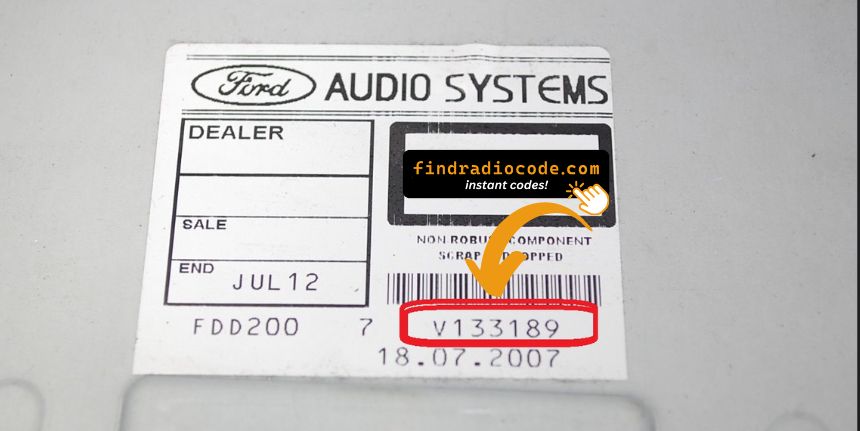
Example: Ford Ranger serial number label location
Common Serial Prefixes on Ford Ranger Radios
The radio uses a serial beginning with M or V, followed by 6 digits — for example M054321. TravelPilot navigation units start with BP. The serial label is on the top or side of the radio unit.
How to Enter the Radio Code on Ford Ranger
Once you have the Ford's security code, you can enter it using the infotainment controls.
Most radios display a "CODE", "ENTER CODE", or "----" message when they are locked.
You typically use the preset buttons to select each digit.
After entering the full code, the radio will restore normal operation.
To input the unlock code on your Ford radio:
- Turn the ignition to ON and power on the radio.
- The display will show "CODE" or "ENTER KEY CODE".
- Use the preset buttons (1–4) to enter each digit of your 4-digit code. Press each button the number of times corresponding to the digit (e.g. press button 1 three times for digit 3).
- After entering all 4 digits, press button 5 or ENTER to confirm.
Tip: On some Ford models (e.g. Sony MP3), you can enter the code directly using the numbered buttons instead of cycling preset buttons.
Ford Ranger Radio Code - FAQ
Yes. Each radio unit has its own unique security code.
A replacement radio will need its own code to work.
Free codes are not usually available.
You might locate the code in the paperwork or from a dealer, but most require a serial number lookup.
Not all of them require a security code, but many factory radios use it as an security measure.
Certain series may still use a code depending on the radio unit.
The most common method is to hold preset buttons 1 and 6 at the same time on Ford 6000CD and Sony MP3 radios. For the Ford 4500 RDS, hold buttons 2 and 6 instead.
Not all Ford radios support on-screen serial display. If the button method does not work for your model, the serial number is printed on a label on the top or side of the radio unit, which requires physical removal to view. See our full guide for all methods.
The following Ford radio models are able to display the serial number on screen: 6000CD, 6000CD MK2, 4500 RDS E-O-N, Sony MP3, and some Travelpilot navigation units.
Older Ford radios and some models without a digital display lack this capability. In those cases, physical removal is the only way to access the serial number label.