
When the Ford Stereo May Lock
Facing a locked Ford S-Max radio? In most cases, it was triggered by one of these well-known situations.
Radio Asking for Code After Battery Replacement
After a battery change, your radio may lock.
This happens because the radio loses power, which triggers the anti-theft system.
Other Situations That Trigger PIN Code
- Replacing the factory stereo with a second-hand one requires the code for that specific unit.
- A fuse replacement can interrupt the radio and prompt for a code.
- ECU reflashing may reset the radio memory on some Ford S-Max units.
- Even a quick battery boost can activate the anti-theft lock.
What You Might Try First
There is a chance your Ford S-Max radio code is written down in your documents.
Before spending money, quickly check the places below - it costs nothing to look.
Search the Vehicle Documents
- Near the spare tire, where some manufacturers place radio labels.
- On a sticker in the center console.
- In the maintenance records provided with the car.
- On the radio chassis if the unit was previously removed.
- In the owner's handbook, often on a separate page.
Can You Get a Ford S-Max Radio Code from the Dealer?
A Ford dealer can usually retrieve the security code using your S-Max's vehicle identification number.
In most cases, you need to contact the service department or visit the dealership and prove ownership.
Once verified, they can generate the original anti-theft code for your radio.
Possible Drawbacks:
- You usually need to visit in person and bring ID.
- Dealers often charge a fee for the lookup service and it's sometimes more than 100$.
- Some older Ford S-Max radios may not be supported.
- The process can take hours depending on the model and database.
Locating the Serial Number on Your Radio
To generate the right security code, you first need the serial number from the radio.
Depending on your model, you can see it on the screen or check the radio hardware.
It's often written as: Serial Num. / S/N / Serial Number etc.
These are the typical ways to find it:
1. Finding S-Max's S/N on the Infotainment
The Ford S-MAX (2006–2015) was typically fitted with the Ford 6000CD or Sony MP3 radio, which support on-screen serial display using the 1+6 method.
S-MAX with Ford 6000CD or Sony MP3
- Turn ignition to ON and power on the radio.
- Press and hold preset 1 and preset 6 simultaneously.
- The display cycles through codes — write down the serial number. For the Sony MP3, hold the centre button for 3 seconds.
- Serial format:
M123456(6000CD) orSOCD6X8V404077(Sony MP3).
2. How to Find the S/N on the Radio Body
To find the serial number, you'll need to remove the radio unit from the dashboard.
- Start by turning off the vehicle and taking off the dashboard bezel.
- Next, release the clips and pull the unit forward to check the sticker on the side of the radio. Pay attention not to damage the cables that the unit is connected to.
- Write down the serial number carefully and come back to our website.
- Know that serial number and part number are not the same thing. You will find both on the unit, and you only care for the serial.
How to Pull Out Your Ford Radio
Use radio extraction keys to remove the unit. Insert into the slots on each side of the radio, release the clips, and slide the unit forward. The serial label will be visible on the top or side of the housing.
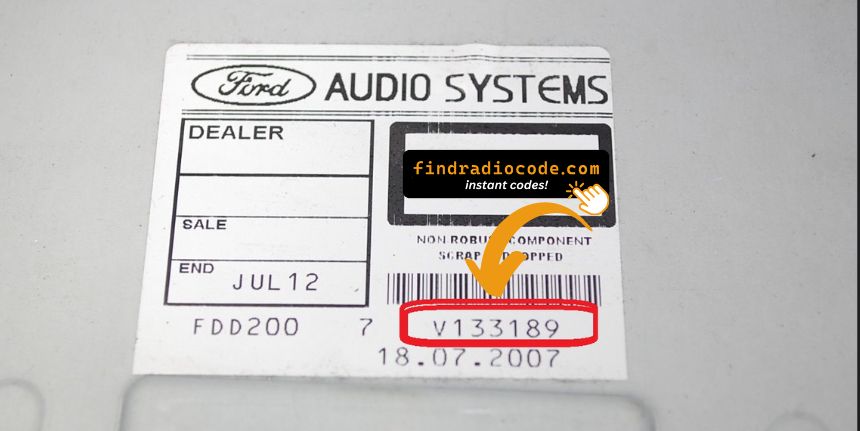
Example: Ford S-Max serial number label location
Serial Number Prefixes You'll See on Ford S-Max
The radio uses a serial beginning with M or V, followed by 6 digits — for example M054321. TravelPilot navigation units start with BP. The serial label is on the top or side of the radio unit.
How to Enter the Anti-Theft Code on Your Vehicle
With your code ready, it's time to enter it into the Ford S-Max's radio.
The locked radio will usually show a "CODE" prompt.
Use the radio presets or a rotary dial to select each number, then press OK to activate the stereo.
To enter the unlock code on your Ford radio:
- Turn the ignition to ON and power on the radio.
- The display will show "CODE" or "ENTER KEY CODE".
- Use the preset buttons (1–4) to enter each digit of your 4-digit code. Press each button the number of times corresponding to the digit (e.g. press button 1 three times for digit 3).
- After entering all 4 digits, press button 5 or ENTER to confirm.
Tip: On some Ford models (e.g. Sony MP3), you enter the code directly using the numbered buttons instead of cycling preset buttons.
S-Max's Radio Code FAQs
Yes. Each head unit has its own unique code.
If you install a used radio, you'll need the code for that particular device.
Many OEM stereos use a radio unlock code, but not all production years require one.
Whether a code is needed varies by the installed head unit and the vehicle generation.
Free unlock codes are rarely available.
Some service documents may help, but most codes require a serial number lookup.
The only free possibility would be to check your car and its documentation to see if you have it written down.
The most common method is to hold preset buttons 1 and 6 simultaneously on Ford 6000CD and Sony MP3 radios. For the Ford 4500 RDS, hold buttons 2 and 6 instead.
Not all Ford radios support on-screen serial display. If the button method does not work for your model, the serial number is printed on a label on the top or side of the radio unit, which requires physical removal to view. See our full guide for all methods.
The following Ford radio models can show the serial number on screen: 6000CD, 6000CD MK2, 4500 RDS E-O-N, Sony MP3, and some Travelpilot navigation units.
Older Ford radios and some models without a digital display do not support this feature. In those cases, physical removal is the only way to access the serial number label.