
Ford Transit's Usual Anti-Theft Code Scenarios
Facing a locked Ford Transit radio? In most cases, it was triggered by one of these common events.
After a Battery Change
When the battery is removed, the Ford Transit radio requests a security code.
This security feature is designed to protect the original head unit by disabling the radio after electrical reset.
More Events That Can Lock Your Transit's Radio
- Jump-starting the vehicle can reset the radio, requiring the unlock code.
- After an ECU or software reset, the radio may lock.
- Installing a used head unit will require the original anti-theft code.
- A fuse removal can cause the Ford Transit radio to lock.
Quick Fixes Before Paying for a Radio Code
Before you decide to pay, it's worth checking a few places where the code is often already written down.
Some owners find their Ford Transit radio code without needing any tools or paperwork.
Here are the easiest things to check first.
Search the Vehicle Documents
- Inside the center console, sometimes on a label.
- In the boot compartment, on a radio label.
- On the radio unit itself, if it was removed before.
- In your maintenance booklet from the previous owner.
- In the vehicle handbook, often on a sticker page.
Through the Dealer
Dealerships can generate your radio code by checking the vehicle records in their system.
They typically require proof of ownership before sharing the security PIN.
This is the official way to restore access to the factory radio.
Disadvantages:
- Some imported or older radios may not be in their database.
- Dealers frequently charge a service fee (It may cost more than 100$).
- You may need to contact service support during business hours.
- The lookup is often slower and may require waiting.
Finding the S/N on a Radio
The only thing you'll need to get the code is your radio's unit serial. VIN or other details are not required.
On most Ford models, you can find it in one of the following locations:
- Shown on the radio screen (in some cases by using button combinations)
- On the radio body itself - you'll need to pull it out and write down the serial number (which is fairly easy)
Search for a label such as: Serial Num. or SN.
1. View the Serial Number on Ford Transit's Display
The Ford Transit (2000–2014) was typically fitted with the Ford 6000CD radio, which supports on-screen serial display.
Transit with Ford 6000CD
- Turn ignition to ON and power on the radio.
- Press and hold preset 1 and preset 6 simultaneously.
- The display cycles through codes — write down the serial number (format:
M123456).
2. Locating your S/N on the Radio Itself
The serial number is usually printed on a label attached to the radio casing.
Step 1: Turn off the car.
Step 2: After that, remove the dashboard.
Step 3: Then unscrew the radio brackets.
Step 4: Carefully pull the radio forward partially (Be careful not to damage the cables that the unit is connected to).
Step 5: Search for the serial number on the rear of the unit.
Step 6: Write down the full number carefully and come back to our website so that we can generate the code.
Important: Don't mix the Serial Number for the Part Number!
How to Pull Out Your Ford Radio
Ford removal requires radio release keys that insert into the slot-shaped openings on both sides of the faceplate. Push until the clips disengage, then pull the radio out by the keys. The serial sticker is on the unit's casing.
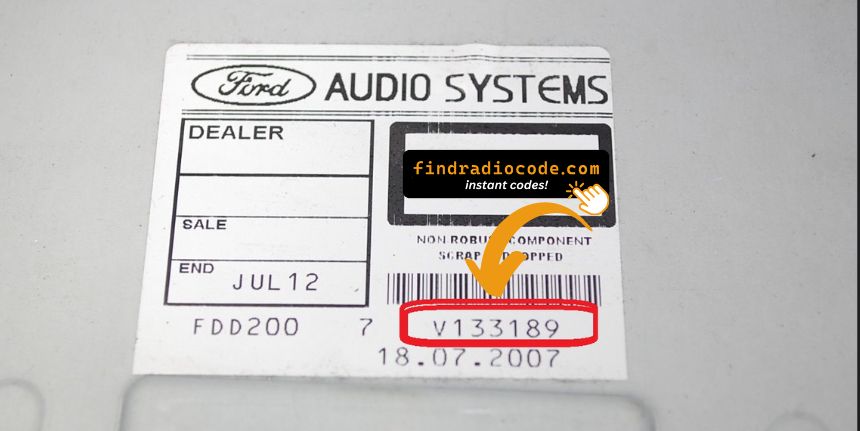
Example: Ford Transit serial number label location
Serial Number Prefixes You'll See on Ford Transit
Your Ford Transit radio serial number starts with M (e.g. M123456) or V (e.g. V123456). Becker TravelPilot units use the BP prefix. The serial is a 7-character code printed on a label on the radio housing.
How to Enter the Anti-Theft Code on Ford Transit
You need to type in the radio security code into the system to unlock your Ford's radio.
When the unit is locked, the screen usually shows a security message.
Based on the radio, use radio presets, control knob, or touchscreen to enter the numbers, then submit the code to restore radio functionality.
To input the unlock code on your Ford radio:
- Turn the ignition to ON and power on the radio.
- The display will show "CODE" or "ENTER KEY CODE".
- Use the preset buttons (1–4) to enter each digit of your 4-digit code. Press each button the number of times corresponding to the digit (e.g. press button 1 three times for digit 3).
- After entering all 4 digits, press button 5 or ENTER to confirm.
Tip: On some Ford models (e.g. Sony MP3), you enter the code directly using the numbered buttons instead of cycling preset buttons.
Why Should You Use Our Ford Transit Radio Code Generator Service?
Our Ford Transit radio code lookup service retrieves the anti-theft code using the radio serial number.
Compared to dealership VIN lookup, this Ford Transit radio code generator is more convenient, doesn't require appointments, and costs less.
It's an easy way to restore access to your factory radio without leaving your home.
Traditional Option (The Dealer) vs FindRadioCode
- Pricing: It often costs 100 - 200 USD, while our service starts from 9.99 USD.
- Availability: Dealers work business hours only, while our service is 24/7.
- Delivery time: May take hours, while FindRadioCode is instant 95% of the time.
- In-person visit: Lookup can require an appointment, while FindRadioCode works online.
- Refund policy: Dealers usually offer limited refunds, while we include a full refund policy.
Ford Transit Radio Code - Common Questions
Yes. Each stereo has its own unique security code.
A replacement radio will need its own code to work.
Free codes are rare.
You might find the code in the paperwork or from a dealer, but most require a serial number lookup.
Not all of them require a radio code, but many factory radios use it as an security measure.
Certain series may still use a code depending on the head unit.
The most common method is to hold preset buttons 1 and 6 at the same time on Ford 6000CD and Sony MP3 radios. For the Ford 4500 RDS, hold buttons 2 and 6 instead.
Not all Ford radios support on-screen serial display. If the button method does not work for your model, the serial number is printed on a label on the top or side of the radio unit, which requires physical removal to view. See our full guide for all methods.
The following Ford radio models can show the serial number on screen: 6000CD, 6000CD MK2, 4500 RDS E-O-N, Sony MP3, and some Travelpilot navigation units.
Older Ford radios and some models without a digital display do not support this feature. In those cases, physical removal is the only way to access the serial number label.