
Code was delivered almost instantly and worked perfect
Honda Radio Code - Instant Unlock⚡
Serial → Code in Seconds⚡
The system retrieves the code automatically and shows it on the confirmation screen right away.
Our support operates 24 hours a day, 7 days a week.
Some requests require manual review (almost never), and we clearly state that before checkout.
These the code typically arrives within 1 hour, with a max timeframe of 24 hours.
If the unlock PIN does not work, we offer a full refund.
A quick recording of the code attempt and serial number is required to process the refund.
Full terms are available on our Refund Policy page.
The lookup tool works with a wide range of Honda OEM radios.
If the unit is in the lookup system, the correct code is generated instantly.
1. Not sure how it works? View our demo video for a quick walkthrough of the entire process.
2. You can also review feedback from verified users who unlocked their radio units using our lookup.
3. You can also check our blog for many tutorials and explanations.
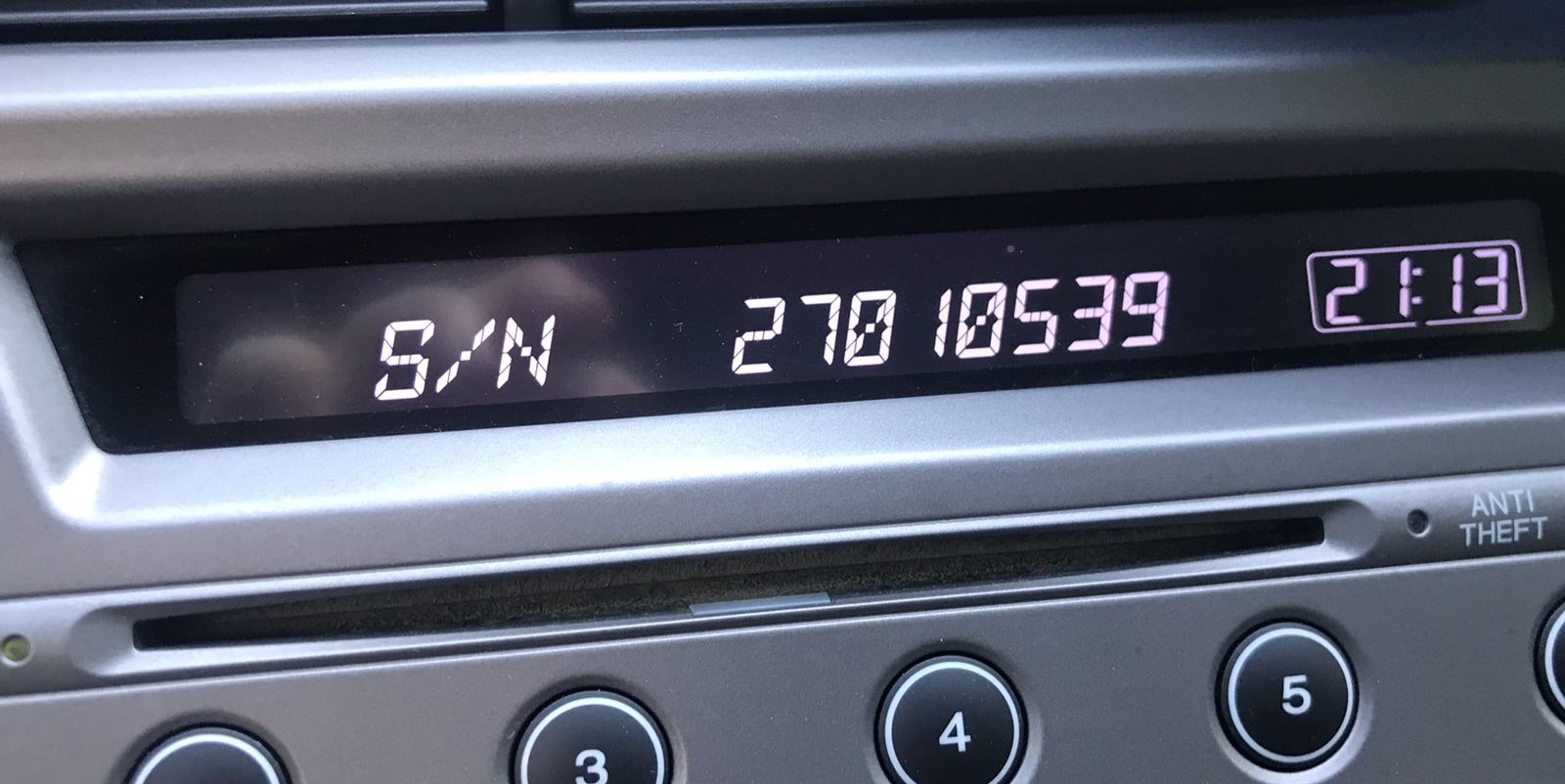
1. Get your serial number WITHOUT removing the radio - display it directly on the screen! Turn ignition ON, turn radio OFF, then hold preset buttons 1 and 6 while turning radio ON. The serial appears as U#### L#### format (e.g., U2200 L0055) or 8 digits (22000055).
2. When you have the serial number ready, just type it in the serial number field above.
3. Go to checkout and instantly receive your 4-digit or 5-digit radio unlock code, displayed on screen and sent to your email.
Serial Number on Display Screen
🚘 Honda / Acura: Get the Radio Serial from the Display
Method A: Without Navigation (Audio-Only Radios)
- Turn the ignition ON
- If "CODE" appears, turn the radio OFF
- Hold preset buttons 1 & 6 while turning the radio ON
- A 10-digit serial will appear (e.g. U1234 L5678 or just 12345678)
- Take a photo or write it down — you'll need it to get your unlock code
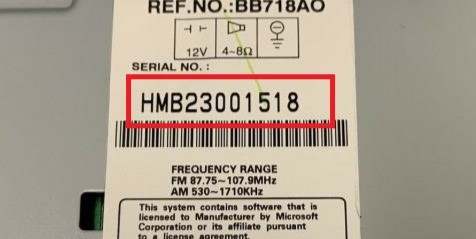
Serial Number Examples: HONDA:HBM23001518, HBM23001518, 21002313, U1234L1234
Serial on Screen (U#### L####)
Buttons 1 + 6 Method
Navigation Systems (2003–2008 Models):
- Turn the ignition ON
- When the radio is on, "CODE" will display — turn the radio OFF
- Press and hold the top halves of SEEK/SKIP and CH/DISC bars, then press and release the PWR/VOL knob
- Serial number appears as U1234 L5678 (across two screens) or 12345678 (all at once)
Navigation Systems (2008–2019 Models):
- Turn the ignition ON
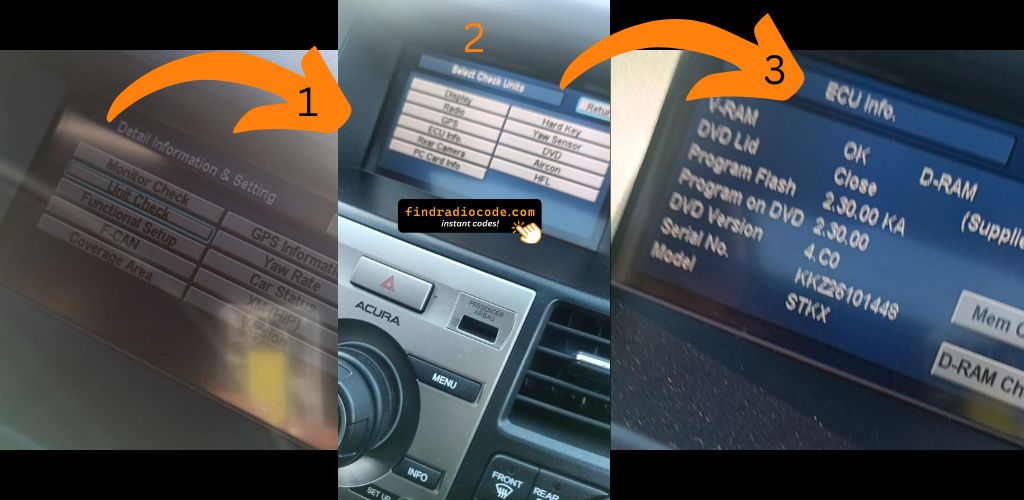
- Press and hold MAP, MENU, and CANCEL buttons together for 5–6 seconds
- Navigate to: Diagnosis Items → Unit Check → Navi ECU → Serial No.
- The serial number will start with three letters (e.g. GNA21003214)
Method 2: Physical Label (If On-Screen Fails)
Remove the radio and check for a sticker label on the top or side of the unit.
No VIN required - just the radio serial number!
Experiencing CODE ERROR E? This error appears when incorrect codes are entered 10 times, causing the radio to lock.
Important
The CODE ERROR E appears when the correct code is not entered in the first 10 attempts. Honda radios are programmed to accept only 10 input attempts before locking you out.
How to Reset ERROR E:
- Disconnect the battery from your vehicle for about 10-15 minutes
- Reconnect the battery
- The display will return to "CODE"
- You now have 10 new attempts to enter the correct code
Alternative: Leave the radio OFF for 1 hour to auto-reset
If you're unsure of your code, use our service to retrieve it using just the serial number. Get the correct code on your first try!
Works with These Models
Compatible Radio Unit Manufacturers
Alpine
1 model
Great experience.
Instant and worked perfect
How to Find Honda/Acura Serial Number (VIDEO)
Watch our step-by-step guide to find your Honda/Acura radio serial number
Getting the Unlock Code for Your Radio
When a Honda radio asks for an unlock code, there are multiple ways to retrieve it.
Dealer Retrieval (Slower Process)
Vehicle manufacturers store radio security codes in their internal databases. To retrieve it through official channels, you often need to contact a dealer.
Before providing it, the dealer will typically request the VIN, proof of ownership, and supporting vehicle documents. This verification process confirms that the radio belongs to your vehicle.
Because the request is done manually, response times vary. Some dealerships can provide the code the same day, while others may take a few days.
Many dealers charge a fee for retrieving your code, which can make this option quite costly.
Our Instant Radio Code Service - Fast and Reliable
Find Radio Code is an automated lookup service that retrieves the correct unlock code for your Honda radio.
The system does so by matching the radio's S/N with the manufacturer database.
The process of generating your code, requires the serial number from your radio and a valid email address. No dealership, paperwork or VIN are required.
Once you submit the serial number and the order is completed, your PIN is generated instantly and displayed on screen.
Our service supports most original Honda radios installed across different vehicle models.
Everything is processed automatically through our secure lookup tool, and every order is covered by a 100% refund guarantee if the code fails.
How to Find the Serial Number (S/N)
Once you find the radio serial number, the unlock code can be generated instantly.
Physical Radio Removal
In most cases the serial is displayed directly on screen without removing the radio. Physical removal is only needed if the screen method fails.
- Look for a white or yellow sticker marked "Serial" or "S/N" on the top or side of the unit.
- Honda/Acura radio serials appear in U#### L#### format (e.g.
U1234 L5678) or as 8 digits (e.g.12345678). - Navigation unit serials start with three letters (e.g. GNA
21003214or HBM23001518). - Do not confuse the serial with the part number — the part number is not accepted.
Serial Number on Screen (U#### L####)
How to Display Serial (Buttons 1+6)
Finding the Serial Number on the Display
Honda and Acura radios support on-screen serial retrieval:
- Audio-only units: Turn ignition ON, turn radio OFF, then hold buttons 1 & 6 while turning the radio ON. The serial appears as
U#### L####or 8 digits. - Navigation systems (2003–2008): Hold the top halves of SEEK/SKIP and CH/DISC, then press the PWR/VOL knob.
- Navigation systems (2008–2019): Hold MAP + MENU + CANCEL for 5–6 seconds, then navigate to Diagnosis Items → Unit Check → Navi ECU → Serial No.
The Difference Between the Serial Number (S/N) and Part Number (P/N)
The Serial Number (S/N):
- This is the unit-specific code assigned to your specific radio.
- It's used by our radio code generator.
- Usually found starting with a brand-specific prefix like "M," "V," or "CL".
The Part Number:
- This refers to the internal hardware specification of the unit.
- It's used by manufacturers for repairs, but not for code generation.
- Usually labeled "P/N" or "Part No.".
How to Input the Security Unlock Code
With the correct code, unlocking the radio is straightforward.
The unit typically shows "ENTER CODE" after power loss.
Use the radio preset buttons to type the digits.
Some models require you to press a specific button - such as pressing OK, Enter, or 5 to confirm or holding preset key, Seek or Tune.
Repeated incorrect attempts can cause lockout.
After several failed attempts the radio may temporarily disable input.
Lockout time varies by brand, sometimes requiring extended waiting.
Need help entering the code? Our guides explain the process.
- Turn ignition to ACC position
- Radio displays "CODE"
- Use preset buttons 1–5 to enter digits
- Radio unlocks automatically
Example: Code 12345
Press: 1 2 3 4 5
- Turn ignition ON
- Access navigation menu
- Navigate to security/code screen
- Enter code using touchscreen/joystick
Example: Code 6789
Enter: 6 7 8 9
Help & FAQs
A radio unlock code, also known as an anti-theft code is a unique numeric unlock key that restores access to your car stereo after it has been locked.
This factory security PIN is triggered when the radio is disconnected from power.
Car manufacturers use this security system to prevent stolen radios from being reused.
If power is interrupted, the radio stops functioning and requires the unlock CODE before it can function normally.
Once the valid numbers combination is entered, the stereo is restored to normal operation.
- Someone entered incorrect codes too many times
- The car experienced a sudden loss of power
- Inactivity can cause the anti-theft lock to engage
- A blown fuse caused the radio to reset
- Your vehicle battery died or was replaced
- Radio was reset to factory settings
- A technician disconnected the battery or ran a diagnostic
- A previous owner didn't supply the radio code
- Radio was removed or swapped
Yes, all Honda and Acura vehicles with factory-installed radios require a radio code after battery disconnection or radio replacement. This applies to all models including Honda Accord, Civic, CRV, Pilot, Odyssey, Fit, HR-V and Acura MDX, RDX, TLX, TL, TSX, ILX.
Exception: 2013-2014 Honda Odyssey and Pilot models do NOT require a radio code. All other Honda and Acura models do require the anti-theft code after power loss. Your 4-digit or 5-digit code is permanently linked to your radio's unique serial number.
Start by inspecting the vehicle handbook. The code is often found on a detachable slip or written directly on a dedicated panel.
You can also search the glovebox or trunk, where dealers or previous owners may have placed a sticker with the code. Some also search for it behind trim pieces or inside the fuse box.
If you have the original factory-issued code slip, that's the simplest place to find the code - it usually includes both the serial number and unlock key.
There are a few options - but they depend on your situation.
- For most users, our system is the easiest way to retrieve the correct code instantly.
- Call an authorized service center - some offer free code retrieval if you're the original owner and can provide registration papers.
- Look inside the glovebox or vehicle documents - some vehicles came with the code printed at delivery.
- Try DIY forums or online databases, but they don't work for serial-based systems.