
Porsche Radio Code: Fast, Secure, VIN-Free⚡

Fast Porsche Radio Code Lookup

Dealer offer: $120-150 92% OFF!
Our price: only $19.99
Porsche radio code online instant unlock service
Safe Payment
Fast Delivery
245+ Reviews
See reviews →

As soon as payment is processed, the radio code becomes available on-screen and by email.

We're available 24/7, day and night.

Some requests require manual review (not common), and we clearly state that before checkout.

In that case the code in most cases arrives within 1 hour, with a maximum wait of 24 hours.

In the unlikely event the code fails, you're covered by our full refund policy.

To get a refund, send a video showing the code entry with the serial number visible.

See our Refund Policy for full details.

The code generator covers most Porsche radios.

If the serial number matches our database, the correct code is retrieved automatically.

1. Understand the process in our demo video showing how the code is retrieved.

2. Thousands of customers have already used the lookup - check their authentic reviews.

3. Our blog includes detailed examples, full guides and videos.

1. Get your Becker serial number WITHOUT removing the radio - display it directly on the screen (see instructions below), OR pull out the unit to see the label on the back. No VIN needed!

2. When you have the serial number ready, just type it in the serial number field.

3. Go to checkout and instantly receive your 4-digit or 5-digit anti-theft unlock code, displayed on screen and sent to your email.

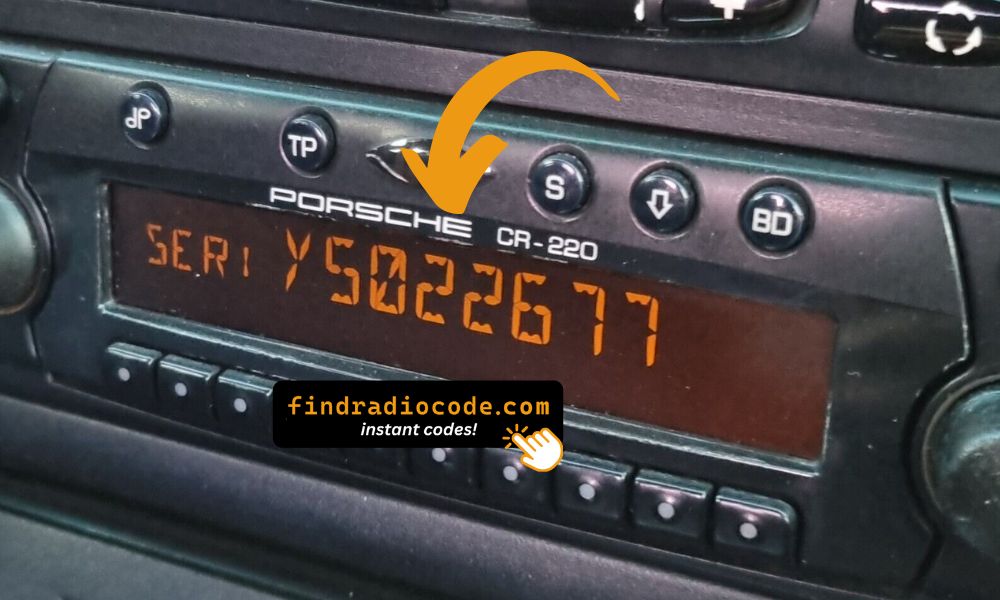
Porsche Becker serial number display on screen

Serial Number on Display Screen

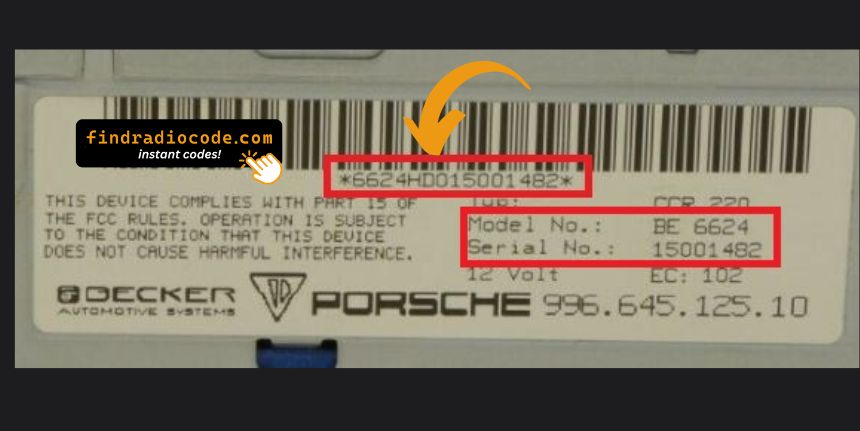
Porsche Becker serial number label location

Serial Number on Back Label

No radio removal required! Display your Becker serial number directly on screen:

CR-220 / CDR-220
  1. Turn off the radio
  2. Hold the TP button for 10 seconds
  3. Turn the radio on - "Becker 1" appears
  4. Rotate the right knob to show the model number, then the serial number
CR-210
  1. Press TONE, then 8 and 0 at the same time - "Becker" appears
  2. Press the station up arrow (right side) until "PR-VERS" appears
  3. Press one of the numbered buttons under the display - model number shows
  4. Press the station up arrow again until "SERIAL N" is displayed
  5. Press the numbered button again to reveal the serial number
Traffic Pro
  1. Go to the Service Menu
  2. In radio mode, press NAV and key 10 simultaneously
  3. Use Nxt, Prv, or the right knob to scroll
  4. Rotate the knob until the serial number appears
  5. Press END to exit
Becker Serial Number Display

Becker Serial Number on Display Screen

We support all Porsche Becker radio models:

CR-11, CR-21, CR-31, CR-210, CCR-22, CDR-22, CDR-32, CDR-210, CR-220, CDR-220, Traffic Pro, MDR-32

All Becker serial numbers starting with BE are supported. Compatible with Porsche 911, Boxster, Cayenne, Cayman, Macan, and all classic models.

Porsche Logo

Manufacturers of Supported Radio

Becker Logo

Becker

17 models • 58+ part numbers

Blaupunkt Logo

Blaupunkt

3 models • 9+ part numbers


Porsche Vehicles Compatible with This Service

User Reviews

5 out of 5
Based on 1 reviews
Write a Review
mark ramey Verified
Porsche logo Porsche
Prompt service, saves time and money. Worked great easy to use thanks again

Ways to Recover Your Porsche Radio Code

If the security code for your Porsche radio is missing, there are a few ways to recover it.

Dealer Retrieval (VIN Required)

One way to retrieve the radio code is by contacting a Porsche dealer, manufacturer, or authorized service center.

They usually require your Vehicle Identification Number (VIN), proof of ownership, and vehicle documentation.

In some cases, additional verification such as a registration certificate may also be required.

The process is often delayed. Depending on the each dealer and availability of records, retrieving it may take several hours or even a few days.

Some dealers provide the code for free, while others charge a fee - which can sometimes be quite expensive.

Instant Radio Unlock Service

Find Radio Code is a quick lookup tool that finds the correct unlock code for your Porsche radio.

The system does so by matching the radio's serial number with the manufacturer database.

The process of generating the code, requires the serial number from your radio and a valid email address. No dealership, paperwork or VIN are required.

Once the serial is submitted and the order is completed, the code is there.

Compatibility includes a wide range of factory-installed Porsche head units.

Everything is processed automatically through our secure lookup tool, and each order is covered by a 100% refund guarantee if the code does not work.

Dealership Retrieval vs Online Unlock

Authorized Service
  • Code delivery time: Sometimes several days
  • Working hours: Mon–Fri
  • In person visit?: May require visiting the dealership
  • Typical cost: Typically over $100
  • Money-back option: Usually no refund policy
Us
  • Code delivery time: Instant almost always
  • Working hours: 24/7
  • In person visit?: No visit needed
  • Typical cost: From $19.99
  • Money-back option: 100% Refund

How to Locate the S/N on a Porsche

Once you find the radio serial number, the unlock code can be generated instantly.

By Extracting the Radio

The serial number is on a label on the back or side of the radio unit. On Becker CDR-220 and CR-220 units it can also be retrieved on-screen without removal.

  • Look for a barcode sticker marked "S/N" on the rear or side of the unit.
  • Porsche radios are typically Becker units with prefix BE (e.g. BE7822, BE0512). Models include CDR-220, CR-220, CDR-23, and CDR-24.
  • Do not enter the part number — only the serial number is accepted.
Porsche Becker serial number on display screen

Serial Number on Screen Display

Porsche Becker serial number label on back of radio

Serial Number on Back Label

Pro Tip: For most Porsche Becker radios, you can display the serial number directly on the screen without removing the unit. See the instructions in the FAQ above!

Finding the Serial Number on the Display

On Becker CDR-220 and CR-220 units, the serial number can be shown on-screen:

  • Press and hold the TP button until the serial number appears on the display.

Other Porsche/Becker models (CDR-23, CDR-24) require physical removal to read the serial label.

The Difference Between the Serial and Part Number

The Serial Number (S/N):

  • This is the unit-specific code assigned to your specific radio.
  • It's the only input used by our lookup system.
  • Usually found next to a barcode.

The Part Number:

  • This refers to the model type of the unit.
  • It's used by manufacturers for repairs, but not for code generation.
  • May look similar, but doesn't link to your specific code.

Radio Code Entry Guide

Entering the code into your radio takes only a few steps.

Most radios display four dashes when powered on.

Use the radio preset buttons to type the digits.

Some models require you to press a specific button - such as pressing 5, Enter or OK to confirm or holding "Seek", "Tune" or the preset key.

Avoid entering the wrong code repeatedly.

After 3 to 10 incorrect attempts the radio may temporarily disable input.

Lockout time varies by brand, sometimes requiring extended waiting.

Refer to your radio manual or our support guides if needed.

Frequently Asked Questions

Many OEM head units will ask for a PIN code after a vehicle electrical reset.

This happens because the radio includes an radio locking system designed to prevent theft.

When power is restored, the unit displays a CODE prompt before normal operation resumes.

The required code is a PIN-style unlock code that restores normal operation.

  • Radio was removed or swapped
  • You purchased a used vehicle without the unlock code
  • A reset cleared the saved code
  • Too many failed code entries triggered a lockout
  • The car was jump-started or lost power
  • A technician disconnected the battery or ran a diagnostic
  • You recently changed or disconnected the battery
  • There was an electrical issue affecting the radio fuse
  • Radio asks for the code after sitting unused for a long time

Yes, all Porsche vehicles with factory-installed Becker radios require a radio code after battery disconnection or radio replacement. This applies to all models including 911 (996, 997, 991), Boxster, Cayenne, Cayman (981, 987), Macan, and classic models like 944.

The anti-theft feature is standard on all Porsche Becker radios. Your 4-digit or 5-digit code is permanently linked to your radio's unique serial number (starting with BE).

Start by inspecting the owner's manual. The code is occasionally found on a detachable slip or written directly on a section.

You can also look the glovebox or trunk, where dealers or previous owners may have stored a sticker with the code. Some also search for it behind trim pieces or inside the fuse box.

If you have the original radio code card, that's the simplest place to find the code - it usually includes both the serial number and unlock key.

There are a few options - but they depend on your situation.

  1. If none of these work, our service is the fastest and most accurate option.
  2. Look inside the glovebox or vehicle documents - some vehicles came with the code printed at delivery.
  3. Contact your dealership - some offer free code retrieval if you're the original owner and can provide proof of ownership.
  4. Try DIY forums or online databases, but you risk using incorrect or locked codes.
Get Your Porsche Radio Code Now
Guaranteed refund if the code is invalid