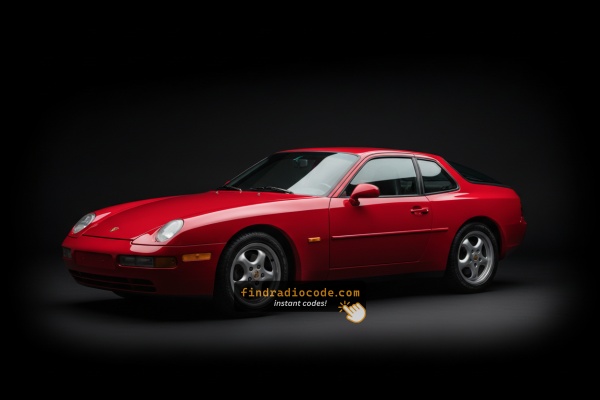
Finding the Serial Number on a 968's Radio
To get the correct security code, you first need the radio serial number.
Depending on your vehicle model, you can find it shown on the display or check the radio hardware.
It's often written as: S/N / SN / Serial / Serial Num. / Serial Number.
These are the easiest ways to find it:
1. Find the S/N on Porsche 968's Screen
Several Porsche radio models (manufactured by Becker) are able to show the serial number on the display using specific button combinations. The method varies by radio model.
Porsche CR-220 / CDR-220
- Turn the radio OFF.
- Press and hold the TP button for 10 seconds.
- Turn the radio ON – the display will show "Becker 1".
- Rotate the right knob to cycle through information – the model number appears first, followed by the serial number.
Porsche CR-210
- Press the TONE button, then press 8 and 0 simultaneously – the display shows "Becker".
- Press the station up arrow until "PR-VERS" appears.
- Press the numbered button under the display to see the model number.
- Press the station up arrow again until "SERIAL N" appears.
- Press the numbered button to display the serial number.
Porsche Traffic Pro (Becker Navigation)
- Press NAV and key 10 simultaneously to open the Service Menu.
- Use the Nxt, Prv, or the right knob to navigate through the menu.
- Rotate until the serial number is displayed.
- Press END to exit the service menu.
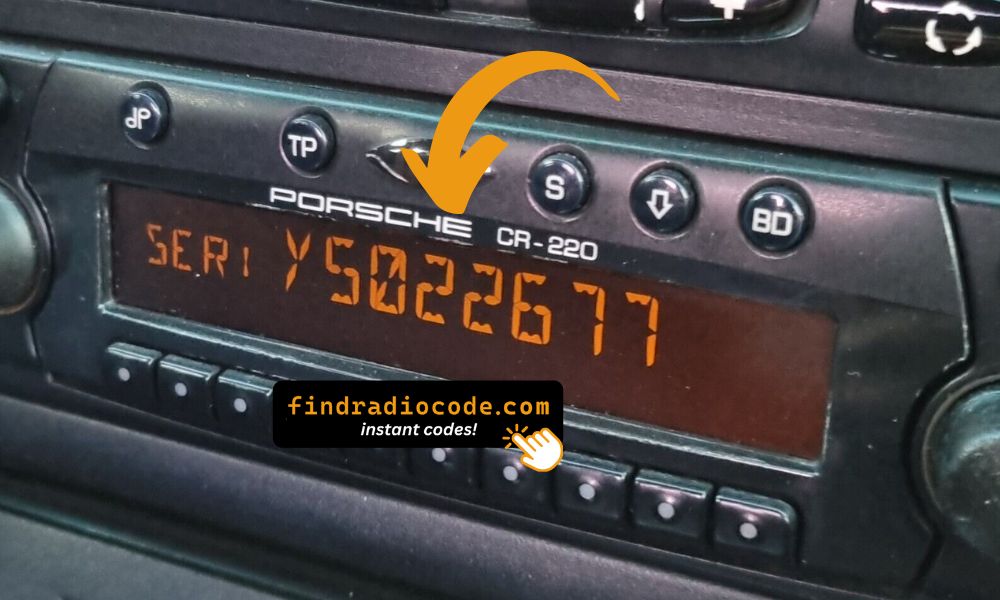
Porsche radio serial number displayed on screen via service menu
2. Locating the Serial Number on the Radio Body
The serial number is usually printed on a sticker attached to the head unit.
Step 1: Turn off the the ignition.
Step 2: After that, take off the surrounding panel.
Step 3: Then unscrew the radio brackets.
Step 4: Carefully slide the unit out partially (Be careful not to damage the cables).
Step 5: Search for the serial number on the side of the unit.
Step 6: Write down the full S/N carefully and come back here so that we can generate the code.
Important: Be careful not to mix the Serial Number for the Part Number!
Removing the Porsche 968 Radio
The Becker radio is mounted behind the dashboard panel. Remove the trim, unscrew, and slide the unit out. The serial is on the chassis.
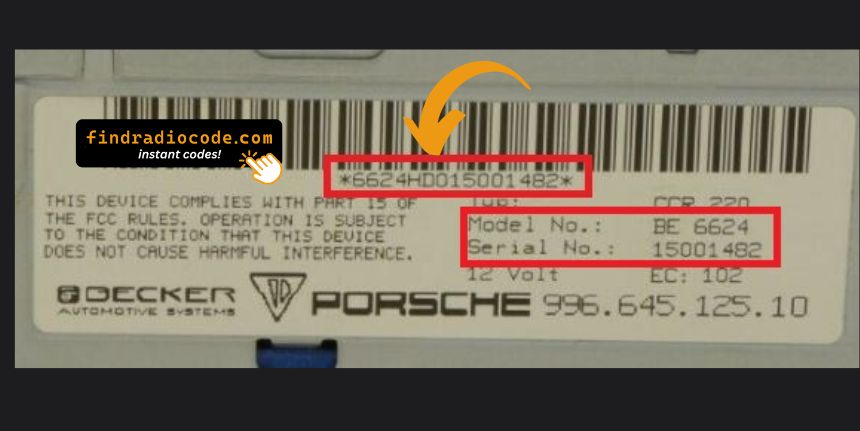
Example: Porsche 968 serial number label location
Usual Serial Prefixes on Porsche 968 Factory Units
The radio uses Becker serials starting with BE (e.g. BE7822, BE0512). Units include the CDR-220, CR-220, CDR-23, and CDR-24.
When Your Porsche 968 Radio May Ask for a Code
Your radio may request a security code when it loses power.
These are the some typical scenarios that trigger the radio code prompt.
After a Battery Work
When the battery is replaced, the Porsche 968 radio enters anti-theft mode.
This factory protection system is designed to prevent theft by disabling the radio after power loss.
More Situations That Can Lock Your 968's Radio
- Jump-starting the vehicle can reset the radio, requiring the PIN.
- After an ECU or software reset, the radio may enter security mode.
- Installing a replacement head unit will require the original radio code.
- A blown fuse can cause the Porsche 968 radio to request a security code.
Free Options First
Before you decide to pay, it's worth checking a few places where the code is often already written down.
Some drivers find their Porsche 968 radio code without needing any tools or paperwork.
Here are the most common things to check first.
Check Inside the Car
- In your car paperwork from the previous owner.
- On the radio unit itself, if it was serviced earlier.
- In the trunk, on a service sticker.
- In the radio manual, often on a code card.
- Inside the glovebox, sometimes on a label.
Can You Get a Porsche 968 Radio Code from the Dealer?
Dealerships can retrieve your radio code by checking the VIN in their system.
They typically require proof of ownership before sharing the unlock code.
This is the official way to restore access to the factory radio.
Disadvantages:
- You may need to visit the dealer during business hours.
- Dealers frequently charge a service fee (sometimes more than 100$).
- Some imported or older radios may not be in their database.
- The lookup is often slower and may require waiting.
Entering the Anti-Theft Code on Porsche 968
Once you have the unlock code, it's time to enter it into the Porsche 968's radio.
The locked radio will usually show a blank screen with dashes.
Use the radio presets or a rotary dial to dial in each digit, then confirm to unlock the stereo.
To enter the unlock code on your Porsche radio (Becker):
- Turn the ignition to ON and power on the radio.
- The display will show "CODE" or "SAFE".
- Use the numbered buttons or the right knob to enter each digit of your unlock code.
- After entering all digits, press ENTER or the right knob to confirm.
Note: The exact entry method varies by radio model (CR-220, CR-210, Traffic Pro). If the radio shows "SAFE" after incorrect attempts, it has been locked out.
What is a Radio Code?
A radio code, also known as an anti-theft code is a unique numeric unlock key that restores access to your car stereo after it has been disabled.
This anti-theft code is triggered when the radio loses power.
Automakers include this feature to protect factory stereos from theft.
If power is lost, the radio disables itself and asks for the CODE before it can be used again.
Once the correct numbers is entered, the stereo is fully reactivated.
968's Radio Code FAQs
Free radio codes are rarely available.
Some service documents may help, but most codes require a database lookup.
The only free way would be to check your car and its glovebox to see if you have it written down.
Yes. Each car stereo has its own unlock code.
If you install a different radio, you'll need the code for that particular device.
Many factory radios use a radio unlock code, but not all production years require one.
Whether a code is needed depends on the radio unit and the model year.
Three main Porsche (Becker) radio models support on-screen serial display: the CR-220 / CDR-220 (hold TP button for 10 seconds), the CR-210 (press TONE, then 8+0), and the Traffic Pro navigation unit (press NAV + key 10 for the service menu).
For other Porsche radio models, the serial number is printed on a label on the side or back of the unit, which can only be seen after removal. See our Porsche serial number guide.
"SAFE" indicates that the radio has been locked out after too many incorrect code attempts. This is a security feature that protects against repeated incorrect entries.
To reset, leave the radio powered on (ignition ON) for approximately 60 minutes without entering any codes. After the wait, the display will show "CODE" and you can try again. Be sure you have the correct code before your next attempt.