Porsche Cayenne's Usual Radio Code Scenarios
Many drivers encounter security code prompts on their Cayenne after electrical work.
Below are the most frequent situations when this can occur.
Radio Asking for Code After Battery Swap
A disconnected battery is the most common reason a Porsche Cayenne radio asks for a code.
Even a brief voltage drop is enough to trigger the built-in security system.
Other Situations That May Trigger the Code
- After a jump-start, the radio may reset and request a radio code.
- After an ECU reset, software update, or electrical repair, some Porsche Cayenne radios ask for a code.
- When the radio is removed, it usually locks automatically.
- If a fuse is pulled, the radio can enter anti-theft mode.
Places to Check Before Paying for a Radio Code
Before you pay for it, you should check a few places where the code is often stored.
Some drivers find their Porsche Cayenne radio code without needing any tools or paperwork.
Here are the most common things to check first.
Look Through Car Documentation
- Near the boot panel, where some manufacturers place radio labels.
- In the service booklet provided with the car.
- In the user guide, often on a separate code card.
- On the head unit casing if the unit was previously removed.
- On a label in the center console.
Getting It from the Dealer
A Porsche dealer can usually retrieve the security code using your Cayenne's VIN.
In most cases, you need to contact the service department or visit the dealership and show vehicle documents.
When it is verified, they can generate the original unlock code for your radio.
Possible Drawbacks:
- Dealers often ask for payment for the lookup service and it can cost more than 100$.
- Some older Porsche Cayenne radios may require manual lookup.
- You usually need to visit in person and bring vehicle paperwork.
- The process can take hours depending on the model and database.
How to Locate the Serial Number on a Cayenne
To retrieve the correct unlock code, you will need the serial number from your Porsche Cayenne's head unit.
You may be able to find it on the radio body. Common labels to look for: S/N, SN, Serial, Serial Number.
1. Getting Cayenne's S/N on the Screen
The Porsche Cayenne serial number method varies by the generation.
Cayenne 955 / 957 (2002–2010) — Becker Traffic Pro
- Press NAV and key 10 simultaneously to open the Service Menu.
- Use Nxt / Prv buttons or the right knob to navigate.
- Rotate until the serial number appears on screen.
- Press END to exit the service menu.
Cayenne E2 (2011–2018) — PCM 3.x
Navigate: Settings → System → System Information on the PCM touchscreen.
Cayenne E3 (2018+) — PCM 6.x
Navigate: Settings → System → System Information. The latest PCM version uses a redesigned interface but the path is the same.
2. Locating the Serial on the Radio Unit
To find the serial number, you'll need to remove the head unit out.
- Start by turning off the ignition and removing the trim panel.
- Next, release the clips and slide the radio out to check the label on the side of the radio. Pay attention not to damage the cables.
- Write down full serial number carefully and then come back to the website.
- Know that serial number and part number are not the same. You will find both of them on the unit, but you only care for the serial.
Removing the Porsche Cayenne Radio
The Becker radio is secured by trim and screws. Remove the trim, unscrew, and slide the unit out. The serial is on the chassis.
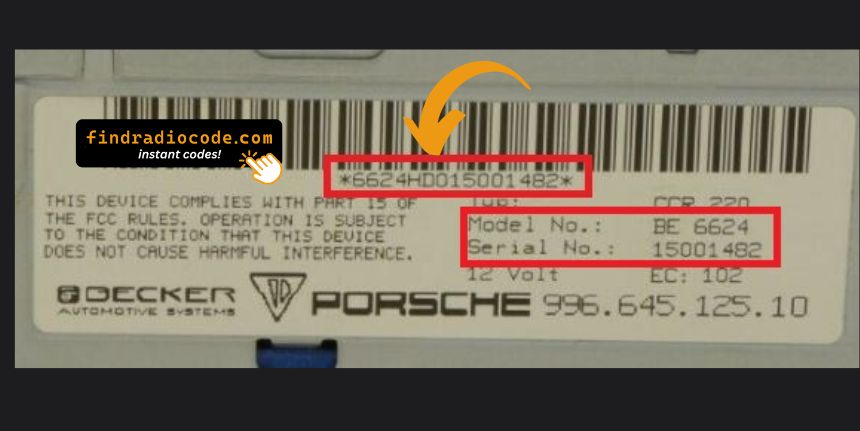
Example: Porsche Cayenne serial number label location
Typical Porsche Cayenne Serial Formats
To decode your radio, find the serial beginning with BE — Becker-manufactured. Typical models: CDR-220, CR-220, CDR-23, CDR-24.
How to Enter the Unlock Code on the Vehicle
Once you have the unlock code, it's time to input it into the Porsche Cayenne's radio.
The locked radio will usually show a blank screen with dashes.
Use the built-in buttons or touch controls to select each number, then confirm to activate the head unit.
To enter the unlock code on your Porsche radio (Becker):
- Turn the ignition to ON and power on the radio.
- The display will show "CODE" or "SAFE".
- Use the numbered buttons or the right knob to enter each digit of your unlock code.
- After entering all digits, press ENTER or the right knob to confirm.
Note: The exact entry method varies by radio model (CR-220, CR-210, Traffic Pro). If the radio shows "SAFE" after incorrect attempts, it has been locked out.
Frequent Questions about Porsche Cayenne Radio Code
Yes. Each car stereo has its own unique code.
If you install a different radio, you'll need the code for that specific unit.
Free unlock codes are rarely available.
Some dealers may help, but most codes require a database lookup.
The only free way would be to search your vehicle and its glovebox to see if you have it written down.
Many factory radios use a radio unlock code, but not every model year require one.
Whether a code is needed varies by the radio unit and the model year.
Three main Porsche (Becker) radio models support on-screen serial display: the CR-220 / CDR-220 (hold TP button for 10 seconds), the CR-210 (press TONE, then 8+0), and the Traffic Pro navigation unit (press NAV + key 10 for the service menu).
For other Porsche radio models, the serial number is printed on a label on the back or side of the unit, which can only be seen after removal. See our Porsche serial number guide.
"SAFE" indicates that the radio has entered lockout mode after too many incorrect code attempts. This is a security feature that prevents brute-force code guessing.
To reset, leave the radio powered on (ignition ON) for approximately 60 minutes without entering any codes. After the wait, the display will show "CODE" and you can try again. Ensure you have the correct code before your next attempt.