
Why Do Alhambra Radios Use a Security Code?
A radio code, also known as an anti-theft code is a numeric security code that reactivates your car audio system after it has been locked.
This factory security PIN is triggered when the radio detects a power interruption.
This system helps prevent stolen radios from working in other vehicles.
If power is cut, the radio stops functioning and requires the unlock CODE before it can be used again.
Once the right combination is entered, the stereo is restored to normal operation.
Seat Alhambra's Usual Radio Code Causes
Your radio may request a security code when it loses power.
These are the most common scenarios that trigger the radio code prompt.
Error After a Battery Change
A dead battery is the most common reason a Seat Alhambra radio asks for a code.
Even a brief power loss is enough to trigger the built-in anti-theft lock.
Other Possible Triggers
- A blown fuse can cause the Seat Alhambra radio to request a security code.
- Jump-starting the vehicle can trigger anti-theft mode, requiring the PIN.
- After an ECU or software reset, the radio may lock.
- Installing a replacement head unit will require the original anti-theft code.
Places to Check Before Paying for a Radio Code
There is a chance your Seat Alhambra radio code is written down in your documents.
Before spending money, take a few minutes check the places below - you might be surprised.
Look Inside the Owner's Manual
- Inside the glovebox, sometimes on a label.
- In the owner's manual, often on a code card.
- On the radio unit itself, if it was serviced earlier.
- In your maintenance booklet from the previous owner.
- In the boot compartment, on a radio label.
Getting It from the Dealer
Dealerships can retrieve your radio code by checking the VIN in their system.
They typically ask for registration and ID before sharing the security PIN.
This is the official way to restore access to the factory radio.
Drawbacks:
- Dealers frequently bill for the code (It may cost more than 100$).
- The lookup is often slower and may require waiting.
- You may need to visit the dealer during business hours.
- Some imported or older radios may need extra verification.
Finding the S/N on a Alhambra's Radio
To generate the right unlock code, you first need the serial number from the radio.
Depending on your model, you can find it shown on the display or find it on the radio unit itself.
It's often written as: S/N / SN / Serial / Serial Num. / Serial Number.
These are the easiest ways to get it:
1. Getting Alhambra's S/N on the Screen
If the radio is an older unit, try holding 1 + 6 while turning on the radio to display the serial. For newer units (Media System, Media System Plus, Navi System), this does not work and the radio must be removed.
2. The Serial Number on the Radio Label
The serial number is usually found on a label attached to the head unit.
Step 1: Turn off the the ignition.
Step 2: After that, remove the dashboard trim.
Step 3: Then unscrew the radio brackets.
Step 4: Carefully pull the radio forward partially (Be careful not to damage the connections).
Step 5: Search for the serial number on the side of the unit.
Step 6: Write down the full number carefully and come back to our website so that we can generate your code.
Important: Be careful not to mix the Serial Number and the Part Number!
Seat Radio Removal Step by Step
The radio uses the standard VAG extraction key system. Push the flat keys into the round holes on both sides, wait for the clips to release, then pull the radio forward. The serial sticker is on the chassis of the unit.
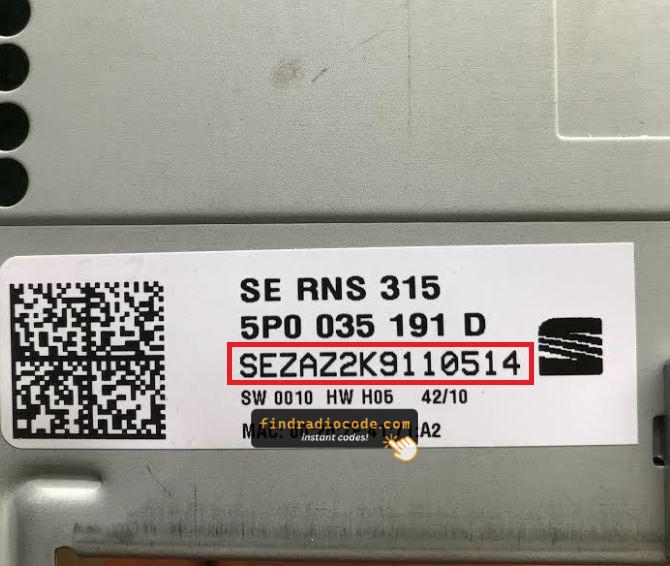
Example: Seat Alhambra serial number label location
Serial Number Prefixes You'll See on Seat Alhambra
To unlock your radio, you need the serial number that starts with SEZ, which is exactly 13 characters long (e.g. SEZ6Z7J1234567). The label is on the radio body itself. Some cross-platform VAG units may show VWZ or AUZ instead.
How to Enter the Radio Code on the Vehicle
You need to enter the anti-theft code into the system to unlock your Seat's radio.
When the unit is locked, the screen usually displays a code prompt.
You should use control knob, touchscreen, or radio presets to enter the numbers, then submit the code to restore radio functionality.
If you fail multiple times, you may cause the Alhambra's head unit to enter lockout mode.
When this happens, the screen can display messages like "CODE ERR", "ERROR", or a blank screen.
To unlock the system, you usually need to keep the ignition on for a shown waiting period or up to an hour before trying again.
Alhambra's Radio Code FAQs
Free codes are uncommon.
You might find the code in the owner's booklet or from a previous owner, but most require a paid retrieval.
Not all of them require a radio code, but many factory radios use it as an security measure.
Some series may still use a code depending on the radio unit.
Yes. Each stereo has its own unlock code.
A used radio will need its original code to work.