
Acura Integra's Most Common Radio Code Causes
Many drivers encounter radio lock problems on their Integra after electrical work.
Below are the most frequent situations when this can occur.
Radio Locked After Battery Replacement
When the battery is disconnected, the Acura Integra radio enters anti-theft mode.
This security feature is designed to protect the original head unit by disabling the radio after power loss.
More Events That Can Lock Your Integra's Radio
- If a fuse blows, the radio can enter anti-theft mode.
- After an ECU reset, software update, or electrical repair, some Acura Integra radios ask for a code.
- When the head unit is replaced, it usually requires the original code.
- After a boost start, the radio may reset and request a security code.
The Radio Code - What is It and Why It's Important for Acura Integra?
When the radio is disconnected from power, it automatically locks and requires an anti-theft code to be entered before it can be operated.
A radio code (also known as an anti-theft code) is a built-in security system integrated into factory car stereos to protect theft.
This system ensures that a removed radio becomes inoperable without the original code.
Entering the right code restores full stereo and infotainment functionality.
Free Things to Try
Before you pay for it, it's worth checking a few places where the code is often already written down.
Some drivers find their Acura Integra radio code without needing any tools or paperwork.
Here are the most common things to check first.
Look for it in the Car Itself
- On the radio unit itself, if it was removed before.
- In your maintenance booklet from the previous owner.
- In the trunk, on a service sticker.
- In the vehicle handbook, often on a sticker page.
- Inside the glovebox, sometimes on a small card.
Can the Dealer Help?
Dealerships can retrieve your radio code by checking the vehicle records in their system.
They typically ask for registration and ID before sharing the security PIN.
This is the official way to restore access to the factory radio.
Disadvantages:
- The lookup is often slower and may require waiting.
- Some imported or older radios may not be in their database.
- Dealers frequently bill for the code (It may cost more than 100$).
- You may need to visit the dealer during business hours.
Searching for the Serial Number on a Integra
The only thing you'll need to get the code is your radio's radio serial. VIN or other details are not required.
On many Acura vehicles, you can find it in one of these places:
- Visible on the radio screen (occasionally by using specific button presses)
- On the radio body itself - you'll need to pull it out and write down your serial (which is not as hard as it seems)
Search for something like: Serial Number or SN.
1. Displaying the Serial Number on the Integra Screen
Accessing the Serial Number in Acura Integra
The new Acura Integra (2023–present) is Acura's modern sport compact, built on the Honda Civic platform. It features a modern infotainment system with multiple ways to retrieve the radio serial number.
Primary Method (Settings Menu):
- Turn the ignition ON and power on the infotainment system.
- Navigate to Settings → System → About or System Information.
- The serial number should be displayed in the device information.
Alternative Method (Button Combination):
If the settings menu doesn't show the serial, try the classic Honda method: hold preset buttons 1 and 6 while turning the radio ON. This may work on some Integra audio units.
Model Notes:
- 2023–2025 Integra – All trims (Base, A-Spec, Type S) share the same 9-inch touchscreen infotainment. The system is based on Honda's latest architecture, shared with the 11th-gen Civic.
Physical Removal: As a last resort, the radio serial label can be found by removing the infotainment unit from the dashboard. This requires removing the center console trim panel.
2. The Serial Number on the Radio Sticker
The serial number is usually found on a sticker attached to the head unit.
Step 1: Turn off the vehicle.
Step 2: After that, take off the surrounding panel.
Step 3: Then unscrew the radio brackets.
Step 4: Carefully pull the radio forward partially (Be careful not to damage the connections).
Step 5: Search for the serial number on the side of the unit.
Step 6: Write down the full number carefully and come back here so that we can generate your code.
Important: Be careful not to mix the Serial Number and the Part Number!
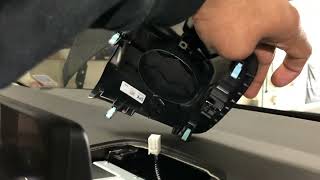
Alternative: Removing the Acura Radio
If you cannot view the serial on screen, remove the radio by unclipping the trim panel around the unit. The serial sticker is on the body of the radio.
Example: Acura Integra serial number label location
Common Acura Integra Serial Formats
To unlock your radio, find the serial in U####L#### format. Navigation units show GNA or HBM prefixes. This serial is essential for generating the correct unlock code.
How to Enter the Anti-Theft Code on Your Integra
You need to input the radio security code into the system to unlock your Acura's radio.
When the unit is locked, the screen usually displays a code prompt.
You should use control knob, touchscreen, or radio presets to set each digit, then confirm the code to reactivate the audio system.
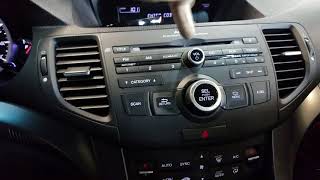
To input your Acura Integra unlock code:
- Turn the ignition ON – The infotainment system will prompt for a code.
- The 9-inch touchscreen should display an on-screen numeric keypad.
- Tap each digit of your unlock code and press "Enter" or "Confirm".
Alternative: If the touchscreen shows a traditional "CODE" prompt without a keypad, use preset buttons 1–5 to enter each digit of your 5-digit code, then hold button 6 to confirm.
Lockout Warning: After 3 incorrect attempts, the system locks for approximately 1 hour. Keep the ignition ON during the waiting period.
Acura Integra Radio Code - FAQ
Yes. Each factory radio has its own unlock code.
A different radio will need its original code to work.
Free codes are uncommon.
You might already possess the code in the manual or from a previous owner, but most require a serial number lookup.
Not all of them require a radio code, but many factory radios use it as an anti-theft feature.
Certain production series may still use a code depending on the head unit.
For most Honda radios: turn the ignition ON, turn the radio OFF, then hold preset buttons 1 and 6 while turning the radio back ON. The serial number is displayed on the screen as a complete number or in two parts (U#### and L####).
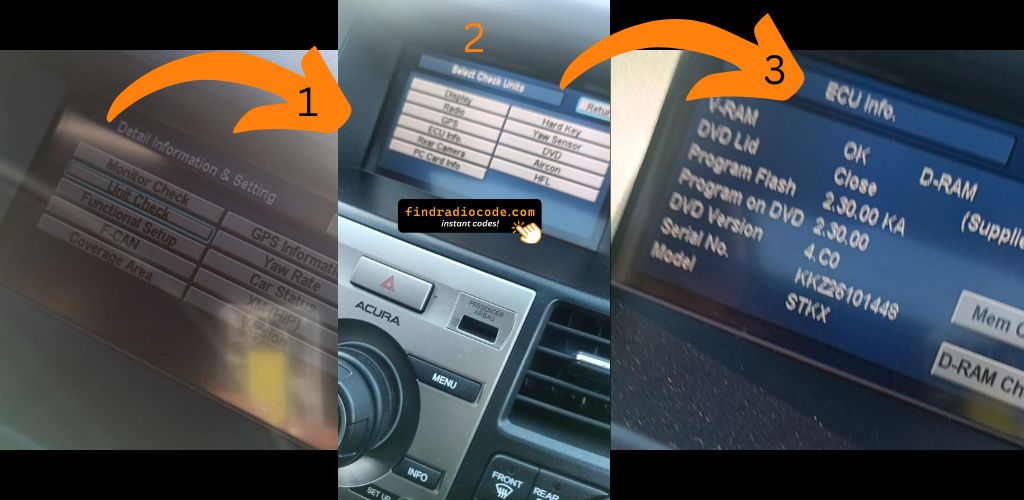
For navigation-equipped models (2008–2019), press and hold CANCEL + MAP + MENU simultaneously to access the diagnostic menu, then navigate to Detail Information → Unit Check → ECU Information. See our full Honda serial number guide for all methods.
Honda and Acura radio codes are 5 digits long, using only digits 1 through 6 (no zeros, sevens, eights, or nines). This is different from most other manufacturers that use 4-digit codes.
You enter the code using the preset buttons 1–5 on the radio. Each button press corresponds to one digit of the code.