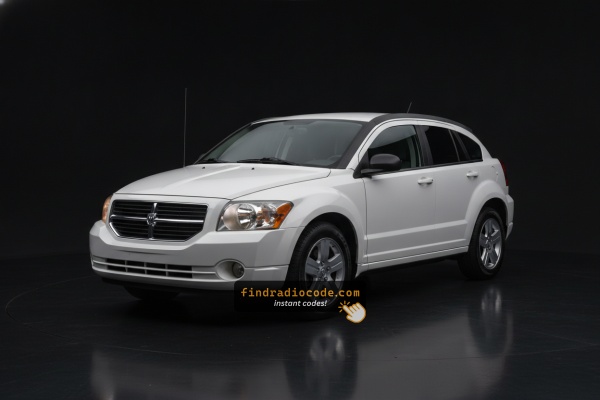
OEM Radios Used in the 2008 Dodge Caliber
Even within a single year, the 2008 Dodge Caliber could leave the factory with different radios. Start with the one that matches your dash.
| Years | Factory radio | Serial starts with |
|---|---|---|
| 2007-2010 | Chrysler Media Center 640 RE2 Panasonic |
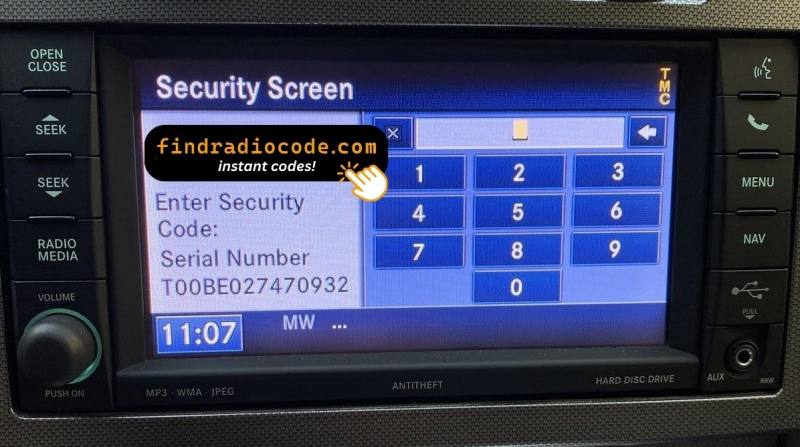
T0012, T00BE
|
| 2008-2013 | MyGIG NTG4 REN Harman |
T00AM, T00BE, T0012
|
| 2008-2012 | MyGIG NTG4 REU Harman |
T00AM, T00BE, T0012
|
Serial Number Location Guide for Dodge Caliber 2008
The first step is to find the radio's serial number.
Based on the head unit type used in your 2008 Caliber, the serial can be found either through the display menu or by pulling the unit out and checking the label on the radio itself.
Below are the most common methods to identify your serial the right way.
2008 Caliber - Which Radio Did You Get?
The 2008 Caliber's factory radio menu is essentially carried over from 2007 - still pre-MyGIG, still single-DIN, with the sales code printed on the lower right of the faceplate. Use the list below to pin down which one is in your dash.
- REF - AM/FM/CD with Aux input. Standard fitment on SE and most SXT cars. Single CD slot, monochrome two-line display, two rotary knobs and six preset buttons across the bottom. No satellite branding, no cassette. The unit you will see most often.
- RAQ - AM/FM 6-disc CD/MP3. Optional in-dash 6-disc changer. Same dash opening as the REF but with an upgraded display and a single load slot that holds six discs. Aux jack on the lower face. Mid-tier take rate.
- RAK - AM/FM 6-disc CD/MP3 with cassette. Optional combo unit. Easy to spot by the cassette door above the CD slot - the only 2008 Caliber radio with a tape door. Niche.
- REC - AM/FM/6-disc CD/MP3 navigation. Top-line option. Identifiable by its 5.8-inch full-color screen, eight-way joystick to the right of the display, and the dedicated satin-silver navigation bezel that the non-nav cars do not have. Rare.
Note: MyGIG (REN/RBZ) was not yet a factory order code for the Caliber in 2008; if a 2008 car has a touchscreen MyGIG it was retrofitted with a 2009-up faceplate and lockpick.
Accessing the Serial Number Through the Radio Menu
Try the following for your 2008 Dodge Caliber:
The 2008 Dodge Caliber may be equipped with the REF (AM/FM CD player), RES 130 (Media Center), or RAQ (base 6-disc CD) radio. These older systems support on-screen serial number retrieval.
The serial number can only be located by removing the radio and reading the label on the casing. Look for a printed sticker on the side of the radio unit.
Releasing the Unit to View the S/N on the Tag
If the serial number cannot be accessed via display, use the hardware method.
Most Dodge Caliber OEM radios include a sticker with the serial number printed on the housing.
Basic process:
- Disable power.
- Lift away surrounding panel pieces.
- Remove fasteners holding the radio.
- Slide outward to inspect the label.
The 2008 Caliber's radio is installed in the center of the dash. To pull it out:
- Turn off the vehicle.
- Pry off the trim panel around the radio. The Caliber uses friction clips – begin from the bottom and pry along the edges using a plastic tool.
- Remove the 4 mounting screws securing the radio.
- Ease the radio forward and locate the serial number on the rear or side label.
Note: The Caliber's bezel also covers the climate controls. Work carefully to avoid breaking the trim clips.
Find the S/N by Pulling Out the Unit
For the 2008 Dodge Caliber the radio fleet is essentially carried over from 2007: pre-MyGIG Mopar units such as the REF AM/FM/CD and the RES Media Center 130 with MP3 and aux input. The serial number lives on a printed label on the metal chassis, so you have to release the head unit from the dash to read it.
Before you begin, make sure the ignition is fully off and the key is removed. Disconnect the negative battery cable and wait roughly 10 to 15 minutes; this lets the SRS/airbag system de-energize so any wiring you brush against behind the dash is safe. Be especially careful around any yellow airbag-related connectors and use plastic trim tools rather than metal screwdrivers so you do not score the dash plastics.
You will want a basic kit of plastic trim/pry tools, a 7 mm socket, a Phillips screwdriver, a soft cloth and a small container to keep the four bracket screws together.
Removal on the 2008 Caliber follows the same pattern as the 2007 car. Pull the shift knob upward off its threaded shaft, lift the shift bezel out, then start at the bottom edge of the center radio bezel and pry it forward with a plastic tool. The bezel snaps onto clips along each side - work bottom to top, side to side, until it releases. Tilt it out, unplug any switch and HVAC connectors behind it, and set it aside.
With the bezel removed you will see the radio held in place by four screws (roughly at the corners). Take those out, slide the head unit straight forward and disconnect the wiring harness and antenna lead. Pull the antenna by the connector, never by the cable, to avoid damaging it.
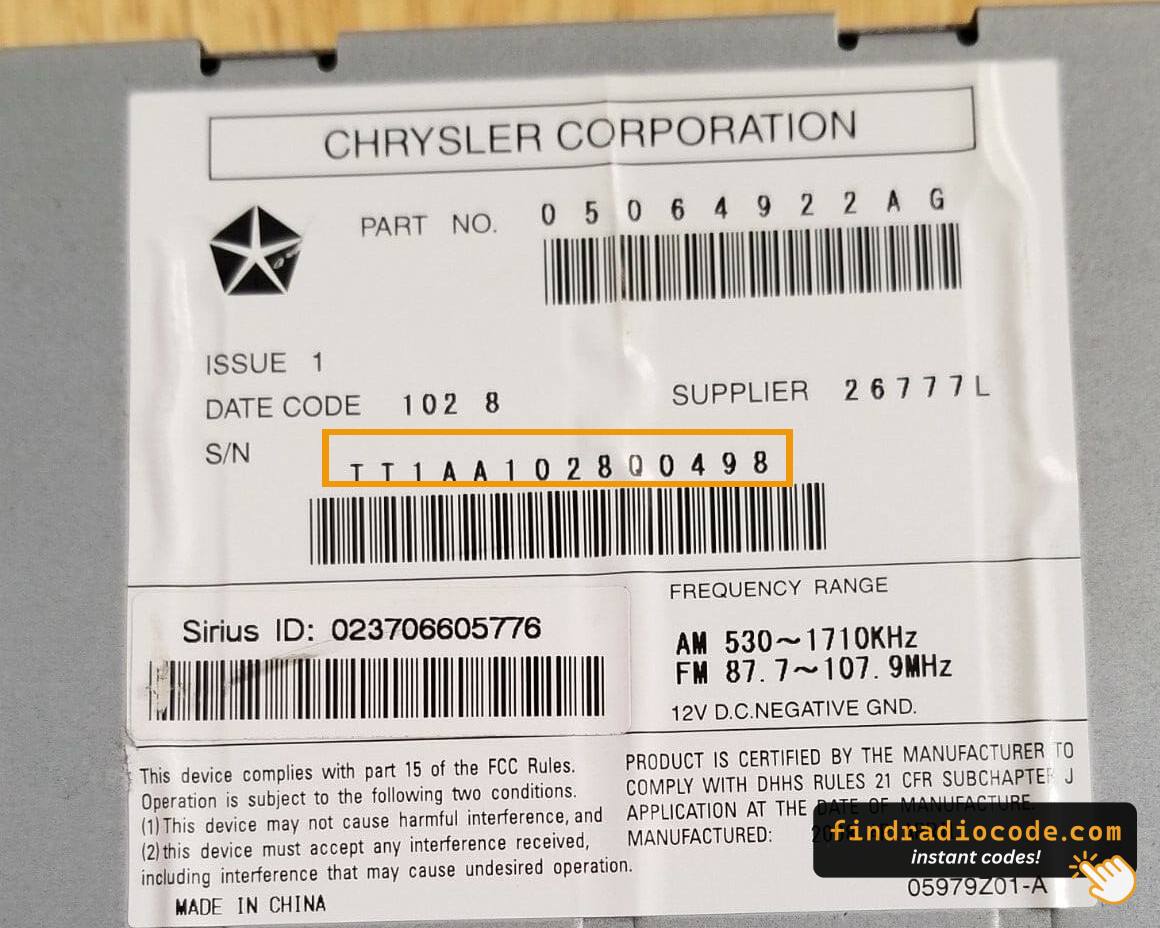
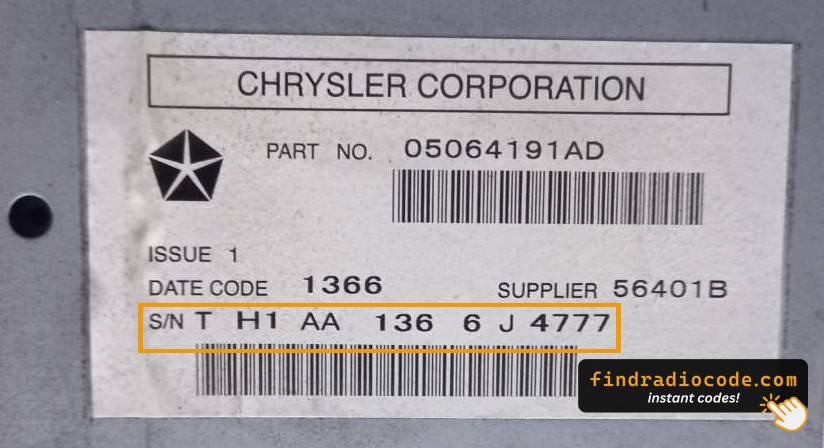
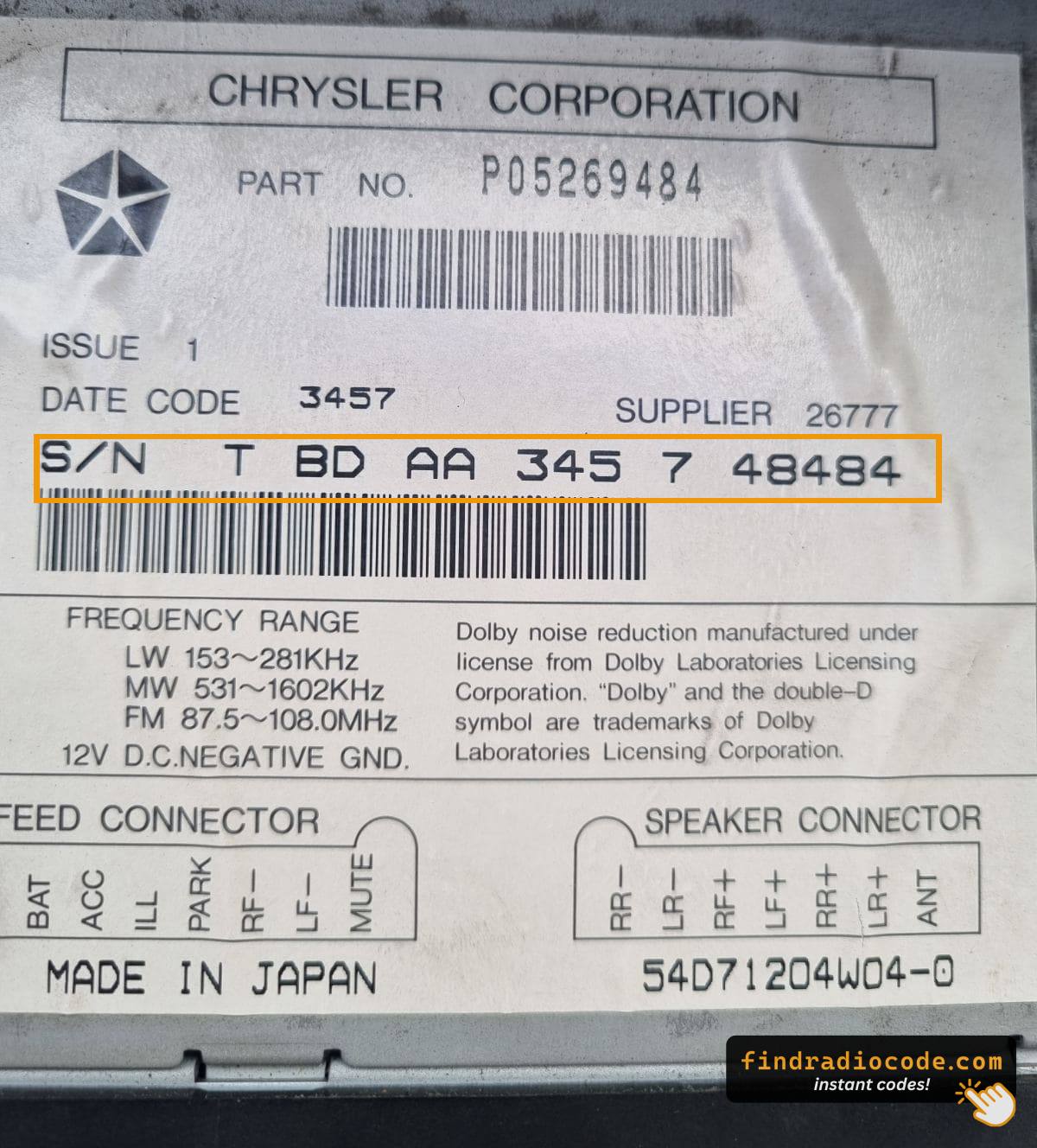
Now flip the unit so you can see the top, sides and rear of the metal chassis. Mopar prints the unit's serial number on a label there, usually next to a barcode and the Mopar part number. That long alphanumeric serial - copied exactly, including any leading letters - is what the calculator needs to generate your unlock code. Photographing the label is a good idea so you can zoom in and double-check digits like 0/O and 1/I before reinstalling the radio in the reverse order.

Example: Dodge Caliber serial number label location
What a Valid Serial Number Looks Like
Typical radio models in the 2008 Caliber:
- REF (AM/FM CD, 66W) – Serial prefix:
TM9 - RES 130 (Media Center 130, CD/MP3) – Serial prefix:
TM9orT00AM - RAQ (base 6-disc AM/FM/CD) – Serial prefix:
TM9 - MyGIG REP/RBZ 430 (on higher trims) – Serial prefix:
TM9
All serial numbers are 14 characters. The Caliber shared its head unit platform with the Jeep Patriot and Jeep Compass of the same era.
Common S/N Formats Used on 2008 Caliber Units
The Mopar radios installed in the 2008 Caliber tend to share the same family of serial-number conventions used elsewhere in the Chrysler/Dodge lineup of that era. Most of the time the serial printed on the chassis label opens with the letter T, followed by a short letter/number group and then a longer unique identifier. You will normally find it printed next to a barcode and the Mopar part number on the same sticker.
Because Chrysler sourced these head units from more than one supplier, treat any specific prefix you have seen referenced online as a typical example rather than a hard rule. The label on your particular radio could open with a TM-style group, a T00-style group, or another T-led pattern, and there is no display-based menu on this generation that exposes a different internal value. The safest approach is simply to copy the full string exactly as it is printed - leading letters included - and let the calculator validate the format before you commit to entering anything on the dash.
How 2008 Dodge Caliber Radio Code Lookup Works
Getting your radio code takes only a few simple steps.
- Find the radio's serial number - this is the only info required by our side.
The difference with the dealership lookup is that no VIN is needed. - When you've found the S/N, type it into the form above.
The system checks it against a database of supported units and automatically catches the matching security code. - In most cases, the code will appear instantly on the screen after you pay and is also sent to your email , just in case.
If manual verification is required (rare situations), you'll be informed before checkout. - When you receive the code, simply enter it into your radio to restore the functionality.
Code Entry Instructions
Once you receive the correct unlock code based on the S/N, you can restore default functionality by entering it into the unit.
The code entry process depends on the head unit design, but most 2008 Caliber systems follow a similar structure using preset buttons, touch controls, or rotary knobs - depending on if it's a factory or an aftermarket unit.
You will typically see SAFE displayed on screen.
Entering Process
To input the radio code on your 2008 Dodge Caliber:
- Turn ignition ON. The radio shows "CODE".
- Non-touchscreen (REF/RES/RAQ): Press preset button 1 multiple times to set the first digit. Repeat with buttons 2, 3, 4. Hold Enter/OK to confirm.
- Touchscreen (MyGIG 430): Use the on-screen keypad to enter all 4 digits.
Lockout: Too many incorrect attempts cause a lockout. Keep the radio on for approximately 60 minutes to reset.
Detailed Input Instructions for Caliber 2008
Entering the unlock code on the 2008 Caliber's factory radio uses the same legacy Mopar process as the 2007 car. The keypad is the radio's preset buttons, and the radio is strict about how many wrong attempts it will tolerate, so read the warning before you start.
Limited Attempts Warning: Mopar legacy units on this generation typically allow three consecutive wrong code entries. After the third bad attempt the display flips to WAIT and the keypad is locked. The accepted way to clear it is to leave the ignition in the RUN position - the radio powered up, ignition on, engine running or not - for a continuous 30 minutes. Only after that timer expires will the unit accept a fresh attempt. Pulling the radio fuse or disconnecting the battery will not shortcut the lockout, so always double-check the serial and the code itself before typing.
To enter the code, turn the key to the RUN or ACC position so the radio powers on. The display should show a CODE or anti-theft prompt. Use preset buttons 1 through 6 on the faceplate to type each digit of your code in order - press preset 1 for a 1, preset 2 for a 2, and so on. If your radio has an explicit Enter/OK soft key, press it after the last digit; on simpler REF/RES units the radio will accept the code automatically once all digits are in. When the code is correct the display clears and the radio returns to normal operation.
If you see WAIT, leave the ignition in RUN and let the timer count down. Once it clears, recheck the serial number and the code, then enter it carefully - this is your safest path to a working radio without further lockouts.
Fixing Common Code Entry Problems for 2008 Caliber
If the Caliber's radio does not show after a power event:
- Ensure the ignition is in ON — not just ACC to display the code screen.
- Inspect the fuse in the fuse box — it is under the hood. A blown fuse prevents any display.
- Try pressing the power button on the radio face to trigger the code prompt.
Older Calibers with high mileage occasionally have fuse box corrosion that mimic a dead radio.
The Caliber's radio must be removed to access the serial label, as none of the Caliber's radios support on-screen serial display. On the label:
- Serial number — 14 characters, beginning with
TM9orT00AM. Use this. - Part number — commonly
P05064...or68.... Skip.
On older Caliber labels, the print may have faded. Use a flashlight and photograph the label before putting the radio back.
The Caliber's radio enters a lockout after three incorrect codes. The display will show "WAIT" or simply goes quiet. To clear it:
- Do not turn the car off for about 60 minutes.
- Turning the key off resets the wait.
Calibers are particularly prone to aging batteries which cause this more often than on newer vehicles. After the lockout clears, enter the code slowly.
The entry method on the Caliber depends on which radio is fitted:
- REF, RES 130, RAQ (non-touchscreen) — Press preset button 1 cycling to reach the first digit, button 2 for digit two, button 3 for digit three, button 4 for digit four. After that, hold Enter/OK to confirm.
- MyGIG REP/RBZ 430 (touchscreen) — Enter digits directly on the on-screen keypad. The radio auto-confirms needed.
If unsure which radio type you have, look at the display — a touchscreen means MyGIG 430; a black physical display means preset button entry.
On the Caliber, code refusal is almost certainly caused by the wrong serial being submitted. Multiple numbers appear on the radio label — look for the one that starts with TM9 or T00AM and is exactly 14 characters. The part number (P05064...) looks similar but will not generate a code.
If the code was rejected, check the serial again carefully and contact support if anything is unclear.
What Caused the Radio to Lock?
The Caliber is among the Dodge models where battery-related radio locking is particularly frequent. Reasons include:
- Battery failure or disconnect — Older Calibers frequently need battery replacements, and each replacement triggers the radio lock.
- Dead battery from sitting — vehicles of this age can drain enough to trigger the anti-theft.
- Blown fuse — a fuse failure also counts as power loss.
- Used purchase — Calibers are popular used buys, so a lot of buyers encounter the lock immediately.
Regardless of why it locked, the unlock code is permanently tied to the serial number and is always recoverable.