
OEM Radios Found in the 2012 Dodge Nitro
The head unit in a 2012 Dodge Nitro depends on the trim level. These guides cover every matching unit separately.
| Years | Factory radio | Serial starts with |
|---|---|---|
| 2008-2013 | MyGIG NTG4 REN Harman |
T00AM, T00BE, T0012
|
| 2008-2012 | MyGIG NTG4 REU Harman |
T00AM, T00BE, T0012
|
Locked Nitro Radio? Here's Exactly How to Get the Code
Vehicle radios use anti-theft codes dependent on the radio unit itself rather than the vehicle model or production year.
- Our lookup service works by matching your Dodge Nitro radio's serial number.
- Once the serial number is submitted, the system identifies the radio unit and retrieves the corresponding code.
- Simply input the digits into the Nitro stereo.
- This approach saves time compared to traditional methods for 2012 Dodge Nitro.
Radio Code Input Guide
Once the system gives you 2012 Dodge Nitro radio code from the serial number, you're ready to reactivate the radio.
Some drivers hesitate at this stage because input process can look different across radio versions, but it's usually quick.
When the radio shows CODE, it means the unit is waiting for the correct numbers.
Correct Entering Process
Entering the unlock code on the 2012 Nitro's radio:
- Turn ignition to ON. The radio displays "CODE" or "ENTER CODE".
- Touchscreen models (REP/RBZ/RER): Use the on-screen keypad to enter each digit.
- Non-touchscreen models (RES/REF): Press preset button 1 repeatedly for the first digit, button 2 for the second, 3 for the third, 4 for the fourth. Hold Enter/OK to confirm.
Warning: 3+ wrong attempts cause a lockout. Keep the Nitro's radio powered for about 60 minutes to clear it.
Detailed Input Instructions for Nitro 2012
For the 2012 Dodge Nitro the unlock procedure follows the standard Mopar pattern: power the radio with the ignition, wait for the anti-theft prompt, and enter the digits with the radio's controls. The keypad differs between the legacy RES deck and the MyGIG RBZ/RHB touchscreens, but the limits and recovery process are the same. Note that 2012 was the model year in which Mopar broadly enabled radio anti-theft enforcement on RHB, RES and several other US head units, so seeing the CODE prompt is normal for these vehicles after a battery disconnect.
- Limited Attempts Warning: Mopar anti-theft logic on this generation typically allows only three consecutive wrong code entries. After the third bad attempt the display switches to WAIT and the keypad is locked. The accepted recovery is to leave the radio powered with the ignition in the RUN position for a continuous 30 minutes - the vehicle may even be driven during this time - until the timer clears. Pulling the radio fuse or disconnecting the battery does not shortcut the cooldown.
- Turn the ignition to the RUN or ACC position so the radio powers up. The display should show a
CODEor anti-theft prompt. - On a legacy RES deck, use preset buttons 1 through 6 on the faceplate to enter each digit of the code in order - preset 1 for a 1, preset 2 for a 2, and so on.
- On a MyGIG RBZ or RHB touchscreen, use the on-screen number pad presented by the anti-theft prompt to tap each digit in turn.
- If the radio shows an explicit Enter or OK soft key after the last digit, press it. On simpler RES decks the radio accepts the sequence automatically once all digits are in.
- When the code is correct the prompt clears and the radio returns to normal operation. If WAIT appears, leave the ignition in RUN, let the 30-minute cooldown finish, and re-verify the serial and the code carefully before re-entering them.
Serial Number Location Guide for Dodge Nitro 2012
The initial step is to find and write down the radio's serial num.
Depending on the radio unit installed in your 2012 Nitro, the S/N can be found either through the display menu or by checking the label on the radio itself.
Follow the steps below to identify your S/N quickly.
2012 Nitro - Which Radio Did You Get?
2012 was the final model year for the Dodge Nitro, and the factory radio lineup is essentially carried over from 2011 with no major hardware changes. Most 2012 Nitros came with one of the following Mopar head units:
- RES (Media Center 130) - the standard single-DIN-style deck with AM/FM, single-disc CD/MP3 and an aux-in. Satellite-ready and Uconnect Phone variants exist depending on options.
- RBZ (Media Center 430) - the MyGIG touchscreen option, with 6.5" colour screen, internal music hard drive and SiriusXM-ready hardware, but no factory navigation.
- RHB (Media Center 430N) - the same MyGIG touchscreen platform with built-in Garmin-style navigation.
One important 2012-specific note: starting with the 2012 model year, several Mopar radios (including RHB, RHR, RES and others) shipped with anti-theft code enforcement enabled at the factory level, which is one reason owners of late-Nitro vehicles run into the CODE prompt more often than earlier-year owners. You can confirm which unit is in your dash by checking the model code printed on the chassis label, visible once the radio is out of the dash.
Accessing the Serial Number Through the Radio Menu
These are the steps you need to follow for 2012 Dodge Nitro:
The 2012 Dodge Nitro compact SUV of this generation uses a MyGIG radio (RBZ 430) or an first-generation Uconnect system fitted in the SUV's center stack. These older head units lack on-screen serial display.
The serial number can only be accessed by physically removing the radio from the Nitro's center stack and locating the barcode label on the unit casing.
Access the S/N by Pulling Out the Radio
If the serial number cannot be accessed via display, use the pull-out method.
Most Dodge Nitro factory radios include a sticker with the serial number printed on the casing.
Step-by-Step:
- Switch off the vehicle.
- Remove the bezel surrounding the radio.
- Unscrew the mounting bolts.
- Slide the unit outward to access the label.
The serial number is usually located near the printed code.
To access the serial on the 2012 Nitro's radio, you'll need to remove it from the dash:
- Turn off the vehicle.
- Carefully pry off the center trim panel around the radio. The Nitro's compact SUV trim is held by friction clips – work from the lower edge.
- Remove the 4 Torx T20 mounting screws securing the radio.
- Pull the unit forward and read the serial label on the back or side of the radio.
Be careful with the wiring harness. You don't have to disconnect it unless absolutely necessary.
Locate Serial on Nitro's Radio Chassis
For the 2012 Dodge Nitro the serial number is printed on a sticker on the metal radio chassis - not shown on the touchscreen or single-line display - so the only reliable way to capture it is to take the head unit out of the dash. The Nitro's center stack is one of the simpler Mopar setups of its era: a couple of hidden screws, clips, and four bracket screws.
- Ignition off, key out before any tools come out.
- Disconnect the negative battery terminal and let the vehicle sit for 10-15 minutes so the airbag/SRS capacitors discharge.
- Avoid yellow airbag-related wiring and connectors behind the dash.
- Use plastic trim tools rather than metal screwdrivers - the bezel scratches very easily. Wrapping the tip of a screwdriver in electrical tape is a common compromise if you do not have plastic tools handy.
Tools you will want:
- Plastic pry/trim tool set (a 4140-style pry tool works well on Nitro clips).
- 7 mm socket, ideally magnetic, plus a Phillips screwdriver.
- Soft cloth or painter's tape along the bezel edges.
- A small cup or magnetic tray for the four bracket screws so they do not fall into the dash.
Removal sequence (2012 Nitro):
- Lift the rubber mat off the top dash tray and remove the two Phillips screws hidden underneath. The tray is otherwise clip-retained - pull up from the corners closest to the windshield to pop it free.
- Move to the center bezel running from the bottom of the tray down to the top of the center console. It is held by clips along its perimeter; putting the shifter in 1st can give you extra hand clearance.
- Tilt the bezel forward, disconnect the switch and HVAC-related connectors behind it, and set it aside.
- The radio is now held in by four Phillips screws, one near each corner of the chassis. Remove all four.
- Slide the head unit straight forward and unplug the wiring harness and antenna lead - pull the antenna by the connector, never by the cable.
Reading the serial: with the radio in hand, look at the top, sides and rear of the metal chassis. Mopar prints a thermal/barcode label there listing the radio model code (RES, RBZ or RHB), the Mopar part number, and the long alphanumeric serial number. Copy that serial exactly as it appears - leading letters included - and photograph the label so you can verify ambiguous characters (0 vs O, 1 vs I) before reinstalling in reverse order. The whole removal-and-replace job typically takes only a few minutes.
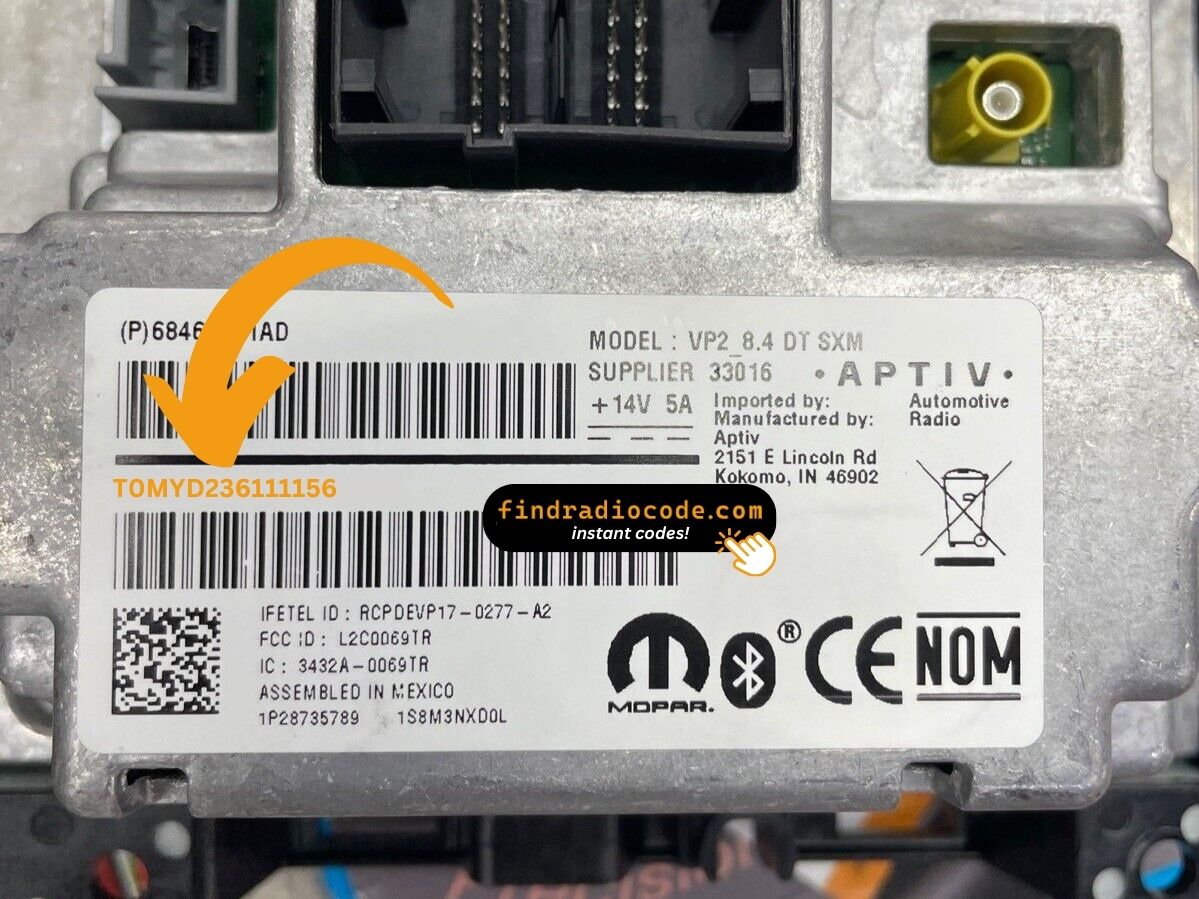
Example: Dodge Nitro serial number label location
Typical Serial Number Formats for 2012 Nitro Radios
Typical radio models in the 2012 Dodge Nitro and their serial formats:
- MyGIG REP 430 (non-nav touchscreen) – Serial prefix:
TM9 - MyGIG RBZ 430 (6.5" touchscreen) – Serial prefix:
TM9orT00AM - MyGIG RER 730N (navigation) – Serial prefix:
TM9 - RES 130 (base CD/MP3) – Serial prefix:
TM9orT00AM
All serials are 14 characters. Ensure to use the serial number, not the part number (P05064... or 68...).
Common S/N Formats Used on 2012 Nitro Units
The 2012 Nitro's factory head units (RES, RBZ and RHB) all carry the serial number on a thermal/barcode chassis label. Across these models the printed string generally follows the broad Chrysler/Dodge convention seen elsewhere in the lineup of that era.
RES (Media Center 130)
- Most often begins with the letter T, frequently followed by a short letter/number group such as a TM- or T00- style opener.
- Continues with a longer unit-unique alphanumeric block.
- Shown on the chassis label alongside a barcode and the Mopar part number.
RBZ / RHB (MyGIG 430 / 430N)
- Also typically T-led on a thermal/barcode sticker, in the MyGIG-era label format.
- The radio model code (RBZ or RHB) is printed on the same label, which makes it easy to confirm exactly which unit you are working with.
- The full alphanumeric string - leading letters and all - is what the calculator needs.
Specific prefixes are best treated as typical examples rather than guarantees, because Chrysler used multiple suppliers across these radios. The most reliable approach is to copy the entire serial exactly as printed on the chassis label and let the calculator validate the format. There is no documented user-accessible display menu on the 2012 Nitro that exposes a different internal serial, so the chassis sticker is the authoritative source.
Troubleshooting Common Radio Problems - Nitro 2012
How you enter the code on the Nitro varies with which radio is fitted:
- Touchscreen models (MyGIG REP 430, RBZ, RER 730N) — Use the on-screen number pad. The display accepts each digit.
- Non-touchscreen models (RES 130, REF) — Press preset button 1 cycling to reach the first digit, button 2 for the second, 3 for the third, 4 for the fourth. Press and hold Enter/OK to confirm.
Not sure of your radio: a glass you can tap means touchscreen entry; a black physical display means preset buttons.
Code rejection on the Nitro's MyGIG almost always means the wrong serial was submitted. The label shows a serial number (TM9 or T00AM, 14 characters) and a part number (P05064... or 68...) — only the serial generates the code.
Look at the sticker again and contact support for a free re-check if needed.
If the Nitro's radio doesn't ask for a code after a battery event:
- Ensure the ignition is in ON (not ACC) and wait 15–20 seconds to initialize.
- Check the radio fuse — a blown fuse stops the radio.
- On certain MyGIG models, pressing the power button on the radio face can wake the code prompt.
Should nothing appear, a blown fuse is the most likely cause.
The Nitro's early Uconnect radio requires physical removal to access the serial label. On the label:
- Serial number — 14 characters, beginning with
TM9orT00AM. Submit this. - Part number — prefixed by
P05064or68. Not needed.
Copy all 14 characters carefully — digits like 0/O and 1/I are easy to mix up on older stickers.
After 3 failed entries on the Nitro's early Uconnect, a 60-minute lockout takes effect. The display will present "WAIT":
- Keep the radio powered — key must stay in ON, engine off is fine.
- Allow the full 60 minutes.
- Cycling the ignition restarts the wait.
Once clear, re-enter carefully.
Why Did the Radio Lock and Ask for a Code?
Nitro owners from this era face this most often because of:
- Battery disconnect or replacement — the primary cause on pre-2014 Nitros.
- Off-road use electrical work — those installing off-road lighting or winches who disconnect the battery will encounter this.
- Aging battery failure — compact SUVs of this generation are prone to battery failure which cut power unexpectedly.
- Used purchase — buying these used often means the code was never recorded.
The unlock code is tied to the radio serial and does not expire.