Why Is the Radio Asking for a Code?
The Viper experience radio lockouts more often than many vehicles because of the nature of supercar ownership:
- Battery drain from storage — Sports cars are often stored over winter, draining the battery enough to trigger the anti-theft.
- Trailering and transport — each time power is cut for trailer transport, the radio reactivates its lock.
- Battery replacement — any battery service will cause the code prompt.
- Used purchase — Viper collectors acquiring without documentation will need the code immediately.
Your code is permanently linked to the serial number and remains valid indefinitely.
Locate the Serial Number Needed to Generate Dodge Viper 2015 Radio Code
The starting step is finding the radio serial number.
Many drivers assume the code depends on the Dodge model or year, but in reality, the unlock process relies on the unique radio's serial number.
The serial is the key used to calculate the correct unlock code.
This is actually better, because if you have an aftermarket radio, the VIN or other Dodge-specific data wouldn't help.
Depending on the radio version used, you may be able to see the serial directly from the display or by looking at the label on the radio chassis.
Identify Your 2015 Viper's Factory Radio
For 2015 the car returned to the Dodge Viper badge after the SRT brand was folded back into Dodge. Mechanically and electronically the head unit is unchanged from 2013-2014: every 2015 Viper, Viper GT, GTS and TA ships with the same Harman-built 8.4-inch Uconnect, paired with the Harman Kardon premium amplifier and speaker package. There is no base or alternative radio on this car.
RA4 - Uconnect 8.4AN with Harman Kardon premium audio (standard): the only factory radio on the 2015 Dodge Viper. 8.4-inch portrait touchscreen with hard buttons (Radio / Media / Climate / Phone / Apps / Nav) across the bottom and tactile volume and tune knobs flanking the display. Built by Harman, it shares its core hardware with the Uconnect 3C/8.4AN family used in Ram, Charger and Grand Cherokee, but runs a Viper-themed UI and works alongside the 7-inch reconfigurable digital cluster.
Harman Kardon premium audio (standard): all 2015 Dodge Vipers use a Harman Kardon high-voltage class-D amplifier with up to 12 channels and high-efficiency GreenEdge speakers; the GTS adds the Harman Kardon Logic 7 surround system with up to 18 speakers, including four subwoofers behind the seats. The head unit itself remains the 8.4AN/RA4.
Quick visual check: if the centre stack has an 8.4-inch portrait touchscreen with the Dodge crosshair / Viper snake on the splash/boot screen, it is the 8.4AN/RA4. There is no smaller 5-inch RA2 or older MyGig variant on the Viper.
Check the Display First - Serial Retrieval Without Tools
The method for 2015 Dodge Viper is this:
The 2015 Dodge Viper (5th generation, VX) features the Uconnect 8.4" touchscreen system (the same platform other same-era Dodge vehicles). You can display the serial number via Dealer Mode:
- Turn ignition to ACC or ON.
- Hold the Climate Up, Climate Down, and Front Defrost buttons simultaneously for 5 seconds.
- Navigate to: System Info → Radio Part Info → Serial Number.
Be aware: The Viper's sports car dashboard layout may have modified climate button positioning compared to sedans. Check the climate buttons on the lower center console.
Screen-Based Serial Lookup Method
The 2015 Dodge Viper uses the same Harman-built 8.4AN/RA4 Uconnect as 2013-2014. That platform exposes a hidden dealer/diagnostic menu that prints the head-unit serial number directly on the touchscreen, so the radio normally does not have to come out of the dash.
Switch the ignition to RUN/ACC and wait for the Uconnect screen to finish booting. Press and hold the driver-side temperature UP, the driver-side temperature DOWN, and the front DEFROST buttons together for roughly 7-10 seconds until the dealer/diagnostic interface opens. Open the radio or system information section to view the serial number printed on screen, and photograph the display so the digits can be transcribed without errors.
Serial Number on the Unit
If the serial number cannot be accessed via display, use the removal method.
Most Dodge Viper factory radios include a label with the serial number printed on the casing.
Step-by-Step:
- Turn off the vehicle.
- Detach the dashboard frame surrounding the radio.
- Unscrew the fasteners.
- Move the unit slightly out to access the label.
The serial number is usually located near the manufacturer sticker.
If Dealer Mode is inaccessible on your 2015 Viper, the Uconnect 8.4" radio needs to be removed. The Viper has a specialized dashboard layout:
- Carefully pry off the carbon fiber trim bezel around the infotainment screen.
- Remove the four mounting bolts (Torx T20).
- Slide the unit out, being mindful of the limited space in the Viper's cockpit.
- Read the serial number on the sticker on the unit side or top.
Tip: Due to the Viper's low cockpit, consider reaching from the other side for easier reach.
Viper's Hardware Label Method
If the screen-based shortcut is not available, the printed chassis label on the back of the radio is the next reliable source for the serial number on a 2015 Dodge Viper. The Viper centre stack is tightly packaged with the 7-inch digital cluster wiring, so work slowly. If you are not comfortable with airbag-adjacent trim work, professional service is recommended.
Safety first. Turn the ignition off, remove the key, disconnect the negative battery terminal, and wait several minutes before touching wiring. Avoid the yellow airbag/SRS connectors entirely and use plastic trim tools so nothing shorts or breaks.
Tools you will need. Plastic trim removal kit, Phillips screwdriver, small Torx bit set, flashlight.
Removal overview. Engage the parking brake and pop the centre dash bezel free with a plastic pry tool, working slowly around the panel so the hidden retaining clips release without cracking the trim. Once the bezel is loose, unplug the HVAC/climate control and hazard-switch connectors at the rear before setting the trim aside on a clean cloth. Remove the screws holding the radio cage to the dash support bracket (typically four Phillips: two upper, two lower), then slide the radio straight rearward and disconnect the antenna lead and the multi-pin power/data harness on the back of the unit.
Where the serial sits. The serial number is printed on a barcode/sticker label on the top, side, or rear of the radio chassis, alongside the Harman part number and the RA4 / 8.4AN markings.
Tips. Photograph the label up close and double-check easily confused characters such as 0/O and 1/I before transcribing the serial.
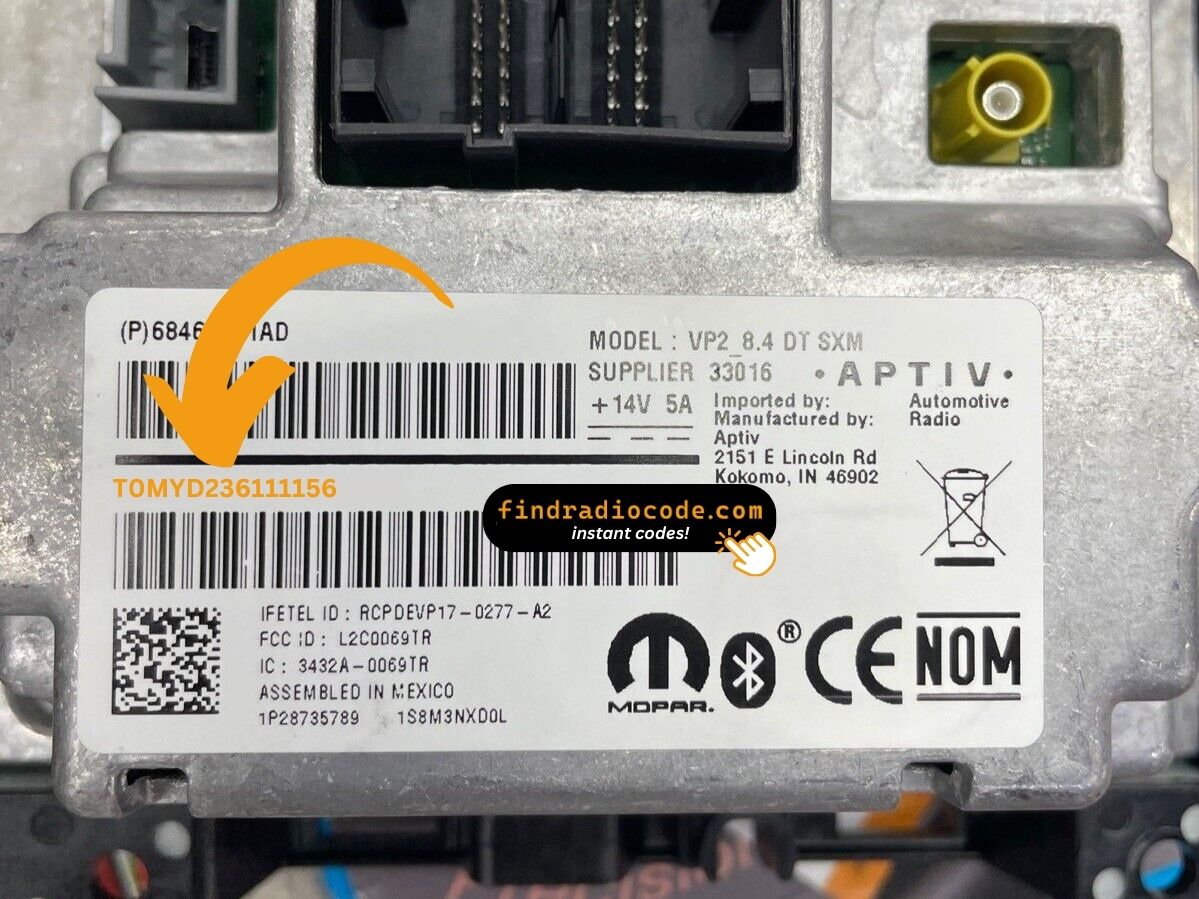
Example: Dodge Viper serial number label location
What a Valid Serial Number Looks Like
The 2015 Dodge Viper uses the Uconnect 8.4" (RA3) system, the same as other Stellantis vehicles:
T00AM– Most common Harman prefixT00BE– Continental variant
The radio is model RA3 (VP2 with premium audio). Serial is 14 characters, alphanumeric. Although it's a performance vehicle, the radio system is standard across the Dodge lineup.
Standard Serial Number Patterns on This Radio
The 2015 Dodge Viper's Harman-built 8.4AN/RA4 head unit follows the standard Mopar/Harman serial style used across the wider Uconnect 3C family. The chassis sticker on the unit itself is always the authoritative reference.
The serial is typically a 14-character alphanumeric string printed on the chassis label. It commonly begins with T - frequent prefixes include T00BE on RA4 units, with T00AM, TM9 and TQ1 appearing on closely related Harman/Continental Uconnect variants. Usually it runs as a continuous string of letters and digits with no spaces or dashes. Always copy the serial exactly as printed and avoid guessing characters that look unclear.
How to Unlock a Dodge Viper Radio After Power Loss
- Skip long troubleshooting discussions or service visits - you can retrieve the code online with the radio S/N.
- First locate the serial number. It is always present on the unit itself, and sometimes it can be visible on the Viper's radio screen.
- Type it into the field above, and the software will identify the correct 2015 Viper unlock code.
- When you receive the code, input it using Viper's radio buttons to unlock the system successfully.
- The entire process takes just a short moment and requires no VIN, documents, or technical knowledge.
Radio Code Input Guide
Once you receive the correct unlock code based on the serial number, you can restore normal functionality by entering it into the unit.
The code entry process depends on the radio interface, but most 2015 Viper systems follow a similar structure using preset buttons, touch controls, or rotary knobs - depending on if it's a factory or an aftermarket unit.
You will typically see CODE displayed on screen.
Step-by-Step - Correct Entering Process
To enter the code on the 2015 Viper's Uconnect 8.4":
- Ignition ON. Screen shows "ENTER CODE".
- Tap the touchscreen keypad for each digit of the 4-digit code.
- Radio unlocks automatically after the 4th digit.
Lockout: 3 incorrect attempts = 60-minute lockout. Keep ignition ON. The Viper's code entry process is the same as all other Uconnect 8.4" systems.
Correct Entering Process
Once the unlock code has been retrieved, the 2015 Dodge Viper's Uconnect 8.4AN/RA4 radio is unlocked directly at the head unit - no scan tool or dealer visit is required.
Limited attempts. Mopar/Uconnect head units only accept a small number of incorrect tries (commonly three) before going into a WAIT/LOCK state, so confirm every digit before pressing it.
Entering the code. Place the ignition in RUN/ACC so the radio powers up but the engine stays off. Wait for the display to show CODE, Enter Anti-Theft Code, or a similar prompt. Key each digit using the on-screen number pad on the 8.4-inch touchscreen, then confirm the entry with the on-screen OK/Enter button.
If a wrong code was entered. If WAIT appears after incorrect attempts, leave the radio powered with the ignition in RUN for the documented cool-down period (around 30 minutes of continuous run-state) before trying the correct code again.
Fixing Common Code Entry Problems for 2015 Viper
When no code entry screen appears after a battery event:
- Ensure full ignition ON and wait 15–20 seconds for the radio to initialize.
- Inspect the fuse panel — fuse failure will prevent the radio from powering on.
- Some Viper units may need a button press to wake the code screen after the system initializes.
Should the display remain blank, a blown fuse is the most likely cause.
The Viper's Uconnect 8.4" uses the touchscreen number pad exclusively for code entry. Once "ENTER CODE" is on screen:
- Tap each digit on the on-screen number pad.
- The radio unlocks without a confirm button after the final number.
Given the Viper's tight cockpit, the center console touchscreen carefully. No physical preset buttons is used during code entry.
Despite the Viper's exotic reputation, the Uconnect 8.4" radio operates identically as on any other Dodge vehicle. A rejected code points to the wrong serial was used. The label contains both the serial (T00AM or TM9, 14 characters) and the part number (P... or 68...) — only the serial generates the unlock code.
If rejected, use Dealer Mode to verify the serial and reach out for a free re-check.
Three wrong entries on the Viper's Uconnect activates the standard 60-minute lockout. The screen shows "WAIT". To handle it:
- Leave the ignition ON for the full 60 minutes.
- Turning the ignition off resets the timer.
Viper note: Sports cars like the Viper are trailered or stored for events which causes battery discharge — battery-related lockouts happen regularly and the same 60-minute wait is required.
The Viper's Uconnect 8.4" serial can typically be found via Dealer Mode without any physical removal. Go to System Info → Radio Part Info → Serial Number. The serial will be a 14-character code starting with T00AM or TM9.
Should you need to pull the radio, be aware that the Viper's compact dashboard has limited space around the center stack. The label additionally contains a part number (P... or 68...) — use only the serial.