Radio code for Chrysler Uconnect 8.4 RA4 / VP4 NA
Instant Radio Code Generation ⚡
Also compatible with: Dodge, Jeep, and RAM.
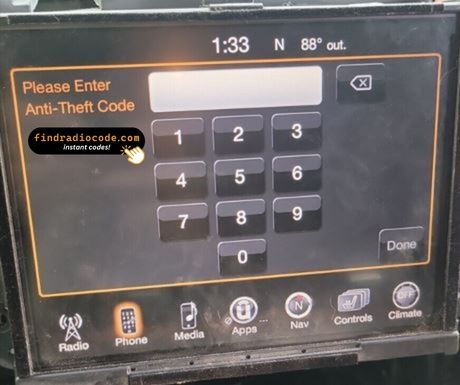
We're available round the clock.
Simply send us a video that shows both the code entry and serial number together.
View our complete Refund Policy.
1. Check out our service explanation video.
2. Browse through our customer reviews.
3. Explore our blog for verification, proof, and detailed information.
How to get your Chrysler Uconnect 8.4 RA4 / VP4 NA radio code?
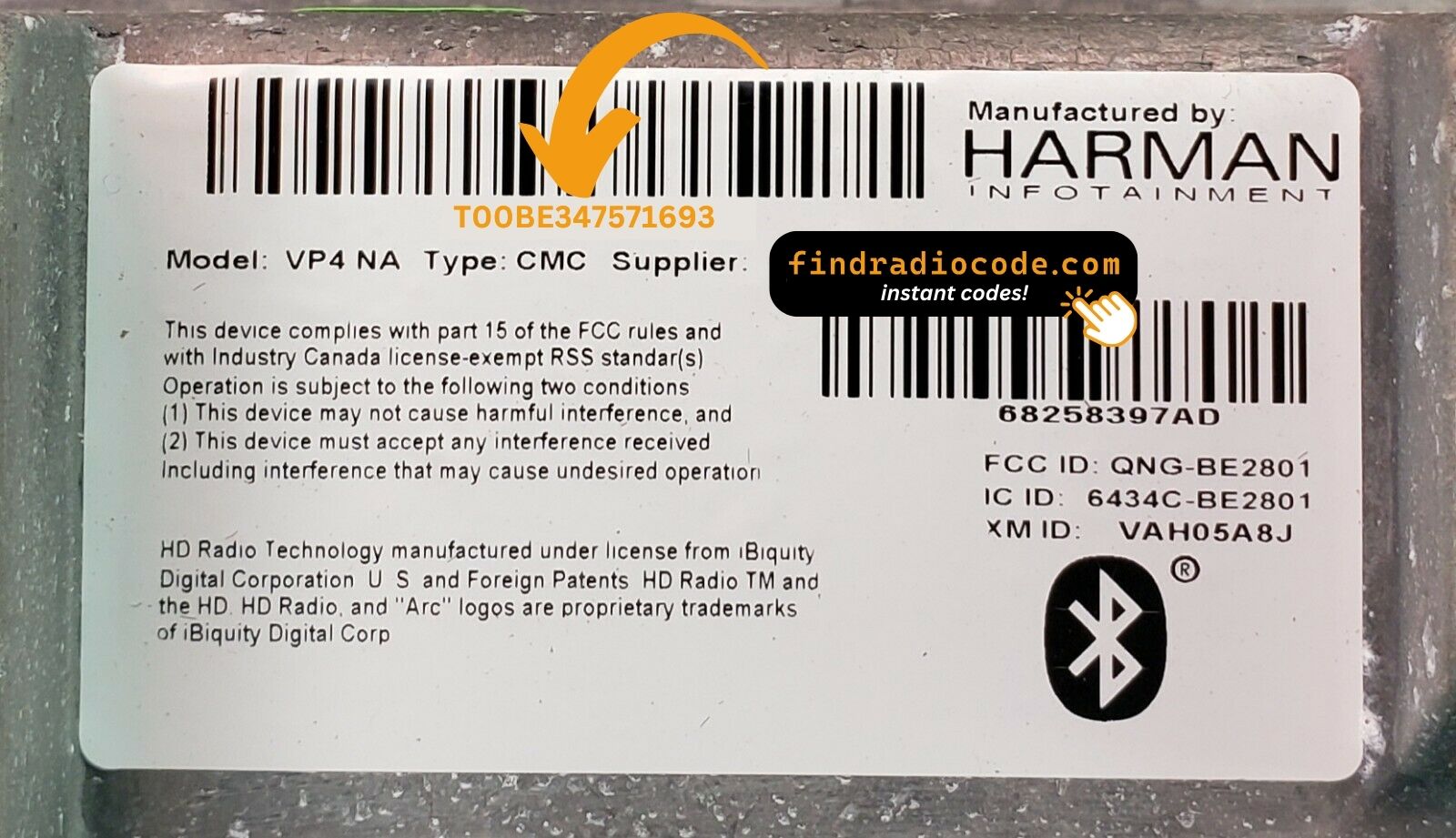
1. Find the serial number on the label at the back of your radio. No VIN required.
2. Enter your serial number in the field provided.
3. Proceed to checkout to instantly receive your unlock code on screen and via email.
Supported partnumbers for model Chrysler Uconnect 8.4 RA4 / VP4 NA
:
COMPATIBLE
COMPATIBILITY
05091051AC
05091051AD
05091051AE
05091051AF
05091051AG
05091051AH
05091051AI
05091051AJ
05091051AK
68164641AC
68164641AD
68164641AE
68164641AF
68164641AG
68164641AH
68190240AA
68190240AB
68190240AC
68190240AD
68190240AE
68190240AF
68190240AG
68190240ZA
68190240ZB
68190240ZC
68190240ZD
68190240ZE
68190240ZF
68190240ZG
68190260AA
68190260AB
68190260AC
68190260AD
68190260AE
68190260AF
68190260AG
68190260AH
68190260AI
68190260AL
68190260AM
68190260ZE
68190260ZF
68190260ZG
68190260ZH
68190260ZI
68190260ZJ
68190260ZK
68190260ZL
68190260ZM
68206388AB
68206388AC
68206388AD
68206388AE
68206388AF
68206388AG
68206388AH
68206388AI
68206388AJ
68206388AK
68206388AL
68206388AM
68211955AA
68211955AB
68211955AC
68211955AD
68211955AE
68211955AF
68211955AG
68211955AH
68211955AI
68211955ZI
68211955ZJ
68224525AA
68224525AB
68224525AC
68224525AD
68224525AE
68224525AF
68224525AG
68224525AH
68224525AI
68224525AJ
68224525ZA
68224525ZB
68224525ZC
68224525ZD
68224525ZE
68224525ZF
68224525ZG
68224525ZH
68224525ZI
68224525ZJ
68224525ZK
68232026AB
68232026AH
68232026AI
68232026AJ
68232026AK
68232026AM
68232026AN
68238619AA
68238619AB
68238619AC
68238619AD
68238619AE
68238619AF
68238619AG
68238619AH
68239117AE
68239117AF
68239117AG
68239117AH
68239117AI
68239117AJ
68257281AA
68257281AB
68257281AC
68258382AA
68258382AB
68258382AC
68258382AD
68258382AE
68258382AF
68258382AG
68258382AH
68258382AI
68258382ZD
68258382ZE
68258382ZF
68258382ZG
68258382ZH
68258382ZI
68258397AD
68258397AF
68258397AG
68258397AH
68258397ZA
68258397ZB
68258397ZC
68258397ZD
68258397ZE
68258397ZF
68258397ZG
68258397ZH
68258671AA
68258671AC
68258671AD
68258671AE
68258671AF
68258671AG
68258671AH
68258671AJ
68258671ZB
68258671ZC
68258671ZD
68258671ZE
68258671ZF
68258671ZG
68258671ZH
68261196AB
68261196AD
68261196AE
68261196AF
68261196AG
68261196AH
68261196AI
68270661AB
68270661AC
68270661AD
68270661AE
68270661AF
68270661AG
68270661AH
68270661ZB
REMANUFACTURED
REPLACEMENT
Related Uconnect Radio Models
If you have a different Uconnect 8.4 radio variant, we also offer unlock codes for these related models:
Other RA4 Regional Variants:
- Uconnect 8.4 RA4 / VP4 CA (Canada)
- Uconnect 8.4 RA4 / VP4 ROW (Rest of World)
- Uconnect 8.4 RA4 / VP4 MX (Mexico)
Previous Generation (RA3):
European Market (RJ/RG):
Other Uconnect Systems:
Technical Specifications - Harman Uconnect 8.4 RA4 / VP4 NA
What is RA4 / VP4 NA?
RA4 refers to the Radio Architecture 4, which is Harman's fourth-generation platform for Uconnect systems. VP4 stands for Vehicle Platform 4, indicating this is designed for the fourth-generation FCA (Fiat Chrysler Automobiles) vehicle architecture. NA indicates this radio is programmed for the North American market with specific frequencies, features, and broadcast standards for the USA and Canada.
| Specification | Details |
|---|---|
| Display Size | 8.4-inch touchscreen (diagonal) |
| Manufacturer | Harman International (subsidiary of Samsung) |
| Radio Platform | RA4 (Radio Architecture 4) |
| Vehicle Platform | VP4 (Vehicle Platform 4) |
| Market Region | North America (NA) - USA, Canada, Mexico |
| Display Resolution | 1280 x 720 pixels (HD) |
| Operating System | Linux-based Uconnect OS |
| Connectivity | Bluetooth, USB, AUX, SiriusXM Satellite Radio |
| Navigation | Available (depending on trim level) |
| Apple CarPlay/Android Auto | Available on 2016+ models |
| Radio Tuner | AM/FM with HD Radio capability |
| Security System | 4-digit anti-theft PIN code |
| Total Part Numbers | 168+ unique part numbers supported |
Important: The RA4/VP4 NA designation means this radio operates on North American broadcast frequencies (87.5-108 MHz for FM) and includes features like SiriusXM satellite radio, which differ from European (ROW) or Canadian (CA) variants.
Complete Step-by-Step Unlocking Guide
How to Unlock Your Uconnect 8.4 RA4 / VP4 NA Radio
Follow these detailed steps to successfully unlock your radio after battery disconnection or radio removal:
Step 1Remove the Radio from the Dashboard
To access the radio serial number label, you'll need to remove the radio unit:
- Disconnect the vehicle battery negative terminal first for safety
- Remove the trim panel around the radio (usually clips in place)
- Unscrew the radio mounting bolts (typically 4x 7mm or 10mm bolts)
- Carefully pull the radio forward without disconnecting cables
- Important: You don't need to disconnect the radio cables completely
Step 2Locate the Serial Number Label
The serial number label is located on the back or side of the radio unit:
- Look for a white or silver label on the radio casing
- The serial number typically starts with T00AM, TM9, or TQ1
- Serial format: Usually 8-12 alphanumeric characters
- Example: T00AM1234567 or TM9ABCD1234
- Also note the part number (e.g., 68258671AF) for verification
Step 3Purchase Your Unlock Code
- Enter your serial number in the form above on this page
- Double-check the serial number for accuracy
- Complete the secure checkout process
- Your 4-digit unlock code will display instantly after purchase
- You'll also receive the code via email for your records
Step 4Reinstall the Radio
- Carefully push the radio back into the dashboard
- Secure with the mounting bolts
- Reinstall the trim panel
- Reconnect the vehicle battery negative terminal
Step 5Enter the Unlock Code
When you start the vehicle, the radio will display "ENTER RADIO SECURITY CODE" or similar message:
- The radio screen will show a 4-digit code entry interface
- Use the preset buttons or touchscreen to enter your 4-digit code
- On most models: Use buttons 1-6 to cycle through numbers 0-9
- Enter each digit of your unlock code in sequence
- Press "OK" or "ENTER" button to submit the code
- The radio should display "ACCEPTED" and unlock immediately
⚠️ Important Tips:
- Attempt Limit: You have 10 attempts to enter the correct code. After 10 failed attempts, the radio may lock for 1 hour.
- Case Sensitive: Enter letters in UPPERCASE as they appear in your code.
- No Spaces: Enter the code without spaces or dashes.
- Power: Ensure the vehicle ignition is in the "ACC" or "ON" position.
Compatible Vehicles for Uconnect 8.4 RA4 / VP4 NA
The Harman Uconnect 8.4 RA4 / VP4 NA radio system is designed specifically for the North American market (United States, Canada, and select territories). This 8.4-inch touchscreen infotainment system was installed in various Chrysler, Dodge, Jeep, and RAM vehicles from model years 2013-2023.
Chrysler Models:
- Chrysler 200 (2015-2017)
- Chrysler 300 (2015-2023)
- Chrysler Pacifica (2017-2023)
- Chrysler Town & Country (2013-2016)
Dodge Models:
- Dodge Challenger (2015-2023)
- Dodge Charger (2015-2023)
- Dodge Durango (2014-2023)
- Dodge Grand Caravan (2013-2020)
- Dodge Journey (2014-2020)
- Dodge Dart (2013-2016)
Jeep Models:
- Jeep Grand Cherokee (2014-2023)
- Jeep Cherokee (2014-2023)
- Jeep Wrangler JK (2015-2018)
- Jeep Wrangler JL (2018-2023)
- Jeep Compass (2017-2023)
- Jeep Renegade (2015-2023)
- Jeep Gladiator (2020-2023)
RAM Models:
- RAM 1500 (2013-2023)
- RAM 2500 (2013-2023)
- RAM 3500 (2013-2023)
- RAM ProMaster (2014-2023)
- RAM ProMaster City (2015-2023)
Note: This unlock code service works for all trim levels including base, sport, limited, SRT, Hellcat, Rubicon, Sahara, Laramie, and higher trim packages equipped with the Uconnect 8.4 system.
Troubleshooting Common Issues
Unlock Code Problems & Solutions
- Turn off the vehicle completely and wait 30 seconds
- Restart the vehicle - the radio should now function normally
- If still not working, disconnect the battery for 5 minutes and reconnect
- Some radios require a drive cycle (drive for 10-15 minutes) to fully reset
- Verify you entered the serial number correctly when purchasing - check for 0/O and 1/I confusion
- Make sure all letters are entered in UPPERCASE
- Ensure you're not including spaces or dashes in the code
- Double-check you're entering the code on the correct radio (if vehicle has multiple audio systems)
- Contact our support with a photo of your serial number label for verification
- Wait 60 minutes with the radio powered on (ignition in ACC or ON position)
- After 1 hour, the radio will automatically reset and allow new attempts
- Alternative: Disconnect the battery for 10 minutes, then reconnect
- The attempt counter will reset and you can try entering the code again
- The label is usually on the back or right side of the radio unit
- Use a flashlight and mirror to check hard-to-see areas
- Some labels are on the top of the radio - check all sides
- Look for a white or silver sticker with barcode and text
- The serial number often starts with T00AM, TM9, or TQ1
- If completely missing, contact us with your part number - we may have alternative solutions
- Check all fuses related to the radio and infotainment system
- Verify the radio is receiving power (check connector behind radio)
- A blank screen may indicate a hardware failure, not just a code issue
- Try performing a radio reset: Hold power button + volume down for 10 seconds
- If screen remains blank, the radio may need professional repair or replacement
- Note: A completely dead radio cannot accept unlock codes
- This usually happens if the battery was disconnected again
- Use the same code you purchased - it remains valid for your radio permanently
- Check for loose battery connections or electrical issues
- If your vehicle is having repeated battery drain issues, address those first
- Keep your unlock code saved - you can reuse it unlimited times
💡 Still Need Help?
If your issue isn't listed above or the solutions don't work, please contact our support team. We offer a 100% Money-Back Guarantee if the code doesn't work for your radio. Include a video showing the code entry attempt and the serial number label for fastest assistance.