Harman Uconnect 8.4 RJ4 VP4 EU Locked? Get It Back Today
Harman | Chrysler | Instant Retrieval
Complete guarantee details.
Recognized Serial Prefixes
| Serial Prefix | Status |
|---|---|
T00AM |
Supported |
T00BE |
Supported |
T0012 |
Supported |
If your serial starts with any prefix above, we can recover your code.
How the process works
The whole process needs one piece of information and a few minutes.
- 1 Find the serial number Pull the radio a few centimetres forward and read the number off its sticker - nothing has to be unplugged.
- 2 Put it in the form on the left Copy it character for character. We check the format before checkout, so a typo never costs you anything.
- 3 The code comes back instantly Payment done, code shown on screen and emailed. It works for the life of the unit, so hold on to it.
If it does not work, you get your money back.

This is an example label - the one in your car sits in the same place and looks much like it.
Sample serials we handle
Examples of serial numbers we see on Chrysler vehicles:
T00AM1801T0282
(prefix: T00AM)
T00BE351823197
(prefix: T00BE)
T0012566327123
(prefix: T0012)
T00AM2244H1937
(prefix: T00AM)
T00BE104477269
(prefix: T00BE)
Prefixes we see most: T00AM, T00BE, T0012
Is This Your Uconnect 8.4 RJ4 VP4 EU?
Before requesting a radio code it is important to confirm the exact model. Match the design, controls, display and features below with the unit in your dashboard.
Visual signs on this unit:
- Centre-stack 8.4" touchscreen
- Built-in navigation with factory map data
- Built for the Right-hand drive / Rest of World market
- RJ4 VP4 EU printed on the factory label
- Label serial opening with T00AM, T00BE, T0012
You most likely have the Uconnect 8.4 RJ4 VP4 EU if:
- RJ4 VP4 EU appears as the sales code on the label
- the serial on the label starts with T00AM, T00BE, T0012
- the vehicle was built between 2015-2018
- the display matches the Uconnect 8.4 8.4" touchscreen
RJ4 EU is the navigation variant. RJ3 is non-nav. Distinguish by NAV tile presence.
Everything You Need to Know About the Uconnect 8.4 RJ4 VP4 EU
The Uconnect 8.4 RJ4 VP4 EU is an original factory-installed head unit developed for selected Chrysler vehicles. Designed to provide reliable audio playback and vehicle integration, this unit may also offer Bluetooth connectivity, touchscreen controls, CD/DVD playback, navigation or multimedia support, depending on the exact configuration.
Uconnect 8.4 RJ4 (VP4 Europe) is the second-spec 8.4-inch navigation Uconnect for select European/RHD applications - VP4 hardware, built-in EU maps, DAB+.
The Uconnect 8.4 RJ4 VP4 EU was installed in various Chrysler models between 2015-2018. It was commonly fitted to vehicles built on the Harman multimedia platform and is still one of the more recognisable factory radios of that period.
Common features on this unit:
8.4" touchscreen
AM/FM radio
Factory navigation with on-board maps
Bluetooth hands-free and audio streaming
USB media playback
SiriusXM satellite radio*
Steering wheel control support
Anti-theft security code
*Availability depends on the vehicle specification.
Like many factory-installed radios, the Uconnect 8.4 RJ4 VP4 EU is protected by an anti-theft system. If power is interrupted after replacing or disconnecting the vehicle battery, the unit may request the original radio code before it can be used again.
Background on the platform itself is published by the official Uconnect site.
Finding the Serial Number on the Uconnect 8.4 RJ4 VP4 EU
The code is calculated from the radio's own serial number, so that number is the only thing you need before ordering. It is printed on the factory sticker of the unit itself, not in the vehicle documents.
On this unit: Top of the chassis label.
Getting to the label:
- Slide the radio out of the dash - most units need a pair of release keys, which cost very little online.
- Find the white label on the housing and read the serial off it - it sits beside the barcode.
- Copy it into the form letter for letter; the checker catches any typo before payment.
The label you are looking for
The unlock on video

Recorded on a radio from this family; your unit behaves the same.
The Situations That Lock a Uconnect 8.4 RJ4 VP4 EU
A locked Uconnect 8.4 RJ4 VP4 EU is nearly always the result of one of four everyday situations, none of which mean anything is broken.
New battery, locked radio
The most common trigger by far: the moment the battery is disconnected, the radio forgets it was ever unlocked and asks for its code on the next start.
A unit from a breaker
The code does not transfer between radios: the swapped-in unit has a different serial, and that serial is what the code is based on.
Back from the mechanic, radio locked
Mechanics routinely disconnect the battery before electrical work. The car comes back fixed and the radio comes back locked - expected, not a fault.
A used car with a locked radio
Second and third owners almost never get the code card. The radio itself still carries everything needed - its serial number.
All four roads lead to the same fix - read the serial off the unit, enter it above, and the original code comes back instantly.
OEM Technical Specifications
| Specification | Value |
|---|---|
| Manufacturer | Harman |
| Radio Family | Uconnect 8.4 |
| Variant | RJ4 VP4 EU |
| Market | Right-hand drive / Rest of World |
| Vehicle Brand | Jeep / Alfa Romeo |
| Production Years | 2015-2018 |
| Display | 8.4" touchscreen |
| Navigation | Yes |
| Serial Prefixes | T00AM, T00BE, T0012 |
The exact functionality of the Uconnect 8.4 RJ4 VP4 EU depends on the vehicle it was installed in. Some versions include full multimedia features like navigation and Bluetooth, others ship in a simpler configuration. Features vary by production year, trim and regional specification.
Find Your Part Number 7
These are the OEM references this page covers. If the number on your radio's label is in the list, we can retrieve your code.
68234425AA 68234425AB 68234425AC 68234425AD 68234425AE 68234425AF 68234425AG Look for the part number on the radio's identification sticker, typically beside the serial number. Any reference listed here is covered by this service.
Uconnect 8.4 RJ4 VP4 EU Vehicle Compatibility
| Vehicle Model | Typical Production Years | Notes |
|---|---|---|
| Jeep Cherokee KL, Grand Cherokee WK2 (EU nav, specific trims) | 2015-2018 | |
| Alfa Romeo Giulia, Stelvio (specific nav builds) | 2015-2018 |
Some vehicle models were available with more than one factory radio depending on trim level, production year or regional market. Always confirm your radio model before ordering a code.
How to enter your Uconnect 8.4 RJ4 VP4 EU code
It takes less than a minute once you have the four digits.
- Put the key in accessory position so the unit powers up and asks for the code.
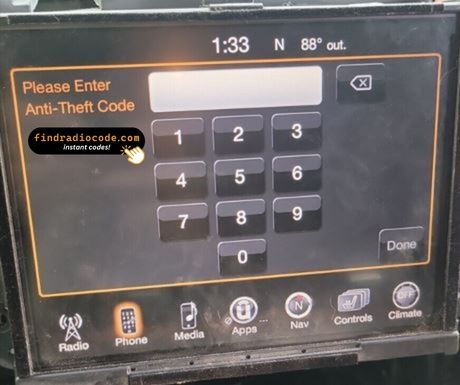
- A four-digit keypad appears on the display.
- Key in the code, one digit at a time, left to right.
- The unit checks the code automatically on the last digit.
- Right code in, lock screen gone - the radio is back to normal.
When it does not go to plan
The radio is counting down
A countdown means the anti-theft system is holding the unit. Leave the ignition on until it clears. 30-minute WAIT after three wrong attempts.
I cannot find the serial number
It is printed on the housing, so the unit normally has to come forward to read it. Top of the chassis label.
Why it happened again
That is normal - the anti-theft system re-arms every time the unit loses power. Battery disconnect.
I am not sure I have the right variant
Close relatives of this unit look almost identical from the driver's seat. RJ4 EU is the navigation variant. RJ3 is non-nav. Distinguish by NAV tile presence.
Note the four digits somewhere safe - they are yours for good and reusable after any power cut.
Questions About Your Uconnect 8.4 RJ4 VP4 EU Code
Verified Customer Experiences
What a few recent customers said after unlocking - every review is on the reviews page.
"Best 20.00 dollars I've spent. Went to 3 different dealerships, and they acted like they couldn't find the code and i found seen findradiocode on youtube and it only took 3 second"
I would give it a 10 all day didn't know if I was going to get took for my money but soon as I sent the money the code I need for my wife chrysler 200 came back an work
Robert Edmonds - Chrysler
Nice the code worked great now I can use my radio thanks for your help
John flores - Chrysler
Ordering a Uconnect 8.4 RJ4 VP4 EU Code
Your original code arrives the moment you pay, with an email copy for safe keeping.
A complete refund whenever the code fails to open your unit.
Available 24/7 - no appointment, no dealer visit, no towing.
One code, for good: the same digits unlock the unit after every power cut.
You May Also Have
The models below share the same family and are frequently mistaken for the Uconnect 8.4 RJ4 VP4 EU. Not your radio? Try one of these.
Every Harman radio family we cover, not just the Uconnect 8.4 RJ4 VP4 EU, is on the Harman radio code page.