Recover Your Harman Uconnect 8.4 RG3 VP3 EU Radio Code
Harman | Chrysler | Instant Retrieval
See the full guarantee terms.
Supported Radio Serial Prefixes
| Serial Prefix | Status |
|---|---|
T00AM |
Supported |
T00BE |
Supported |
T0012 |
Supported |
If your serial starts with one of these, we can retrieve your code.
How it works
The whole process needs one piece of information and a few minutes.
- 1 Track down the number on the unit The serial sits on a sticker on the radio chassis, not in the car's paperwork. Ease the unit forward using release keys to see it.
- 2 Key in the serial Exactly as printed, without spaces or dashes. The format is checked before any payment.
- 3 Get the code The code is on screen in seconds and in your inbox. It never expires and keeps working every time power is cut.
If it does not work, you get your money back.

Same label, different radio: yours carries its own serial in this spot.
Sample serials we handle
Examples of serial numbers taken from Chrysler vehicles:
T00AM1801T0282
(prefix: T00AM)
T00BE351823197
(prefix: T00BE)
T0012566327123
(prefix: T0012)
T00AM2244H1937
(prefix: T00AM)
T00BE104477269
(prefix: T00BE)
Prefixes we see most: T00AM, T00BE, T0012
Do You Have the Uconnect 8.4 RG3 VP3 EU?
Not sure if your vehicle is fitted with the Uconnect 8.4 RG3 VP3 EU? Compare the design, controls, display and features listed below against your factory radio.
Typical identification features:
- 8.4" touchscreen set into the middle of the dash
- A non-navigation unit: the menus never show a map
- A Europe-market build
- Sales code RG3 VP3 EU on the chassis label
- Label serial opening with T00AM, T00BE, T0012
Your radio is the Uconnect 8.4 RG3 VP3 EU if:
- the chassis label carries the RG3 VP3 EU sales code
- the printed serial opens with T00AM, T00BE, T0012
- the car left the factory between 2013-2017
- the screen is the 8.4" touchscreen fitted to the Uconnect 8.4
RG3 is non-nav (EU). For navigation, the EU equivalent is RG4. DAB+ support distinguishes EU variants from NA RA3.
Learn More About the Uconnect 8.4 RG3 VP3 EU
Fitted as factory equipment in selected Chrysler models, the Uconnect 8.4 RG3 VP3 EU handles audio playback and vehicle integration from the factory. Depending on the version, it can also add Bluetooth, touchscreen operation, CD/DVD playback, navigation or wider multimedia support.
Uconnect 8.4 RG3 (VP3 Europe) is the first-spec 8.4-inch non-navigation Uconnect for European markets - 8.4-inch touchscreen, DAB+ radio support, no built-in maps. European language packs.
Chrysler used the Uconnect 8.4 RG3 VP3 EU on selected models produced between 2013-2017, typically alongside the Harman multimedia platform. It is one of the factory units most often encountered from that era.
Typical features include:
8.4" touchscreen
AM/FM radio
Bluetooth for hands-free calls and music streaming
Media playback over USB
SiriusXM satellite radio*
Steering wheel control support
Anti-theft security code
*Availability varies with the vehicle specification.
As with other Harman factory units, the Uconnect 8.4 RG3 VP3 EU locks itself when power is lost. After a battery disconnect or a workshop visit the screen will prompt for the original security code before any audio returns.
For the manufacturer's own documentation of this platform, see the official Uconnect site.
Where to Find Your Uconnect 8.4 RG3 VP3 EU Serial Number
Your unlock code is tied to the radio's serial number, so it is the one detail the form asks for. The number lives on the label stuck to the chassis of the radio itself.
On this unit: Top of the chassis. Pull the radio.
How to reach the number:
- Pull the unit forward with release keys (cheap online) - the wiring can stay connected.
- Find the printed label on the housing and read the serial off it - it sits beside the barcode.
- Enter it exactly as it appears - no spaces, no dashes.
Where the label sits on this radio
Watch the whole process

Our own clip of the process - more videos are on the channel.
Factory Radio Specifications
| Specification | Value |
|---|---|
| Manufacturer | Harman |
| Radio Family | Uconnect 8.4 |
| Variant | RG3 VP3 EU |
| Market | Europe |
| Vehicle Brand | Jeep / Fiat / Alfa Romeo |
| Production Years | 2013-2017 |
| Display | 8.4" touchscreen |
| Navigation | No |
| Serial Prefixes | T00AM, T00BE, T0012 |
Not every Uconnect 8.4 RG3 VP3 EU offers the same set of features. Bluetooth connectivity, navigation, USB support or multimedia playback may vary depending on the vehicle specification, production year and factory equipment package.
The Situations That Lock a Uconnect 8.4 RG3 VP3 EU
A locked Uconnect 8.4 RG3 VP3 EU is nearly always the result of one of four everyday situations, none of which mean anything is broken.
You swapped the radio itself
A used unit from a donor car arrives locked, and the code from your old radio will not fit - the code follows each radio's own serial number, so order it for the serial on the REPLACEMENT unit.
The battery was disconnected
Any battery work counts as a power cut to the radio. It re-arms automatically and waits for the original code before playing again.
The code card is long gone
The code card that shipped with the car disappeared an owner or two ago. That is not a problem - the code is recovered from the radio's serial, not from any paperwork.
The car was in the garage
Any repair that touches the 12V supply - even briefly - is enough to bring up the code screen on the next start.
Whichever of these applies, the fix is identical: the serial number off the radio, the form at the top of this page, and the code is emailed in seconds.
Compatible Vehicles
| Vehicle Model | Typical Production Years | Notes |
|---|---|---|
| Jeep Cherokee KL, Grand Cherokee WK2, Renegade BU (EU) | 2013-2017 | |
| Fiat 500X (EU, top trims) | 2013-2017 | |
| Alfa Romeo Giulia, Stelvio (EU) | 2013-2017 |
Vehicle compatibility can differ between trims, model years and regional versions. Because the same car could leave the factory with different radios, identify your unit before placing an order.
Supported Factory Identifiers 59
Check your radio's label against this list - any matching number means the code for your unit can be retrieved here.
Behind the 59 references sit 9 base part numbers; suffix letters like AA or ZD separate factory revisions of the same hardware, all of them supported here.
05091056AC 05091056AD 05091056AE 05091056AF 05091056AG 68190244AB 68190244AC 68190244AD 68190244AE 68190244AF 68190244AG 68211961AA 68211961AI 68211961AJ 68211961AK 68211961AL 68211961AM 68224533AA 68224533AB 68224533AC 68224533AD 68224533AE 68224533AF 68224533AG 68224533AH 68224533AI 68258359AA 68258359AC 68258359AD 68258359AE All 59 supported references
68258359AF 68258359AG 68258359AH 68258359AI 68258406AB 68258406AC 68258406AD 68258406AE 68258406AF 68258406AG 68258406AH 68270660AD 68270660AE 68270660AF 68270660AG 68270660AH 68349245AB 68349245AC 68349245AD 68349245AE 68349245AF P68242384AA P68242384AB P68242384AC P68242384AD P68242384AE P68242384AF P68242384AG P68242384AH You will find the part number on the factory sticker of the unit, normally alongside the serial. A match in this list confirms you are on the right page for the Uconnect 8.4 RG3 VP3 EU.
Typing the code into your Uconnect 8.4 RG3 VP3 EU
Nothing to install and no tools needed - just the four digits.
- Give the radio power - key to accessory is enough - and wait for the code prompt.
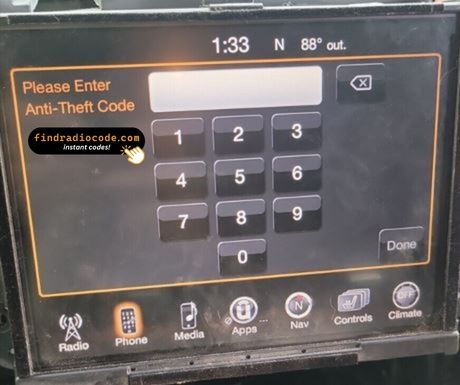
- The screen shows a numeric keypad for the four digits.
- Punch in the four digits, first to last.
- Verification happens by itself once the fourth digit is in.
- The security screen disappears and the unit returns to normal operation.
Things that can catch you out
The screen shows a wait timer
The timer is the radio guarding itself after failed entries - power on, patience, then try again. 30-minute WAIT after three wrong attempts.
The serial is hiding from you
Nothing on the car's menus shows it - the number lives on the radio's own label. Top of the chassis. Pull the radio.
It is asking for the code a second time
By design, every loss of power resets the anti-theft lock. Loss of 12V power.
This radio looks like several others
A few models in this family share the same face, so the label is what settles it. RG3 is non-nav (EU). For navigation, the EU equivalent is RG4. DAB+ support distinguishes EU variants from NA RA3.
Save the code: it stays valid, so the next battery change costs you nothing.
Everything Else You Might Ask
Recent Reviews From Our Customers
What a few recent customers wrote after unlocking - every review is on the reviews page.
"Amazing people amazing service everything amazing I got my code immediately thank God for these people"
Nice the code worked great now I can use my radio thanks for your help
John flores - Chrysler
Quick and easy! Got my code immediately after payment.
Twig - Chrysler
What Happens After You Order
Your genuine code arrives the moment you pay, with an email copy for safe keeping.
Full money-back guarantee if the code does not unlock your radio.
Order at any hour - no dealership, no appointment, no towing.
Works every time - the code stays valid for the life of the radio.
You May Also Have
Still unsure? These neighbouring units use much of the same hardware as the Uconnect 8.4 RG3 VP3 EU and may be what you actually have.
The Uconnect 8.4 RG3 VP3 EU is one of many Harman head units we cover - the Harman radio code overview shows all of them.