
Factory Radios Used in the 2011 Dodge Nitro
Unsure which unit is in your dash? Compare the screen and buttons with the 2011 Dodge Nitro radios below. Each guide lists the serial prefixes and how to tell it apart.
| Years | Factory radio | Serial starts with |
|---|---|---|
| 2008-2013 | MyGIG NTG4 REN Harman |
T00AM, T00BE, T0012
|
| 2008-2012 | MyGIG NTG4 REU Harman |
T00AM, T00BE, T0012
|
Why Did the Radio Lock and Ask for a Code?
Nitro owners from this era encounter radio lockouts primarily due to:
- Battery disconnect or replacement — the primary cause on pre-2014 Nitros.
- Off-road use electrical work — Nitro owners who add accessories who disconnect the battery trigger the lock.
- Aging battery failure — Nitros from this era are prone to dead batteries which trigger the lock.
- Used purchase — buying these used often means the code was never recorded.
Your code is tied to the radio serial and does not expire.
Locked Nitro Radio? Here's Exactly How to Get the Code
- Rather than relying on Dodge dealership lookup or online threads you can find the code online with the radio S/N.
- First locate the serial number. You will always find it on the unit itself, and sometimes it can be visible on the Nitro's display.
- Type it into the field above, and our software will retrieve the correct 2011 Nitro unlock code.
- When you receive the code, type it in using Nitro's radio buttons to release the blockade fully.
- The entire process takes just a short moment and requires minimal effort.
Can't Locate Your Unit's Serial Number? Follow These Steps for Dodge Nitro 2011
The first step is locating the radio serial number.
Most people assume the code depends on the Dodge model or year, but in reality, the whole process depends on the unique radio unit's serial number.
Each radio has its own serial tied to the security system.
This is even better, because if you have bought an aftermarket radio, the VIN or other Dodge-specific data wouldn't be of much use.
Based on the radio version used, you may be able to see the serial directly from the display or by checking the label on the radio chassis.
Factory Radios on the 2011 Dodge Nitro
The 2011 Dodge Nitro carried over the late-KA Mopar radio lineup, with a fairly narrow selection by this point in the model's run. Most 2011 Nitros left the dealership with one of the following factory head units:
- RES (Media Center 130) - the standard single-disc CD/MP3 deck with AM/FM tuner. Optional satellite-ready and Uconnect Phone variants exist depending on the trim.
- RBZ (Media Center 430) - the upmarket MyGIG touchscreen with 6.5" screen, internal hard drive for music storage, and SiriusXM-ready hardware. No factory navigation on this unit.
- RHB (Media Center 430N) - the same MyGIG touchscreen as RBZ but with built-in Garmin-based navigation.
You can usually identify which one is in your dash at a glance: a single-line text display with a CD slot points to the RES, while a 6.5" colour touchscreen points to one of the MyGIG units (RBZ or RHB). The radio model code (RES, RBZ, RHB) is also printed on the chassis label visible once the unit is out of the dash.
Access the Serial via the Radio Display
The method for 2011 Dodge Nitro is this:
The 2011 Dodge Nitro off-road-oriented SUV of this generation may feature a MyGIG radio (RER 730N) or an first-generation Uconnect system fitted in the SUV's center stack. These pre-2014 head units lack on-screen serial display.
The serial number can only be accessed by physically removing the radio from the Nitro's center stack and reading the barcode label on the radio chassis.
Nitro's Hardware Label Method
If the serial number cannot be accessed via display, use the hardware method.
Most Dodge Nitro original radios include a sticker with the serial number printed on the casing.
Process details:
- Remove key from ignition.
- Carefully remove surrounding panel pieces.
- Loosen screws holding the radio.
- Move slightly to inspect the label.
To access the serial on the 2011 Nitro's radio, you must remove it from the dash:
- Power down the vehicle.
- Carefully pry off the center trim panel around the radio. The Nitro's center stack bezel releases with friction clips – work from the lower edge.
- Remove the four Torx T20 mounting screws holding the radio.
- Slide the unit forward and read the serial label on the back or side of the radio.
Take care with the wiring harness. You don't have to disconnect it unless more space is required.
View Serial by Pulling Out the Radio Unit
On the 2011 Dodge Nitro the serial number is printed on a sticker on the radio chassis itself, not shown on the screen, so the only reliable way to read it is to take the head unit out of the dash. The good news is the Nitro's center stack is one of the simpler ones to disassemble - clips and four screws, no hidden fasteners behind padding.
Safety first:
- Turn the ignition off and remove the key.
- Disconnect the negative battery terminal.
- Wait at least 10-15 minutes for the airbag/SRS capacitors to discharge.
- Avoid yellow airbag-related connectors and wiring you may see behind the dash.
- Use plastic trim tools rather than metal screwdrivers to protect the bezel.
Tools to have ready:
- Plastic trim/pry tool set (a 4140-style pry tool is well suited).
- 7 mm socket, ideally magnetic, plus a Phillips screwdriver.
- Soft cloth or painter's tape to protect bezel edges.
- A small cup or magnetic tray for the four radio bracket screws.
Removal sequence (2011 Nitro):
- Lift off the rubber mat from the top tray on the dash, then remove the two Phillips screws hidden underneath. The tray itself is otherwise clip-retained and pops up by pulling from the windshield-side corners.
- Move to the center bezel that runs from the bottom of the tray down to the top of the center console - it is also held by clips. Putting the shifter in 1st can give you a little extra clearance to pull it.
- Tilt the bezel forward and disconnect the switch connectors on the back so you can fully set it aside.
- You should now see the radio held in by four Phillips screws (one near each corner of the chassis). Remove all four.
- Slide the head unit straight out, then unplug the wiring harness and antenna lead. Always pull the antenna by the connector, never by the cable.
Reading the serial: with the radio in hand, look at the top, sides and rear of the metal chassis. Mopar prints a thermal/barcode label there showing the radio model code (RES, RBZ or RHB), the Mopar part number and the long alphanumeric serial number. That serial - copied exactly as printed, leading letters included - is what feeds the code calculator. Photograph the label so you can zoom in and double-check ambiguous characters (0 vs O, 1 vs I) before reinstalling the radio in reverse order.
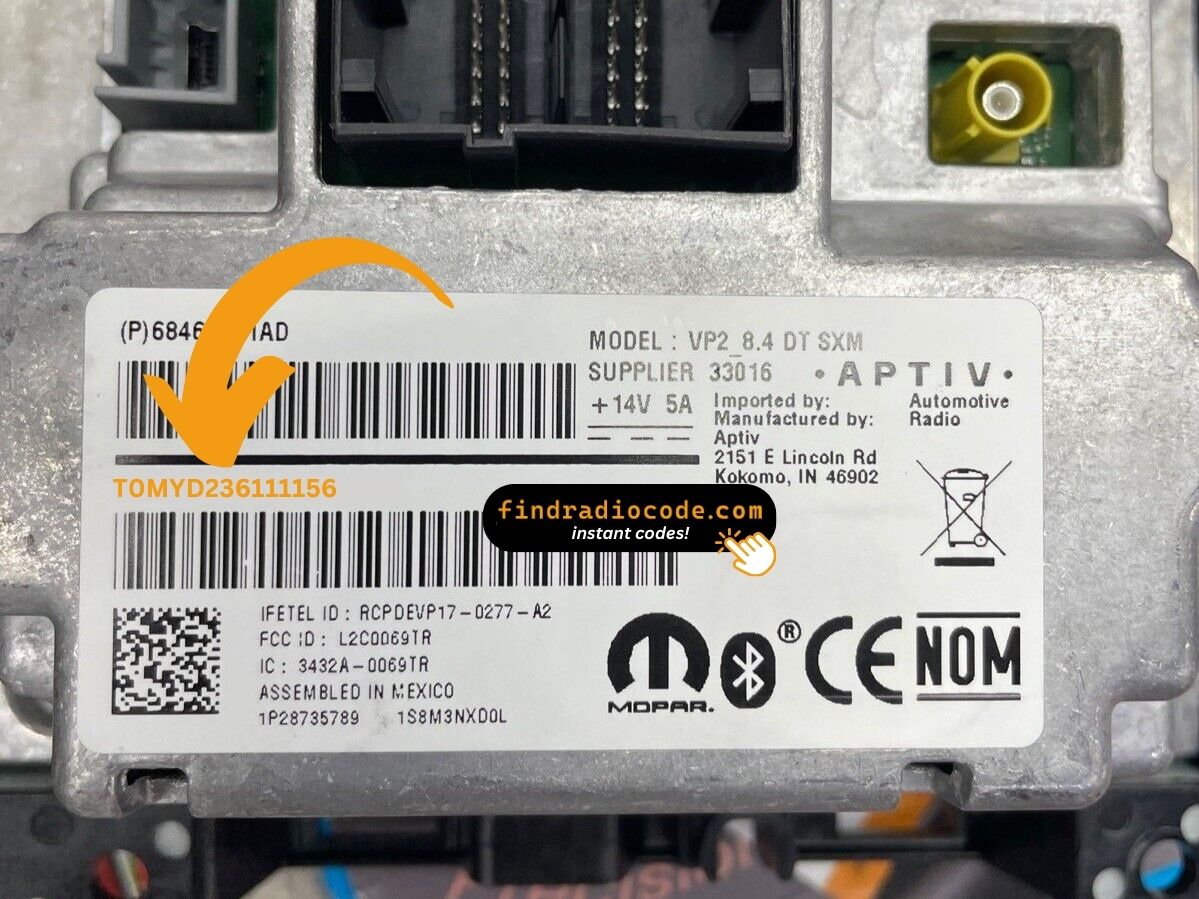
Example: Dodge Nitro serial number label location
Common Serial Number Structures
Typical radio units in the 2011 Dodge Nitro and their serial formats:
- MyGIG REP 430 (non-nav touchscreen) – Serial prefix:
TM9 - MyGIG RBZ 430 (6.5" touchscreen) – Serial prefix:
TM9orT00AM - MyGIG RER 730N (navigation) – Serial prefix:
TM9 - RES 130 (base CD/MP3) – Serial prefix:
TM9orT00AM
All serials are 14 characters. Be sure to use the serial number, not the part number (P05064... or 68...).
Typical Serial Number Formats for 2011 Nitro Radios
The serials printed on the chassis labels of the 2011 Nitro's factory radios generally follow the broad Chrysler/Dodge convention used across this era. The exact pattern varies by model code and supplier, so the safest summary is:
RES (Media Center 130)
- Typically opens with the letter T, often followed by a short letter/number group such as a TM- or T00- style prefix.
- Continues with a longer unit-unique alphanumeric block.
- Printed on a thermal/barcode label alongside the Mopar part number and the radio model code.
RBZ / RHB (MyGIG 430 / 430N)
- Uses the MyGIG-era serial label, also typically T-led on a thermal/barcode sticker.
- The radio model code (RBZ or RHB) is printed on the same label, which makes it easy to confirm the exact unit.
- The full alphanumeric string is what the calculator needs - including any leading letters.
Treat any specific prefix you see referenced online as a typical example rather than a guarantee: Chrysler used multiple suppliers across these head units. The most reliable approach is to copy the entire serial exactly as it is printed on the chassis label and let the calculator validate the format. There is no documented dealer-mode menu on the 2011 Nitro that exposes a different internal serial value, so the chassis sticker is the authoritative source.
Code Entry Process for 2011 Nitro
When you obtain the correct unlock code based on the S/N, you can restore default functionality by entering it into the unit.
The code entry process depends on the radio interface, but most 2011 Nitro systems follow a similar structure using preset buttons, touch controls, or rotary knobs - depending on if it's a factory or an aftermarket unit.
You will typically see CODE displayed on screen.
Step-by-Step - Correct Entering Process
To input the unlock code on the 2011 Nitro's radio:
- Turn ignition to ON. The radio shows "CODE" or "ENTER CODE".
- Touchscreen models (REP/RBZ/RER): Use the on-screen keypad to enter each digit.
- Non-touchscreen models (RES/REF): Press preset button 1 multiple times for the first digit, button 2 for the second, 3 for the third, 4 for the fourth. Press and hold Enter/OK to confirm.
Warning: 3+ wrong attempts cause a lockout. Keep the Nitro's radio powered for about 60 minutes to reset it.
Step-by-Step Code Input Guide
Once you have the unlock code for your 2011 Dodge Nitro, entering it on the original Mopar head unit is straightforward, but the radio is unforgiving about wrong attempts. Read the warning below before you start typing.
Limited Attempts Warning: Mopar anti-theft logic on this generation typically allows only three consecutive wrong code entries. After the third bad attempt the display switches to WAIT and the keypad is locked. The accepted recovery is to leave the radio powered with the ignition in the RUN position for a continuous 30 minutes - the vehicle may be driven during this time. Only after the timer clears will the unit accept a fresh attempt. Pulling the radio fuse or disconnecting the battery does not shortcut the cooldown, so always double-check each digit before pressing it.
Step-by-step entry:
- Turn the ignition key to the RUN or ACC position so the radio powers up. The display should show a
CODEor anti-theft prompt. - On the legacy RES deck, use preset buttons 1 through 6 on the faceplate to enter each digit of the code in order - preset 1 for a 1, preset 2 for a 2, and so on.
- On a MyGIG RBZ or RHB touchscreen, the anti-theft prompt presents an on-screen number pad - tap each digit of the code in turn.
- If the radio shows an explicit Enter or OK soft key after the last digit, press it. On simpler RES decks the radio accepts the sequence automatically once all digits are in.
- When the code is correct the prompt clears and the radio returns to normal operation.
If WAIT appears, do not keep retrying. Leave the ignition in RUN, let the 30-minute cooldown finish, and re-verify the serial and the code carefully before re-entering them.
Troubleshooting Common Radio Problems - Nitro 2011
After 3 failed entries on the Nitro's early Uconnect, a 60-minute lockout takes effect. The display will show "WAIT":
- Leave the radio powered — ignition stays in ON, engine off is fine.
- Allow the full 60 minutes.
- Cycling the ignition resets the timer.
Once clear, try the verified code again.
When no "CODE" screen appears after a battery event:
- Confirm the ignition is in ON (not ACC) and wait 15–20 seconds to power up.
- Check the radio fuse — a blown fuse prevents any display.
- On some older units, pressing any button on the radio face can wake the code prompt.
Should nothing appear, a blown fuse is the most likely cause.
A rejected code on the Nitro's early Uconnect almost always means a serial number mismatch. The label shows a serial number (TM9 or T00AM, 14 characters) and a part number (P05064... or 68...) — submit only the serial.
Re-read the label and contact support for a free re-check if needed.
The Nitro's early Uconnect radio must be removed to read the serial label. On the label:
- Serial number — 14 characters, beginning with
TM9orT00AM. Use this. - Part number — starts with
P05064or68. Do not use.
Copy all 14 characters carefully — similar-looking characters are easy to mix up on older stickers.
How you enter the code on the Nitro varies with which radio is fitted:
- Touchscreen models (MyGIG REP 430, RBZ, RER 730N) — Use the on-screen number pad. The display accepts each digit.
- Non-touchscreen models (RES 130, REF) — Press preset button 1 repeatedly to set the first digit, button 2 for the second, 3 for the third, 4 for the fourth. Hold Enter/OK to confirm.
If unsure which type you have: a touchscreen means touchscreen entry; a black physical display means preset buttons.