Alpine Radio Code for Honda / Acura
Fast online radio code lookup for compatible Alpine radios installed in Honda / Acura vehicles.
Alpine Radio Models Supported:
For Honda / Acura Vehicles
All Alpine Radio Models
Quick Answers
If the unlock code doesn't work, first make sure that the serial number was entered correctly and that the code was typed into the radio exactly as provided. If everything is correct and the issue remains, contact our support team. We'll review your order and find the correct solution. Our refund policy applies if we're unable to provide the correct code.
Yes. All payments are processed through secure payment providers, and your order information is used only to retrieve the correct radio code.
Yes. Once you receive the correct unlock code, simply enter it using your radio controls. You won't need any tools or a technician in most cases.
Most radio codes are delivered almost instantly after your order has been processed. In some cases, delivery may take longer depending on the radio model, but we'll always keep you informed.
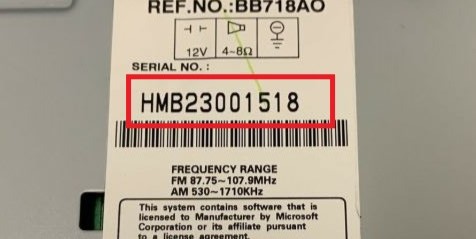
To retrieve your Alpine unlock code, you only need your serial number. The VIN is not required in most cases. You can find the serial number on the unit itself.
How to Unlock a Alpine Radio in Honda / Acura
Alpine was one of the OEM manufacturers behind Honda and Acura factory head units, producing radios and navigation units used across many models. The unlock code is tied to the radio's serial number, which on 2001 and later units can usually be shown on the display by holding presets 1 and 6 with the ignition on, or read from a label on the unit, and the code is based on that serial rather than the VIN alone.
After a battery disconnect or a flat battery, a Honda or Acura Alpine radio will often show CODE or ask you to enter your anti-theft code before it will play. This is the built-in factory security, not a fault with the unit. Retrieve your radio serial number, enter it here, and get the matching Honda or Acura code online.
A locked Alpine radio doesn't necessarily mean there's a fault. This security feature is standard on many factory-installed radios that requests a unlock code whenever the unit loses power.
If you have the serial number of your stereo, we can help you generate the correct unlock code quickly. No technical knowledge is required, so you can reactivate your infotainment system without unnecessary delays.
Alpine Radios Installed in Honda / Acura Models
Alpine has supplied OEM radios for many Honda / Acura models over the years.
Depending on the production year and trim level, some Honda / Acura vehicles were equipped with Alpine head units instead of radios produced by other manufacturers.
Below are some of the most common Honda / Acura models that may include a Alpine radio from the factory.
| Model | Years | Factory Radio |
|---|---|---|
| Honda Civic | 2001-2011 | Alpine OEM head unit |
| Honda Accord | 2003-2012 | Alpine OEM head unit |
| Honda CR-V | 2002-2011 | Alpine OEM head unit |
| Honda Odyssey | 2005-2010 | Alpine OEM head unit |
| Acura MDX | 2001-2013 | Alpine OEM head unit |
| Acura TL | 2004-2014 | Alpine OEM head unit |
Looking for a specific Honda / Acura model instead? The Honda / Acura radio codes by model sorts every supported car by model and year.
To see all the Alpine units we support, open the Alpine radio codes page.
Need a different manufacturer? Open the radio manufacturer index.
Verified Customer Reviews
Verified reviews from drivers whose stereos were reactivated through findradiocode.
Great service - worked as advertised. The best feature is when you enter your radio serial number, the site explicitly states whether you code is already available in their database BEFORE you pay. In my case, it was i...
Gri11 - Ram
I got my code basically instantly and it worked will recommend this website
Zane - Dodge
Easy and fast way to get a code for my radio based on the serial number. Received code in email quickly after ordering it. Worked first time I entered it! Nice not to have to go to manufacturer or a dealer. Thanks guy...
Michael - Dodge
Why Does a Alpine Radio Become Locked?
The Alpine radio security system is designed to keep the factory radio secure. Whenever the radio cannot verify continuous power, it will request a radio code.
Several everyday situations can cause this to happen:
Power Supply Interruption
Service Work
Radio Transferred Between Vehicles
Disconnecting the Battery
Retrieve Your Alpine Radio Code
You don't need technical experience to recover your Alpine radio code. If you know your serial number, you can complete the entire process online.
Here's how it works.
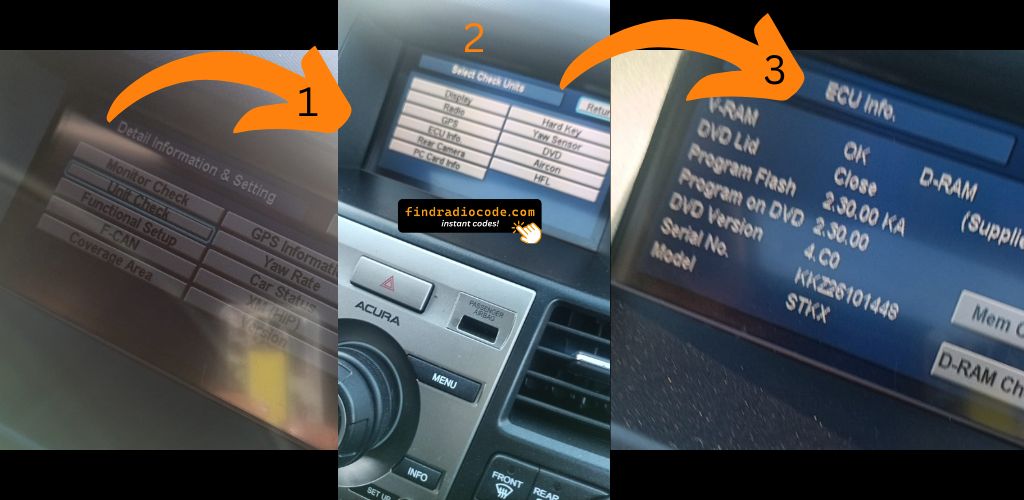
1. Check Your Radio Serial Number
Every Alpine radio has a unique serial number used to identify the unit. This number is required to retrieve the correct radio code.
If you don't know where to find it, see the instructions above.
2. Enter Your Radio Information
Type your serial number into our online form. Our system will process the information and generate the correct code for your radio.
The process is simple and only takes a few moments.
3. Receive and Enter Your Code
After receiving your radio code, simply enter it using your radio's buttons.
Once the correct code has been entered, your Alpine radio will be fully functional again.
Everything You Need to Know About Alpine Radio Codes
The radio serial number may be located on the top or side of the unit, depending on the model.
If it cannot be displayed electronically, you may need to remove the radio to access the identification label.
Yes. As long as you have the radio serial number, the unlock code can usually be generated online without visiting a dealership.
Not necessarily. Radio suppliers often vary depending on the production year. Reading the label or serial on the radio is the surest way to tell.
Once your serial number have been processed, the unlock code is typically delivered almost instantly, allowing you to unlock your radio as quickly as possible.
After several failed tries, most factory units lock themselves for a while. Depending on the manufacturer, you may need to leave the radio powered on for a certain period before another attempt can be made.
First, verify that the serial number was entered correctly and that the code was typed into the radio exactly as provided.
Should the problem remain, our support team can check the order and put it right.