Becker Radio Code for Ford
Generate your Becker radio code online using only your radio serial number. No VIN required.
Becker Radio Models Supported:
For Ford Vehicles
Quick Answers
To retrieve your Becker unlock code, you only need your radio serial number. The VIN is not required in most cases. You can find the serial number using the methods explained in our guide.
Yes. All payments are processed through secure payment providers, and your order information is used only to retrieve the correct radio code.
No. In most cases, the radio serial number is all that's needed to retrieve your Becker radio code. The VIN alone usually cannot identify the radio, which is why we ask for the serial instead.
If the radio code doesn't work, first make sure that the serial number was entered correctly and that the code was typed into the radio exactly as provided. If everything is correct and the issue remains, get in touch with us. We'll review your order and find the correct solution. Our refund policy applies if we're unable to provide the correct code.
We support a wide range of Becker radios installed in Ford vehicles. Compatibility depends on the head unit rather than the vehicle alone. If you're unsure, check your radio against the supported models on this page or contact our support team.
Becker Radio Code Lookup for Ford
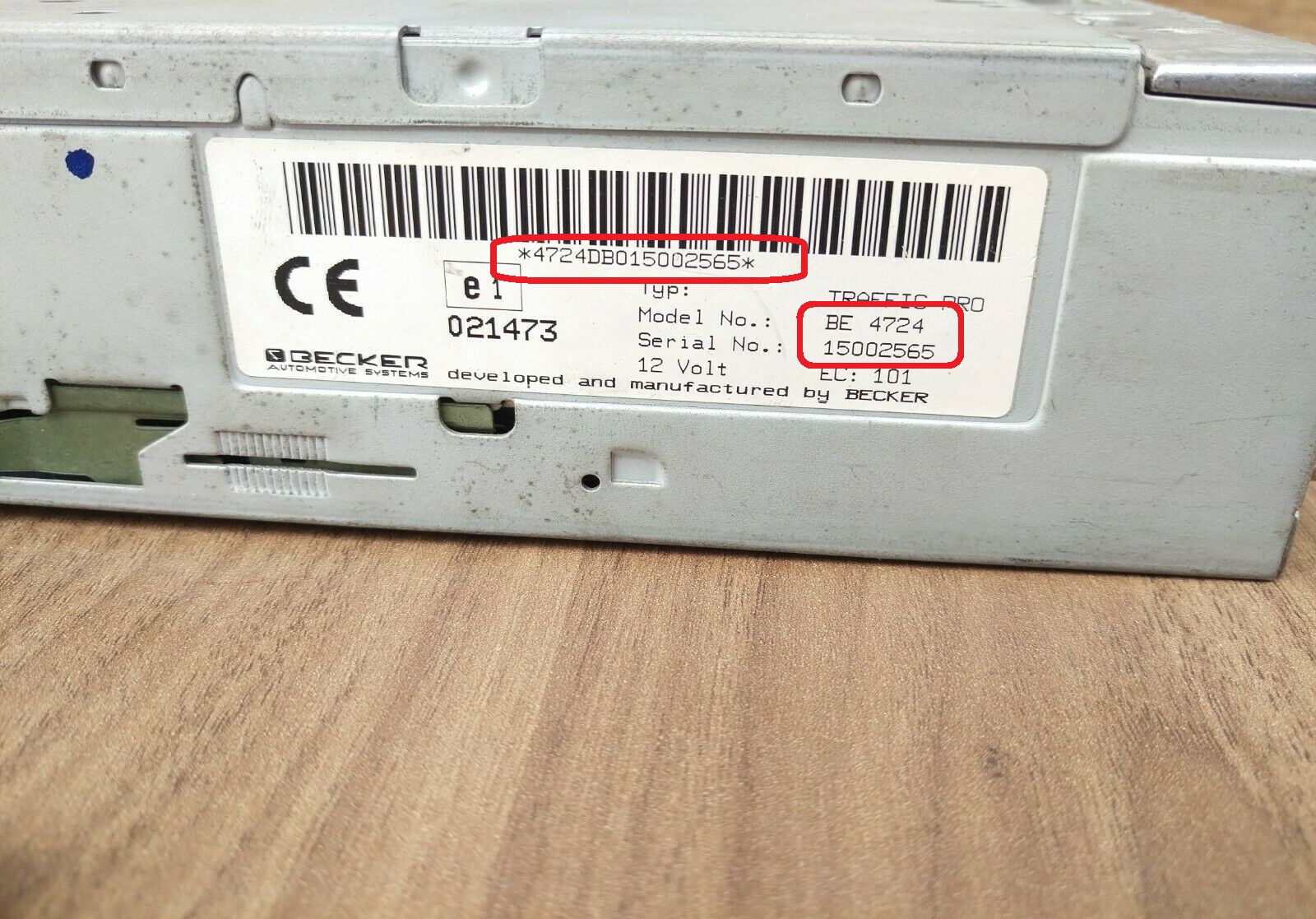
Becker built a small number of OEM head units used in Ford models, including Traffic Pro style 1-DIN radios and CD units, with Harman/Becker supplying certain Ford applications. Becker serials start with the letters BE and are found on a sticker on the radio chassis, and the unlock code is generated from that serial number rather than from the vehicle VIN.
After a battery change or workshop visit, a Becker-equipped Ford radio can drop into a locked state and display CODE, LOCKED or ask you to enter your security code before any sound returns. This is the standard factory protection working as designed. Simply locate the BE serial on the unit, type it in, and get your Ford Becker code without a dealer trip.
If your Becker radio in a Ford is displaying CODE, don't worry. This usually happens after a loss of electrical power.
Our radio unlock service allows you to get the correct security code using only your radio serial number.
There's no need to visit a dealership or wait for assistance. In most cases, your unlock code can be delivered within a very short time, allowing you to restore your audio system quickly.
Supported Ford Models with Becker Radios
Radio suppliers varied across the Ford lineup. Factory equipment varies between countries and model years, your car may be fitted with a Becker stereo.
If your vehicle still has its OEM radio, there's a good chance it is one of the compatible models listed below.
| Model | Years | Factory Radio |
|---|---|---|
| Ford Focus (Mk1/Mk2) | 2000-2007 | Becker Traffic Pro |
| Ford Mondeo (Mk3) | 2000-2007 | Becker Traffic Pro |
| Ford Galaxy (Mk1) | 2000-2006 | Becker Indianapolis Pro |
| Ford C-Max (Mk1) | 2003-2007 | Becker Traffic Pro |
| Ford Fusion | 2002-2007 | Becker Traffic Pro |
Would you rather start from the car? The Ford radio code page lets you pick your Ford model first and lists the matching radios.
Different car brand? The Becker radio code overview lists every make with a Becker radio.
Looking for another radio maker? Start from the list of radio manufacturers.
What Causes a Becker Radio to Lock?
Your Becker radio doesn't lock without a reason. Whenever the system registers a power interruption, it may request the radio code before allowing normal operation.
Below are the most common situations that can trigger this protection.
Replacing the Vehicle Battery
Battery Completely Discharged
Electrical System Maintenance
Radio Removal or Replacement
Verified Customer Reviews
Genuine feedback from car owners whose stereos were reactivated through findradiocode.
Unlocked stereo in less than 5 mins great service just a little pricey
Damien - Jeep
Unbelievable!!! it really works. I have been fighting with the dealership to give me my Radio Code and they were telling me the only way was paying $345. So I am def thankful for the money I was going to pay for don´t se...
Yasmin - Jeep
Fast accurate service. The radio code worked the first time I entered it. The website was easy to find and easy to navigate. I am happy to have my radio working so fast. The Chrysler dealer wanted $200 to fix it. Thank Y...
Norm B. - Dodge
Everything You Need to Know About Becker Radio Codes
This usually happens after the radio has been disconnected from the battery. The built-in anti-theft system automatically locks the unit until the correct radio code is entered.
In some cases, the security code may already be available in your glove box if it was recorded by the previous owner or supplied with the vehicle.
If the code is not available, it usually needs to be generated using the serial number, which typically requires a professional lookup service.
Once the correct radio code has been entered successfully, it is normally stored in the radio's memory.
The code will only be requested again if the radio undergoes another power interruption.
The serial number may be printed on a label attached to the radio, depending on the model.
When the serial cannot be shown on the display, removing the unit is usually the only way to read it.
First, verify that the radio information was entered correctly and that the code was typed into the radio exactly as provided.
Should the problem remain, our support team can check the order and put it right.
The radio code remains the same for the radio throughout its lifetime. Should it lose power again later, you simply enter that same code.
Why Get Your Becker Radio Code With Us?
Choosing the right way to retrieve your radio code is important when your Becker system becomes locked.
Our service is designed to make the process fast, simple, and fully online. You only need your radio serial number, and the system handles the rest.
Unlike traditional dealership methods that can take hours, our code generator provides results in a much shorter time frame, helping you restore your audio system without unnecessary delays.