Blaupunkt Radio Code for Ford
Generate your Blaupunkt radio code online using only your serial number. No VIN required.
Blaupunkt Radio Models Supported:
For Ford Vehicles
TRAVELPILOT 170 / 132 / 256 (27)
TRAVELPILOT EX (70)
TRAVELPILOT FX LSRNS (108)
TRAVELPILOT NX HSRNS (91)
Casablanca RCM85 (2)
Radio Navigation System (12)
RNS2 (3)
Quick Answers
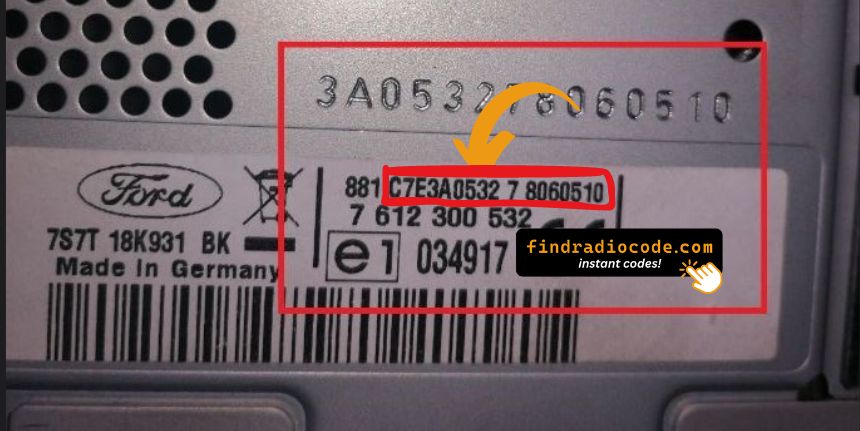
To retrieve your Blaupunkt unlock code, you only need your radio serial number. The VIN is usually not required. You can find the serial number on the radio label.
If the unlock code doesn't work, first make sure that the radio serial number was entered correctly and that the code was typed into the radio exactly as provided. If everything is correct and the issue remains, get in touch with us. We'll review your order and find the correct solution. Our refund policy applies if we're unable to provide the correct code.
No. In most cases, the radio serial number is all that's needed to retrieve your Blaupunkt unlock code. The VIN alone usually cannot identify the radio, which is why the serial number is required.
We cover a wide range of Blaupunkt radios installed in Ford vehicles. Compatibility depends on the head unit rather than the vehicle alone. If you're unsure, match your unit to the models listed here or contact our support team.
Yes. All payments are processed through secure payment providers, and your radio serial number is used only to retrieve the correct unlock code.
How to Get Your Blaupunkt Radio Code for Ford Vehicles
Blaupunkt built the navigation-grade systems for Ford, most notably the Travelpilot units (EX, FX and NX variants) as well as some Becker Traffic Pro style head units in models like the Mondeo, Focus and Galaxy. These carry a Ford-format serial number on the unit label, and the security code is worked out from that serial rather than from the car's VIN.
After a power interruption a Blaupunkt Ford radio or Travelpilot navigation unit will request its code and may show 'ENTER CODE' or a locked hold-time prompt before accepting further attempts. This is the intended anti-theft response, not a hardware fault - read off the serial number and enter it here to get your unlock code online.
If your Blaupunkt radio in a Ford is displaying ENTER CODE, you're not alone. This usually happens after replacing the battery.
Our online radio code service allows you to get the correct radio code using only your radio identification number.
You can avoid expensive dealer visits and long waiting times. In most cases, your unlock code can be retrieved within minutes, allowing you to restore your audio system quickly.
Supported Ford Models with Blaupunkt Radios
Not every Ford vehicle uses the same radio manufacturer. Depending on the model, production year, and market, your car may be fitted with a Blaupunkt stereo.
If your vehicle still has its OEM radio, there's a good chance it is one of the compatible models listed below.
| Model | Years | Factory Radio |
|---|---|---|
| Ford Mondeo (Mk2/Mk3) | 1996-2007 | Blaupunkt TravelPilot EX/DX |
| Ford Focus (Mk1) | 2001-2005 | Blaupunkt TravelPilot DX |
| Ford Galaxy (Mk1) | 2000-2006 | Blaupunkt TravelPilot EX |
| Ford Fiesta (Mk5) | 2002-2006 | Blaupunkt TravelPilot DX |
| Ford Fusion | 2002-2006 | Blaupunkt TravelPilot DX |
| Ford Mondeo (Mk4) / S-Max | 2006-2010 | Blaupunkt TravelPilot NX (RNS) |
If the radio label is hard to reach, you can start from the Ford radio codes by model instead - it is sorted by Ford model and year.
Different car brand? The Blaupunkt radio code page lists every car brand with a Blaupunkt radio.
Need a different radio maker? Open the radio manufacturers page.
Why Drivers Trust Find Radio Code
When your Blaupunkt radio is locked, you need a solution that is effective without complications. That's exactly what our service provides.
Instead of relying on slow dealership procedures, you can retrieve your radio code online using just your radio ID.
The entire process is optimized for users who want to get back to driving with music.
Fast & Automatic Processing
Easy Online Process
Straightforward Code Retrieval
Designed for All Blaupunkt Radios
Common Questions About Blaupunkt Radio Codes
Yes. Our ordering process uses secure payment methods, and your serial number are used solely to retrieve the correct unlock code for your device.
Yes. As long as you have the serial number, the radio code can usually be retrieved online without visiting a dealership.
First, verify that the serial number was entered correctly and that the code was typed into the radio exactly as provided.
Should the problem remain, our support team can check the order and put it right.
The radio code remains the same for the radio throughout its lifetime. Should it lose power again later, you simply enter that same code.
In some cases, the security code may already be available in your owner's manual if it was recorded by the previous owner or supplied with the vehicle.
If the code is not available, it usually needs to be generated using the radio serial number, which typically requires a professional lookup service.
Once the correct security code has been entered successfully, it is normally stored in the radio's memory.
The code will only be requested again if the radio loses power.