Visteon Radio Code for Ford
Recover your Visteon radio code online using only your radio serial number. No VIN required.
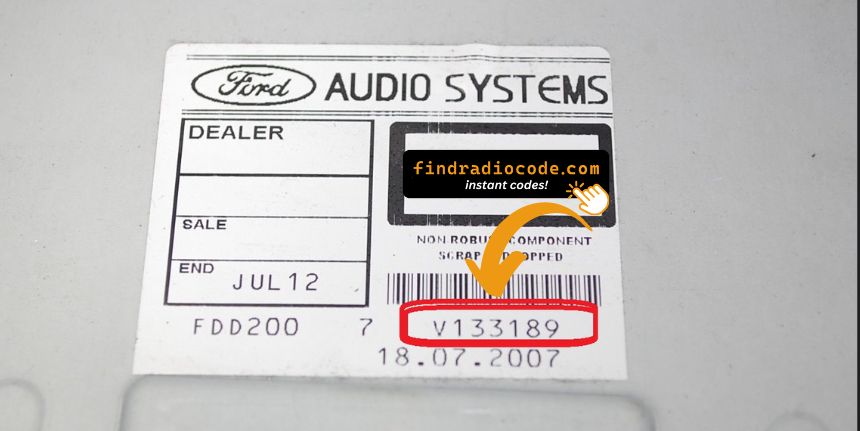
Visteon Radio Models Supported:
For Ford Vehicles
Sound 2000 (42)
6000CD RDS EON (84)
6006E CD RDS EON (27)
CD MP3 Series (58)
RDS Series (2006-2008) (33)
6000 CD / Single CD KW2000 (37)
2500 B1 Ultra Low Cassette (7)
3000 Traffic (15)
3500 RDS EON B2 Cassette (13)
4000 RDS (7)
4000 Traffic (4)
4050 RDS EON (4)
4500 RDS EON B3 Single CD (10)
4500NG (1)
5000 RDS EON (44)
5000C (8)
5500R (1)
6000 CD (10)
6000 CD / Radio / Single CD (8)
6006 CD Tuner (2)
Show all 39 radio models Show fewer
6006 RDS EON B5 6-Disc CD (6)
6500R CD (4)
7000 RDS EON (9)
9000 VNR (1)
CD132 NAV Module (14)
Ecosport CD MP3 (14)
My Connection CD MP3 (29)
Figo B517 High (8)
Figo B517 Low (8)
Figo B376 Low (1)
6000 MNE MP3 (2)
Figo B376 High (1)
6000 CD / Single CD GGDS (21)
6006 CDC / 6CD GGDS (6)
6006 CDC / 6CD KW2000 (4)
CD345 MCA Premium (7)
CD340 NAV Module (1)
1500 RDS / Medialess (3)
C307 / C214 NAV Module (4)
Quick Answers
If the unlock code doesn't work, first make sure that the serial number was entered correctly and that the code was typed into the radio exactly as provided. If everything is correct and the issue remains, contact our support team. We'll review your order and find the correct solution. Our refund policy applies if we're unable to provide the correct code.
To retrieve your Visteon radio code, you only need your serial number. The VIN is not required in most cases. You can find the serial number on the radio label.
Yes. Once you receive the correct unlock code, simply enter it using your radio controls. You won't need any tools or a technician in most cases.
Most unlock codes are delivered almost instantly after your order has been processed. In some cases, delivery may take longer depending on the manufacturer, but we'll always keep you informed.
No. In most cases, the radio serial number is all that's needed to retrieve your Visteon radio code. The VIN alone cannot pinpoint which radio you have, which is why the serial number is required.
Which Ford Models Use Visteon Radios?
Visteon has supplied original radios for many Ford models over the years.
Depending on the production year and equipment package, some Ford vehicles were equipped with Visteon head units instead of radios produced by other manufacturers.
Below are some of the most common Ford models that may include a Visteon radio from the factory.
| Model | Years | Factory Radio |
|---|---|---|
| Ford Focus (Mk1) | 1998-2004 | Visteon 5000/6000CD |
| Ford Focus (Mk2) | 2004-2011 | Visteon 6000CD |
| Ford Fiesta (Mk5/Mk6) | 2002-2008 | Visteon 4500/6000CD |
| Ford Mondeo (Mk3) | 2000-2007 | Visteon 6000CD |
| Ford Transit (Mk6/Mk7) | 2000-2012 | Visteon 4500/6000CD |
| Ford Ka (Mk1) | 1998-2008 | Visteon 4000/5000 |
| Ford Fusion | 2002-2008 | Visteon 6000CD |
Looking for a specific Ford model or year? The Ford radio codes by model sorts all supported cars by model and year.
Not a Ford? The Visteon radio code page covers every make with a Visteon head unit.
If the name on your radio label is not Visteon, see the list of radio manufacturers instead.
Unlock Your Factory Visteon Radio
Visteon manufactured a large share of Ford's factory radios, including many 6000CD and 4500/5000 series units across Fiesta, Focus, Mondeo, Transit and Puma. You can spot a Visteon unit by the 'V' prefix on its serial number (Ford also uses 'M' on other builds); that serial, read from the label on the radio body, is the only thing needed to work out the code - the VIN is not used.
A Visteon-built Ford radio that has lost power will display 'CODE' or 'ENTER CODE', and after several failed attempts it shows the familiar 'LOCKED 10' or 'LOCKED 13' hold-time message. This is standard Ford anti-theft protection rather than a breakdown - enter your serial number to retrieve the code and clear the lock.
A locked Visteon radio doesn't necessarily mean there's a fault. Most original car stereos include built-in anti-theft protection that requests a security code whenever the battery is disconnected.
If you have the serial number of your stereo, we can help you recover the correct radio code quickly. The process is simple and secure, so you can reactivate your infotainment system without unnecessary delays.
Common Reasons Your Visteon Radio Is Locked
Your Visteon radio doesn't lock without a reason. Whenever the system registers a power interruption, it may request the security code before allowing normal operation.
Below are the most frequent situations that can trigger this protection.
A Flat or Dead Battery
Radio Removal or Replacement
After Installing a New Battery
Electrical Repairs
Customer Reviews
Real reviews from drivers whose stereos were reactivated through findradiocode.
Easy and fast way to get a code for my radio based on the serial number. Received code in email quickly after ordering it. Worked first time I entered it! Nice not to have to go to manufacturer or a dealer. Thanks guy...
Michael - Dodge
Fast accurate service. The radio code worked the first time I entered it. The website was easy to find and easy to navigate. I am happy to have my radio working so fast. The Chrysler dealer wanted $200 to fix it. Thank Y...
Norm B. - Dodge
This actually works it is worth it to buy
Emily - Chrysler
Questions About Visteon Radio Codes
Once the correct security code has been entered successfully, it is normally stored in the radio's memory.
The code will only be requested again if the radio undergoes another power interruption.
First, verify that the serial number was entered correctly and that the code was typed into the radio exactly as provided.
If it still will not unlock, get in touch and we will review the order.
For most Visteon radios, the vehicle identification number alone is not required. The correct unlock code is normally generated using the radio serial number, which uniquely identifies the radio.
Most factory radios temporarily lock after several incorrect attempts. Depending on the manufacturer, you may need to leave the radio powered on for a certain period before another attempt can be made.
The security code remains the same for the radio throughout its lifetime. Any future power loss just means keying in the same code again.
In some cases, the security code may already be available in your glove box if it was recorded by the previous owner or supplied with the vehicle.
If the code is not available, it usually needs to be generated using the serial number, which typically requires a professional lookup service.