2013 Chrysler Town & Country Head Units and Their Makers
Even for a single year, the 2013 Chrysler Town & Country was built with more than one head units. Pick the unit that looks like yours.
| Years | Factory radio | Serial starts with |
|---|---|---|
| 2008-2013 | Chrysler REL Alpine Alpine |
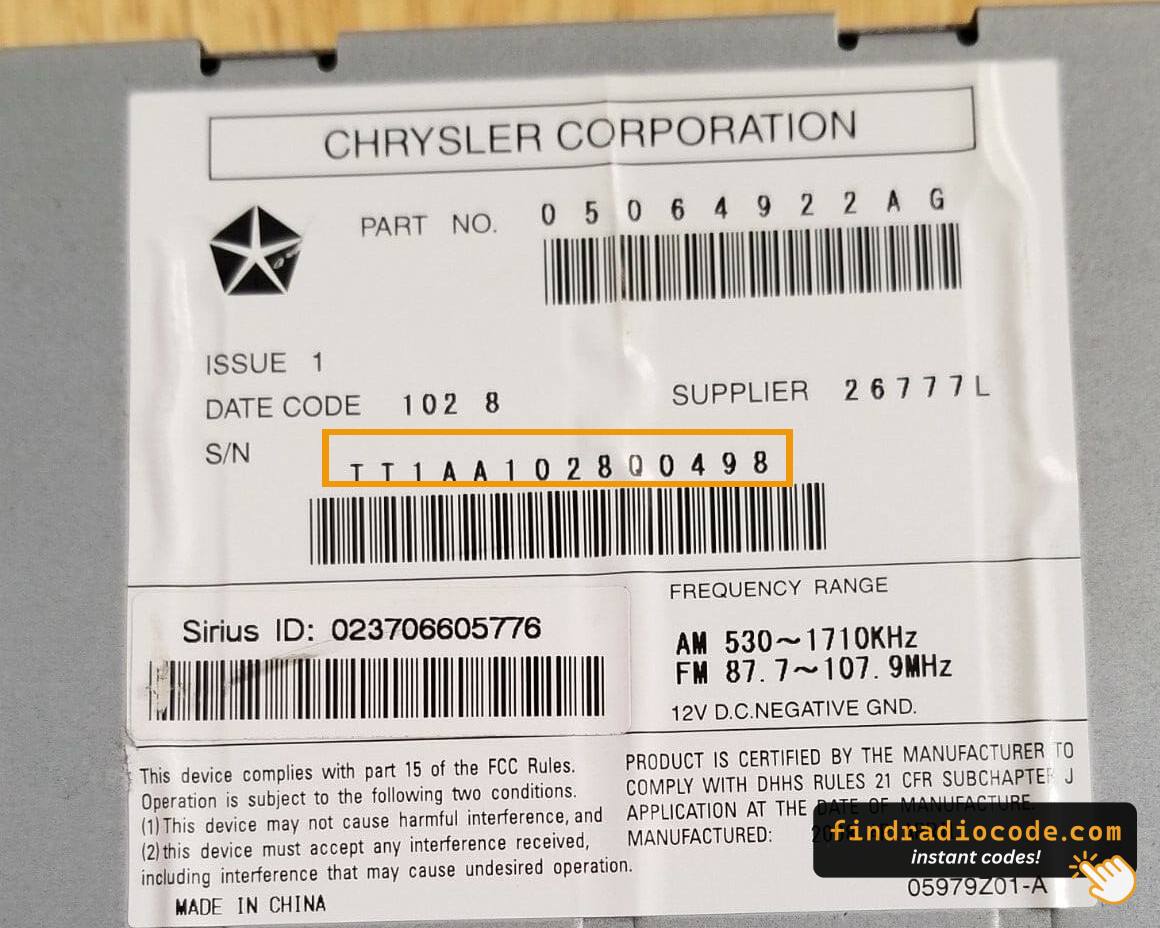
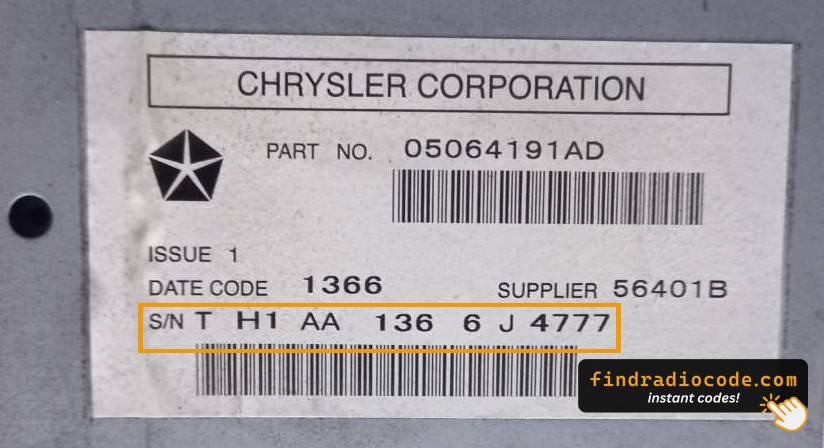
TQ1AA, TT1AA, TH1AA, THAAA, TCAAA
|
| 2009-2013 | Chrysler RET Alpine Alpine |
TQ1AA, TT1AA, TH1AA, THAAA, TCAAA
|
| 2011-2013 | Chrysler REQ Alpine Alpine |
TQ1AA, TT1AA, TH1AA, THAAA, TCAAA
|
| 2011-2013 | MyGIG NTG4 REZ Harman |
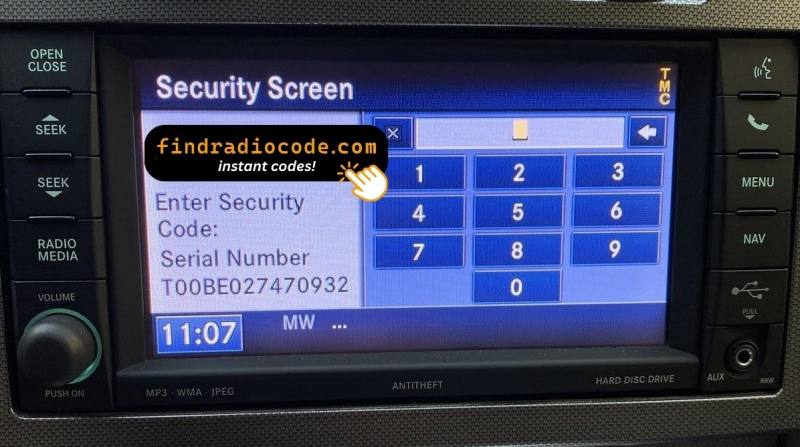
T00AM, T00BE, T0012
|
| 2011-2013 | MyGIG NTG4 RHR Harman |
T00AM, T00BE, T0012
|
| 2011-2013 | MyGIG NTG4 RHW Harman |
T00AM, T00BE, T0012
|
How 2013 Chrysler Town & Country Radio Code Lookup Works
Car radios use security codes dependent on the radio unit itself rather than the model or production year.
- The generator identifies your Chrysler radio via serial-based verification.
- When you input the serial into the generator, the system identifies the radio family and retrieves the corresponding code.
- Use the code to unlock the radio immediately.
- Compared to Chrysler dealer retrieval, this method is faster and more convenient.
How to Enter the Radio Code
Now that you've found the radio serial and retrieved the unlock code, the next part is entering it into your radio.
Chrysler OEM units display a CODE prompt when ready for input.
The process is usually simple, but button layouts and confirmation methods may vary depending on the radio version installed in your Town & Country.
Correct Entering Process
To enter the code on the 2013 Chrysler Town & Country Uconnect 8.4":
- Turn ignition to ON. Screen shows "ENTER CODE".
- Tap each digit to enter your 4-digit code.
- Radio unlocks automatically after the 4th digit.
3 wrong attempts cause a 60-minute lockout. Keep ignition ON throughout. Switching off restarts the timer.
Entering the 4-Digit Code on a 2013 Town & Country Radio
Once the unlock code has been retrieved for a 2013 Town & Country radio, the digits can be entered straight at the head unit - no scan tool or dealer visit is required. The radio is strict about wrong attempts, so type carefully.
Limited Attempt Warning
- The radio allows roughly three consecutive wrong tries before it enters a timed
WAITstate. - To clear the wait, the radio must remain powered with the ignition in the RUN position for around 30 minutes - do not pull the key or disconnect the battery during this window.
- Verify each digit on the screen against the written code before submitting; do not guess any digit.
Code Entry Procedure
- Turn the ignition to the ACC or RUN position so the radio powers up and shows the
CODEorEnter Anti-Theft Codeprompt. - On the RBZ/RHB MyGIG (6.5") units, key the four digits using the on-screen number pad.
- On the base RES head unit, press preset button 1 the required number of times for the first digit, button 2 for the second, button 3 for the third, and button 4 for the fourth.
- Confirm the displayed digits match the code sheet exactly before submitting.
- Press and hold the OK/ENTER control - or the rightmost on-screen preset on the RBZ/RHB touchscreen - for two to five seconds to validate the entry.
If the Code Is Rejected
- Wait for any countdown shown on the screen to fully clear before retrying - the lock-out gets longer with repeated wrong tries.
- Re-check each digit against the chassis-label serial, then re-enter exactly as written.
- If repeated correct entries still fail, stop and re-verify the serial number rather than continuing to guess.
Can't Find Your Unit's S/N? Follow The Steps Below for Chrysler Town & Country 2013
The first part is to find and write down the radio's serial number.
Based on the head unit type fitted in your 2013 Town & Country, the S/N can usually be found either through the screen menu or by checking the label on the radio itself.
Below are the most common methods to identify your serial quickly.
Factory Radios on the 2013 Chrysler Town & Country
The 2013 Town & Country carried the same three-tier MyGIG/RES factory radio lineup, with the rear-seat DVD entertainment module remaining standard on all trims. The three-letter sales code is printed in the lower right corner of the radio faceplate near the AUX jack.
- RES - Media Center 130 (CD/MP3): Standard on Touring base. Single-DIN non-touchscreen unit with twin rotary knobs, monochrome segment display, CD slot and front
AUXinput. SiriusXM-ready tuner; no screen and no Bluetooth from the factory. - RBZ - Media Center 430 (MyGIG, non-nav): Standard or optional on Touring-L and higher. 6.5" colour resistive touchscreen, CD/DVD slot, internal hard drive, integrated Bluetooth and SiriusXM. No NAV button on the bezel; Mitsubishi-built head unit on the low-speed CAN bus.
- RHB - Media Center 430N (MyGIG with Garmin Navigation): Optional on Touring-L, standard on Limited. Same 6.5" touchscreen chassis as the RBZ but with a dedicated NAV hard key on the bezel and a GPS antenna lead on the back, mapping powered by Garmin.
- REZ - Rear-Seat Video Entertainment System (standard): Single-screen overhead/rear-seat DVD module mounted separately from the head unit, with its own chassis label and serial.
The Town & Country never moved to the Uconnect 8.4 RA3/RA4 platform - the RT minivan stayed on the legacy MyGIG family right through to its 2016 final year.
Accessing the Serial Number Through the Radio Menu
The method for 2013 Chrysler Town & Country is this:
The 2013 Chrysler Town & Country — Chrysler's premium minivan with leather-appointed interior and upscale cabin appointments — features the Uconnect 8.4" Classic (RA3). The Town & Country's center stack mounts the display mid-dash with the climate controls in a row directly below.
Press and hold Climate Up, Climate Down, and Front Defrost simultaneously for 5 seconds (ignition ACC or ON). Dealer Mode opens. Go to: System Info → Radio Part Info → Serial Number.
Releasing the Unit to Access the S/N on the Tag
If the serial does not appear on screen, the next step is checking the radio itself.
Many Chrysler radios require physical access to the serial sticker attached to the unit.
Usual approach:
- Start by completely shutting off the engine - pull the key out.
- Then lift the radio surround.
- Next, loosen the mounting points and move the radio forward.
- Look for a barcode label showing the serial number.
If Dealer Mode is unavailable on the 2013 Chrysler Town & Country, the RA3 needs to be physically removed from the premium minivan dash.
- Pry off the bezel panel with a plastic pry tool. The Town & Country's premium interior trim snaps on.
- Remove the four Torx T20 mounting screws.
- Pull the unit out to access the serial label on the top or side of the chassis.
Pulling Out the 2013 Town & Country Radio to Read the Serial
The 2013 Town & Country continues with the post-2011 one-piece dash, so the radio comes out cleanly with a bezel pry and four Phillips screws. The factory head units for this year are the RES base CD radio, the RBZ 430 MyGIG, the RHB 430N MyGIG with navigation, and the standard REZ rear-seat DVD module - all Mopar-supplied. The serial number lives on a white printed label on the chassis, so the unit must come out for the sticker to be read.
Safety Notice
- Turn the ignition fully off, pull the key out of the cylinder, and let the vehicle sit for a moment so accessory circuits power down.
- Disconnect the negative battery terminal at the post and wait several minutes so the SRS capacitors discharge.
- Avoid all yellow-jacketed wiring and yellow connectors behind the dash - those carry airbag circuits and must not be probed or unplugged.
- Use plastic trim tools instead of metal blades against the bezel so the soft-touch dash trim stays unmarked.
Tools You Will Need
- A #2 Phillips screwdriver for the four screws that secure the radio chassis to the dash cage.
- A plastic dash trim removal tool or wide nylon pry wedge for the centre bezel clips.
- A small flat-blade trim tool as a backup for stubborn clips.
- A soft cloth to lay over the centre console while you work, plus a phone camera to photograph connectors before unplugging them.
Removal Overview
- Starting at one of the upper corners of the radio bezel, push the trim tool behind the panel and ease it outwards to release the spring clips.
- Walk the trim tool around the perimeter so the bezel pops free a section at a time, then tilt it forward and unplug any switch harness on its back.
- Set the bezel face-down on the cloth and locate the four Phillips screws around the radio face that hold the chassis to the dash cage.
- Loosen and remove all four screws, then pull the radio outwards a few inches.
- Disconnect the antenna lead and the rectangular multi-pin harnesses at the rear of the unit, and lift the radio clear of the dash.
Where the Serial Sits
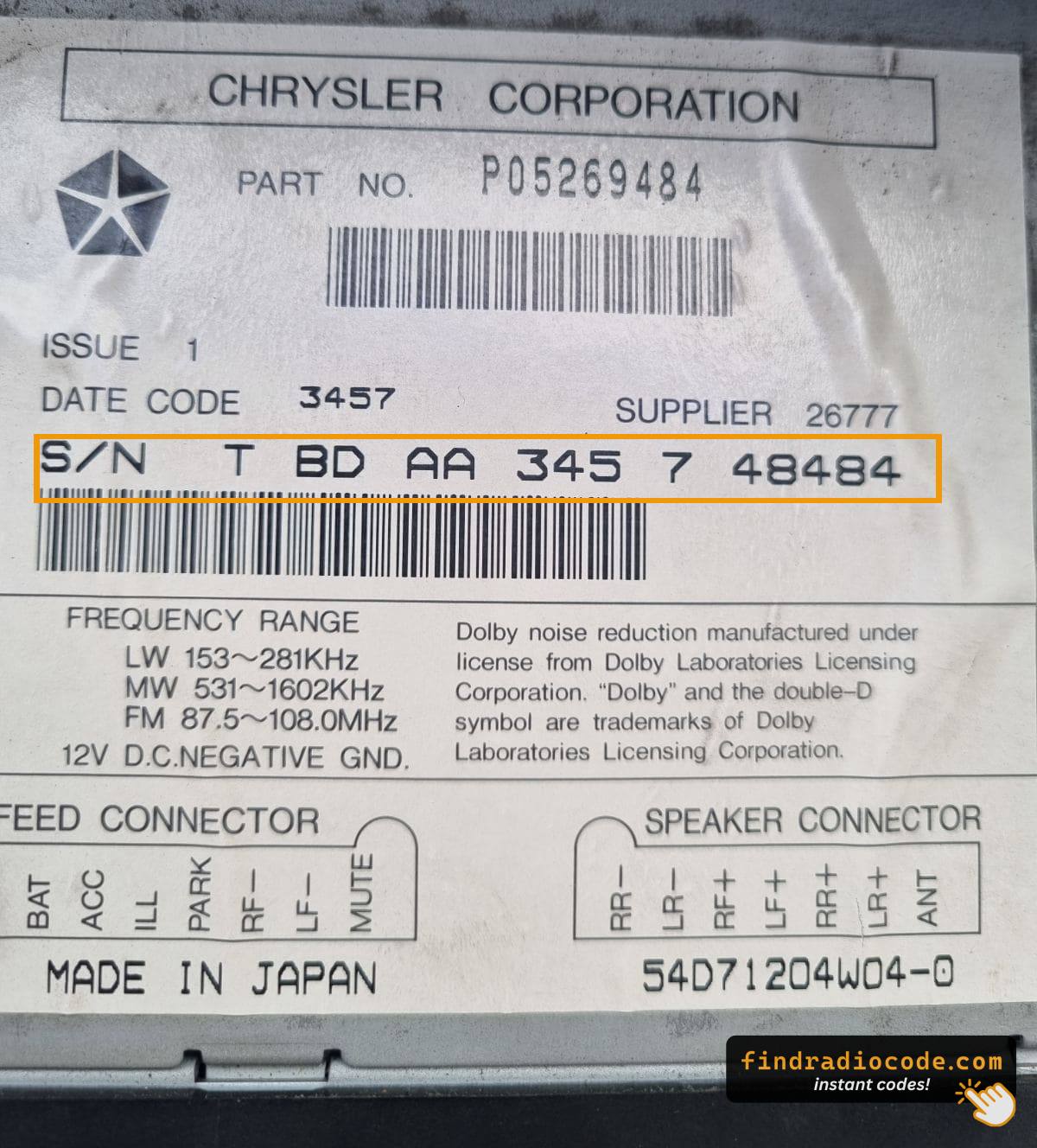
- Inspect the top, side, and rear of the metal chassis for a white printed label bearing a barcode.
- The serial number is the longer alphanumeric string near or directly below the barcode - the Mopar part number printed on the same label (typically
P05091on RES orP0506xon RBZ/RHB) is a separate field. - The standard REZ rear-seat DVD module wears the same kind of printed label on its own case if codes are needed for that unit.
Tips
- Photograph the label up close in good light and double-check ambiguous characters such as 0/O and 1/I before transcribing the serial.
- On reassembly, reseat each plug fully so it clicks home and route the wiring so nothing is pinched against the dash cage.

Example: Chrysler Town & Country serial number label location
Common S/N Formats Used on 2013 Town & Country Units
Year Chrysler Town & Country RA3 serial patterns:
T00AM– Harman VP2 RA3 (standard on Town & Country)T00BE– Continental variantTM9– Older Harman production
Serial is 14 alphanumeric characters. Skip the part number (starts with P05064 or 68).
Typical Serial Number Formats for 2013 Town & Country Radios
The factory radios fitted to the 2013 Town & Country are legacy Mopar units rather than the later Uconnect 8.4 platform, so the prefix on the chassis label depends on which radio was specified and which supplier built it. Serials usually run as a continuous block of letters and digits with no dashes or spaces.
RBZ 430 MyGIG and RHB 430N MyGIG (Touchscreens)
- These Mitsubishi-built MyGIG units typically print an alphanumeric serial on the case sticker.
- Common Mopar/MyGIG prefixes seen on this generation include
T00AM,T00BE, andTM9alongside otherT-style codes. - The Mopar part number printed beside the serial commonly starts with
P0506on these touchscreen heads.
RES (Single-Disc CD)
- The base RES head unit usually carries a Mopar-style serial on the chassis sticker.
- The accompanying Mopar part number is typically in the
P05091xxxAxfamily. - Treat the printed label on the unit itself as the authoritative reference and copy each character exactly.
REZ Rear-Seat DVD Module
- The standard REZ overhead DVD entertainment unit also wears a printed chassis label with its own serial.
- If codes are needed for that module, transcribe its serial separately and avoid guessing unclear characters.
Reading the Label Correctly
- Anything that begins with
Pis a part number and is not the serial. - Anything that starts with
Tis typically the serial - copy every character exactly as printed. - Watch the digit
0versus the letterO, and capture every leading zero - one wrong character produces a wrong unlock code.
Why Did the Radio Lock and Ask for a Code?
The 2013 Chrysler Town & Country radio locks itself after power is cut. A premium minivan radio is just as vulnerable — any power interruption triggers the lock.
Most common cause: battery replacement or disconnect. Other causes:
- Failed radio fuse
- Buying the Town & Country pre-owned without a code
- Battery disconnect during service
- Battery dead from sitting unused
Code comes from the radio serial number — not the VIN.
Troubleshooting Common Radio Problems - Town & Country 2013
The radio label: serial = 14 alphanumeric chars, starts with T00AM, T00BE, or TM9. Part number starts with P05064 or 68 — that's not the serial.
3 wrong entries lock the Town & Country RA3 for 60 minutes. Keep ignition in ON or ACC. Cutting power restarts the timer.
If no code prompt appears, the lock hasn't fired. Force the prompt by briefly pulling the radio fuse, then reconnect and turn to ON.
The Town & Country Uconnect RA3 uses touchscreen-only code entry. Tap each digit on the on-screen keypad. Auto-unlocks after the 4th digit. No physical buttons needed.
The Town & Country RA3 label has both serial and part number. Serial (use this): 14 chars, starts with T00AM, T00BE, or TM9. Part number (skip): starts with P05064 or 68.
Re-read the label carefully. Contact support for a free re-check if needed.