Get Your Factory Panasonic Chrysler Media Center 640 RE2 Anti-Theft Code
Panasonic | Chrysler | Instant Retrieval
Read the full refund policy.
Supported Factory Serial Numbers
| Serial Prefix | Status |
|---|---|
T0012 |
Supported |
T00BE |
Supported |
If your serial starts with one of these, we can retrieve your code.
Your code in three steps
No VIN, no paperwork, no appointment - the serial number off the radio is all we need.
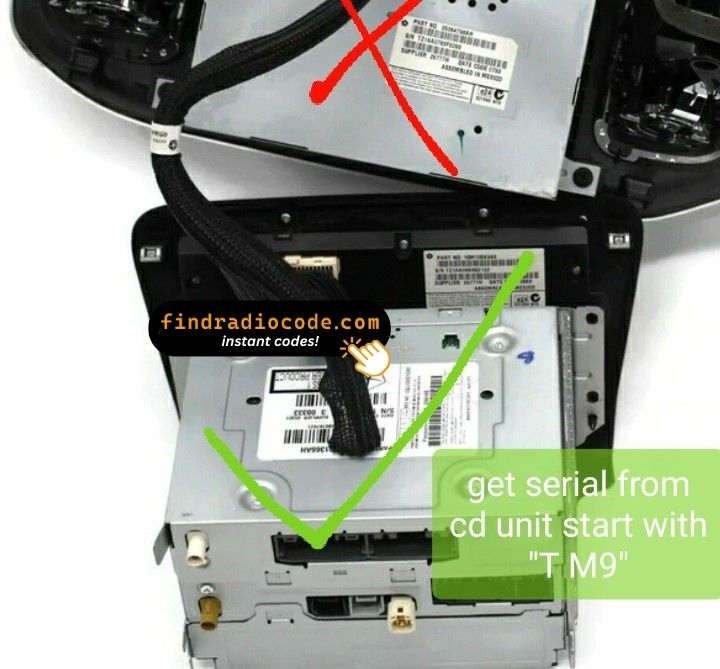
- 1 Track down the number on the unit Pull the radio a few centimetres forward and copy the number off its label - nothing has to be unplugged.
- 2 Paste it into the box Copy it character for character. We check the format up front, so a typo never costs you anything.
- 3 The code comes back instantly The code is delivered automatically, day or night. Enter it on the radio and the anti-theft screen goes away.
Covered by a full refund if the code does not work on your unit.
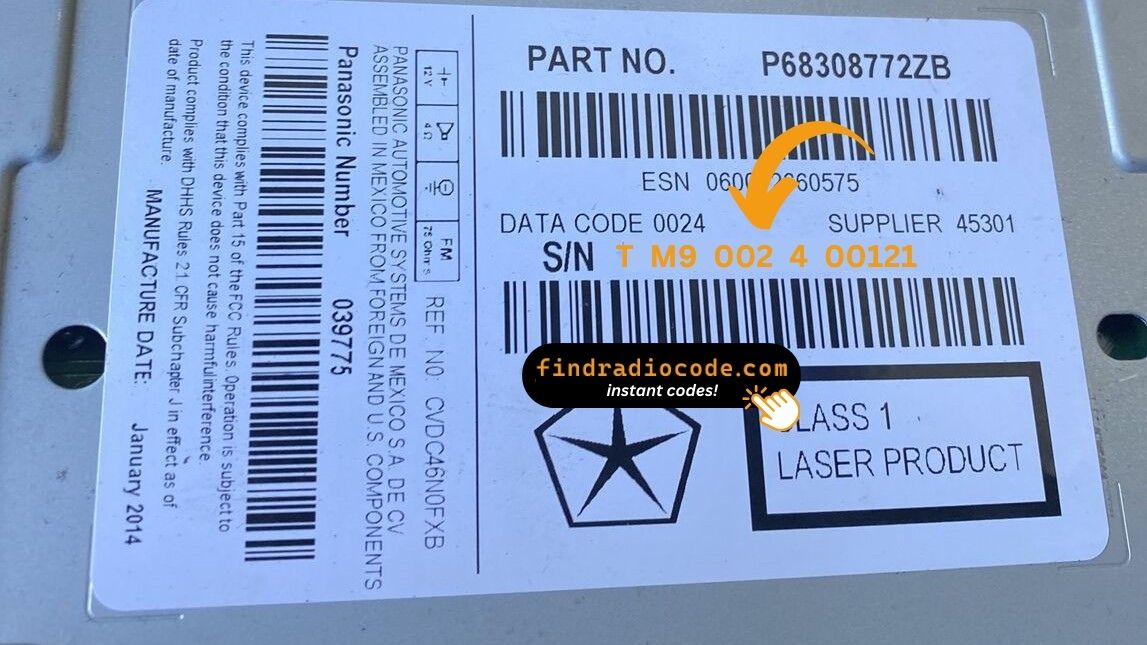
An example from the same family - find the matching sticker on your unit.
Example serial numbers
Examples of serial numbers taken from Chrysler vehicles:
T00BE351823197
(prefix: T00BE)
T0012566327123
(prefix: T0012)
Common prefixes: T0012, T00BE
Identify Your Chrysler Media Center 640 RE2 Radio
Compare the design, controls, display and features listed below with your factory-installed radio - the Chrysler Media Center 640 RE2 is easy to identify once you know what to look for.
Visual clues on this unit:
- 6.5" touchscreen in the centre of the dash
- The home screen has no NAV tile and no maps on board
- Sales code RE2 on the chassis label
- Serial number starting with T0012, T00BE
This is probably your radio if:
- the chassis label carries the RE2 sales code
- the label serial begins with T0012, T00BE
- the build year falls inside 2007-2010
- the screen is the 6.5" touchscreen fitted to the Media Center 640
RE2 has no NAV soft key. If your screen draws a map, you have a 730N RB1 or 740N RB5 nav variant instead. The disc slot on RE2 is a single CD/DVD - if you see a six-disc magazine load, that is an REC, not an RE2.
Understanding the Chrysler Media Center 640 RE2
The Chrysler Media Center 640 RE2 is an original factory-installed head unit developed for selected Chrysler vehicles. Built to deliver reliable audio playback and vehicle integration, this unit may also offer Bluetooth connectivity, touchscreen controls, CD/DVD playback, navigation or multimedia support, depending on the specific version.
Media Center 640 RE2 is the entry Panasonic-built MyGIG sibling - a 6.5-inch touchscreen with single-disc CD/DVD, AM/FM and SiriusXM, but no navigation and no hard drive. The home screen carries the "Media Center" wordmark in the top-left corner of the boot animation.
Production of the Chrysler Media Center 640 RE2 ran across 2007-2010, mainly in Chrysler models built around the Panasonic multimedia platform, so plenty of these units are still on the road.
Features you may find on the Chrysler Media Center 640 RE2:
6.5" touchscreen
AM/FM radio
CD/DVD playback
Internal hard drive for ripped music
SiriusXM satellite radio*
Steering wheel control support
Anti-theft security code
*Availability varies with the vehicle specification.
Like many factory-installed radios, the Chrysler Media Center 640 RE2 is secured with an anti-theft system. If power is interrupted after replacing or disconnecting the vehicle battery, the unit may demand the original radio code before it can be used again.
Background on the platform itself is published by Panasonic Automotive.
Finding the Serial Number on the Chrysler Media Center 640 RE2
The code is generated from the radio's own serial number, so that number is the only thing you need before ordering. It is printed on the factory sticker of the unit itself, not in the vehicle documents.
On this unit: White printed sticker on the top face of the chassis, slightly toward the rear edge. There is no software menu that exposes the serial while the radio is locked - the unit must be unbolted from the dash and pulled forward to read the label. Two T20 Torx screws on the trim bezel.
Three steps to the serial number:
- Ease the radio out of the dash - most units need a pair of release keys, which cost a few dollars online.
- Find the white label on the housing and read the serial off it - it sits near the barcode.
- Copy it into the form precisely as printed; the checker catches any typo before payment.
Serial number location on this unit
When Does the Chrysler Media Center 640 RE2 Ask for Its Code?
A locked Chrysler Media Center 640 RE2 is nearly always the result of one of four everyday situations, none of which mean anything is broken.
The battery was replaced
Any battery work counts as a power cut to the radio. It re-arms automatically and waits for the original code before playing again.
The code card is long gone
The code card that shipped with the car went missing an owner or two ago. That is not a problem - the code is generated from the radio's serial, not from any paperwork.
The car was in the garage
Any repair that touches the 12V supply - even briefly - is enough to bring up the code screen on the next start.
You swapped the radio itself
A used unit from a donor car arrives locked, and the code from your old radio will not fit - the code follows each radio's own serial number, so order it for the serial on the REPLACEMENT unit.
The route back to a working radio is the same in every case: serial number in, original code out, within seconds.
Factory Specifications
| Specification | Value |
|---|---|
| Manufacturer | Panasonic |
| Radio Family | Media Center 640 |
| Variant | RE2 |
| Vehicle Brand | Chrysler / Dodge / Ram / Jeep |
| Production Years | 2007-2010 |
| Display | 6.5" touchscreen |
| Navigation | No |
| Serial Prefixes | T0012, T00BE |
Treat the list above as the typical spec - individual Chrysler Media Center 640 RE2 units can have more or fewer features, depending on the equipment package chosen for the car.
Vehicles Equipped with the Chrysler Media Center 640 RE2
| Vehicle Model | Typical Production Years | Notes |
|---|---|---|
| Chrysler 300, Aspen, Town & Country, Sebring | 2007-2010 | |
| Dodge Caliber, Caravan, Charger, Magnum, Nitro, Ram 1500/2500/3500 | 2007-2010 | |
| Jeep Commander, Grand Cherokee WK, Liberty, Wrangler JK | 2007-2010 |
The vehicles listed above are the most common factory applications for the Chrysler Media Center 640 RE2. Equipment packages and regional specifications vary, so verify the radio using its design, serial number or part number before ordering a code.
Factory Part Numbers 34
Check your radio's label against this list - any match means the code for your unit can be retrieved here.
Do not worry about the trailing letters: the 34 numbers span 2 base references, and the letter suffixes only mark production revisions - the code works for every revision.
P05064542AF P05064542AG P05064542AH P05064542AI P05064542AJ P05064542AK P05064542AL P05064542AM P05064542AN P05064542ZF P05064542ZG P05064542ZH P05064542ZI P05064542ZJ P05064542ZK P05064542ZL P05064542ZM P05064542ZN P05091134AA P05091134AB P05091134AC P05091134AD P05091134AE P05091134AF P05091134AG P05091134AH P05091134ZA P05091134ZB P05091134ZC P05091134ZD Show all 34 part numbers
P05091134ZE P05091134ZF P05091134ZG P05091134ZH The part number is printed on the sticker on top of or on the side of the radio chassis, usually next to the serial number. If yours appears above, the Chrysler Media Center 640 RE2 is the correct page.
How to enter your Chrysler Media Center 640 RE2 code
It takes under a minute once you have the four digits.
- Switch the ignition on and let the radio boot to its security screen.
- The code prompt appears with its own keypad.
- Enter the four digits in the order you received them.
- As soon as the last digit lands, the radio verifies on its own.
- On a correct code the radio leaves security mode and plays again.
Common problems
The radio is counting down
A countdown means the anti-theft system is holding the unit. Leave the ignition on until it clears. After three wrong codes the radio shows "INCORRECT CODE - WAIT" with a 30-minute countdown. The timer only counts down while the ignition is in RUN or ACC; cutting power resets it back to 30 minutes. The unit cannot be permanently bricked - the correct code always clears the screen once the timer expires.
Where the number actually is
The serial is on the unit itself, not in the vehicle papers or on the dashboard. White printed sticker on the top face of the chassis, slightly toward the rear edge. There is no software menu that exposes the serial while the radio is locked - the unit must be unbolted from the dash and pulled forward to read the label. Two T20 Torx screws on the trim bezel.
The radio locked itself again
Expected behaviour: the security system trips again whenever power is cut. RE2 locks after any 12V interruption longer than about a minute - dead battery, battery replacement, alternator service, or removal of the radio from the dash. Body shop work that disconnects the battery is the single most common trigger we see.
Same face, different radio
One glance at the label removes the doubt - worth doing before the order. RE2 has no NAV soft key. If your screen draws a map, you have a 730N RB1 or 740N RB5 nav variant instead. The disc slot on RE2 is a single CD/DVD - if you see a six-disc magazine load, that is an REC, not an RE2.
The code belongs to the radio and never changes, so keep it somewhere safe once you have it.
Before You Order - Common Questions
Recent Customer Reviews
Left by customers after entering their code. See the reviews page for all of them.
"This was a simple procedure. My Chrysler 300s, I found out my radio S/N (I had to disassemble the radio to get it) and on my vehicle I had 2. The main unit was the right S/N to use and paid my fee, at the same time received my code. It beats paying an $100 + to get it from the dealership."
It's definitely legit. My code came less the 3 minutes and I'm a car dealer and don't have time for scam websites. You guys are now my go to. Thanks
Curt - Chrysler
Wow I got my radio code and less than three minutes
Martin Murillo - Chrysler
What Is Included
The original code on screen seconds after you pay, emailed to you as well.
Full money-back guarantee if the code does not open your radio.
Runs around the clock, so a locked radio never waits for opening hours.
Works every time - the code stays valid for the life of the radio.
The Chrysler Media Center 640 RE2 is one of many Panasonic radios we cover - the Panasonic radio code page lists the rest.