Recover Your Panasonic Chrysler Media Center 740N RB5 Radio Code
Panasonic | Chrysler | Instant Retrieval
How the refund works.
Accepted Serial Number Formats
| Serial Prefix | Status |
|---|---|
T00AM |
Supported |
T00BE |
Supported |
If your serial starts with any prefix above, we can recover your code.
How it works
One number, three steps, about two minutes.
- 1 Check the unit's sticker On the printed label on the radio housing, beside the barcode. Most units have to come out of the dash - release keys cost a few dollars.
- 2 Enter it in the form Copy it character for character. We check the format up front, so a typo never costs you anything.
- 3 The code comes back instantly The code is on screen in seconds and in your inbox. It never expires and works after every battery disconnect.
Money-back guarantee if the code does not unlock your radio.
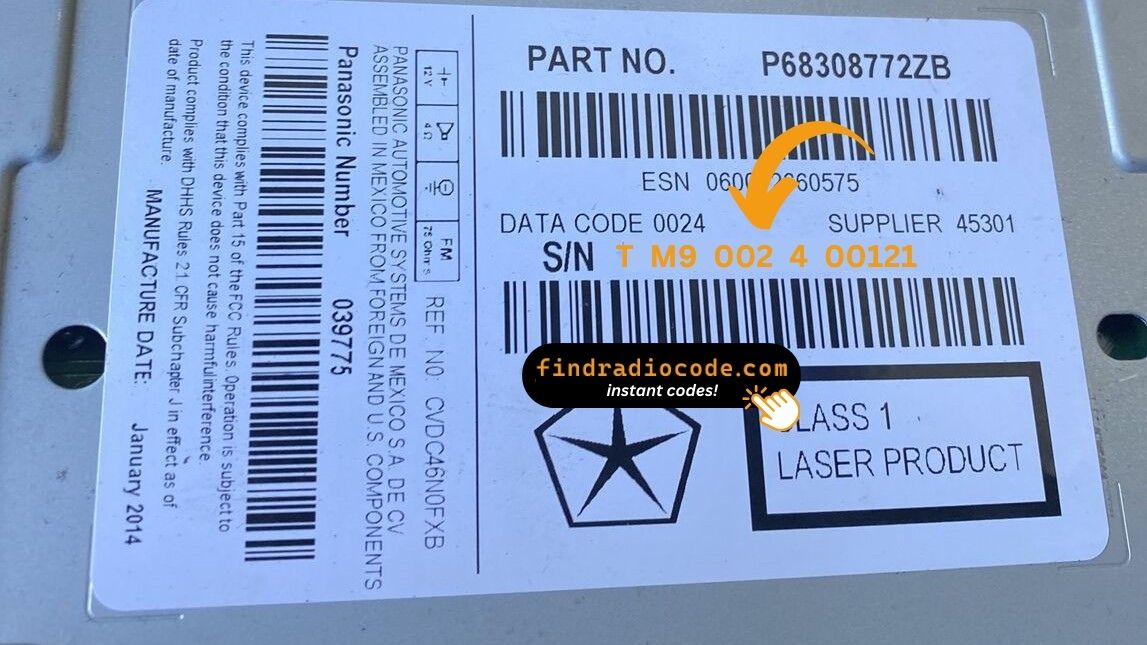
The photo is a stand-in: your radio wears the same kind of label.
What a valid serial looks like
Typical Chrysler serial numbers look like this:
T00AM1801T0282
(prefix: T00AM)
T00BE351823197
(prefix: T00BE)
Usual starting characters: T00AM, T00BE
Do You Have the Chrysler Media Center 740N RB5?
Line up the design, controls, display and features listed below with your factory-installed radio - the Chrysler Media Center 740N RB5 is easy to tell apart once you know what to look for.
Visual signs on this unit:
- Centre-stack 6.5" touchscreen
- A navigation unit - maps installed from the factory
- Sales code RB5 on the chassis label
- Serial number starting with T00AM, T00BE
Your radio is the Chrysler Media Center 740N RB5 if:
- the factory label reads RB5
- the label serial begins with T00AM, T00BE
- the vehicle was built between 2008-2012
- the screen is the 6.5" touchscreen fitted to the Media Center 740N
RB5 draws maps. If tapping NAV on your screen returns "Feature not available", you have an RE2 instead. RB5 part numbers sit in the P05064xxx and P68xxxxxx ranges with an "RB5" or "740N" reference on the dealer label.
Where to Find Your Chrysler Media Center 740N RB5 Serial Number
Every Chrysler Media Center 740N RB5 has a unique serial number, and the unlock code is derived from it. You will find that number on the unit's own label - it is not in the service book and not on the dashboard.
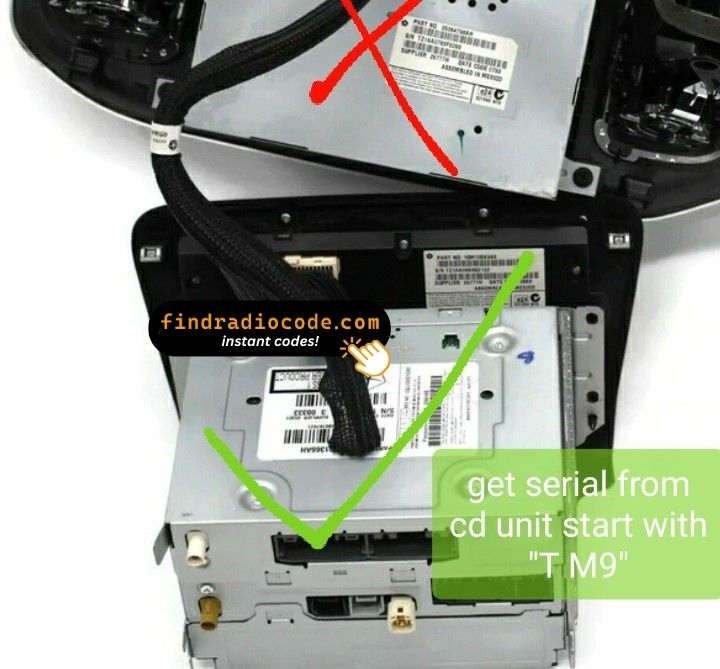
On this unit: Top of the chassis, near the back-right corner on a printed white sticker. Pull the radio out via four 7mm bolts behind the dash trim - the Panasonic chassis carries no menu shortcut for displaying the serial.
Getting to the label:
- Pull the unit forward with release keys (a few dollars online) - the wiring can stay plugged in.
- The serial is on the chassis label, usually right by the barcode - copy it down.
- Copy it into the form precisely as printed; the checker catches any typo before payment.
Where the label sits on this radio
Everything You Need to Know About the Chrysler Media Center 740N RB5
The Chrysler Media Center 740N RB5 is a factory-fitted Chrysler audio and multimedia unit. Alongside everyday radio and audio playback it may include touchscreen controls, Bluetooth, CD/DVD playback or factory navigation, depending on how the vehicle was specified.
Media Center 740N RB5 is the Panasonic-built navigation MyGIG variant - 6.5-inch touchscreen, single-disc CD/DVD, AM/FM, SiriusXM, plus a built-in flash-based navigation engine with SD-card map updates. NAV soft key visible on the lower bar.
Production of the Chrysler Media Center 740N RB5 ran across 2008-2012, mainly in Chrysler models built around the Panasonic multimedia platform, so plenty of these units are still in daily use.
Typical features include:
6.5" touchscreen
AM/FM radio
Navigation built in, with factory map data
CD/DVD playback
SiriusXM satellite radio*
Steering wheel control support
Anti-theft security code
*Availability varies with the vehicle specification.
Like many factory-installed radios, the Chrysler Media Center 740N RB5 is protected by an anti-theft system. If power is interrupted after replacing or disconnecting the vehicle battery, the unit may request the original radio code before it can be used again.
For the manufacturer's own documentation of this platform, see Panasonic Automotive.
How Owners End Up on This Page
A locked Chrysler Media Center 740N RB5 is nearly always the result of one of four everyday situations, none of which mean anything is broken.
New battery, locked radio
The most common trigger by far: the moment the battery is swapped, the radio forgets it was ever unlocked and asks for its code on the next start.
Back from the mechanic, radio locked
Mechanics often disconnect the battery before electrical work. The car comes back fixed and the radio comes back locked - expected, not a fault.
A used car with a locked radio
Second and third owners rarely get the code card. The radio itself still carries everything needed - its serial number.
A unit from a donor car
A used unit from a donor car arrives locked, and the code from your old radio will not fit - the code follows each radio's own serial number, so order it for the serial on the REPLACEMENT unit.
The route back to a working radio is the same in every case: serial number in, original code out, in seconds.
OEM Technical Specifications
| Specification | Value |
|---|---|
| Manufacturer | Panasonic |
| Radio Family | Media Center 740N |
| Variant | RB5 |
| Vehicle Brand | Chrysler / Dodge / Ram / Jeep |
| Production Years | 2008-2012 |
| Display | 6.5" touchscreen |
| Navigation | Yes |
| Serial Prefixes | T00AM, T00BE |
The exact functionality of the Chrysler Media Center 740N RB5 depends on the vehicle it was installed in. Some versions include full multimedia features like navigation and Bluetooth, others ship in a more basic configuration. Features vary by production year, trim and regional specification.
Compatible Vehicles
| Vehicle Model | Typical Production Years | Notes |
|---|---|---|
| Chrysler 300, Town & Country, Sebring (navigation trims) | 2008-2012 | |
| Dodge Charger, Challenger, Journey, Ram 1500 Laramie, Durango (nav) | 2008-2012 | |
| Jeep Grand Cherokee WK, Wrangler JK Sahara (nav option) | 2008-2012 |
Some vehicle models were available with several different factory radio depending on trim level, production year or regional market. Always verify your radio model before ordering a code.
OEM Radio References 33
Check your radio's label against this list - any match means the code for your unit can be recovered here.
Do not worry about the trailing letters: the 33 numbers span 2 base references, and the letter suffixes only mark factory revisions - the code works across all of them.
P05064538AF P05064538AG P05064538AH P05064538AI P05064538AJ P05064538AK P05064538AL P05064538AM P05064538AN P05064538ZG P05064538ZH P05064538ZI P05064538ZJ P05064538ZK P05064538ZL P05064538ZM P05064538ZN P05091135AA P05091135AB P05091135AC P05091135AD P05091135AE P05091135AF P05091135AG P05091135AH P05091135ZA P05091135ZB P05091135ZC P05091135ZD P05091135ZE Show all 33 part numbers
P05091135ZF P05091135ZG P05091135ZH The part number is printed on the label on top of or on the side of the radio chassis, usually next to the serial number. If yours appears above, the Chrysler Media Center 740N RB5 is the correct page.
Once the code arrives
Nothing to install and no tools needed - just the four digits.
- Give the radio power - key to accessory is enough - and wait for the code prompt.
- The screen shows a numeric keypad for the four digits.
- Punch in all four digits, first to last.
- Verification happens by itself once the fourth digit is in.
- The security screen disappears and the unit returns to normal operation.
Things that can catch you out
The unit will not take more codes
Wrong codes put the unit into a lockout, and the only fix is to leave it powered and wait. Three wrong codes triggers "WAIT" for 30 minutes. Keep the key in RUN or ACC so the timer counts down; the timer pauses (and resets) if power is cut.
The serial is hiding from you
Nothing on the car's menus shows it - the number lives on the radio's own label. Top of the chassis, near the back-right corner on a printed white sticker. Pull the radio out via four 7mm bolts behind the dash trim - the Panasonic chassis carries no menu shortcut for displaying the serial.
It is asking for the code a second time
By design, every loss of power re-arms the anti-theft lock. Any loss of 12V power longer than around a minute - dead battery, battery swap, jump-start failure, or pulling the unit out of the dash during repair.
This radio looks like several others
A few models in this family share the same face, so the label is what settles it. RB5 draws maps. If tapping NAV on your screen returns "Feature not available", you have an RE2 instead. RB5 part numbers sit in the P05064xxx and P68xxxxxx ranges with an "RB5" or "740N" reference on the dealer label.
Save the code: it stays valid, so the next battery change costs you nothing.
Everything Else You Might Ask
Verified Customer Experiences
A few of the latest reviews left after an unlock - the full list is on the reviews page.
"Fantastic: only to took 5seconds to receive code ..was skeptic at first..will fully recommend there services..Thanks saved alot of money : compared to taking it to the dealership..Very happy customer:"
Thank you for the code, you saved me a 140.00 and a trip to the dealer.
Matt Diekmann - Chrysler
the fastest website I have ever seen excellent services
Gus Hanna - Chrysler
What Happens After You Order
Code delivered instantly once payment clears - on screen and in your inbox.
Does not work? Full refund - no questions beyond a short video.
Order at 3 a.m. or 3 p.m. - no dealership, no appointment, no towing.
One code, for good: the same digits unlock the unit after every power cut.
Not sure this is your unit? Browse every Panasonic radio we cover on the Panasonic radio codes page.