
How to Find the Serial Number on Your 2003 Ford C-Max Radio?
The starting step is locating the radio serial number.
Most people assume the code depends on the Ford model or year, but in reality, the unlock process relies on the unique radio unit's serial number.
Each radio has its own serial tied to the security system.
This is actually better, because if you have a used radio, the VIN or other Ford-specific data wouldn't help.
Depending on the radio used, you can retrieve the serial directly from the screen or by checking the label on the radio chassis.
Factory Radios on the 2003 Ford C-Max
The 2003 C-Max (sold initially as Focus C-Max on the C214 platform) shipped with the Ford Visteon family of single-DIN head units. The lineup centered on the Ford 5000 RDS cassette and the 6000 CD single-disc player, with the higher Sony 6 CD changer offered on better-equipped trims.
The 5000 RDS is the basic cassette unit with a small monochrome dot-matrix display, while the 6000 CD adds a top-loading CD slot and a slightly larger display. The Sony 6 CD unit is visually similar to the 6000 CD but carries Sony branding on the fascia and an in-dash 6-disc magazine.
A quick field check: confirm the brand label on the fascia (Ford or Sony), count the disc slots, and note whether the unit has a cassette opening. These cues map directly to the supplier and decide which serial format you should expect.
Using Hidden Radio Menus to Find the Serial
These are the steps you need to follow for 2003 Ford C-Max:
The 2003 Ford C-Max is equipped with a Ford 6000CD radio. Ford radios lack an on-screen method to show the serial.
The serial number must be located directly from the label on the radio. See the removal instructions below.
Try this first (Ford 6000CD): Press and hold buttons 1 and 6 together for 2–3 seconds. The radio displays system information — the serial (e.g., V197905) is shown last. If no serial showed, try holding buttons 2 and 6 for the M serial variant. Occasionally the serial appears split across two screens — combine both parts to get the full serial.
If neither button combination works, continue with the manual removal approach below.
Quick Method: Find the Serial Number on the Screen
Most 2003 C-Max head units expose the radio serial through a hidden self-test screen triggered by a preset combination.
Ford 5000 RDS and 6000 CD
Switch the radio on with the ignition in accessory. Press and hold preset 1 and preset 6 together for several seconds until the display cycles through factory data. The serial line typically begins with M followed by six characters. If the display only flips back to the radio frequency, the hidden mode is disabled on that build and you will need to remove the unit.
Serial Number on the Unit
If the serial number cannot be accessed through menu, use the hardware method.
Most Ford C-Max factory radios include a sticker with the serial number printed on the housing.
The process:
- Remove key from ignition.
- Gently detach surrounding panel pieces.
- Remove fasteners holding the radio.
- Move slightly to inspect the label.
To find the serial number on the 2003 Ford C-Max's radio, you need to pull out the unit:
- Power down the vehicle.
- Locate the extraction holes on the left and right of the radio faceplate. Ford radios from this era use 4 release pins (two per side).
- Insert removal keys into the 4 holes. Press them in until you feel a click.
- Slide the radio out using the keys as grips.
- Read the serial number printed on a silver label on the side of the unit. It starts with M or V.
Tip: Extraction tools are affordable and widely available at auto parts stores. They are flat steel tools shaped like thin bent keys that fit into the extraction slots.
View the Serial by Pulling Out the Radio Unit
If the screen method does not show the serial, the Ford single-DIN head units in the 2003 C-Max can be released with standard Ford radio extraction keys to expose the chassis label.
Safety first: turn the ignition off, remove the key, disconnect the negative battery terminal, and wait several minutes before touching the unit. Avoid contact with any yellow SRS or airbag connectors near the dashboard.
Tools: a pair of Ford U-shaped radio extraction keys, a plastic trim removal tool, a flashlight, and a phone to photograph the label.
Procedure: insert one extraction key fully into each of the four side slots on the radio fascia until you hear the internal clips release, then pull both keys outward in parallel to slide the unit out of the DIN cage. Disconnect the antenna lead and the rear multi-pin connector only after the chassis is fully clear. Do not power the radio while it is partially disconnected.
The serial label is on the top or left side of the metal chassis. Look for the line marked Serial No., S/N, or SN. Photograph the sticker, then double-check 0 versus O and 1 versus I before transcribing. The unlock code is never printed on the chassis - only the serial number is.
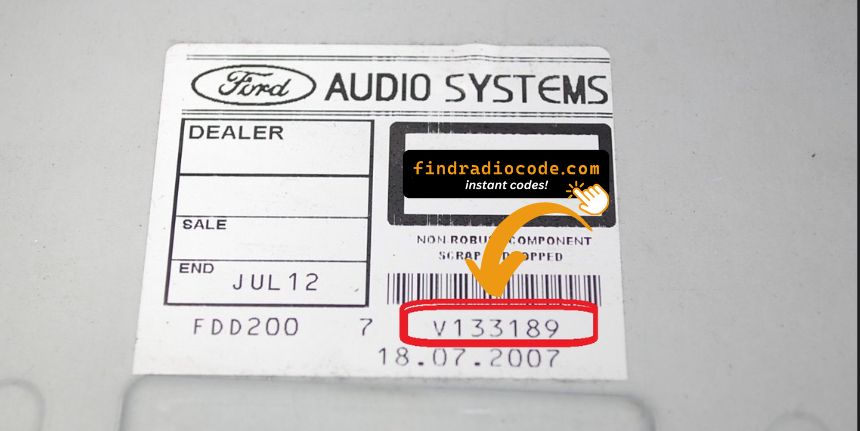
Example: Ford C-Max serial number label location
Common Serial Number Structures
The 2003 Ford C-Max radio serial number starts with one of these codes:
M######– Primary Ford radio serial prefix (6-7 digits after the M)V######– Secondary Ford radio serial prefix
The radio in the 2003 C-Max is typically a Ford 4500 RDS unit. The serial number is printed on a barcode label on the radio casing.
Important The serial must begin with M or V. Don't confuse it with the Ford part number (which starts with different characters). The serial is 6-7 digits plus the prefix letter.
Typical Serial Number Formats for 2003 C-Max Radios
The serial format on factory units is set by the radio supplier, not by Ford. Knowing the expected pattern helps you confirm you have copied the correct line off the chassis label.
On the Ford 5000 RDS and 6000 CD units built by Visteon, the serial typically begins with the letter M followed by six alphanumeric characters, for a total around seven characters. The Sony 6 CD variant usually starts with a different prefix and is printed alongside the Sony part number on the same sticker.
Validation tips: do not submit the long part number or barcode reference - look specifically for the field labelled S/N or Serial. Double-check similar-looking characters (0 vs O, 1 vs I) and ignore any leading or trailing spaces when transcribing.
How to Get Your 2003 Ford C-Max Radio Code
Getting your radio code takes only 4 simple steps.
- Locate your radio's serial number - this is the only information required by our side.
Unlike when contacting the dealer, no VIN is needed. - When you've found the S/N, type it into the form above.
The system checks it against a database of supported radios and automatically catches the matching security code. - In most cases, the code appears instantly on the screen after you pay and is also sent to your email for backup.
If manual verification is required (rare situations), you'll be informed before checkout. - When you receive the code, just enter it into your radio to restore full functionality.
Got the Code? Here's How to Enter It
After locating the radio serial and received the unlock code, the next step is entering it into your radio.
Ford factory radios display a ENTER CODE message when ready for input.
The process is quick, but button layouts and confirmation methods may change depending on the radio version installed in your C-Max.
In-depth Entering Instructions for C-Max 2003
To input the unlock code on the 2003 Ford C-Max's Ford radio:
- Turn ignition to ON. The radio shows "CODE" or "ENTER KEY CODE".
- Press preset buttons 1-4 to enter the 4-digit code:
- Press button 1 repeatedly to cycle to the first digit
- Press button 2 for the second digit, and so on
- Press button 5 or OK to submit the code.
Lockout: After ten incorrect attempts, the radio displays "LOCKED" or "WAIT". Leave the radio switched on for up to 1 hour — it should return to the code prompt automatically. If "Locked 10" appears, try holding button 6 while switching the radio on to get 3 more attempts.
Entering Process Explained
Once you have the correct four-digit code, enter it carefully on the head unit. The 2003 C-Max factory radios use the preset buttons for digit selection and one preset to confirm.
Limited Attempt Warning: the Ford 5000 RDS and 6000 CD allow only ten attempts in total. After ten incorrect entries the display switches to LOCKED 10 and you have three further attempts unlocked by a hidden bypass; if those also fail, the unit shows LOCKED 13 and is permanently locked at user level.
Ford 5000 RDS and 6000 CD
Turn the ignition to accessory and switch the radio on. The display should show CODE - - - -. Press preset 1 repeatedly until the first digit of your code appears, then preset 2 for the second digit, preset 3 for the third, and preset 4 for the fourth. Press preset 5 to submit. If the code is correct the radio returns to normal operation. If the display shows WAIT or CODE INCORRECT PLEASE WAIT, leave the radio switched on with the ignition in accessory and do not attempt re-entry until the wait state clears.
What Caused the Radio to Lock?
Ford's older radios (6000CD, 4500 RDS, 5000C) include a built-in anti-theft system that activates whenever the radio is disconnected from the battery. This covers:
- Battery replacement — the typical cause; even a brief battery disconnect activates the lock.
- Flat or dead battery — a completely drained battery has the same effect.
- Radio removal for repair or theft — removing the radio severs its power connection, triggering the anti-theft when reinstalled.
The lock was designed to deter theft by making a removed radio useless in another vehicle. Supplying the correct code immediately restores normal operation.
Troubleshooting Common Radio Problems - C-Max 2003
Older Ford radios (6000CD, 4500 RDS) use preset buttons 1–4 for digit entry and button 5 to confirm:
- Button 1 — each press cycles through digits for the first position of the 4-digit code.
- Buttons 2, 3, 4 — identical process for the second, third, and fourth digits.
- Button 5 — press to confirm the complete code.
Certain Ford 4500 and 5000 models may use an AM/FM or AS button rather than button 5 to confirm — check your radio's manual if button 5 does not confirm the code. Every preset button cycle digits from 1 to 0 through 9.
Older Ford radio serials must start with M or V:
M######— primary Ford serial format (M + 6 digits).V######— found on Visteon-manufactured radios (V + 6 digits).
The label on the top or back of the unit additionally contains a Ford part number — that is distinct from the serial and should not be submitted. If the two are printed side by side, the correct value is the one starting with M or V. Should the sticker be unreadable, physical removal of the radio is the sole way to read the label — there is no on-screen serial display on these older Ford units.
When a Ford 6000CD or 4500 turns on but does not show a "CODE" prompt:
- The anti-theft may not have engaged — try normal radio operation first.
- Some older Ford units display "SAFE" before the code prompt — wait a few seconds for the full prompt to appear.
- Should nothing appear on screen, check the radio fuse — these older Ford units typically have a separate radio fuse under the dashboard fuse box.
Ford 6000CD and 4500 radios from this period use their own extraction tool to pull out — if you can't see the screen clearly, shine a flashlight to check the display prior to assuming it's blank.
Older Ford radios (Ford 6000CD, 4500) allow up to 10 attempts before showing "LOCKED" or "WAIT". To exit the lockout:
- Leave the radio switched on — avoid turning it off during the lockout wait.
- Wait up to 1 hour. The radio will automatically return to the "CODE" prompt.
- If the display shows "Locked 10", try holding button 6 while switching the radio on to unlock 3 more attempts.
If the radio shows "LOCKED" permanently even after waiting the full hour, the unit may need a dealer reset.
The most frequent cause of a rejected code on older Ford radios (6000CD, 4500 RDS) is using a code generated from the wrong serial. The serial must be read from the label on the back or top of the radio casing — it must start with M or V followed by 6 digits.
Part numbers on the same label look different but can be confused for the serial. If the code was rejected, avoid entering more guesses — ten attempts are allowed before a 30-minute lockout. Reach out for a free reverification if needed.