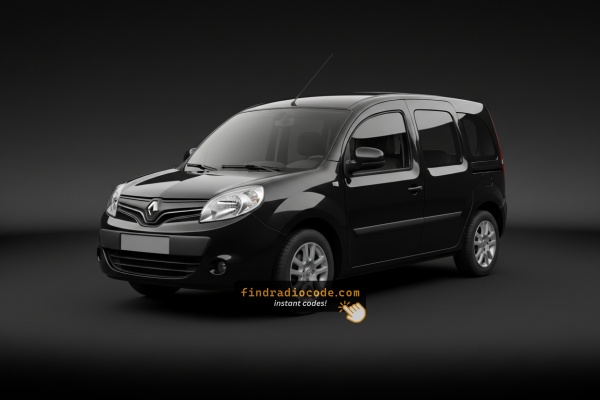
What Caused the Radio to Lock?
Battery replacement is the number one reason for a locked radio on Renault vehicles, but several other situations worth knowing:
- Battery swap or disconnect: Battery replacement is the top reason across all Renault models. The lock activates any time 12V power is interrupted. It catches many owners off-guard, even during a very short disconnect.
- Buying a used Renault: The original code is seldom included when a car changes hands. Both trade and private sellers frequently cannot provide it.
- Flat battery from sitting: A completely flat battery activates the lock on reconnection or recharge.
- Service disconnect: Service that disconnects the battery — including an MOT, tyre change, or oil change — can trigger the lock.
How Serial-Based Renault Kangoo Radio Unlock Works
Getting your radio code takes only 4 easy steps.
- Locate your radio's serial number - this is the only info required to generate the correct unlock code.
The difference with the dealership lookup is that no VIN or paperwork is needed. - Enter the serial number into our generator above.
The system checks it against a database of supported radios and automatically finds the matching security code. - In most cases, the code will appear instantly on the screen after you pay and is also sent to your email for backup.
If manual verification is required (rare situations), you'll be informed before checkout. - Once you receive it, just enter it into your radio to restore the functionality.
Got the Code? Here's How to Enter It
Once you have the S/N and retrieved the unlock code, the next step is entering it into your radio.
Renault original head units display a locked screen when ready for input.
The process is straightforward, but button layouts and confirmation methods may vary depending on the radio version installed in your Kangoo.
Step-by-Step - Correct Entering Process
To enter the code on the 2008 Renault Kangoo:
- Ignition ON. Radio shows "CODE" or four dashes (----).
- Use preset buttons 1-4 to enter each digit of the 4-digit code. Each press advances the digit (0-9).
- Press and hold button 5 or button 6 to submit.
Lockout: Multiple incorrect entries will cause a lockout. Leave the radio for approximately 30 minutes, then retry.
The Correct Way to Enter It
Once the 4-digit unlock code has been derived, it is entered on the Tuner List head unit using preset buttons 1 to 4 and confirmed with a hold of the dedicated preset.
Limited Attempt Warning: the Tuner List family typically allows only 3 attempts. After repeated incorrect entries the radio enters a lockout state requiring an extended waiting period before further attempts are accepted. Verify the pre-code reading and the derived unlock code before starting.
Renault Tuner Cassette / Tuner List CD
Switch the ignition to accessory; the radio powers up and shows CODE. Press preset 1 repeatedly until the first digit of the unlock code is displayed. Press preset 2 for the second digit, then preset 3 for the third digit and preset 4 for the fourth digit. The display updates after each press.
Hold the confirm preset (commonly preset 6) for several seconds until a beep and the return of normal audio confirm a successful unlock. If the value is rejected, the display shows an error and the attempt counter advances; stop and re-verify before any further attempt.
How Serial Numbers Work and Where to Find Them on 2008 Renault Kangoo Radios
The initial step is finding the radio serial.
Most people assume the code depends on the Renault model or year, but actually, the whole process depends on the unique radio unit's serial number.
The serial is the key used to calculate the correct unlock code.
This is actually better, because if you have an aftermarket radio, the VIN or other vehicle-specific data wouldn't help.
Depending on the radio version used, you can retrieve the serial directly from the screen or by checking the label on the radio chassis.
Factory Radios on the 2008 Renault Kangoo
2008 was the final year of the Kangoo Mk1 (KC) before the Mk2 (W) replaced it. Audio remained the post-facelift Tuner List family, with the CD variant the most common factory fitment by this point.
The principal coded factory units were the Renault Tuner Cassette (Tuner List) on remaining entry trims and the Renault Tuner List CD on better-equipped vehicles. Both are single-DIN, share a monochrome display, the same four-button preset row (1 to 4) and the same CODE security architecture; only the media slot differs. Base panel vans could still leave the factory without a coded head unit.
Access the Serial Number on the Radio Display
These are the steps you need to follow for 2008 Renault Kangoo:
The 2008 Renault Kangoo comes with a Renault OEM radio or MediaNav system. Many Renault radios don't have an on-screen serial number retrieval method.
The serial number can be found on a sticker on the radio chassis. The radio must be extracted to access it. Some more recent Kangoo with MediaNav may show the serial in Settings → System.
Before Removing the Radio, Try This Screen Method
Both the Tuner Cassette and the Tuner List CD on the 2008 Kangoo can output the pre-code to the display via a hidden button combination.
Renault Tuner Cassette / Tuner List CD
Switch the ignition to the accessory position so the head unit powers up without starting the engine. With the radio at the standby screen or the CODE prompt, press and hold preset buttons 1 and 6 together for around 5 seconds.
The display will then show a value of one letter followed by three digits (examples: S103, V993). Record this pre-code exactly. It identifies the unit; the unlock code itself is a separate 4-digit value derived from it.
Locate Serial on Kangoo's Radio Chassis
If the serial does not appear on screen, the next step is checking the radio itself.
Many Renault radios require physical access to the serial tag attached to the unit.
Usual approach:
- Start by completely turning off the engine - pull the key out.
- Then lift the dashboard bezel.
- Next, unscrew the mounting points and slide the radio forward.
- Look for a printed tag showing the serial number.
To retrieve the serial on the 2008 Renault Kangoo:
- Turn off the vehicle.
- Find the release slots on each side of the radio. Renault radios commonly use DIN-style extraction holes.
- Insert radio release keys and pull the radio forward.
- Find the serial on the barcode label on the housing. It begins with CC.
Tip: Renault extraction tools are the same European-style tools used for Fiat vehicles.
Pulling Out the Radio to View the S/N on the Tag
If the on-screen pre-code is unavailable, the same value appears on the chassis sticker. The Tuner List units sit in a single-DIN cage released by four extraction keys.
Safety: ignition off, key removed, negative battery terminal disconnected, then wait a few minutes before working on the dash. Avoid yellow airbag connectors and never power the radio while it is partially connected.
Tools needed: four U-shaped Renault DIN extraction keys, a plastic trim wedge, a small flashlight, and a phone for photographing the label.
Insert one extraction key fully into each of the four corner holes on the radio fascia until the internal clips release. Apply gentle outward pressure to the keys and pull the chassis straight back from the dash without twisting. Support the unit once it is clear of the cage and unplug the rear ISO connector and antenna lead.
The white printed sticker on the top or side of the case carries the chassis serial starting with T0 + one letter + three digits, and the pre-code in a Security field on the same label. Photograph the sticker, verify 0 vs O and 1 vs I, and refit in reverse order.
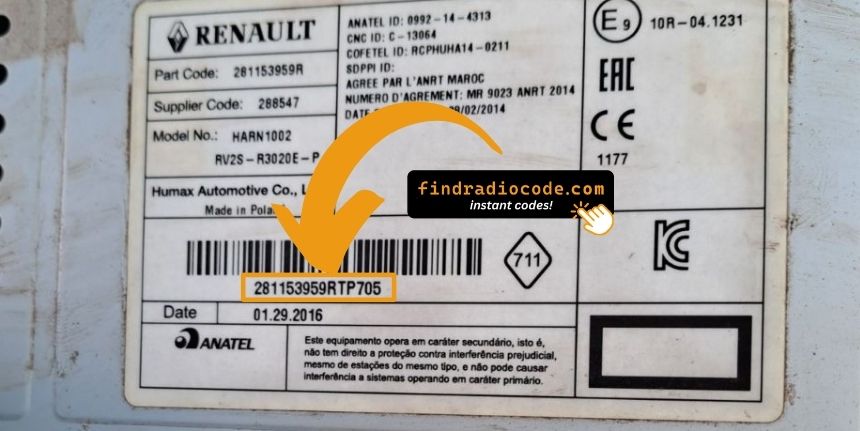
Example: Renault Kangoo serial number label location
Standard Serial Number Patterns on This Radio
The 2008 Renault Kangoo radio serial prefixes:
BP####– Blaupunkt radio serial (standard)CC####– Continental radio serialPH####– Philips radio serialPR####– Other Renault OEM format
The serial is found on the radio unit. Do not mistake it with the vehicle part number.
Typical Serial Number Examples for 2008 Kangoo
Serial format on the 2008 Kangoo Tuner List family is set by the Continental/Becker hardware, not by the vehicle brand. The chassis serial and the pre-code are two distinct values printed on the same side sticker.
The chassis serial typically begins with T0 followed by one letter and three digits. The pre-code, used to derive the unlock code, is always one letter and three digits (examples include V248, D833, O390, T657). Both values are printed on the same label, the pre-code usually under a Security heading.
Validation tips: the pre-code is always 4 characters total. Do not submit the longer part number, the EAN barcode reference, or any value longer than 4 characters. Recheck visually similar characters (0 vs O, 1 vs I) before submission.
Troubleshooting Common Radio Problems - Kangoo 2008
The radio shows "WAIT" / "SAFE" after 3 wrong code attempts, preventing further input until the timer resets.
How to reset it: Turn the ignition to ON and keep it in that position for a full 60 minutes. Turning the ignition off restarts the 60-minute timer. This is particularly important — the timer does not pause, it restarts.
With Renault vehicles, voltage can drop if the ignition is on for an extended period without the engine running. Run the engine or connect a charger if possible to prevent the timer restarting.
The serial number on Renault radios can be found on a sticker on the rear or side of the radio unit, only accessible once the radio is pulled forward.
- What to look for: Look for a string beginning with BP, CC, PH, or PR then 8–10 alphanumeric characters.
- If the label is hard to read: Older Renault labels can be faded. Take a well-lit close-up photo — a camera often reveals characters the eye misses.
- How to access the serial: Standard DIN release keys fit all Renault radios. Insert them into the holes on both sides of the radio and draw the unit out far enough to read the rear label.
Never submit the VIN or a part number — they are not the radio serial and will generate the wrong result.
If the radio powers on without prompting for a code, try the following:
- Trigger the code request: Disconnect the battery for 30 seconds, reconnect, and turn the ignition on. The CODE prompt should appear.
- Check if already unlocked: When all functions work normally without restriction, it is not locked. You do not need to do anything.
- MediaNav units: MediaNav does not show a code prompt the same way. Look under Settings and System for unlock-related options.
- Some units need ACC or ON: Some Blaupunkt/Philips units sometimes only display the CODE screen when the ignition is in ACC or ON. Try both.
Code entry on Renault passenger car radios relies on the preset station buttons to dial in the code digit by digit.
- Button 1 sets the first digit — each press cycles from 0 to 9.
- Button 2 controls digit 2, button 3 digit 3, button 4 digit 4.
- Once all four digits are correct, press and hold button 5, button 6, or the Enter / AM-FM button to confirm.
Note: Newer Renault models with a MediaNav touchscreen use an on-screen keypad instead of preset buttons. Tap the digits on the on-screen number pad. The touchscreen confirms automatically.
Should the radio refuse your code, work through the following before making another attempt.
- Verify the serial prefix: Renault radios use serials starting with BP, CC, PH, or PR. Make sure you entered the full serial from the radio label — not any other sticker inside the car.
- Check for misread characters: With older Blaupunkt/Philips stickers, characters are easily confused. Photograph the label and zoom in.
- Entry method: Pressing button 1 cycles digit 1 from 0 to 9. Pressing too quickly can skip over the correct digit. Count each press and take it slowly. Only confirm once all four digits are correct.
If it keeps failing? Send us your serial and order number and we'll check and reissue if needed.