How to Find the Serial Number on Your 1996 Renault Laguna Radio?
The important fact to know is that factory radios use a unique S/N to identify each unitindividually.
Your anti-theft system matches the code directly to the serial.
Different from vehicle-specific data like VIN or registration info, it is not determined by the model or production year, so you'll be able to generate it even if you have an aftermarket radio.
Depending on the manufacturer and radio installed in your Renault Laguna, the access method varies.
Here are the best ways to find it.
Radios Offered in the 1996 Laguna
- Tuner Cassette (Philips, single DIN). Base fitment with a cassette slot and a row of 1 to 6 preset buttons.
- Tuner CD (Philips, single DIN). Optional upgrade with a CD slot in place of the cassette and the same preset row used for code entry.
- Both units share the standard Renault DIN cage and identical pre-code procedure, so the model is identified primarily by the slot type on the front fascia.
Check the Display First - Serial Retrieval Without Tools
The method for 1996 Renault Laguna is this:
The 1996 Renault Laguna features a Renault OEM radio or MediaNav system. Many Renault radios don't support an on-screen serial number retrieval method.
The serial number is located on a sticker on the radio chassis. The radio must be extracted to read it. Certain more recent Laguna with MediaNav may show the serial in Settings → System.
Display-Based Serial Number Retrieval
- Turn the ignition key to accessory and switch the radio on.
- Hold preset buttons 1 and 6 together for around five seconds.
- Watch the screen for a short string in the form letter + three digits (for example V873). That is the pre-code.
- Release the buttons and note the value exactly. If the display does not change, the pre-code is only available from the chassis label.
Access it by Pulling Out the Unit
If the serial number cannot be accessed on-screen, use the removal method.
Most Renault Laguna original radios include a tag with the serial number printed on the chassis.
The process:
- Remove key from ignition.
- Carefully remove surrounding dashboard trim.
- Remove fasteners holding the radio.
- Move slightly to inspect the label.
To find the serial on the 1996 Renault Laguna:
- Turn off the vehicle.
- Locate the extraction holes on both sides of the radio. Renault radios commonly use pin-release extraction slots.
- Insert radio release keys and slide the radio forward.
- Read the serial on the barcode label on the chassis. It begins with PH.
Note: Renault extraction tools are the same DIN-style tools used for many European vehicles.
Pulling Out the Unit to See the S/N on the Tag
- Safety: ignition off, key removed, negative battery terminal disconnected, several minutes of wait time before reaching into the dashboard. Avoid the yellow SRS connectors.
- Tools: four Renault DIN release keys, plastic trim removal tools, flashlight, phone for the photograph.
- Insert the release keys into the four corner slots of the fascia and push until the spring clips release.
- Slide the radio straight out using the keys, then disconnect the ISO power, speaker and antenna leads at the rear.
- Find the sticker on the top or side of the metal chassis. Look for PRE-CODE, SERIAL or S/N. The pre-code is a letter followed by three digits.
- Photograph the label, verify 0 versus O and 1 versus I, and re-fit the unit when finished.
- If the unit refuses to release after firm pressure on the keys, stop and consult a professional rather than forcing the fascia or chassis.
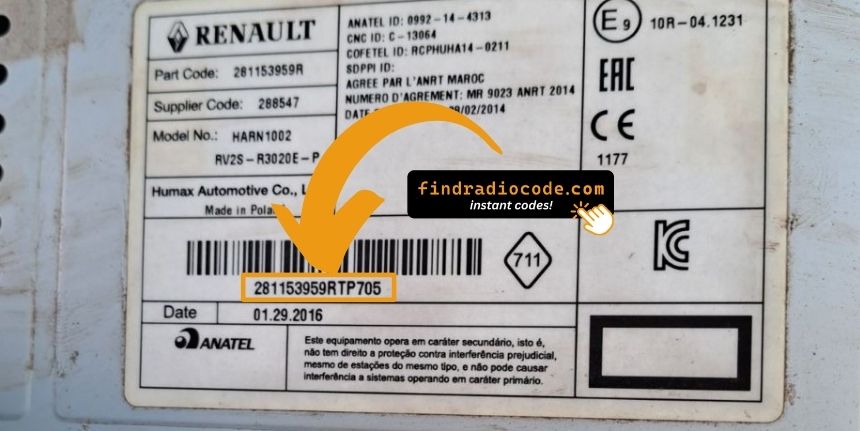
Example: Renault Laguna serial number label location
Serial Number Format Guide for 1996 Renault Laguna
The 1996 Renault Laguna radio serial formats:
BP####– Blaupunkt radio serial (standard)CC####– Continental radio serialPH####– Philips radio serialPR####– Other Renault OEM format
The serial is found on the radio unit. Do not mistake it with the Renault part number.
Standard Serial Number Patterns on This Radio
- Pre-code format: one letter followed by three digits, for example N420.
- The chassis label also carries a longer Philips internal serial and a Renault 7700 part number. These do not unlock the radio and should not replace the pre-code.
- Double-check the pre-code characters before submission, particularly 0 versus O and 1 versus I.
Fast Renault Laguna Radio Unlock Process Explained
Vehicle radios use security codes dependent on the radio unit itself instead of the vehicle model or production year.
- Our lookup service works by matching your Renault Laguna radio's serial number.
- Once the serial number is submitted, the system identifies the radio unit and generates the code that you need.
- You can then enter the code directly into your Renault radio.
- The online process is quicker and more accessible than visiting the Renault dealer.
Code Entry Process for 1996 Laguna
Once the system gives you 1996 Renault Laguna radio code from the serial number, you're ready to reactivate the radio.
Many drivers hesitate at this stage because input process can look different across radio versions, but it's usually simple.
When the radio shows CODE, it means the unit is waiting for the correct numbers.
In-depth Input Instructions for Laguna 1996
To input the code on the 1996 Renault Laguna:
- Ignition ON. Radio shows "CODE" or four dashes (----).
- Use preset buttons 1-4 to enter each digit of the 4-digit code. Each press advances the digit (0-9).
- Hold button 5 or button 6 to submit.
Lockout: Multiple wrong entries will cause a lockout. Leave the radio for about half an hour, then retry.
Correct Entering Process
- Limited Attempt Warning. The Philips unit accepts only a small number of failed entries before it locks. Confirm the correct code before pressing anything.
- Turn the ignition to accessory and switch the radio on.
- Wait for four flashing zeros on the display.
- Press preset 1 to increment the first digit, preset 2 for the second, preset 3 for the third and preset 4 for the fourth.
- When all four digits match the unlock code, press and hold preset 6 until the radio confirms and resumes normal playback.
- If the entry is wrong, the display returns to 0000. Stop after the first failure rather than continuing to guess.
Understanding Unlock Issues with Your Laguna
Code entry on Renault Laguna radios uses the preset station buttons to build the code digit by digit.
- Button 1 sets the first digit — pressing it cycles from 0 to 9.
- Button 2 sets digit 2, button 3 digit 3, button 4 digit 4.
- After setting all digits, hold down button 5, button 6, or the Enter / AM-FM button to submit the entry.
Note: Some later Renault models use a touchscreen code entry pad. Tap the digits on the on-screen number pad. No hold-to-confirm is needed.
When the radio starts but does not ask for a code, try the following:
- Force the code prompt: Disconnect the battery for 30 seconds, reconnect, and turn the ignition on. The CODE prompt should appear.
- It may already be working: When all functions work normally without restriction, it is already unlocked. No code entry is needed.
- MediaNav units: MediaNav does not show a code prompt the same way. Look under Settings and System for unlock-related options.
- Ignition position: Older Renault radios may only show the code prompt when the ignition is in ACC or ON. Check both positions.
The serial number on Renault radios is on a label on the rear or side of the radio unit, only accessible after removing the unit.
- What to look for: Look for a string beginning with BP, CC, PH, or PR then 8–10 alphanumeric characters.
- If the label is hard to read: Labels on higher-mileage vehicles are sometimes worn. Take a well-lit close-up photo — a camera often reveals characters the eye misses.
- Removal tools: Standard DIN release keys fit all Renault models. Insert into the release slots on each side and draw the unit out far enough to read the rear label.
Never submit the VIN or a part number — these produce an incorrect code.
The display shows "WAIT" or "SAFE" after 3 wrong code attempts, preventing further input until the timer runs down.
Clearing the wait: Turn the ignition to ON and leave it there for a full 60 minutes. Turning the ignition off resets the countdown to zero. This is particularly important — the timer does not pause, it restarts.
With Renault vehicles, voltage can drop if the ignition is on for an extended period without the engine running. Keep the engine idling or connect a charger if possible to keep voltage stable.
If the radio rejects your code, work through these points before entering it again.
- Verify the serial prefix: Renault radios use serials starting with BP, CC, PH, or PR. Make sure you entered the full serial from the radio label — not the vehicle part number or chassis number.
- Look for digit confusion: With older Blaupunkt/Philips stickers, characters are easily confused. Take a clear photo and examine it carefully.
- Entry method: Each press of a preset button advances the digit by one. Rapid pressing may go past the right number. Press deliberately and count. Only confirm once all four digits are correct.
Still getting the wrong code? Contact us with your serial number and we will re-verify immediately.
What Caused the Radio to Lock?
Battery replacement is the number one reason for a locked radio on Renault vehicles, but several other situations worth knowing:
- Battery swap or disconnect: Battery replacement is the top reason across all Renault models. The lock activates any time 12V power is interrupted. This is extremely common, even during a very short disconnect.
- Second-hand purchase: The original code is seldom included when a car changes hands. Private sellers and dealers often do not have it.
- Discharged battery: A battery drained from sitting unused triggers the code request when power is restored.
- Workshop or service work: Any work involving the battery — including an MOT, tyre change, or oil change — may activate the code request.