Harman R1 EXT ER Asking for a Code? Get It Back Now
Harman | Chrysler | Instant Retrieval
How the refund works.
Supported Serial Prefixes
| Serial Prefix | Status |
|---|---|
T0012 |
Supported |
T00BE |
Supported |
If your serial starts with any prefix above, we can recover your code.
Your code in three steps
One number, three steps, a couple of minutes.
- 1 Read the number on the label Pull the radio a few centimetres forward and copy the number off its label - nothing has to be unplugged.
- 2 Enter it in the form Copy it character for character. We check the format before checkout, so a typo never costs you anything.
- 3 Your code lands in seconds The code appears the moment the payment clears, and a copy goes to your email. Keep it - the same four digits work for the life of the radio.
If it does not work, you are refunded in full.
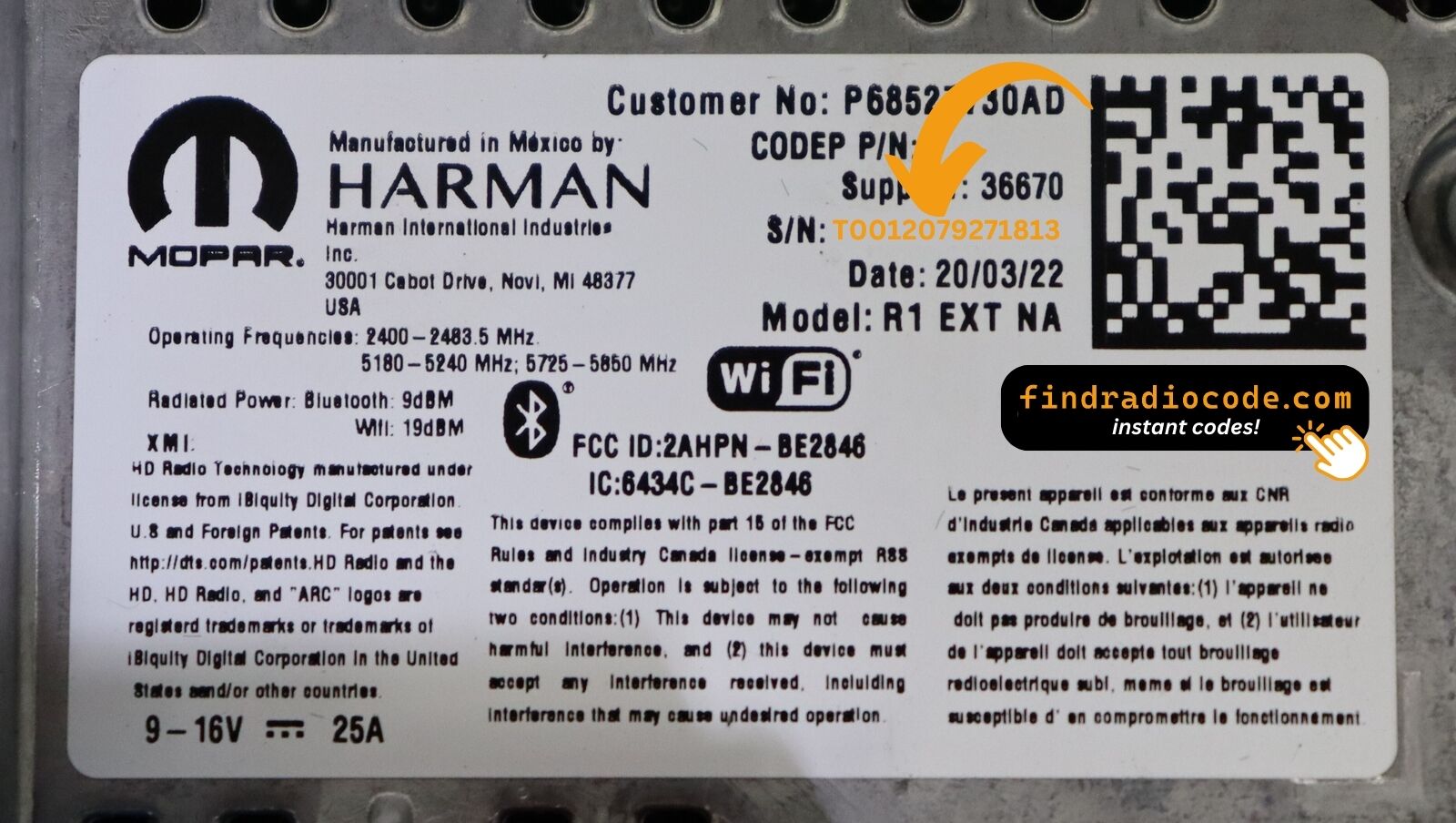
This is an example label - the one in your car sits in the same place and looks much like it.
Sample serials we handle
Common Chrysler serial numbers look like this:
T00BE351823197
(prefix: T00BE)
T0012566327123
(prefix: T0012)
T00BE104477269
(prefix: T00BE)
Common prefixes: T0012, T00BE
How to Identify the R1 EXT ER
Line up the design, controls, display and features listed below with your factory-installed radio - the R1 EXT ER is easy to tell apart once you know what to look for.
Typical identification features:
- 8.4" touchscreen in the centre of the dash
- A Europe-market build
- ER printed on the factory label
- Label serial opening with T0012, T00BE
It is the R1 EXT ER when:
- ER appears as the sales code on the label
- the serial on the label starts with T0012, T00BE
- the model year sits within 2018-2022
- the screen is the 8.4" touchscreen fitted to the R1 EXT
External-mount means the screen sits on top of the dash, not flush with it. If your screen is flush-mounted, you have an internal-mount R1 INT NA variant.
What Is the R1 EXT ER Radio?
The R1 EXT ER is an original factory-installed infotainment system developed for selected Chrysler vehicles. Designed to provide reliable audio playback and vehicle integration, this unit may also offer Bluetooth connectivity, touchscreen controls, CD/DVD playback, navigation or multimedia support, depending on the exact configuration.
R1 EXT ER is the externally-mounted Uconnect 4C NAV 8.4 head unit for European markets - 8.4-inch touchscreen on a stalk-mounted bezel (the screen sits proud of the dash rather than recessed). Modern Uconnect 4C UI with Apple CarPlay/Android Auto, DAB+, built-in EU maps.
The R1 EXT ER was installed in various Chrysler models between 2018-2022. It was commonly fitted to vehicles built on the Harman multimedia platform and is still one of the more recognisable factory radios of that period.
Features you may find on the R1 EXT ER:
8.4" touchscreen
AM/FM radio
Smartphone mirroring: CarPlay / Android Auto*
CD playback
AUX and USB input*
Steering wheel control support
Anti-theft security code
*Availability depends on the vehicle configuration.
Like many factory-installed radios, the R1 EXT ER is secured with an anti-theft system. If power is interrupted after replacing or disconnecting the vehicle battery, the unit may request the original radio code before it can be used again.
Platform details and official documentation are available from the official Uconnect site.
How to Read the Serial Number Off Your R1 EXT ER
The code is calculated from the radio's own serial number, so that number is the only thing you need before ordering. It is printed on the factory sticker of the unit itself, not in the vehicle documents.
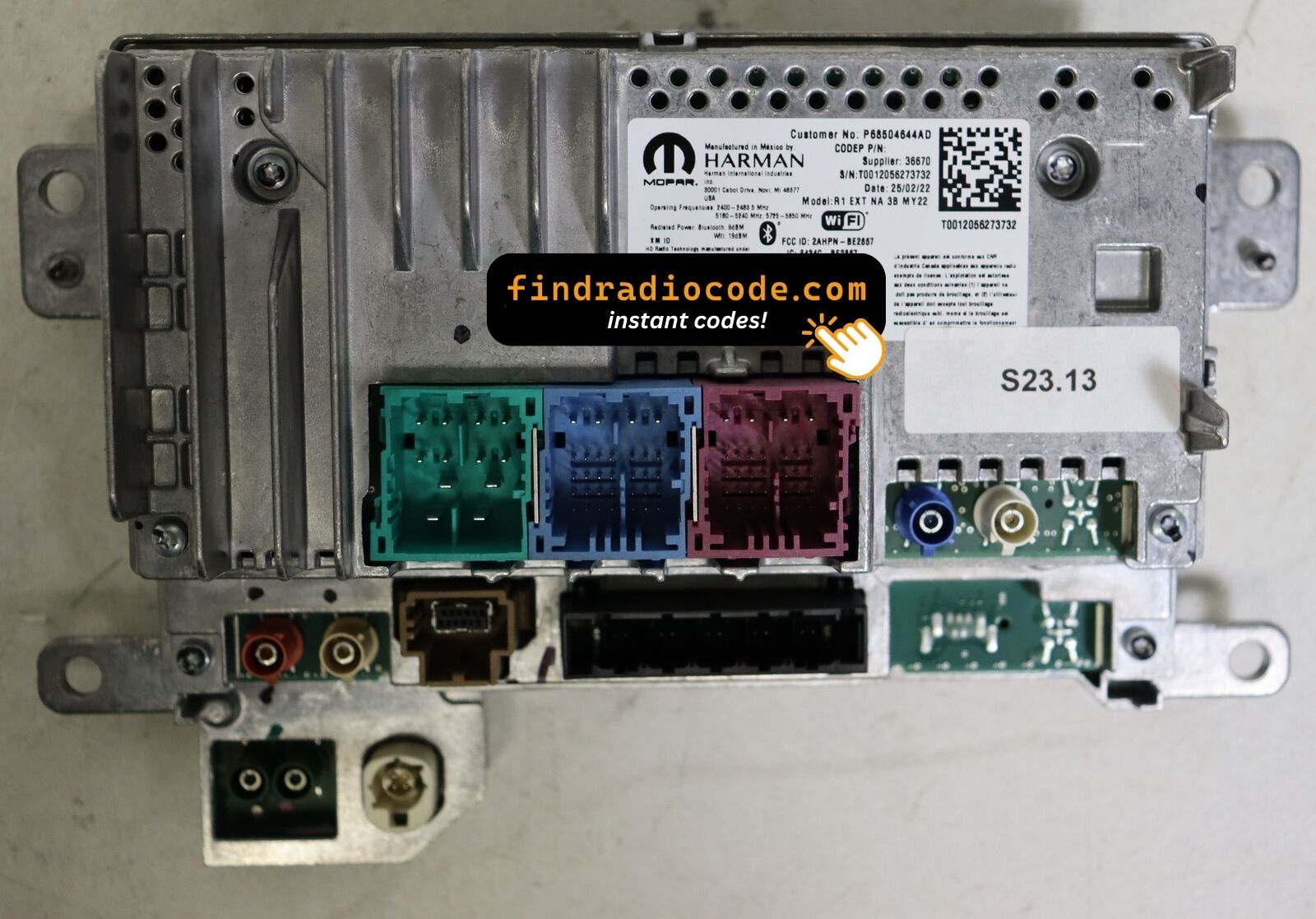
On the R1 EXT ER: Label on the top of the chassis, behind the screen module. The R1 unit comes out of the dash as a single assembly - the screen and the radio chassis are joined and must be removed together.
How to reach the number:
- Pull the unit forward with release keys (cheap online) - the wiring can stay connected.
- Read the serial from the factory sticker on the housing, beside the barcode.
- Enter it exactly as it appears - no spaces, no dashes.
Where the label sits on this radio
What Usually Triggers the Code Screen
Nearly all of the R1 EXT ER codes we generate follow one of these four events.
Back from the mechanic, radio locked
Mechanics often disconnect the battery before electrical work. The car comes back fixed and the radio comes back locked - normal, not a fault.
A unit from a donor car
A radio from a breaker or an online sale comes with its own serial, so it needs its own code - read the label on the unit you fitted.
A used car with a locked radio
Second and third owners almost never get the code card. The radio itself still carries everything needed - its serial number.
New battery, locked radio
The most common trigger by far: the moment the battery is disconnected, the radio forgets it was ever unlocked and asks for its code on the next start.
Whichever of these applies, the fix is identical: the serial number off the radio, the form at the top of this page, and the code arrives in seconds.
Technical Specifications
| Specification | Value |
|---|---|
| Manufacturer | Harman |
| Radio Family | R1 EXT |
| Variant | ER |
| Market | Europe |
| Vehicle Brand | Jeep / Ram |
| Production Years | 2018-2022 |
| Display | 8.4" touchscreen |
| Serial Prefixes | T0012, T00BE |
Treat the list above as the usual spec - individual R1 EXT ER units can have more or fewer features, depending on the factory options chosen for the car.
Which Vehicles Use the R1 EXT ER?
| Vehicle Model | Typical Production Years | Notes |
|---|---|---|
| Jeep Wrangler JL, Gladiator JT (EU) | 2018-2022 | |
| Jeep Cherokee KL refresh, Compass (EU nav trims) | 2018-2022 | |
| Ram 1500 DT (EU conversions) | 2018-2022 |
Some vehicle models were available with more than one factory radio depending on trim level, production year or regional market. Always verify your radio model before ordering a code.
Find Your Part Number 3
Every reference below is covered by this service. Find yours on the factory sticker of the radio to confirm you are on the right page.
68426042AA 68426042AB 68426042AC The part number is printed on the label on top of or on the side of the radio chassis, usually next to the serial number. If yours appears above, the R1 EXT ER is the correct page.
Typing the code into your R1 EXT ER
The code goes straight into the radio, not into the car's menus.
- Switch the ignition on and let the radio boot to its security screen.
- The code prompt appears with its own keypad.
- Enter the four digits in the order you received them.
- As soon as the last digit lands, the radio verifies on its own.
- On a correct code the radio leaves security mode and plays again.
Troubleshooting the R1 EXT ER
The radio is counting down
A countdown means the anti-theft system is holding the unit. Leave the ignition on until it clears. Three wrong codes triggers a "PLEASE WAIT" screen with a 60-minute timer (R1 uses the longer NTG4-era timer rather than the 30-minute Uconnect 8.4 timer). Power must remain applied for the timer to count down.
The label is not where I expected
Only the radio itself carries it - slide the unit forward and the label is right there. Label on the top of the chassis, behind the screen module. The R1 unit comes out of the dash as a single assembly - the screen and the radio chassis are joined and must be removed together.
Locked again after it was fine
Nothing is broken. Any interruption to the 12V supply brings the lock screen back. Loss of 12V power. R1 modules are more tolerant of brief power dips than older Uconnects but still lock on full battery disconnect or jump-start failure.
Same face, different radio
One glance at the label settles it - worth doing before the order. External-mount means the screen sits on top of the dash, not flush with it. If your screen is flush-mounted, you have an internal-mount R1 INT NA variant.
The code belongs to the radio and never changes, so keep it somewhere safe once you have it.
R1 EXT ER FAQ
Verified Customer Experiences
Short notes from real orders; the reviews page has the rest.
"Had to replace the head unit and bought one on eBay but the anti theft code wasn’t provided. This option to get it worked out well"
Thank you for the code, you saved me a 140.00 and a trip to the dealer.
Matt Diekmann - Chrysler
Thank you!!!!
Darius - Chrysler
What Is Included
Your original code arrives the moment you pay, with an email copy for safe keeping.
A complete refund whenever the code fails to open your unit.
Runs day and night, so a locked radio never waits for opening hours.
The code never expires - keep it and future battery changes cost nothing.
Other OEM Radio Models
These units are often mixed up with the R1 EXT ER. If the details above do not match your radio, check one of these instead.
The R1 EXT ER is only one of the Harman radios we support - the Harman radio codes page shows the rest.