
Radio Serial Number Explained - Finding It on Your Ford
The initial step is to find and write down the radio's S/N.
Based on the head unit type fitted in your 2006 Connect, the serial can be found either through the display menu or by checking the label on the radio itself.
Below are the most common methods to identify your serial quickly.
Which Head Unit Is in Your 2006 Connect?
For 2006, the Transit Connect Mk1 continued with the same Visteon-built single-DIN range used since launch.
- 4500 RDS - basic RDS head unit on base-spec vans.
- 5000 RDS - mid-tier RDS option with a slightly larger display.
- 6000 CD - top single-DIN CD unit, identifiable by the centre CD slot and six numbered preset buttons.
View the Serial Number via the Radio Display
Try the following for your 2006 Ford Connect:
The 2006 Ford Connect comes with a Ford 4500 RDS radio. Ford radios don't include an on-screen serial number display.
The serial number must be read physically from the label on the radio. Refer to the removal instructions below.
Try this first (Ford 6000CD): Press and hold buttons 1 and 6 together for approximately 3 seconds. The radio cycles through system information — the serial (e.g., V197905) is shown last. If nothing appeared, try holding buttons 2 and 6 for the M serial variant. Occasionally the serial is split across two screens — join the two halves to get the complete serial.
If the screen method fails, proceed with the manual removal approach below.
Screen-Based Serial Lookup Method
Display retrieval on the 2006 Connect is available only on the 6000 CD. The 4500 RDS and 5000 RDS do not expose the serial on screen.
Ford 6000 CD
- Turn the ignition to ACC or ON and let the radio fully power up.
- Press and hold preset buttons 1 and 6 together for several seconds.
- Wait for the display to cycle through diagnostic information.
- Read the serial that appears - typically an M or V prefix followed by six digits.
- Photograph the display for an accurate record.
Access the Serial by Pulling Out the Unit
If the serial number cannot be accessed through menu, use the removal method.
Most Ford Connect factory radios include a label with the serial number printed on the housing.
Step-by-Step:
- Turn off the vehicle.
- Lift the dashboard frame surrounding the radio.
- Loosen the fasteners.
- Slide the unit slightly out to access the label.
The serial number is usually located near the printed code.
To find the serial number on the 2006 Ford Connect's radio, you must partially remove the unit:
- Switch off the vehicle.
- Locate the release pin holes on the left and right of the radio faceplate. Ford radios of this generation use 4 release pins (two per side).
- Insert Ford radio release keys into the four holes. Push them in until you feel a click.
- Pull the radio out using the keys as grips.
- Read the serial number printed on a white label on the back of the unit. It begins with M or V.
Note: Ford radio release keys are affordable and widely available online. They are thin metal tools shaped like a U that slide into the extraction slots.
Locate Serial on Connect's Radio Chassis
The 4500 RDS and 5000 RDS in the 2006 Connect carry the serial on a chassis sticker, so the unit must be partially withdrawn from the dash cage to read it.
- Safety: turn the ignition off, take out the key, disconnect the negative battery terminal and wait several minutes. Never interfere with yellow airbag connectors or SRS wiring.
- Tools: four Ford DIN release keys, plastic trim tools, a flashlight, and a phone or camera to capture the label.
- Insert one DIN key into each of the four corner slots with the notch facing inward, pushing until each clicks home.
- Pull all four keys outward at once so the internal clips release and the unit slides forward in its cage.
- Withdraw the radio only far enough to read the white sticker on the top or side of the chassis.
- Find the line marked S/N, Serial or SN. Photograph it and verify confusable characters (0 vs O, 1 vs I). The unlock code is never printed on the unit.
- Do not power the radio while the harness is partly disconnected.
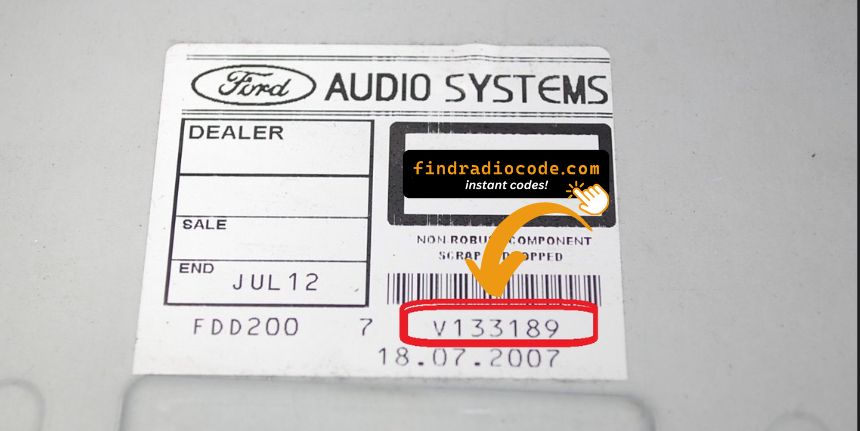
Example: Ford Connect serial number label location
These are the Common Serial Formats
The 2006 Ford Connect radio serial number has the prefix one of these letters:
M######– Standard Ford radio serial prefix (seven digits after the M)V######– Alternate Ford radio serial prefix
The radio in the 2006 Connect is typically a Visteon-made unit. The serial number is located on a white or silver label on the unit chassis.
Important The serial always starts with M or V. Don't confuse it with the part number (which starts with different letters). The serial is 6-7 digits plus the prefix letter.
S/N Patterns and Prefixes
Because the Transit Connect Mk1's head units are built by Visteon, the serial structure is broadly consistent across the 4500 RDS, 5000 RDS and 6000 CD.
- Serials commonly begin with the letter M or V.
- The prefix is typically followed by six digits, for example M123456 or V123456.
- The chassis sticker or screen readout labels the value as S/N, Serial or SN.
- Do not submit part numbers, model codes or barcode references in place of the serial.
- Recheck similar characters such as zero versus the letter O before submitting.
Inputting the Security Code
After generating the correct unlock code based on the S/N, you can restore normal functionality by entering it into the unit.
The code entry process depends on the radio interface, but most 2006 Connect systems follow a similar structure using preset buttons, touch controls, or rotary knobs - depending on if it's a factory or an aftermarket unit.
You will typically see SAFE displayed on screen.
Step-by-Step - Correct Entering Process
To input the unlock code on the 2006 Ford Connect's Ford radio:
- Turn ignition to ON. The radio displays "CODE" or "ENTER KEY CODE".
- Use preset buttons 1-4 to enter the 4-digit code:
- Press button 1 repeatedly to set the first digit
- Press button 2 for the second digit, and so on
- Press button 5 or OK to confirm the code.
Lockout: After 10 incorrect attempts, the radio shows "LOCKED" or "WAIT". Leave the radio switched on for up to 1 hour — it will return to the code prompt automatically. Should "Locked 10" appears, try holding button 6 while switching the radio on to receive 3 more attempts.
Correct Entering Process
Once a valid 4-digit unlock code has been obtained, careful input is essential because Visteon-built units allow only a small number of attempts.
- Limited Attempt Warning: a small number of incorrect entries can push the radio into a wait or locked state. Always confirm the code before pressing anything.
- Switch the ignition to ACC or ON and wait for the CODE prompt on the display.
- Press preset 1 until the first digit shown matches the first digit of the code.
- Repeat with preset 2, preset 3 and preset 4 for the remaining digits.
- Press preset 5 to submit the code.
- If accepted, the radio returns to normal operation. If rejected, stop and recheck the serial and code rather than retrying.
Steps to Unlock Your 2006 Ford Connect Radio
Getting your radio code takes only a few easy steps.
- Locate your radio's serial number - this is the only info required by our side.
Unlike dealership lookup, no VIN or paperwork is needed. - When you've found the S/N, type it into the form above.
Our system checks it against a database of supported factory radios and automatically catches the matching radio code. - In most cases, the code appears instantly on the screen after you pay and is also sent to your email for backup.
If we need to check it manually, you'll be informed before checkout. - When you receive the code, just enter it into your radio to restore the functionality.
What Caused the Radio to Lock?
Ford's older radios (6000CD, 4500 RDS, 5000C) carry a built-in anti-theft system that locks whenever the radio is disconnected from the battery. Common triggers include:
- Battery replacement — the typical cause; even a brief battery disconnect activates the lock.
- Flat or dead battery — a fully discharged battery also triggers the code prompt.
- Radio removal for repair or theft — taking out the radio severs its power connection, triggering the anti-theft when reinstalled.
The lock was designed to deter theft by making a removed radio non-functional in another vehicle. Entering the correct code instantly re-enables normal operation.
Troubleshooting Common Radio Problems - Connect 2006
Older Ford radio serials must start with M or V:
M######— standard Ford serial format (M + 6 digits).V######— used by Visteon-manufactured units (V + 6 digits).
The label on the radio chassis also shows a Ford part number — that is distinct from the serial and should not be submitted. If the two are on the same sticker, the serial is the one with the M or V prefix. If the label is worn, physical removal of the radio is the sole way to read the label — there is no on-screen serial display on these early Ford radios.
Older Ford radios (Ford 6000CD, 4500) permit up to 10 attempts before showing "LOCKED" or "WAIT". To recover:
- Leave the radio switched on — do not turning it off during the lockout wait.
- Wait up to 1 hour. The radio should automatically return to the "CODE" display.
- Should it show "Locked 10", try holding button 6 while switching the radio on to receive 3 more attempts.
Should it display "LOCKED" permanently even after waiting the full hour, the unit may need dealer attention.
If the older Ford radio turns on but skips a "CODE" prompt:
- The anti-theft may not have engaged — test normal radio operation first.
- Some older Ford units display "SAFE" before the code prompt — wait a few seconds for the full prompt to display.
- Should nothing appear on screen, inspect the fuse — these older Ford units often have a dedicated radio fuse under the dashboard fuse box.
Ford 6000CD and 4500 radios of this era use their own extraction tool to remove — should the display be hard to read, use a torch to check the display prior to assuming it's blank.
Older Ford radios (6000CD, 4500 RDS) use preset buttons 1–4 for digit entry and button 5 to confirm:
- Button 1 — press repeatedly scrolls through digits for the first position of the 4-digit code.
- Buttons 2, 3, 4 — same method for the remaining digits.
- Button 5 — press to confirm the complete code.
Certain Ford 4500 and 5000 models may use an AM/FM or AS button rather than button 5 to confirm — consult your radio's manual if button 5 fails to accept the code. Every preset button scroll through 1 to 0 through 9.
The primary cause of a rejected code on older Ford radios (6000CD, 4500 RDS) is using a code generated from the wrong serial. The serial must be read from the label on the radio unit itself — it always begins with M or V followed by 6 digits.
Part numbers on the same label look different but are sometimes mistaken for the serial. If the code was rejected, do not entering more attempts — ten attempts are allowed before a 30-minute lockout. Reach out for a free reverification if needed.