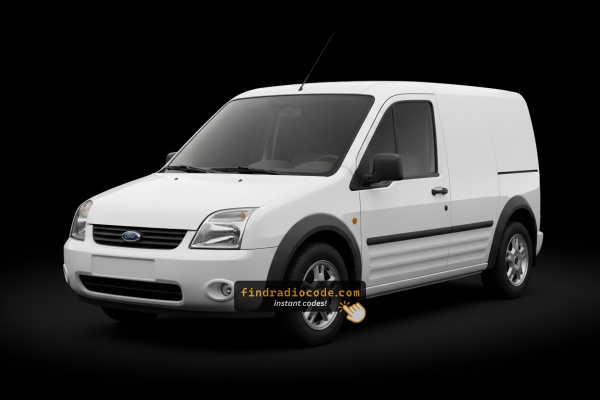
Why Is the Radio Asking for a Code?
Ford's older radios (6000CD, 4500 RDS, 5000C) carry a built-in anti-theft system that activates whenever the radio is disconnected from the battery. This covers:
- Battery replacement — the most frequent cause; even a momentary battery disconnect triggers the lock.
- Flat or dead battery — a completely drained battery also triggers the code prompt.
- Radio removal for repair or theft — removing the radio cuts its power connection, activating the anti-theft when reinstalled.
Ford included this to deter theft by making a removed radio useless in another vehicle. Entering the correct code immediately restores normal operation.
Steps to Unlock Your 2007 Ford Connect Radio
- Skip long troubleshooting discussions or service visits - you can retrieve the code online using the radio serial number.
- Start by finding your radio's serial. The best place to search is on the unit itself, and in some cases you can see it on the Connect's radio screen.
- Enter it into the form above, and our system will identify the correct 2007 Connect unlock code.
- When you receive the code, input it using Connect's radio controls to release the blockade fully.
- The entire process takes less than a minute for most users and requires zero paperwork and no dealer visit.
Entering Your Unlock Code
When you obtain the correct unlock code based on the S/N, you can restore default functionality by entering it into the unit.
The code entry process depends on the head unit design, but most 2007 Connect systems follow a similar structure using preset buttons, touch controls, or rotary knobs - depending on if it's a factory or an aftermarket unit.
You will typically see ENTER CODE displayed on screen.
Correct Entering Process
To input the unlock code on the 2007 Ford Connect's Ford radio:
- Turn ignition to ON. The radio shows "CODE" or "ENTER KEY CODE".
- Use preset buttons 1-4 to enter the 4-digit code:
- Press button 1 multiple times to set the first digit
- Press button 2 for the second digit, and so on
- Press button 5 or OK to accept the code.
Lockout: After ten incorrect entries, the radio displays "LOCKED" or "WAIT". Leave the radio switched on for up to 1 hour — it should return to the code prompt automatically. If "Locked 10" appears, try holding button 6 while switching the radio on to receive 3 more attempts.
In-depth Entering Instructions for Connect 2007
After the correct 4-digit code has been obtained, careful entry is essential because Visteon-built units allow only a small number of attempts before locking out further input.
Limited Attempt Warning: repeated incorrect entries can push the radio into a wait or locked state, after which further attempts may be refused. Always verify the code matches the serial submitted before entering anything.
Turn the ignition to ACC or ON and wait for the CODE prompt on the display. Press preset 1 until the first digit shown matches the first digit of the code, then repeat with preset 2 for the second digit, preset 3 for the third digit and preset 4 for the fourth digit. Press preset 5 to submit the code. If the radio accepts, it returns to normal operation. If it is rejected, stop and verify the serial and code rather than attempting another entry immediately.
Can't Locate Your Radio S/N? Follow The Steps Below for Ford Connect 2007
Very important thing to know is that factory radios use a unique S/N to identify each unit.
Your anti-theft system matches the code directly to the serial.
Different from car-specific data such as VIN or registration information, it is not determined by the model or production year, so you'll be able to generate it even if you have a radio that you installed afterwards.
Depending on the manufacturer and radio installed in your Ford Connect, the access method varies.
These are the best ways to locate it.
Factory Radios on the 2007 Ford Transit Connect
The 2007 Transit Connect Mk1 continued with the established Visteon-built single-DIN family before the 2009 facelift.
The 4500 RDS remained the entry-level RDS head unit on base vans, while the 5000 RDS served the mid-trim slot. The 6000 CD remained the premium single-DIN choice, identifiable by its centre disc slot and six preset buttons. All three units are theft-coded and require the 4-digit security code after the battery is disconnected.
Access the Serial via the Radio Screen
These are the steps you should follow for 2007 Ford Connect:
The 2007 Ford Connect comes with a Ford OEM radio. Ford radios do not have an on-screen method to show the serial.
The serial number must be located physically from the label on the radio. Refer to the removal instructions below.
Try this first (Ford 6000CD): Press and hold buttons 1 and 6 together for approximately 3 seconds. The radio cycles through system information — the serial (e.g., V197905) is shown last. If nothing appeared, try holding buttons 2 and 6 for the M serial variant. On some units the serial is split across two screens — join the two halves to get the complete serial.
If the screen method fails, proceed with the manual removal method below.
Accessing the Serial Number Through the Radio Menu
On the 2007 Connect, only the 6000 CD reliably exposes the serial on screen. The 4500 RDS and 5000 RDS require the radio to be removed for the chassis label.
Ford 6000 CD
Turn the ignition to ACC or ON so the radio powers up. Press and hold preset buttons 1 and 6 together for several seconds and wait for the display to cycle through internal information. The serial typically appears as an M or V prefix followed by six digits. Record it exactly as displayed and photograph the screen if possible to avoid transcription errors.
Manufacturer Label Inspection
If the serial does not appear on display, the next step is checking the radio itself.
Many Ford radios require physical access to the serial tag attached to the unit.
Typical approach:
- Start by completely powering down the engine - pull the key out.
- Then detach the dashboard bezel.
- Next, loosen the mounting points and move the radio forward.
- Look for a barcode label showing the serial number.
To access the serial number on the 2007 Ford Connect's radio, it's necessary to partially remove the unit:
- Switch off the vehicle.
- Find the extraction holes on the left and right of the radio front panel. Ford radios of this generation use 4 release pins (two per side).
- Insert removal keys into the 4 holes. Push them in until you feel a release.
- Slide the radio out using the keys as handles.
- Locate the serial number printed on a white label on the top of the unit. It starts with M or V.
Tip: Ford radio release keys are inexpensive and easily found at auto parts stores. They are flat steel tools shaped like a U that fit into the pin holes.
Find the Serial by Pulling Out the Radio
For 2007 Connect vans fitted with the 4500 RDS or 5000 RDS - or any 6000 CD that refuses to show its serial on screen - the unit must be partially withdrawn so the manufacturer label can be read.
Safety preparation: turn the ignition off, remove the key, disconnect the negative battery terminal and wait several minutes before working in the dash. Avoid all yellow airbag connectors and SRS wiring. Use plastic trim tools rather than metal so the bezel is not scratched.
Tools needed: four Ford DIN release keys, plastic trim tools, a flashlight and a phone for photographing the label.
Procedure: insert one DIN key into each of the four slot openings on the corners of the radio fascia, notch facing inward, until each clicks into place. Pull all four keys outward at the same time so the internal spring clips release and the unit slides forward in its cage. Withdraw the radio only as far as needed to read the white sticker on the top or side of the chassis. The serial sits beside the label S/N, Serial or SN. Photograph the sticker and verify easy-to-confuse characters such as 0 versus O.
If trim panels resist movement, stop and recheck the procedure rather than forcing them. Do not power the radio up while the harness is partly disconnected.
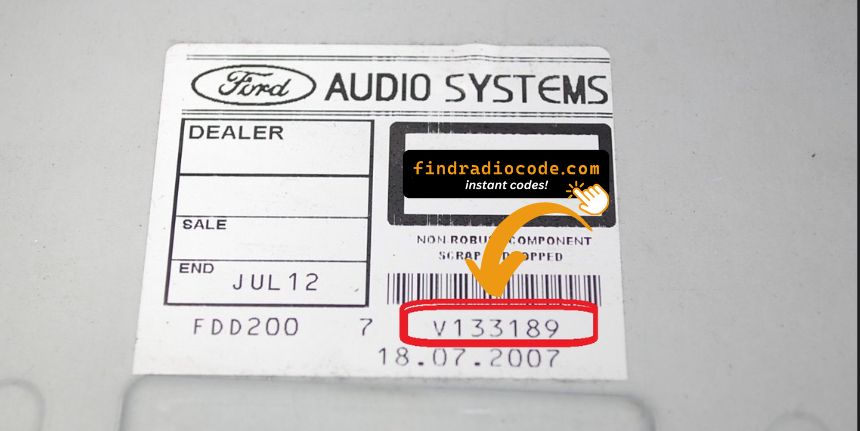
Example: Ford Connect serial number label location
Common S/N Formats Used on 2007 Connect Units
The 2007 Ford Connect radio serial number has the prefix one of these codes:
M######– Standard Ford radio serial prefix (seven digits after the M)V######– Some Ford radio serial prefix
The radio in the 2007 Connect is commonly a Ford 6000CD unit. The serial number is printed on a white or silver label on the unit chassis.
Important The serial must begin with M or V. Don't confuse it with the part number (which starts with different characters). The serial is 6-7 digits plus the prefix letter.
How Serial Numbers Usually Look on These Connect Radios
Serial format on the 2007 Connect's factory units is set by the Visteon supplier rather than by Ford, so the structure is consistent across the 4500 RDS, 5000 RDS and 6000 CD.
Serials typically begin with the letter M or V, followed by six digits, producing formats like M123456 or V123456. The chassis sticker or display readout usually labels the value as S/N, Serial or SN. The unlock code is never printed on the unit, only the serial. Recheck similar-looking characters before submitting: 0 versus the letter O, the digit 1 versus the letter I.
Fixing Common Code Entry Problems for 2007 Connect
Older Ford radio serials always start with M or V:
M######— standard Ford serial format (M + 6 digits).V######— found on Visteon-manufactured units (V + 6 digits).
The label on the top or back of the unit additionally contains a Ford part number — this is different from the serial and must not be submitted. Should they appear printed side by side, the serial is the one starting with M or V. If the label is worn, physical removal of the radio is the only way to read the label — there is no on-screen serial display on these early Ford units.
Older Ford radios (6000CD, 4500 RDS) use preset buttons 1–4 for digit entry and button 5 to confirm:
- Button 1 — each press scrolls through digits for the first position of the 4-digit code.
- Buttons 2, 3, 4 — identical process for the second, third, and fourth digits.
- Button 5 — press to confirm the complete code.
Certain Ford 4500 and 5000 models may use an AM/FM or AS button rather than button 5 to confirm — check your owner's manual if button 5 fails to accept the code. Every preset button scroll through 1 to 0 through 9.
Older Ford radios (Ford 6000CD, 4500) permit up to 10 attempts before showing "LOCKED" or "WAIT". To exit the lockout:
- Leave the radio switched on — avoid turning it off during the lockout wait.
- Allow up to 1 hour. The radio should automatically return to the "CODE" prompt.
- If the display shows "Locked 10", try holding button 6 while switching the radio on to unlock additional attempts.
Should it display "LOCKED" permanently even after waiting the full hour, the unit may need a dealer reset.
When a Ford 6000CD or 4500 powers on but does not show a "CODE" prompt:
- The anti-theft may not have engaged — test normal radio operation first.
- Some older Ford units display "SAFE" before the code prompt — give it a couple of seconds for the full prompt to display.
- If the display is blank, inspect the fuse — early 2000s Ford units often have a separate radio fuse under the dashboard fuse box.
Ford 6000CD and 4500 radios from this period require their own extraction tool to remove — should the display be hard to read, shine a flashlight to check the display before assuming it's blank.
The primary cause of a rejected code on older Ford radios (6000CD, 4500 RDS) is using a code based on the wrong serial. The serial must come from the label on the back or top of the radio casing — it must start with M or V followed by 6 digits.
Ford part codes on the same label look different but can be confused for the serial. After a rejection, avoid entering more guesses — ten attempts are allowed before a 30-minute lockout. Reach out for a free reverification if needed.