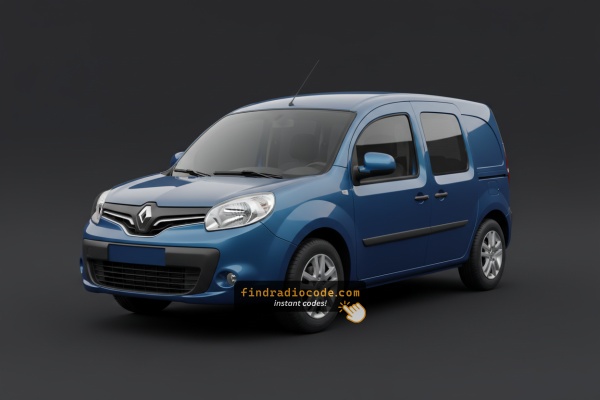
What Caused the Radio to Lock?
Battery replacement is the number one reason for a locked radio on Renault vehicles, but several other situations to be aware of:
- Battery replacement: Battery replacement is the top reason across all Renault models. Renault radios lock every time the battery is disconnected or replaced. It catches many owners off-guard, even during a very short disconnect.
- Buying a used Renault: The original code is rarely passed on when a car changes hands. Both trade and private sellers frequently cannot provide it.
- Discharged battery: A completely flat battery activates the lock on reconnection or recharge.
- Workshop or service work: Service that disconnects the battery — even routine maintenance — may activate the code request.
How Our Radio Code Generator Works for 2013 Renault Kangoo
- Rather than relying on Renault dealership lookup or online threads you can find the code online with the radio S/N.
- First locate your radio's serial. It is always present on the unit itself, and in some cases it can be visible on the Kangoo's display.
- Enter it into the generator above, and our system will generate the correct 2013 Kangoo unlock code.
- After getting it, input it using Kangoo's radio controls to release the blockade fully.
- The entire process takes just a short moment and requires zero paperwork and no dealer visit.
Finding the Radio S/N for Renault
Very useful thing to know is that factory radios use a unique serial number to identify each unit.
Your anti-theft system matches the code directly to this serial.
Different from car-specific data like VIN or registration information, it is not determined by the model or production year, so you'll be able to retrieve it even if you have an aftermarket radio.
Depending on the manufacturer and radio installed in your Renault Kangoo, the retrieval method is different.
Here are the most reliable ways to locate it.
Which Head Unit Is in Your 2013 Kangoo?
- Tuner List (4-digit code): continues as the standard 1-DIN factory radio across base and mid trims. Six numbered preset buttons in one row, small monochrome segment display. CD-equipped variants share the same fascia with an added CD slot.
- Carminat TomTom: optional on selected higher trims in European markets. Dash-mounted colour display paired with a TomTom navigation engine.
- Media Nav: introduced from 2013 on selected top trims as Renault's first integrated touchscreen unit on Kangoo. Recognisable by a colour touchscreen in the centre stack with on-screen buttons rather than a row of physical preset keys. Pre-code retrieval on Media Nav typically requires either an on-screen service menu or dismantling the right-hand air vent to expose the pre-code sticker without removing the unit.
Field test: physical 1-6 preset row plus segment display indicates Tuner List; separate higher-mounted colour TomTom display indicates Carminat TomTom; a colour touchscreen integrated in the centre stack indicates Media Nav.
Check the Display First - Serial Retrieval Without Tools
These are the steps you should follow for 2013 Renault Kangoo:
The 2013 Renault Kangoo features a Blaupunkt OEM radio or MediaNav system. Most Renault radios don't support an on-screen serial display method.
The serial number is located on a label on the radio chassis. The radio must be extracted to read it. Some more recent Kangoo with MediaNav may show the serial in Settings → System.
Screen-Based Serial Lookup Method
- Tuner List
- Turn the ignition to accessory and let the radio finish booting.
- Hold preset buttons 1 and 6 simultaneously for approximately five seconds.
- The display switches to a service screen showing
PREfollowed by a four-character pre-code (one letter and three digits). - If 1 + 6 produces no response, repeat with 1 and 5, which some Tuner List firmware revisions accept.
- Record the pre-code carefully and verify ambiguous characters.
- Media Nav
- The dedicated on-screen pre-code menu on Media Nav is not consistently documented across independent sources for the Kangoo. Where the on-screen method is unavailable, the practical alternative is to dismantle the right-hand air duct in the dashboard to expose the pre-code sticker on the side of the unit without fully removing the radio. Follow the chassis-label approach below if you are not comfortable with that disassembly.
Find the S/N by Pulling Out the Radio Unit
If the serial does not appear on screen, the next step is checking the radio itself.
Many Renault radios require physical access to the serial sticker attached to the unit.
Typical approach:
- Start by completely shutting off the engine - pull the key out.
- Then detach the radio surround.
- Next, loosen the mounting points and pull the radio forward.
- Look for a printed tag showing the serial number.
To access the serial on the 2013 Renault Kangoo:
- Power down the vehicle.
- Find the extraction holes on both sides of the radio. Renault radios commonly use pin-release extraction holes.
- Insert radio release keys and slide the radio forward.
- Read the serial on the barcode label on the casing. It starts with CC.
Note: Renault radio release keys are the same European-style tools used for many European vehicles.
Pulling Out the Radio Unit to See the S/N on the Tag
- Safety: switch the ignition off, remove the key, disconnect the negative battery terminal, and wait several minutes before working near dashboard wiring. Do not pull on or probe yellow connectors that belong to the SRS airbag circuit.
- Tools
- Four Renault DIN release pins (universal four-key set, sold under codes such as CT22UV01).
- Plastic trim removal tools.
- Flashlight and phone camera for the label.
- Tuner List removal
- Insert one DIN pin into each of the four small holes at the corners of the radio fascia until the internal clips disengage.
- Apply even outward pressure on both sides of the unit; it should slide forward in its DIN cage. Do not force the chassis if resistance is high.
- Disconnect the antenna and the ISO power/speaker plug from the rear before fully extracting the unit. Do not power the radio while only partially connected.
- Inspect the top and side surfaces of the chassis for the manufacturer sticker. The pre-code is printed under the barcode in a field marked
SECURITYorS/N. - Photograph the label and verify ambiguous characters (0 vs O, 1 vs I) before refitting.
- Media Nav alternative
- For Media Nav-equipped Kangoos, the more common workshop approach is to remove only the right-hand air duct trim from the dashboard. This exposes the side of the radio chassis so the pre-code sticker can be read in place, without disturbing the touchscreen assembly. If the trim resists, consult a professional rather than levering aggressively.
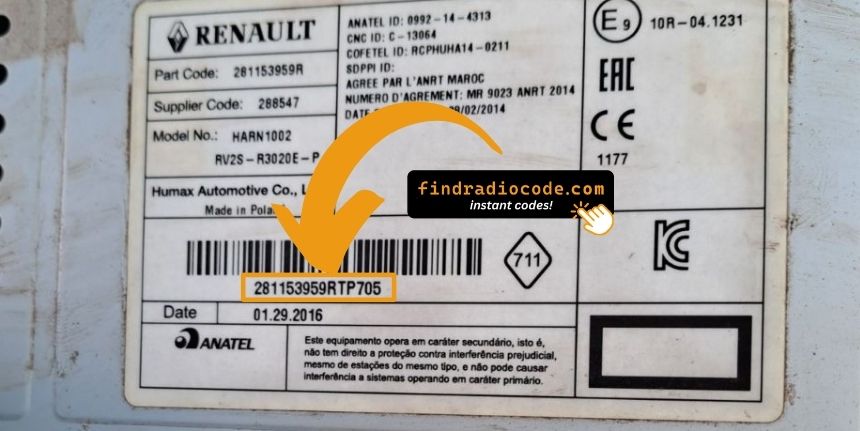
Example: Renault Kangoo serial number label location
Common Serial Number Structures
The 2013 Renault Kangoo radio serial formats:
BP####– Blaupunkt radio serial (standard)CC####– Continental radio serialPH####– Philips radio serialPR####– Alternate Renault OEM format
The serial is printed on the radio unit. Do not mistake it with the Renault part number.
Common Serial Number Structures
- Tuner List: typically four characters, one letter followed by three digits (example pattern
K519). LabelledPREon the display andSECURITYon the chassis sticker. A longer 14-character production serial may also be printed under a barcode on the same sticker; that longer value is a manufacturing traceability number and is not the value entered for code retrieval. - Media Nav: prefix patterns are not consistently documented across independent sources for the Kangoo application. Where the format cannot be confirmed, submit exactly what the chassis sticker labels as the security or pre-code field.
- Validation tips: confirm a single letter followed by three digits on Tuner List units, re-check zero versus letter O and one versus letter I, and avoid submitting part numbers or barcode-only references.
Got the Code? Here's How to Enter It
Once you have the serial number and received the unlock code, the last part is entering it into your radio.
Renault factory radios display a locked screen when ready for input.
The process is quick, but button layouts and confirmation methods may vary depending on the radio version installed in your Kangoo.
Entering Process
To enter the code on the 2013 Renault Kangoo:
- Ignition ON. Radio shows "CODE" or four dashes (----).
- Press preset buttons 1-4 to enter each digit of the 4-digit code. Each press cycles the digit (0-9).
- Hold button 5 or button 6 to submit.
Lockout: Several wrong entries will trigger a lockout. Turn off the radio for approximately half an hour, then try again.
Correct Entering Process
Limited Attempt Warning: Renault factory radios accept only a small number of consecutive incorrect attempts before locking into a wait state. Confirm every digit before validating, and do not enter a code on a guess.
- Tuner List
- Turn the ignition to the accessory position. The radio should display a
CODEprompt with four placeholder digits. - Press preset 1 repeatedly until the first digit on the display matches the first digit of your code.
- Press preset 2, then 3, then 4 in turn, advancing each digit on the display until it matches the corresponding digit of your code.
- Re-read the four-digit string end to end on the display.
- Press and hold preset 6 for approximately five seconds to validate. The radio should exit the prompt and return to normal operation.
- If the prompt returns with an incremented attempt counter, stop and re-verify the code source.
- Turn the ignition to the accessory position. The radio should display a
- Media Nav
- Entry is performed through the on-screen keypad presented after the radio prompts for a code. The precise sequence and confirmation behaviour are not consistently documented across independent sources for the Kangoo application. Follow the on-screen prompts exactly rather than improvising preset combinations.
Fixing Common Code Entry Problems for 2013 Kangoo
When the radio does not accept your code, check the following before entering it again.
- Verify the serial prefix: Renault radios take serials starting with BP, CC, PH, or PR. Confirm you submitted the correct serial from the radio label — not the vehicle part number or chassis number.
- Look for digit confusion: On worn or faded labels, characters are easily confused. Take a clear photo and examine it carefully.
- Entry method: Each press of a preset button advances the digit by one. Rapid pressing may go past the right number. Count each press and take it slowly. Hold button 5 or 6 to confirm only after all four digits are set.
If it keeps failing? Contact us with your serial number and we will re-verify immediately.
Should "CODE" or the four dashes not appear, try the following:
- Trigger the code request: Pull the radio fuse briefly, reconnect, and power up the radio. The CODE prompt should appear.
- It may already be working: When all functions work normally without restriction, it is not locked. No code entry is needed.
- MediaNav units: Renault MediaNav does not show a code prompt the same way. Look under Settings and System for unlock-related options.
- Ignition position: Some Blaupunkt/Philips units sometimes only display the CODE screen when the ignition is in ACC or ON. Check both positions.
Entering the unlock code on Renault passenger car radios relies on the preset station buttons to build the code digit by digit.
- Button 1 controls the first digit — each press cycles from 0 to 9.
- Button 2 controls digit 2, button 3 digit 3, button 4 digit 4.
- Once all four digits are correct, press and hold button 5, button 6, or the Enter / AM-FM button to submit the entry.
Important: Newer Renault models with a MediaNav touchscreen use a touchscreen code entry pad. If a number pad appears on screen, tap it directly. The touchscreen confirms automatically.
Finding the serial on Renault radios can be found on a sticker on the rear or side of the radio unit, only accessible once the radio is pulled forward.
- Expected format: The serial starts with BP, CC, PH, or PR then 8–10 alphanumeric characters.
- Label condition: Older Renault labels can be faded. Take a well-lit close-up photo — detail is easier to read in a zoomed image.
- How to access the serial: Standard DIN release keys work on all Renault models. Insert into the release slots on each side and draw the unit out far enough to read the rear label.
Never submit the VIN or a part number — these produce an incorrect code.
The radio shows "WAIT" or "SAFE" after 3 wrong code attempts, blocking further input until the timer runs down.
To clear the lockout: Turn the ignition to ON and leave it there for a full 60 minutes. Switching off mid-wait resets the countdown to zero. This is particularly important — the timer does not pause, it restarts.
With Renault vehicles, voltage can drop if the ignition is on for an extended period without the engine running. Keep the engine idling or use a battery maintainer if possible to prevent the timer restarting.