
How Our Radio Code Generator Works for 2011 Renault Kerax
Getting your radio code takes only 4 easy steps.
- Find your radio's serial - this is the only information required by our side.
Unlike when contacting the dealer, no VIN or paperwork is needed. - Enter the serial number into our generator above.
The system checks it against a database of supported radios and automatically catches the matching radio code. - In most cases, the code will appear instantly on the screen after payment and is also sent to your email , just in case.
If manual verification is required (rare situations), you'll be informed before checkout. - Once you receive it, simply enter it into your radio to restore the functionality.
Entering the Radio Security Code
Once you have the serial number and generated the unlock code, the last step is entering it into your radio.
Renault original head units display a CODE prompt when ready for input.
The process is usually straightforward, but button layouts and confirmation methods may vary depending on the radio version installed in your Kerax.
In-depth Entering Instructions for Kerax 2011
To enter the code on the 2011 Renault Kerax:
- Ignition ON. Radio shows "CODE".
- Press buttons 1-4 to enter the 4-digit code.
- Press button 5/6 to confirm.
Lockout: Several wrong entries lock the radio for about 30 minutes.
Correct Entering Process
The 4-digit unlock code is entered using the preset row of the Renault Trucks-branded radio.
Limited Attempt Warning: incorrect entries are counted; after several wrong attempts the radio enters a wait or SAFE state. Verify the code is correct before confirming.
- Turn the ignition to ON and wait for the LCD to show
CODE. - Press preset 1 the number of times equal to the first digit (ten presses register a zero).
- Press preset 2 the matching number of times for the second digit.
- Use preset 3 for the third digit and preset 4 for the fourth.
- Compare the displayed digits against the supplied code, then press and hold preset 6 to confirm.
How to Find the Serial Number on Your 2011 Renault Kerax Radio?
The first part is to locate the radio's S/N.
Based on the head unit type used in your 2011 Kerax, the S/N can be accessed either through the screen menu or by checking the label on the radio itself.
Below are the most common methods to identify your S/N quickly.
2011 Kerax - Which Radio Did You Get?
The 2011 Kerax continued with the established Renault Trucks-branded single-DIN OEM receiver in the upper dashboard slot. Continental and Bosch both supplied the OEM hardware; user-facing controls and code-entry behaviour are identical between the two suppliers.
- Renault Trucks-branded cassette receiver: standard fitment, identifiable by the cassette door across the fascia.
- Renault Trucks-branded CD receiver: optional on higher cab specifications, identifiable by a horizontal CD slot below the LCD.
- Both variants share the 6-preset row and prompt
CODEafter any battery interruption.
Accessing the Serial Number Through the Radio Menu
The method for 2011 Renault Kerax is this:
The 2011 Renault Kerax truck is equipped with a VDO radio system. Commercial radios do not support on-screen serial display.
The serial number must be found on the physical label on the radio unit. Follow the removal instructions below.
Using Hidden Radio Menus to Find the Serial
On the 2011 Kerax, the Renault Trucks-branded receivers expose the precode used by the unlock service through a fixed shortcut on the preset row.
Renault Trucks Cassette / CD Receiver (Continental/Bosch)
- Turn the ignition to ON and wait for the LCD to show
CODE. - Press and hold preset buttons 1 and 6 together for around 5 seconds.
- Release the buttons; the precode is shown briefly as one letter and three digits.
- Record the precode exactly, paying attention to the leading letter.
Manufacturer Label Inspection
If the serial number cannot be accessed via display, use the removal method.
Most Renault Kerax factory radios include a label with the serial number printed on the casing.
Steps:
- Power down the vehicle.
- Lift the bezel surrounding the radio.
- Loosen the fasteners.
- Move the unit forward to access the label.
The serial number is usually located near the printed code.
To find the serial on the 2011 Renault Kerax:
- Power down the vehicle.
- Locate the extraction holes on each side of the radio.
- Insert extraction tools and pull the radio forward.
- Find the serial on the label on the unit.
Truck Note: Commercial vehicle radios are typically standard-sized and relatively easy to remove.
Taking Out the Radio to View the S/N on the Tag
If the on-screen precode shortcut does not return a value, the serial can be read from the side label on the radio chassis.
Safety notice: switch the ignition off, remove the key, disconnect the negative battery terminal and wait several minutes. Avoid yellow SRS/airbag connectors and use plastic trim tools rather than metal blades against the fascia.
- Tools: a pair of DIN extraction keys, plastic trim removal tools, a flashlight and a phone for photographing the label.
- Insert the DIN keys vertically into the small slots on either side of the radio fascia until they click.
- Apply gentle outward pressure and draw the unit straight forward; stop if resistance is unusual.
- Support the unit once it clears the dash and disconnect the wiring loom and antenna only if needed.
- Look for the white sticker on the side or top of the metal casing - the serial is under the barcode, marked
S/NorSerial. - Photograph the label and re-check 0 versus O and 1 versus I before submitting.
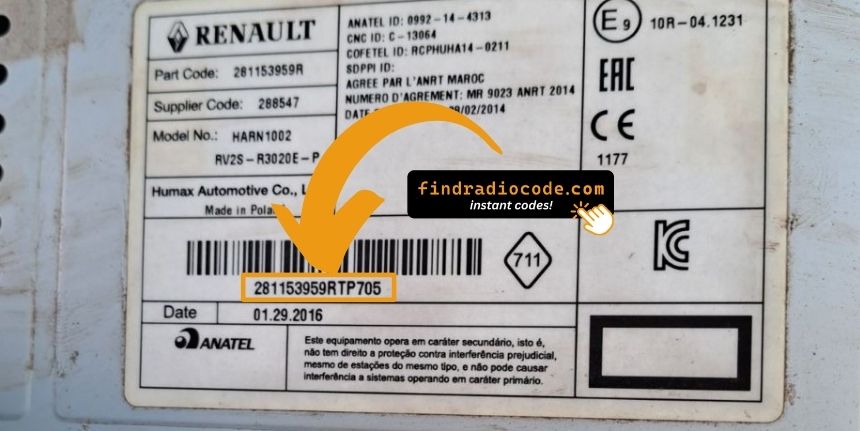
Example: Renault Kerax serial number label location
Serial Number Format Guide for 2011 Renault Kerax
The 2011 Renault Kerax radio serial prefixes:
BP####– Blaupunkt serialCC####– Continental serialPH####– Philips serialPR####– Other Renault prefix
The serial is on the radio housing.
How Serial Numbers Usually Look on These Kerax Radios
The Continental and Bosch OEM units used in the 2011 Kerax produce a short on-screen precode plus a longer chassis-label serial.
- On-screen precode: typically one letter followed by three digits (for example
W342). - Chassis label serial: longer alphanumeric string beneath the barcode, marked
S/NorSerial. - Do not submit part numbers, equipment numbers, or full barcode contents as the precode.
- Re-check easily confused characters: 0 versus O, 1 versus I, 5 versus S.
Kerax 2011 Common Radio Problems
The unit shows "WAIT" / "SAFE" after 3 wrong code attempts, preventing any further entry until the timer resets.
How to reset the lockout: Turn the ignition to ON and leave it there for 60 minutes. Turning off at any point restarts the countdown from zero.
On fleet vehicles, battery disconnect is common during service. If the lockout was caused by a recent battery disconnect, the battery should now be stable.
The serial on Renault truck radios is on a label on the rear or side of the radio unit, visible only after the unit is removed.
- What to look for: Look for a prefix of BP, CC, PH, or PR then 8–10 alphanumeric characters.
- Label condition: Truck radios are in hard-working environments. Labels can be very worn, dirty, or partially obscured. Wipe the label before reading it and photograph under a strong light.
- Removal method: The same pin-release tools used on Renault cars work on commercial vehicle units. Insert into the release slots on both sides and pull forward.
If the radio rejects your code, check these points before attempting re-entry.
- Serial prefix: Commercial vehicle radios use serials starting with BP, CC, PH, or PR. Make sure the serial entered came from the radio label — not any other sticker in the cab.
- Digit confusion on worn labels: Commercial vehicle radios often have labels that are dirty or faded from use. 0 and O, 1 and I, 8 and B look similar. Take a close-up photo.
- Check the entry method: Each press of a button cycles the digit. Press slowly and count. Hold button 5 or 6 to confirm after all four digits are set.
If it keeps failing? Contact us with the serial and order details and we'll check and reissue if needed.
Entering the code on Renault truck radios follows the same preset button method as the passenger car platform.
- Button 1 sets the first digit — each press advances it from 0 to 9.
- Button 2 sets digit 2, button 3 digit 3, button 4 digit 4.
- After setting all four digits, press and hold button 5 or button 6 to confirm.
Important: Confirm only after all four digits are set. Pressing confirm early counts as a wrong attempt and wastes one of your three tries.
If the radio powers on without showing a code prompt, try these steps:
- Force the code prompt: Remove the radio fuse, refit, and turn the ignition to ON. This should trigger the code request.
- Check if already unlocked: If the radio plays and responds normally, it is not locked. Nothing further is required.
- Ignition or power position: Truck radios sometimes need the ignition in ON or ACC — not just auxiliary power. Try the full ON position.
Why Did the Radio Lock and Ask for a Code?
Common reasons for a locked radio on Renault trucks:
- Battery swap during service: The most frequent cause. Fleet vehicles are regularly serviced and batteries replaced. Every battery swap or disconnect triggers the code prompt.
- Second-hand commercial purchase: Fleet disposals almost never come with the radio code. Fleet managers do not typically record radio codes.
- Transport service disconnect: Any electrical or battery work — routine maintenance — may activate the code request.
- Flat battery from short runs or sitting: Fleet vehicles with lots of stop-start driving may end up with a flat battery, which activates the lock when charged or replaced.