Why Did the Radio Lock and Ask for a Code?
Common reasons for a locked radio on Renault trucks:
- Fleet service battery replacement: The most frequent cause. Commercial vehicles undergo frequent maintenance. Every battery swap or disconnect triggers the code prompt.
- Second-hand commercial purchase: Fleet disposals are rarely sold with the original code. Fleet managers do not typically record radio codes.
- Electrical work during transport servicing: Any electrical or battery work — routine maintenance — may activate the code request.
- Flat battery from short runs or sitting: Commercial vehicles on short urban runs may end up with a flat battery, triggering the lock on reconnection.
How Serial-Based Renault Kerax Radio Unlock Works
Car radios use security codes dependent on the radio unit itself rather than the vehicle model or production year.
- Our lookup service works by matching your Renault Kerax radio's serial number.
- After entering the serial into the form above, the system identifies the radio family and generates the code that you need.
- Use the code to unlock the radio immediately.
- This approach saves time compared to traditional methods for 2014 Renault Kerax.
Code Entry Instructions
After generating the correct unlock code based on the serial number, you can restore normal functionality by entering it into the unit.
The code entry process depends on the radio interface, but most 2014 Kerax systems follow a similar structure using preset buttons, touch controls, or rotary knobs - depending on if it's a factory or an aftermarket unit.
You will typically see ENTER CODE displayed on screen.
Step-by-Step - Correct Entering Process
To input the code on the 2014 Renault Kerax:
- Ignition ON. Radio shows "CODE".
- Press buttons 1-4 to enter the 4-digit code.
- Hit button 5/6 to submit.
Lockout: Multiple wrong entries lock the radio for approximately 30 minutes.
Serial Number Location Guide for Renault Kerax 2014
Very important fact to know is that factory radios use a unique S/N to identify each unitindividually.
The security system matches the code directly to this serial.
Unlike vehicle-specific data such as VIN or registration information, it is not determined by the model or production year, so you'll be able to retrieve it even if you have a radio that you bought afterwards.
Depending on the maker and radio installed in your Renault Kerax, the retrieval method varies.
These are the most reliable ways to find it.
Before Removing the Radio, Try This Screen Method
Try the following for your 2014 Renault Kerax:
The 2014 Renault Kerax truck is equipped with a VDO radio system. Commercial radios do not support on-screen serial display.
The serial number must be found on the sticker on the radio unit. See the removal instructions below.
Releasing the Unit to View the S/N on the Tag
If the serial number cannot be accessed through menu, use the hardware method.
Most Renault Kerax OEM radios include a label with the serial number printed on the housing.
Steps:
- Switch off the vehicle.
- Lift the dashboard frame surrounding the radio.
- Unscrew the mounting bolts.
- Pull the unit forward to access the label.
The serial number is usually located near the printed code.
To find the serial on the 2014 Renault Kerax:
- Power down the vehicle.
- Find the release slots on both sides of the radio.
- Insert extraction tools and slide the radio forward.
- Read the serial on the sticker on the radio.
Truck Note: Commercial vehicle radios are typically standard DIN-size and relatively easy to extract.
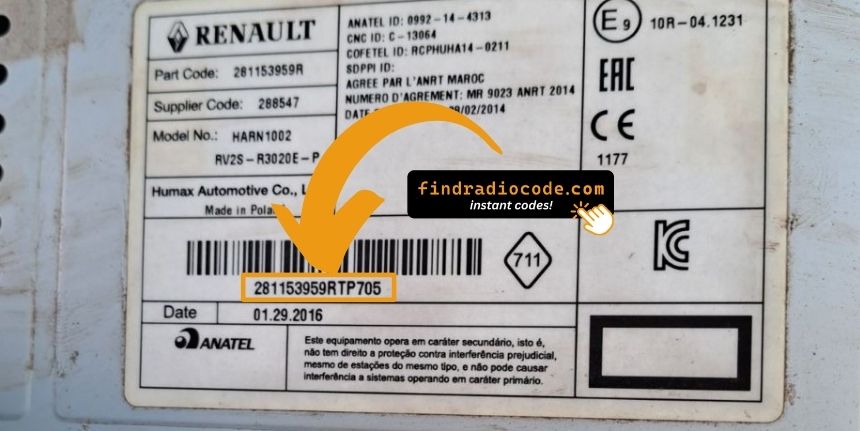
Example: Renault Kerax serial number label location
Standard Serial Number Patterns on This Radio
The 2014 Renault Kerax radio serial formats:
BP####– Blaupunkt serialCC####– Continental serialPH####– Philips serialPR####– Alternate Renault format
The serial is on the radio casing.
Kerax 2014 Common Radio Problems
If the radio rejects your code, check these points before trying again.
- Check the serial format: Commercial vehicle radios take serials starting with BP, CC, PH, or PR. Make sure the serial entered came from the radio label — not the vehicle chassis number or telematics unit.
- Misread characters: Truck radios often have labels that are dirty or faded from use. 0 and O, 1 and I, 8 and B are easy to confuse on worn labels. Take a close-up photo.
- Button entry: Each preset button advances the digit. Press slowly and count. Only confirm once all digits are correct.
Still not working? Contact us with the serial and order details and we'll check and reissue if needed.
The screen shows "WAIT" or "SAFE" after 3 wrong code attempts, blocking any further entry until the timer completes.
Clearing the wait: Turn the ignition to ON and leave it there for 60 minutes. Turning off at any point resets the 60-minute timer.
On fleet vehicles, battery disconnect is common during service. If the lockout was caused by a recent battery disconnect, just leave the ignition on for the full 60 minutes.
Code entry on Renault truck radios follows the same preset button method as the passenger car platform.
- Button 1 sets the first digit — press to cycle from 0 to 9.
- Button 2 sets digit 2, button 3 digit 3, button 4 digit 4.
- Once all digits are correct, press and hold button 5 or button 6 to submit.
Note: Confirm only after all four digits are set. Pressing confirm early submits an incomplete code and wastes one of your three tries.
When the unit starts without asking for a code, try these steps:
- Trigger the code request: Remove the radio fuse, reconnect, and turn the ignition to ON. The CODE prompt should appear.
- It may already be working: If the radio plays and responds normally, it is not locked. No code entry is needed.
- Correct power state: Commercial vehicle units may require the ignition in ON or ACC — not just auxiliary power. Switch fully to ON.
The serial on Renault truck radios appears on a sticker on the rear or side of the radio unit, visible only after the unit is removed.
- Expected format: The serial starts with BP, CC, PH, or PR then 8–10 alphanumeric characters.
- Label condition: Commercial vehicles see heavy use. Stickers may be covered in grime or physically damaged. Clean the label area first and take a well-lit close-up photo.
- Tools needed: The same pin-release tools used on Renault cars fit all Renault truck radios. Use the extraction tools and draw the unit forward.