Need the Unlock Code for Your Continental Uconnect 5.0 RG2 VP2?
Continental | Chrysler | Instant Retrieval
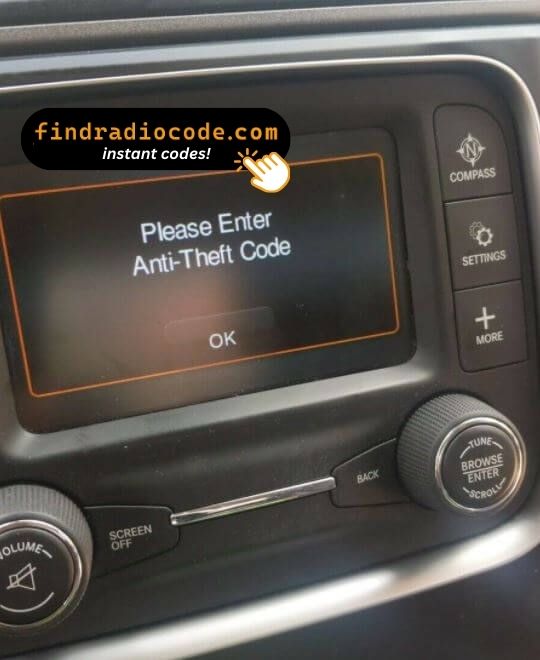
Refund terms in detail.
Accepted Serial Number Formats
| Serial Prefix | Status |
|---|---|
TQN |
Supported |
TVPQN |
Supported |
A2C |
Supported |
A3C |
Supported |
If your serial starts with any prefix above, we can retrieve your code.
What you need to do
Everything runs from the serial number on the radio's own label.
- 1 Read the number on the sticker Pull the radio a few centimetres forward and copy the number off its sticker - nothing has to be unplugged.
- 2 Add it to the order form Letters and digits exactly as printed - the form validates them before payment.
- 3 Get the code The code is delivered automatically, day or night. Enter it on the radio and the anti-theft screen goes away.
Covered by a full refund if the code does not work on your unit.
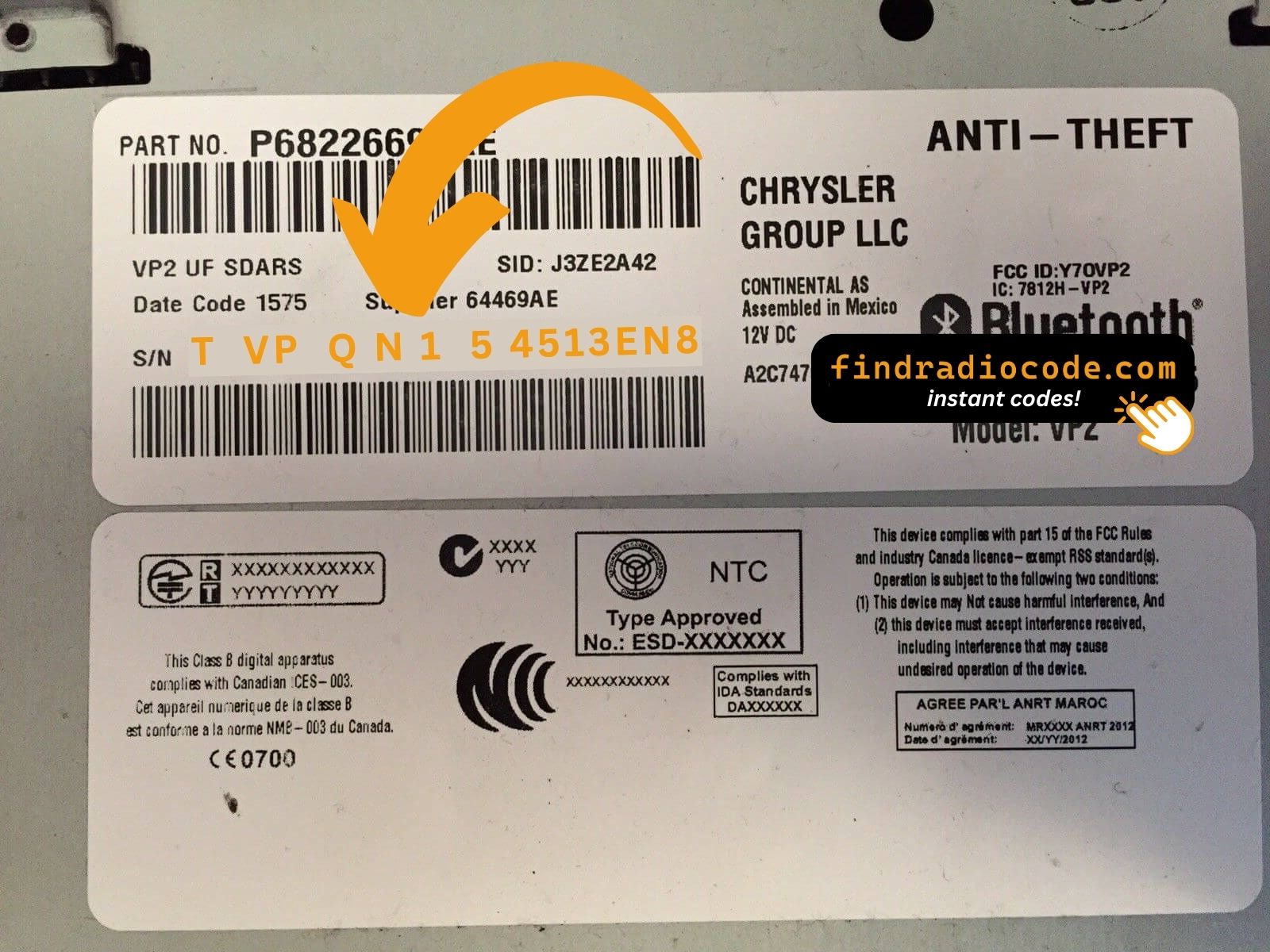
The sticker on your unit will look similar. Read the serial straight off it.
What a valid serial looks like
Real Chrysler serials, so you know what to look for:
TQN33227AGHF
(prefix: TQN)
TVPQN32427GRQA
(prefix: TVPQN)
A2C1453320420008333
(prefix: A2C)
A3C002546000020002320
(prefix: A3C)
Usual starting characters: TQN, TVPQN, A2C, A3C
Is This Your Uconnect 5.0 RG2 VP2?
Compare the design, controls, display and features listed below with your factory-installed radio - the Uconnect 5.0 RG2 VP2 is easy to identify once you know what to look for.
How to recognise it:
- 5.0" touchscreen in the centre of the dash
- A Europe-market build
- The chassis label carries the RG2 VP2 sales code
- A serial that begins with TQN, TVPQN, A2C, A3C
This is probably your radio if:
- the factory label reads RG2 VP2
- the printed serial opens with TQN, TVPQN, A2C, A3C
- the model year sits within 2014-2018
- the display matches the Uconnect 5.0 5.0" touchscreen
EU variant of the 5-inch Uconnect - DAB+ present, no SiriusXM. Distinguishable from RA2 NA and RJ2 ROW only by firmware locale and part number.
What Is the Uconnect 5.0 RG2 VP2 Radio?
The Uconnect 5.0 RG2 VP2 is a dealer-installed Chrysler audio and multimedia unit. Alongside standard radio and audio playback it may include touchscreen controls, Bluetooth, CD/DVD playback or factory navigation, depending on how the vehicle was specified.
Continental Uconnect 5.0 RG2 VP2 is the European-market 5-inch Uconnect touchscreen - same VP2 hardware as RA2 but with EU firmware, DAB+ tuner, metric defaults and EU language packs.
Between 2014-2018 the Uconnect 5.0 RG2 VP2 appeared across a number of Chrysler models, usually on vehicles using the Continental multimedia platform. It stayed in production long enough to become a familiar sight in that generation of cars.
Features you may find on the Uconnect 5.0 RG2 VP2:
5.0" touchscreen
AM/FM radio
DAB+ digital radio*
Hands-free Bluetooth with audio streaming
USB media playback
Steering wheel control support
Anti-theft security code
*Availability varies with the vehicle configuration.
The Uconnect 5.0 RG2 VP2 carries the same anti-theft protection as most factory units. Once power is cut - a flat battery, a battery swap, or the radio being removed - it will ask for the original code before it comes back to life.
For the manufacturer's own documentation of this platform, see the official Uconnect site.
How to Read the Serial Number Off Your Uconnect 5.0 RG2 VP2
Every Uconnect 5.0 RG2 VP2 has a unique serial number, and the unlock code is worked out from it. You will find that number on the unit's own label - it is not in the service book and not on the dashboard.
Where exactly: Top of the chassis. Removal required to read.
Getting to the label:
- Ease the radio out of the dash - most units need a pair of release keys, which cost very little online.
- Find the white label on the housing and read the serial off it - it sits near the barcode.
- Enter it exactly as it appears - no spaces, no dashes.
Where the label sits on this radio
See it done on video

Recorded on a radio from this family; your unit behaves the same.
How Owners End Up on This Page
A locked Uconnect 5.0 RG2 VP2 is almost always the result of one of four everyday situations, none of which mean anything is broken.
Back from the mechanic, radio locked
Mechanics routinely disconnect the battery before electrical work. The car comes back fixed and the radio comes back locked - normal, not a fault.
A unit from a breaker
The code does not transfer from one unit to another: the swapped-in unit has a different serial, and that serial is what the code is calculated from.
New battery, locked radio
The most common trigger by far: the moment the battery is disconnected, the radio forgets it was ever unlocked and asks for its code on the next start.
A used car with a locked radio
Second and third owners almost never get the code card. The radio itself still carries everything needed - its serial number.
The route back to a working radio is the same in every case: serial number in, original code out, within seconds.
Technical Specifications
| Specification | Value |
|---|---|
| Manufacturer | Continental |
| Radio Family | Uconnect 5.0 |
| Variant | RG2 VP2 |
| Market | Europe |
| Vehicle Brand | Fiat / Jeep / Alfa Romeo |
| Production Years | 2014-2018 |
| Display | 5.0" touchscreen |
| Serial Prefixes | TQN, TVPQN, A2C, A3C |
Depending on the vehicle configuration, the Uconnect 5.0 RG2 VP2 may include extra multimedia features such as Bluetooth hands-free calling, USB media playback or factory navigation. Equipment levels can vary between production years and trims.
Supported Factory Identifiers 10
Every reference below is covered by this service. Find yours on the factory sticker of the radio to confirm you are on the right page.
The 10 references boil down to 2 base numbers - the trailing letters (AA, AB, ZC and so on) are hardware revisions of the same unit, and every revision is covered.
P05091377AB P05091377AC P05091377AD P05091377AE P05091377AF P68237074AA P68237074AB P68237074AC P68237074AD P68237074AE The part number is printed on the label on top of or on the side of the radio chassis, usually next to the serial number. If yours appears above, the Uconnect 5.0 RG2 VP2 is the right page.
Uconnect 5.0 RG2 VP2 Vehicle Compatibility
| Vehicle Model | Typical Production Years | Notes |
|---|---|---|
| Fiat 500X, Tipo, Doblo (EU) | 2014-2018 | |
| Jeep Renegade BU, Cherokee KL (EU) | 2014-2018 | |
| Alfa Romeo Giulietta (EU) | 2014-2018 |
Some vehicle models were available with more than one factory radio depending on trim level, production year or regional market. Always confirm your radio model before ordering a code.
Once the code arrives
It takes less than a minute once you have the four digits.
- Turn the ignition on so the radio powers up and shows the locked screen.
- A keypad for the code fills the middle of the screen.
- Tap the four digits of your code in order.
- There is no separate OK button - the radio checks the code on the last tap.
- A correct code clears the lock screen and the audio comes straight back.
Common problems
The screen shows a wait timer
The timer is the radio protecting itself after failed entries - power on, patience, then try again. 30-minute WAIT after three wrong codes.
I cannot find the serial number
It is printed on the housing, so the unit normally has to come forward to read it. Top of the chassis. Removal required to read.
Why it happened again
That is normal - the anti-theft system re-arms every time the unit loses power. Battery disconnect or replacement.
Making sure it is the right unit
The differences are easy to miss, so check this before ordering. EU variant of the 5-inch Uconnect - DAB+ present, no SiriusXM. Distinguishable from RA2 NA and RJ2 ROW only by firmware locale and part number.
Write the code down - the same four digits work for the life of the unit.
Questions About Your Uconnect 5.0 RG2 VP2 Code
Recent Customer Feedback
A few of the most recent reviews left after an unlock - the full list is on the reviews page.
"Screen on our chrysler was cracked so i found a good used one from the local scrap yard. I was EXTREMELY skeptical of this after the other site I tried was flagged as suspicious activity. I did a little more investigating with findradiocode.com and everything I was reading was legit so I took t..."
Super simple and saved us $750 from the dealership...literally the quote from the dealership was they wanted a diagnostic fee and a pin code fee. Ridiculous. Thank you!
Hanna - Chrysler
Thank you for the code, you saved me a 140.00 and a trip to the dealer.
Matt Diekmann - Chrysler
What You Get
Code delivered automatically once payment clears - on screen and in your inbox.
A complete refund whenever the code fails to open your unit.
Available 24/7 - no booking, no dealer visit, no towing.
Works every time - the code stays valid for the life of the radio.
Related Radio Models
Still unsure? These closely related units use much of the same hardware as the Uconnect 5.0 RG2 VP2 and may be what you actually have.
Check the Uconnect 5.0 RG2 VP2 with other Continental head units on the Continental radio code overview.