Need the Unlock Code for Your Continental Uconnect 5.0 RA2 VP2?
Continental | Chrysler | Instant Retrieval
Our refund policy in full.
Supported Radio Serial Prefixes
| Serial Prefix | Status |
|---|---|
TQN |
Supported |
TVPQN |
Supported |
A2C |
Supported |
A3C |
Supported |
If your serial starts with any prefix above, we can retrieve your code.
How it works
Everything runs from the serial number on the radio's own label.
- 1 Read the number on the label Look for it on the chassis label. The radio normally has to come forward a little - the wiring can stay plugged in.
- 2 Put it in the form on the left Type the full serial with your email address. A format check catches mistakes before checkout.
- 3 Receive the radio code The code is on screen in seconds and in your inbox. It never expires and keeps working every time power is cut.
Money-back guarantee if the code does not unlock your radio.
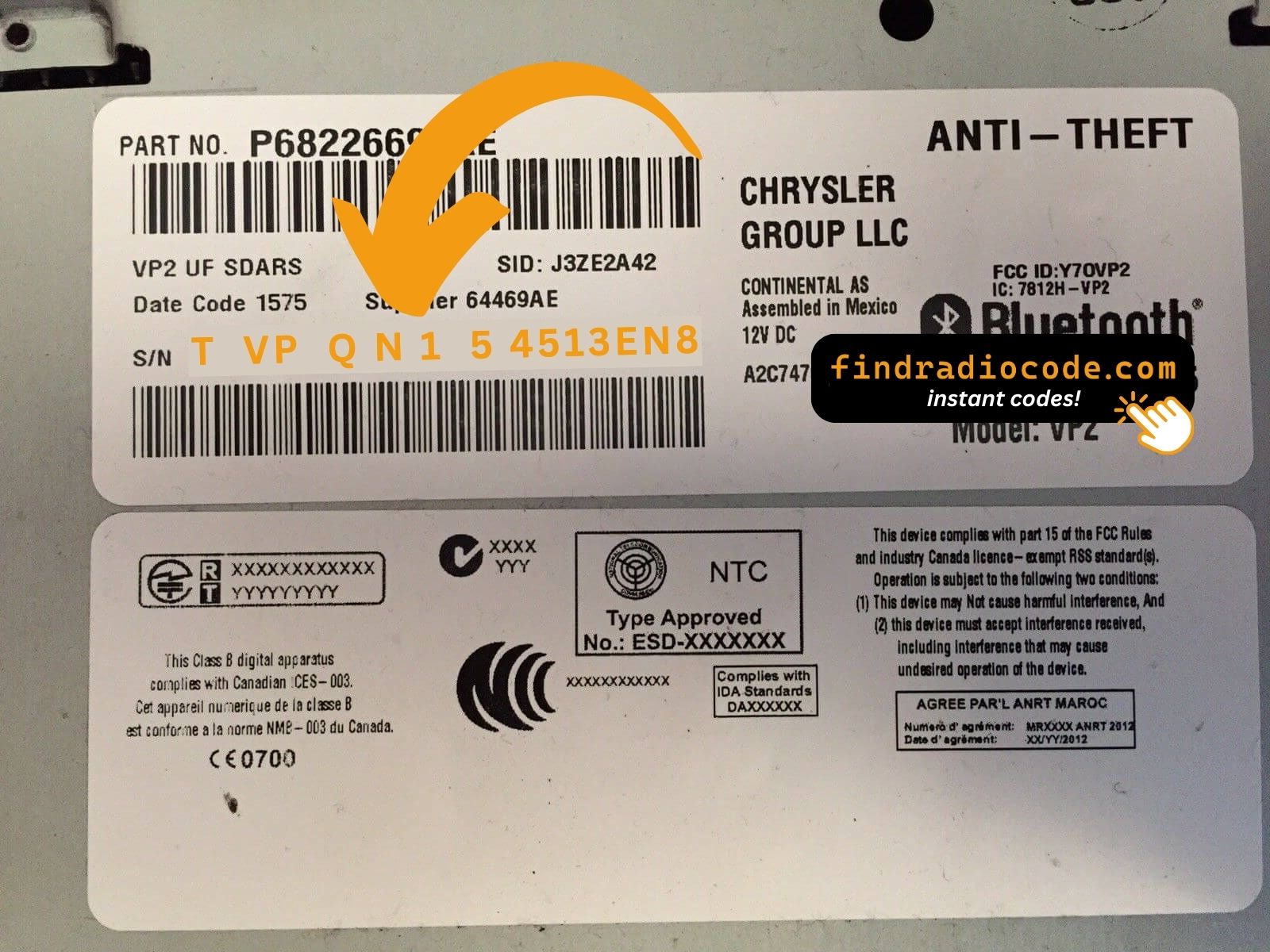
The sticker on your unit will look similar. Read the serial straight off it.
Sample serials we handle
Common Chrysler serial numbers look like this:
TQN33227AGHF
(prefix: TQN)
TVPQN32427GRQA
(prefix: TVPQN)
A2C1453320420008333
(prefix: A2C)
A3C002546000020002320
(prefix: A3C)
Prefixes we see most: TQN, TVPQN, A2C, A3C
Identify Your Factory Radio
Not sure if your vehicle is fitted with the Uconnect 5.0 RA2 VP2? Compare the design, controls, display and features listed below against your factory radio.
What the Uconnect 5.0 RA2 VP2 looks like:
- 5.0" touchscreen set into the middle of the dash
- A non-navigation unit: the menus never show a map
- The chassis label carries the RA2 VP2 sales code
- Label serial opening with TQN, TVPQN, A2C, A3C
It is the Uconnect 5.0 RA2 VP2 when:
- the factory label reads RA2 VP2
- the label serial begins with TQN, TVPQN, A2C, A3C
- it came in a car from the 2014-2018 range
- the display matches the Uconnect 5.0 5.0" touchscreen
5-inch screen sits high in the dash. If your screen is 8.4-inch, you have a Uconnect 8.4 (RA3/RA4) instead. NA variant uses SiriusXM; if your tuner has DAB+, you have the RG2 EU sibling.
Uconnect 5.0 RA2 VP2 Overview
Fitted as original equipment in selected Chrysler models, the Uconnect 5.0 RA2 VP2 handles audio playback and vehicle integration from the factory. Depending on the version, it can also add Bluetooth, touchscreen operation, CD/DVD playback, navigation or wider multimedia support.
Continental Uconnect 5.0 RA2 VP2 is the 5-inch entry-level Uconnect touchscreen for North America - small touchscreen with the four-tile home screen (Radio, Media, Phone, More), AM/FM, SiriusXM, Bluetooth, USB, no built-in maps.
Between 2014-2018 the Uconnect 5.0 RA2 VP2 appeared across a number of Chrysler models, usually on vehicles using the Continental multimedia platform. It stayed in production long enough to become a familiar sight in that generation of cars.
Features you may find on the Uconnect 5.0 RA2 VP2:
5.0" touchscreen
AM/FM radio
Hands-free Bluetooth with audio streaming
USB media playback
SiriusXM satellite radio*
Steering wheel control support
Anti-theft security code
*Availability depends on the vehicle specification.
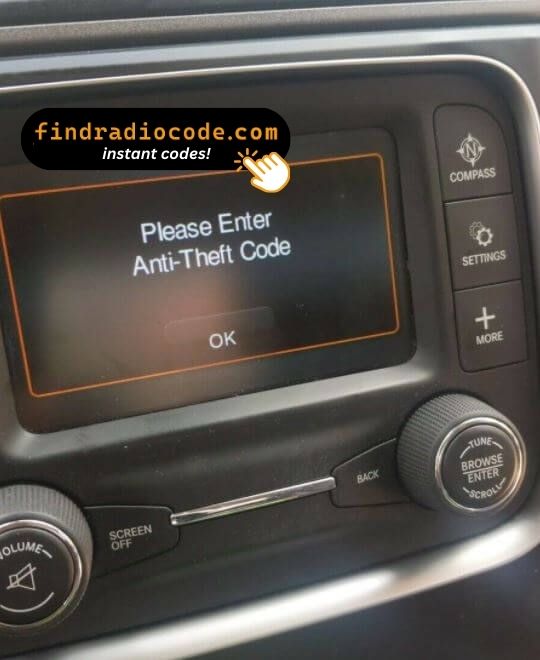
Like many factory-installed radios, the Uconnect 5.0 RA2 VP2 is secured with an anti-theft system. If power is interrupted after replacing or disconnecting the vehicle battery, the unit may request the original radio code before it can be used again.
Background on the platform itself is published by the official Uconnect site.
How to Get the Serial Number From Your Radio
Your unlock code is tied to the radio's serial number, so it is the one detail the form asks for. The number lives on the label stuck to the chassis of the radio itself.
On this unit: White label on the top of the chassis. Pull the radio - dash bezel releases with two clips and four 7mm bolts.
How to reach the number:
- Ease the radio out of the dash - most units need a pair of release keys, which cost very little online.
- The serial is on the chassis sticker, usually right by the barcode - copy it down.
- Copy it into the form precisely as printed; the checker catches any typo before payment.
The label you are looking for
See it done on camera

Recorded on a radio from this family; your unit works the same way.
The Situations That Lock a Uconnect 5.0 RA2 VP2
Nearly all of the Uconnect 5.0 RA2 VP2 codes we generate follow one of these four events.
After mechanical work
The repair went fine - the locked radio is just the side effect of the battery being off the car for a while.
A different unit is in the dash now
A radio from a breaker or an online sale comes with its own serial, so it needs its own code - read the label on the unit you fitted.
The seller had no code
Used cars very often arrive with a locked radio and no code card in the glovebox. The serial number on the unit is all that is needed to recover it.
The battery was disconnected
Whether the battery was replaced or just ran flat, the radio sees a power loss and asks for the code the next time it starts.
Whichever of these happened to you, the fix is identical: the serial number off the radio, the form at the top of this page, and the code is emailed in seconds.
Technical Overview
| Specification | Value |
|---|---|
| Manufacturer | Continental |
| Radio Family | Uconnect 5.0 |
| Variant | RA2 VP2 |
| Vehicle Brand | Chrysler / Dodge / Jeep / Ram |
| Production Years | 2014-2018 |
| Display | 5.0" touchscreen |
| Navigation | No |
| Serial Prefixes | TQN, TVPQN, A2C, A3C |
Treat the list above as the usual spec - individual Uconnect 5.0 RA2 VP2 units can have more or fewer features, depending on the equipment package chosen for the car.
Models Featuring the Uconnect 5.0 RA2 VP2
| Vehicle Model | Typical Production Years | Notes |
|---|---|---|
| Chrysler 200, 300 (NA) | 2014-2018 | |
| Dodge Charger, Challenger, Dart, Durango, Grand Caravan, Journey (NA) | 2014-2018 | |
| Jeep Cherokee KL, Compass, Grand Cherokee WK2, Patriot, Renegade BU, Wrangler JK (NA) | 2014-2018 | |
| Ram 1500/2500/3500/4500/5500, ProMaster (NA) | 2014-2018 |
Vehicle compatibility can differ between trims, model years and regional versions. Because the same car could leave the factory with different radios, identify your unit before placing an order.
OEM Radio References 167
The Uconnect 5.0 RA2 VP2 was supplied under the part numbers below. Spot the one on your unit's label and you can be sure this is the right page.
Behind the 167 references sit 38 base part numbers; suffix letters like AA or ZD distinguish factory revisions of the same hardware, all of them supported here.
P05091375AC P05091375AD P05091375AE P05091375AF P05091376AB P05091376AC P05091376AD P05091376AE P05091376AF P05091548AC P05091548AD P05091548AE P05091551AB P05091551AC P05091551AD P05091551AE P05091551AF P68088693AA P68088693AB P68088693AC P68088693AD P68088693AE P68088694AA P68088694AB P68088694AC P68088694AD P68088694AE P68088694AF P68226685AA P68226685AB Show all 167 part numbers
P68226685AC P68226685AD P68226685AE P68226693AC P68226693AD P68226693AE P68226694AA P68226694AB P68226694AC P68226694AD P68226694AE P68226694AF P68228668AA P68228668AB P68228668AC P68228668AD P68228668AE P68228670AA P68228670AB P68228670AC P68228670AD P68228670AE P68232023AA P68232023AB P68232023AC P68232023AD P68232023AE P68232023AF P68232023AG P68237062AA P68237062AB P68237062AC P68237062AD P68237062AE P68237064AA P68237064AB P68237064AC P68237064AD P68237064AE P68237066AB P68237066AC P68237066AD P68237066AE P68237067AA P68237067AB P68237067AC P68237067AD P68237067AE P68237069AA P68237069AB P68237069AC P68237069AD P68237069AE P68237069AF P68237070AA P68237070AB P68237070AC P68237070AD P68237070AE P68241517AC P68241517AE P68241517ZC P68241517ZE P68241518AA P68241518AB P68241518AC P68241518AE P68245296AC P68245296AD P68245296AE P68245296ZC P68245296ZD P68245296ZE P68245297AA P68245297AB P68245297AC P68245297AD P68245297AE P68245298AA P68245298AB P68245298AC P68245298AD P68245298AE P68245299AA P68245299AB P68245299AC P68245299AE P68269527AB P68269527AD P68269528AA P68269528AB P68269528AC P68269528AD P68269531AA P68269531AC P68269531AD P68269532AA P68269532AB P68269532AC P68269532AD P68269532AE P68271365AC P68271365AD P68271367AB P68271367AC P68271367AD P68271367ZB P68271367ZC P68271367ZD P68271368AA P68271368AB P68271368AC P68271368AD P68271747AA P68271747AB P68271747AC P68271747AD P68271747AE P68271748AA P68271748AB P68271748AC P68271748AD P68271748AE P68292890AB P68292890AC P68292891AA P68292891AB P68292891AC P68292891AD P68292896AB P68292896AC P68292896AD P68292897AA P68292897AB P68292897AC P68292897AD P68292898AB The part number is printed on the label on top of or on the side of the radio chassis, usually next to the serial number. If yours appears above, the Uconnect 5.0 RA2 VP2 is the correct page.
Typing the code into your Uconnect 5.0 RA2 VP2
Nothing to install and no tools needed - only the code itself.
- Give the radio power - key to accessory is enough - and wait for the code prompt.
- The screen shows a numeric keypad for the four digits.
- Punch in all four digits, first to last.
- Verification happens by itself once the fourth digit is in.
- The security screen disappears and the unit returns to normal operation.
Things that can catch you out
The unit will not take more codes
Wrong codes put the unit into a lockout, and the only fix is to leave it powered and wait. After three wrong codes the screen shows "INCORRECT CODE - WAIT" with a 30-minute countdown. Keep ignition in RUN or ACC for the timer to count down.
Where the number actually is
The serial is on the unit itself, not in the vehicle papers or on the dashboard. White label on the top of the chassis. Pull the radio - dash bezel releases with two clips and four 7mm bolts.
The radio locked itself again
Expected behaviour: the security system trips again whenever power is cut. Loss of 12V power for more than a minute - dead battery, battery replacement, alternator service, or radio removal.
This radio looks like several others
A few models in this family share the same face, so the label is what settles it. 5-inch screen sits high in the dash. If your screen is 8.4-inch, you have a Uconnect 8.4 (RA3/RA4) instead. NA variant uses SiriusXM; if your tuner has DAB+, you have the RG2 EU sibling.
Save the code: it stays valid, so the next battery change costs you nothing.
Frequently Asked Questions
Recent Customer Feedback
These are real orders and real radios. More are on the reviews page.
"Screen on our chrysler was cracked so i found a good used one from the local scrap yard. I was EXTREMELY skeptical of this after the other site I tried was flagged as suspicious activity. I did a little more investigating with findradiocode.com and everything I was reading was legit so I took t..."
I was afraid this was a scam, but I took a chance and it worked perfectly. I bought the radio from a junkyard on ebay and of course it was locked. The unlock process was very easy and I received the code within seconds...
Leslie Fonk - Chrysler
Code worked perfectly, ty!!!
Lisa Witherspoon - Chrysler
What Happens After You Order
Code delivered automatically once payment clears - on screen and by email.
Does not work? Every cent back - no questions beyond a short video.
Available 24/7 - no booking, no dealer visit, no towing.
One code, forever: the same digits unlock the unit after every power cut.
Related Radio Models
The models below look similar and are frequently mistaken for the Uconnect 5.0 RA2 VP2. Not your radio? Open one of these.
Not sure this is your unit? See every Continental radio we cover on the Continental radio code overview.